Exception Handling

Exception Handling
Exceptions Fundamentals
Introduction
Some problems will happen during the lifetime of a database application. You cannot eliminate this fact. Instead, you can anticipate as many problems as possible and take appropriate actions. Normally, Microsoft SQL Server provides some means of taking care of problems.
In reality, when it comes to a Microsoft SQL Server database application, you can take care of problems on either the Microsoft SQL Server side or on a programming environment you are using to create a graphical application.
 Practical Learning: Introducing Exception Handling

|
Types of Errors: Syntax Errors |
There are various categories of errors you can deal with. A syntax error occurs if you try writing code that Transact-SQL does not allow. Examples are:
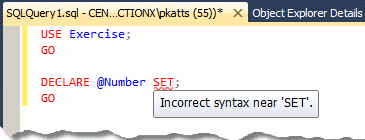
This error is because the SET operator, although part of the Transact-SQL, was used wrongly.
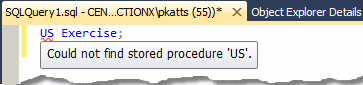
Syntax errors are usually easy to detect because the Code Editor points them out right away. Consequently, these errors are easy to fix.
If you use a command-based application such as SQLCMD or PowerShell, it would not show the error right way. It would show it when you execute the code.
|
Types of Errors: Run-Time Errors |
A run-time error is the type that occurs if your application tries to perform an operation that either or both Microsoft SQL Server and/or the operating system do not allow. These errors can be difficult to fix because sometimes they are not clear, or what happens as the error is not clearly identified or is external to the database. The problem could be that, when testing the database in Microsoft SQL Server, it may work just fine, but after the application has been distributed and is used, problems start occurring.
Examples of run-time errors are:
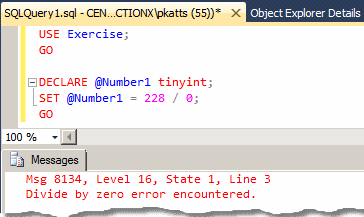
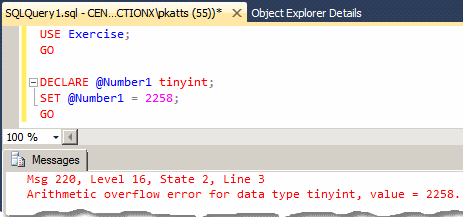
Run-time errors can be difficult to locate and fix.
|
Handling an Exception |
 |
Exception handling is the ability to deal with errors or software problems that occur or can occur on a database. The error is called an exception. To assist you with handling exceptions, Transact-SQL provides a general formula. You start with a section as follows: BEGIN TRY
Normal code
END TRY
Between the BEGIN TRY and the END TRY lines, write the normal code you want to execute. |
Here is an example:
BEGIN TRY
DECLARE @Side decimal(6, 3),
@Perimeter decimal(6, 3);
SET @Side = 124.36;
SET @Perimeter = @Side * 4;
SELECT @Side AS Side, @Perimeter AS Perimeter;
END TRY
The section of code that starts from BEGIN TRY to END TRY is called a try block or a try clause.
After the try block, you must create another section that starts with BEGIN CATCH and ends with END CATCH:
BEGIN TRY
    Normal code
END TRY
BEGIN CATCH
END CATCH
The section of code that goes from BEGIN CATCH to END CATCH is called a catch block or a catch clause. Among the rules you must observe:
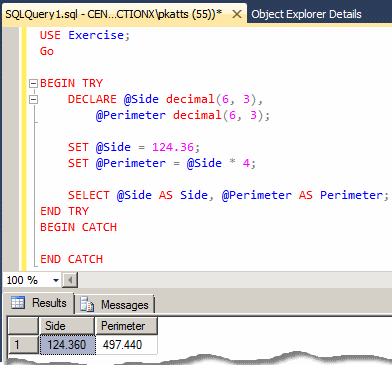
If no error happens in the try block, you can leave the catch block empty. Here is an example:
BEGIN TRY
    DECLARE @Side decimal(6, 3),
	    @Perimeter decimal(6, 3);

    SET @Side = 124.36;
    SET @Perimeter = @Side * 4;

    SELECT @Side AS Side, @Perimeter AS Perimeter;
END TRY
BEGIN CATCH
END CATCH
This would produce:
Imagine you write code that could produce an error:
DECLARE @Number tinyint,
       @Result tinyint;

SET @Number = 252;
SET @Result = @Number + 20;

SELECT @Number AS Number, @Result AS Result;
GO
This would produce:
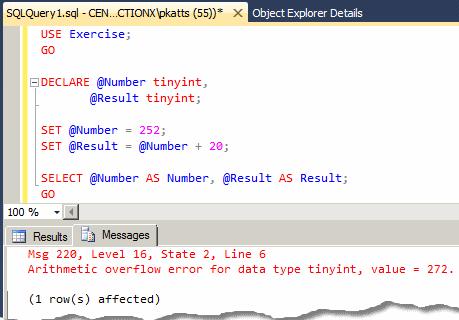
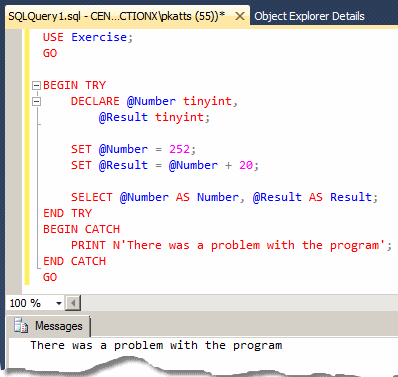
To address this type of problem, you can use exception handling and include the normal code in a try block. Then, if an error occurs in the try block, you can use the catch block to display a message. Here is an example:
BEGIN TRY
    DECLARE @Number tinyint,
	    @Result tinyint;

    SET @Number = 252;
    SET @Result = @Number + 20;

    SELECT @Number AS Number, @Result AS Result;
END TRY
BEGIN CATCH
    PRINT N'There was a problem with the program';
END CATCH
On the other hand, if no error occurs in the try block, that try block executes but when it ends, the execution skips the catch block and continues execution with code below the END CATCH line, if any code is there.
|
|
BEGIN TRY
    DECLARE @Number tinyint,
	    @Result tinyint;

    SET @Number = 252;
    SET @Result = @Number + 20;

    SELECT @Number AS Number, @Result AS Result;
END TRY
BEGIN CATCH
    PRINT N'There was a problem with the program';
END CATCH
GO
Press F5 to execute.
This would produce:
|
Identifying an Error |
|
The Error Line |
To assist you with identifying an error that has occurred, Transact-SQL provides various functions.
When an error occurs in your code, probably the first thing you want to know is where the error occurred in your code. To assist you with this, Transact-SQL provides a function named ERROR_LINE. Its syntax is:
ERROR_LINE() RETURNS int;
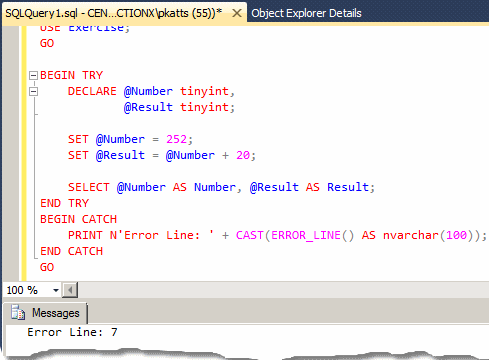
This function doesn't take any argument. It returns a number that represents the line number where the error occurred. Using a conditional statement, you can question the database engine to know the line where the error occurred. With this information, you can take the necessary action.
|
|
BEGIN TRY
    DECLARE @Number tinyint,
            @Result tinyint;

    SET @Number = 252;
    SET @Result = @Number + 20;

    SELECT @Number AS Number, @Result AS Result;
END TRY
BEGIN CATCH
    PRINT N'Error Line: ' + CAST(ERROR_LINE() AS nvarchar(100));
END CATCH
GO
Press F5 to execute.
This would produce:
Every type of error is recognized with a specific number, which is just a type of identity (we will see how you can use that number; but, as a numeric value, that number doesn't indicate anything). To know the number of an error, you can call the ERROR_NUMBER() function. Its syntax is:
ERROR_NUMBER() RETURNS int;
This function takes no argument and returns an integer. Here is an example of calling it:
BEGIN TRY
    DECLARE @Number tinyint,
	    @Result tinyint;

    SET @Number = 252;
    SET @Result = @Number + 20;

    SELECT @Number AS Number, @Result AS Result;
END TRY
BEGIN CATCH
    PRINT N'Error Number: ' + TRY_CAST(ERROR_NUMBER() AS NVARCHAR(50));
END CATCH
You can then get the error number to take action. Here is an example of finding out the number:
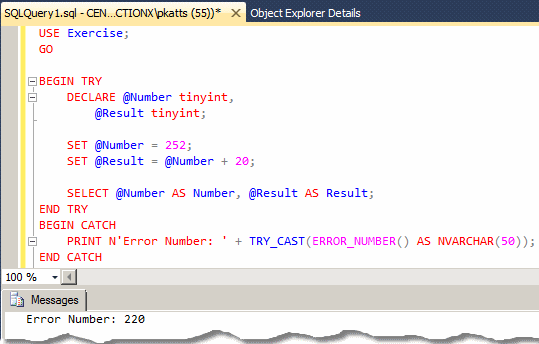
To find out what error number was produced by your code, you can inquire about the value produced by the ERROR_NUMBER() function. To do that, you can write an IF conditional statement. If/once you know the error number, you can take appropriate action(s). At the least you can display a message. Here is an example:
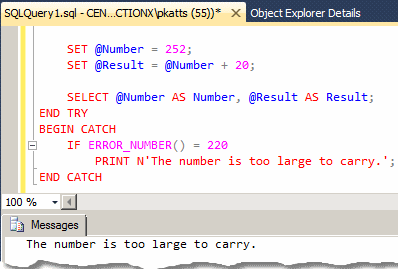
Of course, you can take better action than that.
In previous versions of Microsoft SQL Server, the means of getting an error number was to call a function named @@ERROR. You can still use this function to find out what the error number is in order to take appropriate action(s). Its syntax is:
@@ERROR() RETURNS int;
This function can be called to get the error number produced by an exception. Here is an example;
BEGIN TRY
    DECLARE @Number tinyint,
	    @Result tinyint;

    SET @Number = 252;
    SET @Result = @Number + 20;

    SELECT @Number AS Number, @Result AS Result;
END TRY
BEGIN CATCH
    PRINT N'Error #: ' + CAST(@@ERROR AS NVARCHAR(50));
END CATCH
This would produce:
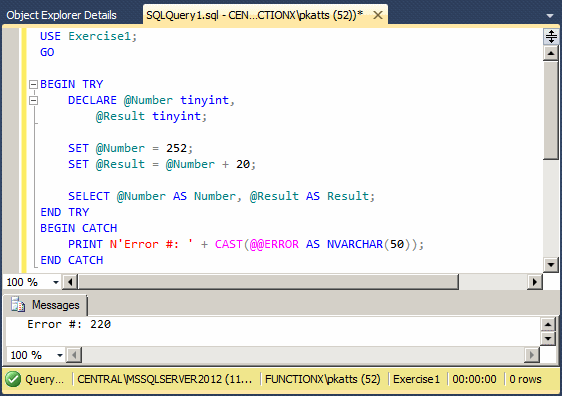
Just as done for the ERROR_NUMBER() function, you can check the value of the @@ERROR call to find out what the error number is, and if it is the right number you are looking for, you can take appropriate action.
|
|
BEGIN TRY
    DECLARE @Number tinyint,
	    @Result tinyint;

    SET @Number = 252;
    SET @Result = @Number + 20;

    SELECT @Number AS Number, @Result AS Result;
END TRY
BEGIN CATCH
    IF @@ERROR = 220
        PRINT N'Something went wrong with your code';
END CATCH
GO
Press F5 to execute
|
The Error Message |
An error number is just a number built in the function code and known by the database engine. That number does not give any meaningful indication about the error. To give you a message related to the error, Transact-SQL provides the ERROR_MESSAGE() function. Its syntax is:
ERROR_MESSAGE() RETURNS nvarchar;
This function takes no argument and it returns a string. Here is an example of calling it:
BEGIN TRY
	DECLARE @Number tinyint,
	        @Result tinyint;

	SET @Number = 252;
	SET @Result = @Number + 20;

	SELECT @Number AS Number, @Result AS Result;
END TRY
BEGIN CATCH
	PRINT ERROR_MESSAGE();
END CATCH
This would produce:
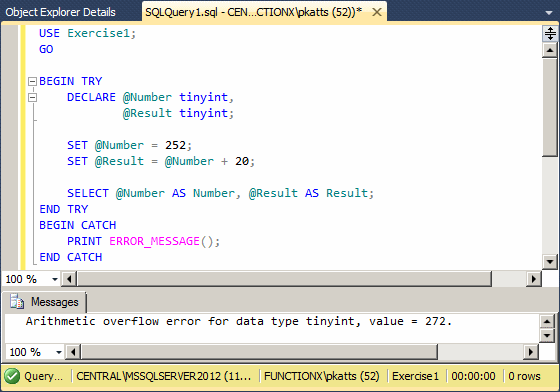
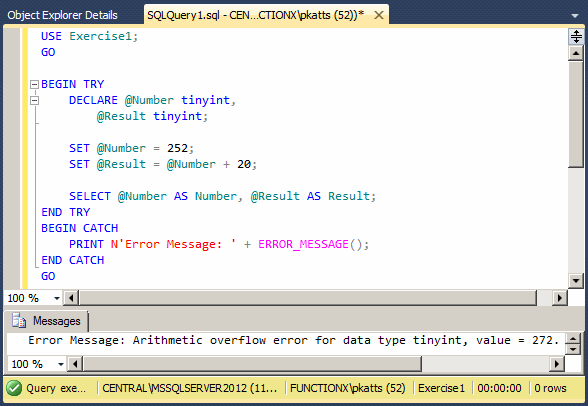
Because you are a programmer, you should understand the meaning of the words overflow, error, and tinyint. Unfortunately, this message may not be very clear to a regular user. For this reason, you should provide an easy way to read the message. You can even combine your own error message to the value of the ERROR_MESSAGE() function.
|
|
BEGIN TRY
    DECLARE @Number tinyint,
	    @Result tinyint;

    SET @Number = 252;
    SET @Result = @Number + 20;

    SELECT @Number AS Number, @Result AS Result;
END TRY
BEGIN CATCH
    PRINT N'Error Message: ' + ERROR_MESSAGE();
END CATCH
GO
Errors have different levels of consideration. Some errors must be dealt with as soon as possible while other errors can wait. To help you identify the severity of an error, Transact-SQL provides the ERROR_SEVERITY() function. Its syntax is:
ERROR_SEVERITY() RETURNS int;
This function takes no argument and returns an integer. Here is an example of calling it to identify the severity of an error:
BEGIN TRY
    DECLARE @Number tinyint,
	    @Result tinyint;

    SET @Number = 252;
    SET @Result = @Number + 20;

    SELECT @Number AS Number, @Result AS Result;
END TRY
BEGIN CATCH
    PRINT N'Error Severity: ' + CAST(ERROR_SEVERITY() AS nvarchar(100));
END CATCH
This would produce:
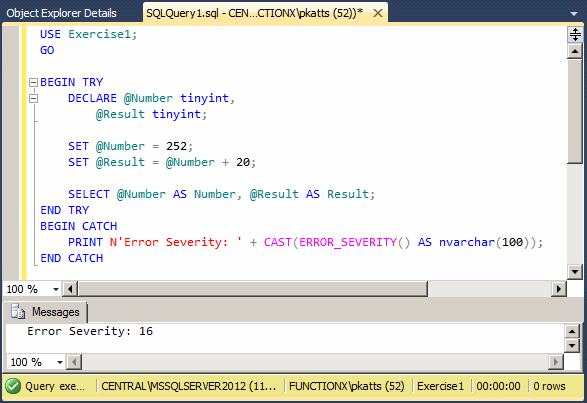
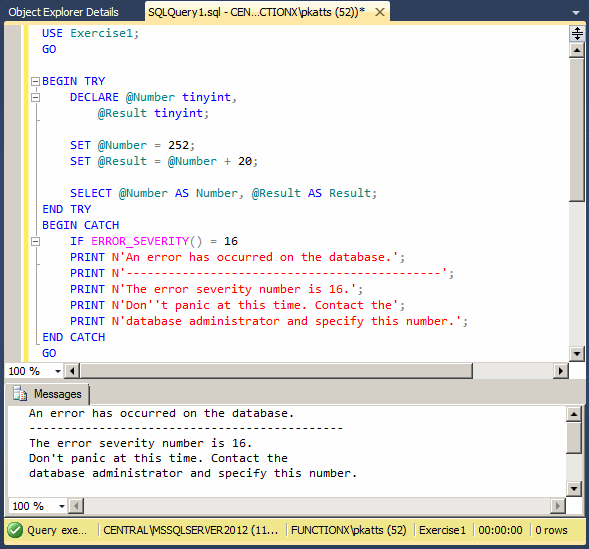
The value of this number is not a level of severity. It is just an indication of the severity. You as the database developer must find out what this number is and take appropriate action. You can write an IF conditional statement to get the value produced by this function and do what you judge necessary.
|
|
BEGIN TRY
    DECLARE @Number tinyint,
	    @Result tinyint;

    SET @Number = 252;
    SET @Result = @Number + 20;

    SELECT @Number AS Number, @Result AS Result;
END TRY
BEGIN CATCH
    IF ERROR_SEVERITY() = 16
	PRINT N'An error has occurred on the database.';
	PRINT N'---------------------------------------------';
	PRINT N'The error severity number is 16.';
	PRINT N'Don''t panic at this time. Contact the';
	PRINT N'database administrator and specify this number.';
END CATCH
GO
The state of an error is a number that specifies the section of code where an error occurred. This is because the same code can produce different errors at different sections of the code. To help you identify the state of an error, Transact-SQL provides the ERROR_STATE() function. Its syntax is:
ERROR_STATE() RETURNS int;
This function takes no argument. It returns an integer that specifies the state of the error. This function is used with the same approach as the severity of an error.
Other Characteristics of Exception Handling
Introduction
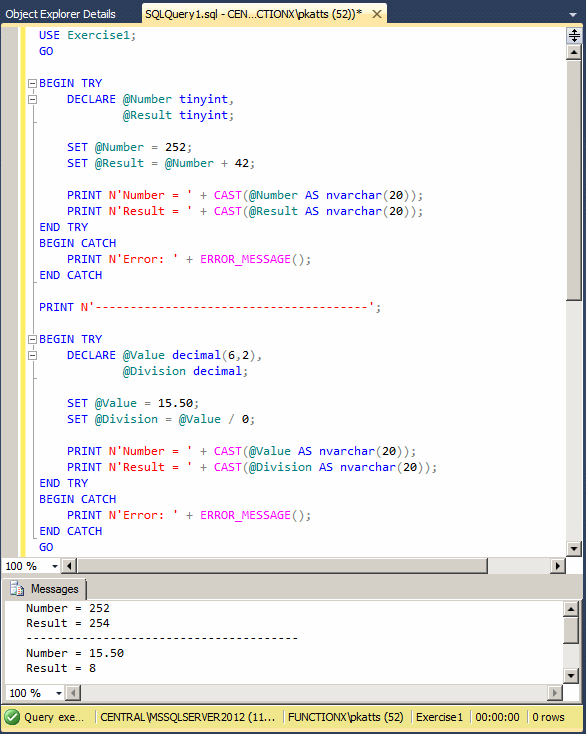
Just as you can write various statements in your code, you can also create various exception sections. Here are examples:
BEGIN TRY
    DECLARE @Number tinyint,
	    @Result tinyint;

    SET @Number = 252;
    SET @Result = @Number + 2;

    PRINT N'Number = ' + CAST(@Number AS nvarchar(20));
    PRINT N'Result = ' + CAST(@Result AS nvarchar(20));
END TRY
BEGIN CATCH
    PRINT N'Error: ' + ERROR_MESSAGE();
END CATCH

PRINT N'---------------------------------------';

BEGIN TRY
    DECLARE @Value decimal(6,2),
	    @Division decimal;

    SET @Value = 15.50;
    SET @Division = @Value / 2;

    PRINT N'Number = ' + CAST(@Value AS nvarchar(20));
    PRINT N'Result = ' + CAST(@Division AS nvarchar(20));
END TRY
BEGIN CATCH
    PRINT N'Error: ' + ERROR_MESSAGE();
END CATCH
This would produce:
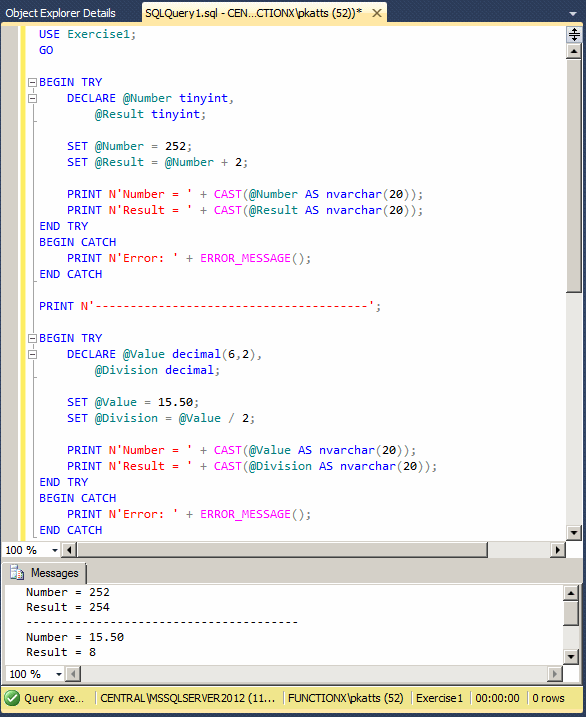
In this case, each section would handle its own exception.
|
|
BEGIN TRY
    DECLARE @Number tinyint,
	        @Result tinyint;

	SET @Number = 252;
	SET @Result = @Number + 42;

	PRINT N'Number = ' + CAST(@Number AS nvarchar(20));
	PRINT N'Result = ' + CAST(@Result AS nvarchar(20));
END TRY
BEGIN CATCH
	PRINT N'Error: ' + ERROR_MESSAGE();
END CATCH

PRINT N'---------------------------------------';

BEGIN TRY
	DECLARE @Value decimal(6,2),
			@Division decimal;

	SET @Value = 15.50;
	SET @Division = @Value / 0;

    PRINT N'Number = ' + CAST(@Value AS nvarchar(20));
	PRINT N'Result = ' + CAST(@Division AS nvarchar(20));
END TRY
BEGIN CATCH
	PRINT N'Error: ' + ERROR_MESSAGE();
END CATCH
GO
|
Nesting an Exception |
You can create an exception handling code inside of another. This is referred to as nesting. The basic formula to follow is:
BEGIN TRY
    BEGIN TRY
	-- Nested try block
    END TRY
    BEGIN CATCH
	-- Nested catch block
    END CATCH
END TRY
BEGIN CATCH

END CATCH
|
|
BEGIN TRY
    BEGIN TRY
        DECLARE @Number tinyint,
	            @Result tinyint;

    	SET @Number = 252;
	    SET @Result = @Number + 42;

    	PRINT N'Number = ' + CAST(@Number AS nvarchar(20));
	    PRINT N'Result = ' + CAST(@Result AS nvarchar(20));
    END TRY
    BEGIN CATCH
		PRINT N'Error: ' + ERROR_MESSAGE();
    END CATCH

    PRINT N'---------------------------------------';

    BEGIN TRY
	    DECLARE @Value decimal(6,2),
		    	@Division decimal;

    	SET @Value = 15.50;
	    SET @Division = @Value / 0;

	    PRINT N'Number = ' + CAST(@Value AS nvarchar(20));
		PRINT N'Result = ' + CAST(@Division AS nvarchar(20));
    END TRY
    BEGIN CATCH
		PRINT N'Error: ' + ERROR_MESSAGE();
    END CATCH
END TRY
BEGIN CATCH
    PRINT N'There was a problem with your code';
END CATCH
GO
|
Raising an Error |
If an error occurs in your code, you can take action as we have done so far. To better customize how an exception is handled when it occurs, you can raise an error. To support this, Transact-SQL provides the RAISERROR() function. Its syntax is:
RAISERROR ( { msg_id | msg_str | @local_variable }
    { ,severity ,state }
    [ ,argument [ ,...n ] ] )
    [ WITH option [ ,...n ] ]
This function takes three required arguments:
We have already seen how to find out or get an idea of what type of error occurred in your code, and we saw how to take actions. One more option is to guide the database engine as to what to do when/if this or that error occurs. You already know how to identify an error by its number. As an alternative, you may want to specify your own error number including its associated message. To do this, you can do what is referred to as throwing an exception.
To throw an exception, you use the THROW keyword. The formula to follow is:
THROW [ { error_number | @local_variable },
        { message | @local_variable },
    { state | @local_variable }
] [ ; ]
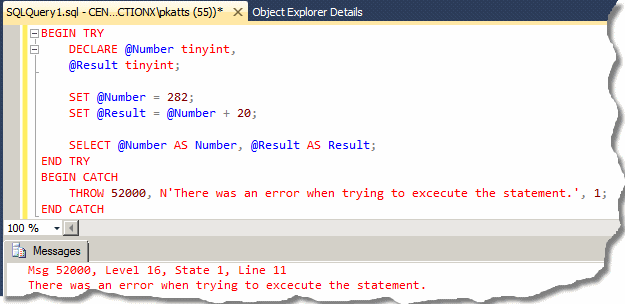
To throw your own exception, you can create a THROW statement in a catch block. In this case, after the THROW keyword, add a number that is greater than 50000, follow by a comma and following by a string message. This must be followed by a small natural number between 0 and 255. Here is an example:
BEGIN TRY
    DECLARE @Number tinyint,
    @Result tinyint;

    SET @Number = 282;
    SET @Result = @Number + 20;

    SELECT @Number AS Number, @Result AS Result;
END TRY
BEGIN CATCH
    THROW 52000, N'There was an error when trying to excecute the statement.', 1;
END CATCH
This would produce:
|
|
|
|
||
| Previous | Copyright © 2010-2022, FunctionX | Next |
|
|
||