Bits Manipulations

Bits Manipulations
Introduction to Bits Operations
Overview
From our introduction to variables, you may remember that the computer stores its data (numbers, strings, Boolean values, etc) in memory using small locations that each contains a bit of information. Because a bit can be represented only either as 1 or 0, we can say that each bit contains 1 or 0. Bit manipulation consists of changing the value (0 to 1, or 1 to 0) in a bit. As we will see in the next few operations, it is not just about changing a value. The operations can involve reversing a value or kind of "moving" a bit from its current position to another position.
The operations on bits are performed on 1s and 0s only. This means that any number in decimal or hexadecimal format involved in a bit operation must be converted to binary first.
You will almost never perform some of the operations we are going to review. You will hardly perform some other operations. There is only one operation you will perform on a regular basis (the OR operation is very regular in Microsoft Windows (Win32) programming so much that we were obliged to include this whole section in the lesson, as opposed to mentioning only OR).
Reversing a Bit
Remember that, at any time, a box (or chunk) in memory contains either 1 or 0:
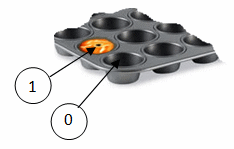
Bit reversal consists of changing the value of a bit. If the box contains 1, it would become 0. If it contains 0, it would become 1. To perform this operation, you use the bitwise negation operator represented with the ~ symbol.
As an example, consider the number 286. The decimal number 286 converted to binary is 100011110. You can reverse each bit as follows:
| 286 | 1 | 0 | 0 | 0 | 1 | 1 | 1 | 1 | 0 |
| Not 286 | 0 | 1 | 1 | 1 | 0 | 0 | 0 | 0 | 1 |
To use the bitwise negation operator, type ~ on the left side of the value. Here is an example:
using static System.Console;

Write("Number:  ");
byte number = byte.Parse(ReadLine()!);

var result = ~number;

WriteLine("-----------------------");
WriteLine("Result: {0}", result);
WriteLine("=======================");
Here is an example of running the program:
Number:  286
-----------------------
Result: -287
=======================

Press any key to close this window . . .
Bitwise Conjunction
Introductory
Bitwise conjunction consists of adding the content of a bit to the content of another bit. To support the bitwise conjunction operation, the C# language provides the & operator.
To perform the bit addition on two numbers, remember that they must be converted to binary first. Then:
| Bit0 | 0 |
| Bit1 | 0 |
| Bit0 And Bit1 | 0 |
| Bit0 | 1 |
| Bit1 | 0 |
| Bit0 And Bit1 | 0 |
| Bit0 | 0 |
| Bit1 | 1 |
| Bit0 And Bit1 | 0 |
| Bit0 | 1 |
| Bit1 | 1 |
| Bit0 And Bit1 | 1 |
As an example, consider the number 286 bit-added to 475. The decimal number 286 converted to binary is 100011110. The decimal number 4075 converted to binary is 111111101011. Based on the above 4 points, we can add these two numbers as follows:
| 286 | 0 | 0 | 0 | 1 | 0 | 0 | 0 | 1 | 1 | 1 | 1 | 0 |
| 4075 | 1 | 1 | 1 | 1 | 1 | 1 | 1 | 0 | 1 | 0 | 1 | 1 |
| 286 & 4075 | 0 | 0 | 0 | 1 | 0 | 0 | 0 | 0 | 1 | 0 | 1 | 0 |
Therefore, 286 & 4075 produces 100001010 which is equivalent to:
| Bit8 | Bit7 | Bit6 | Bit5 | Bit4 | Bit3 | Bit2 | Bit1 | Bit0 | |
| 256 | 128 | 64 | 32 | 16 | 8 | 4 | 2 | 1 | |
| 286 & 4075 | 1 | 0 | 0 | 0 | 0 | 1 | 0 | 1 | 0 |
| 256 | 0 | 0 | 0 | 0 | 8 | 0 | 2 | 0 |
This means that 286 & 4075 = 256 + 16 + 2 = 266. To perform a bitwise conjunction, use the & operator. Here is an example:
using static System.Console;

Write("Number 1: ");
short number1 = short.Parse(ReadLine()!);
Write("Number 2: ");
short number2 = short.Parse(ReadLine()!);

var result = number1 & number2;

WriteLine("-----------------------");
WriteLine("Result:  {0}", result);
WriteLine("=======================");
Here is an example of running the program:
Number 1: 286
Number 2: 4075
-----------------------
Result:  266
=======================

Press any key to close this window . . .
Compound Bitwise Conjunction
You can perform a bitwise conjunction on a variable and assign the result to the same variable. Here is an example:
using static System.Console;

Write("Number:  ");
short number = short.Parse(ReadLine()!);

number = number &

WriteLine("-----------------------");
WriteLine("Result: {0}", result);
WriteLine("=======================");
Here is an example of running the program:
Number: 286
-----------------------
Result: 16
=======================

Press any key to close this window . . .
Instead of performing the operation on two steps, a shorter version of this operator consists of using the compound bitwise conjunction operator represented as &=. Here is an example:
using static System.Console;

Write("Number: ");
short number = short.Parse(ReadLine()!);

number &= 48;

WriteLine("-----------------------");
WriteLine("Result: {0}", number);
WriteLine("=======================");
Bitwise Exclusion
Introductory
Bitwise exclusion consists of adding two bits with the following rules. To support bitwise exclusion, the C# language provides the ^ operator:
| Bit0 | 0 | 1 |
| Bit1 | 0 | 1 |
| Bit0 ^ Bit1 | 0 | 0 |
| Bit0 | 0 | 1 |
| Bit1 | 1 | 0 |
| Bit0 ^ Bit1 | 1 | 1 |
As an example, consider the number 618 bit-excluded from 2548. The decimal number 618 converted to binary is 1001101010. The decimal number 2548 converted to binary is 100111110100. Based on the above 2 points, we can bit-exclude these two numbers as follows:
| 618 | 0 | 0 | 1 | 0 | 0 | 1 | 1 | 0 | 1 | 0 | 1 | 0 |
| 2548 | 1 | 0 | 0 | 1 | 1 | 1 | 1 | 1 | 0 | 1 | 0 | 0 |
| 618 ^ 2548 | 1 | 0 | 1 | 1 | 1 | 0 | 0 | 1 | 1 | 1 | 1 | 0 |
Therefore, 305 ^ 2853 produces 101110011110 which is equivalent to:
| Bit11 | Bit10 | Bit9 | Bit8 | Bit7 | Bit6 | Bit5 | Bit4 | Bit3 | Bit2 | Bit1 | Bit0 | |
| 2048 | 1024 | 512 | 256 | 128 | 64 | 32 | 16 | 8 | 4 | 2 | 1 | |
| 618 ^ 2548 | 1 | 0 | 1 | 1 | 1 | 0 | 0 | 1 | 1 | 1 | 1 | 0 |
| 2048 | 0 | 512 | 256 | 128 | 0 | 0 | 16 | 8 | 4 | 2 | 0 |
This means that 286 ^ 4075 = 2048 + 512 + 256 + 128 + 16 + 8 + 4 + 2 = 2974
This can also be programmatically calculated as follows:
using static System.Console;

Write("Number 1: ");
int number1 = int.Parse(ReadLine()!);
Write("Number 2: ");
int number2 = int.Parse(ReadLine()!);

var result = number1 ^ number2;

WriteLine("-----------------------");
WriteLine("Result: {0}", result);
WriteLine("=======================");
Here is an example of running the program:
Number 1: 618
Number 2: 2548
-----------------------
Result: 2974
=======================

Press any key to close this window . . .
Compound Bitwise Exclusion
You can bitwise exclude a number of bits from a variable and assign the result to the variable itself. Here is an example:
cusing static System.Console;

Write("Number: ");
long number = long.Parse(ReadLine()!);

number = number ^ 38;

WriteLine("-----------------------");
WriteLine("Result:  {0}", number);
WriteLine("=======================");
Here is an example of running the program:
Number: 618
-----------------------
Result:  588
=======================

Press any key to close this window . . .
As an alternative, you can use the ^= operator to get the same result. Here is an example:
using static System.Console;

Write("Number: ");
long number = long.Parse(ReadLine()!);

number ^= 38;

WriteLine("-----------------------");
WriteLine("Result:   {0}", number);
WriteLine("=======================");
Left-Shifting the Bits
Introduction
Left shifting the bits consists of pushing each bit from right to left. You can do this by one ore more bits. Once again, to perform this operation, the number has to be converted to its binary equivalent. To support this operation, the C# language provides an operator represented as <<.
Imagine you have a number as 741. Its binary equivalent is 1011100101 and can be represented as:
| 1 | 0 | 1 | 1 | 1 | 0 | 0 | 1 | 0 | 1 |
To perform a left shift operation on these bits, you push each from its position to the left, depending on the number of pushes you want. For example, to left-shift by 1 bit, you push each bit to the left by one position. Actually, you consider the bit at position x and the bit to its left at position y. You replace the value of Bit y by the value of Bit x. If Bit x is the rightest bit, it receives a value of 0. This can be illustrated as follows:
| Original | 1 | 0 | 1 | 1 | 1 | 0 | 0 | 1 | 0 | 1 | |
| << by 1 | 1 | 0 | 1 | 1 | 1 | 0 | 0 | 1 | 0 | 1 | 0 |
As a result, we get 10111001010. The decimal result can be calculated as follows:
| Bit10 | Bit9 | Bit8 | Bit7 | Bit6 | Bit5 | Bit4 | Bit3 | Bit2 | Bit1 | Bit0 | |
| 1024 | 512 | 256 | 128 | 64 | 32 | 16 | 8 | 4 | 2 | 1 | |
| 741 << 1 | 1 | 0 | 1 | 1 | 1 | 0 | 0 | 1 | 0 | 1 | 0 |
| 1024 | 0 | 256 | 128 | 64 | 0 | 0 | 8 | 0 | 2 | 0 |
Consequently, 741 << 1 = 1024 + 256 + 128 + 64 + 8 + 2 = 1482. To programmatically perform this operation, use the << operator. Here is an example:
using static System.Console;

WriteLine(741 << 1);
This would produce:
1482
Press any key to close this window . . .
In the same way, you can push the bits to the left by more than one unit. Here is an example:
using static System.Console;

Write("Number:      ");
long number = long.Parse(ReadLine()!);
Write("Shift Value: ");
long shift = long.Parse(ReadLine()!);

var result = number << shift;

WriteLine("-----------------------");
WriteLine("Result:   {0}", result);
WriteLine("=======================");
Here is an example of running the program:
Number:      3687
Shift Value: 5
-----------------------
Result:      117984
=======================

Press any key to close this window . . .
Compound Bitwise Left-Shifting
You can push a few bits to the left of a variable and assign the result to the variable itself. Here is an example:
using static System.Console;

Write("Number:      ");
long number = long.Parse(ReadLine()!);
WriteLine("-----------------------");
WriteLine("Number:      {0}", number);

number = number << 5;

WriteLine("-----------------------");
WriteLine("Number:      {0}", number);
WriteLine("=======================");
Here is an example of running the program:
Number:      3682
-----------------------
Number:      3682
-----------------------
Number:      117824
=======================

Press any key to close this window . . .
To provide another version of this operation, the C# language is equipped with the <<= operator. Here is an example of using it:
using static System.Console;

var number = 248;
WriteLine(number);

number <<= 5;
WriteLine(number);
Right-Shifting the Bits
Introduction
You can shift the bits to the right. Everything is done as reviewed for the left shift but in reverse order. To support this operation, the C# language provides the >> operator. Here is an example of using it:
using static System.Console;

Write("Number:      ");
short number = short.Parse(ReadLine()!);
Write("Shift Value: ");
short shift = short.Parse(ReadLine()!);

var result = number >> shift;

WriteLine("-----------------------");
WriteLine("Result:      {0}", result);
WriteLine("=======================");
Here is an example of using the application:
Number:      3849
Shift Value: 9
-----------------------
Result:      7
=======================

Press any key to close this window . . .
Compound Bitwise Right-Shifting
Sometimes you want to right-shift the bits but store the result in the variable that is requesting the operation. Here is an example:
using static System.Console;

Write("Number:      ");
short number = short.Parse(ReadLine()!);
Write("Shift Value: ");
short shift = short.Parse(ReadLine()!);

number = number >> shift;

WriteLine("-----------------------");
WriteLine("Result:      {0}", number);
WriteLine("=======================");
Here is a way to run the application:
Number:      7412
Shift Value: 5
-----------------------
Result:      231
=======================

Press any key to close this window . . .
A shortcut to this operation is to use the compound right-shifting operator represented by the >>= operator. Here is an example:
using static System.Console;

Write("Number:      ");
long number = long.Parse(ReadLine()!);
Write("Shift Value: ");
long shift = long.Parse(ReadLine()!);

number >>= shift;

WriteLine("-----------------------");
WriteLine("Result:      {0}", number);
WriteLine("=======================");
Bitwise Disjunction
Introduction
Bitwise disjunction consists of disjoining a bit from another bit. To support this operation, the C# language provides the bitwise disjunction operator represented with |.
To perform a bitwise conjunction on two numbers, remember that they must be converted to binary first. Then:
| Bit0 | 0 |
| Bit1 | 0 |
| Bit0 Or Bit1 | 0 |
| Bit0 | 1 |
| Bit1 | 0 |
| Bit0 Or Bit1 | 1 |
| Bit0 | 0 |
| Bit1 | 1 |
| Bit0 Or Bit1 | 1 |
| Bit0 | 1 |
| Bit1 | 1 |
| Bit0 Or Bit1 | 1 |
As an example, consider the number 305 bit-disjoined to 2853. The decimal number 305 converted to binary is 100110001. The decimal number 2853 converted to binary is 101100100101. Based on the above 4 points, we can disjoin these two numbers as follows:
| 305 | 0 | 0 | 0 | 1 | 0 | 0 | 1 | 1 | 0 | 0 | 0 | 1 |
| 2853 | 1 | 0 | 1 | 1 | 0 | 0 | 1 | 0 | 0 | 1 | 0 | 1 |
| 305 | 2853 | 1 | 0 | 1 | 1 | 0 | 0 | 1 | 1 | 0 | 1 | 0 | 1 |
Therefore, 305 | 2853 produces 101100110101 which is equivalent to:
| Bit11 | Bit10 | Bit9 | Bit8 | Bit7 | Bit6 | Bit5 | Bit4 | Bit3 | Bit2 | Bit1 | Bit0 | |
| 2048 | 1024 | 512 | 256 | 128 | 64 | 32 | 16 | 8 | 4 | 2 | 1 | |
| 305 Or 2853 | 1 | 0 | 1 | 1 | 0 | 0 | 1 | 1 | 0 | 1 | 0 | 1 |
| 2048 | 0 | 512 | 256 | 0 | 0 | 32 | 16 | 0 | 4 | 0 | 1 |
This means that 286 | 4075 = 2048 + 512 + 256 + 32 + 16 + 4 + 1 = 2869
This can also be programmatically calculated as follows:
using static System.Console;

Write("Number 1: ");
long number1 = long.Parse(ReadLine()!);
Write("Number 2: ");
long number2 = long.Parse(ReadLine()!);

var result = number1 | number2;

WriteLine("-----------------------");
WriteLine("Result:   {0}", result);
WriteLine("=======================");
This would produce:
Number 1: 305
Number 2: 2853
-----------------------
Result:   2869
=======================

Press any key to close this window . . .
You can disjoint a number of bits on a variable and assign the result to the same variable. Here is an example:
using static System.Console;

Write("Number:   ");
int number = int.Parse(ReadLine()!);
Write("Disjoint: ");
int disjoint = int.Parse(ReadLine()!);

number = number | disjoint;

WriteLine("-----------------------");
WriteLine("Result:   {0}", number);
WriteLine("=======================");
Here is one way to run the program:
Number:   5926
Disjoint: 27
-----------------------
Result:   5951
=======================

Press any key to close this window . . .
Compound Bitwise Disjunction
A short version of this operation consists of using the |= operator. Here is an example:
using static System.Console;

Write("Number:   ");
long number = long.Parse(ReadLine()!);
Write("Disjoint: ");
long disjoint = long.Parse(ReadLine()!);

number |= disjoint;

WriteLine("-----------------------");
WriteLine("Result:   {0}", number);
WriteLine("=======================");
This is one way the application was run:
Number:   9737
Disjoint: 46
-----------------------
Result:   9775
=======================

Press any key to close this window . . .
The Values of an Enumeration
The Type of an Enumeration
As it was introduced in previous lessons, an enumeration is a list of members of a group where each member holds an integer. Here is an example of an enumeration:
public enum Alignment
{
    Left,
    Center,
    Right
}
The members of an enumeration can use values of one of the types of signed integers we reviewed. These include the byte, the short, the int, and the long integers (but not their equivalent unsigned types). To indicate the type of integers you want the members to have, after the name of the enumeration, type a colon followed by the desired type. Here is an example:
ublic enum Alignment : byte
{
    Left,
    Center,
    Right
}
After doing this, each member is treated as if it were a static field of a class and it is of the type specified.
If you don't specify the data type of the enumeration, its default type is int. Otherwise, as we mentioned already, you can apply the integral type of your choice. Here are three examples of enumerations of different types:
public enum LibraryMembership : int
{
    Kid, Senior,
    YoungAdult, Adult

}

public enum Cycles : short
{
    Unicycle,
    Bicycle,
    Tricycle,
    Multicycle
}

public enum PoliticalAffilication : long
{
    FarLeft, Left, CenterLeft,
    Center,
    CenterRight, Right, FarRight
}
The Values of the Members of an Enumeration
Consider the following enumeration:
public enum HouseType
{
    Unknown,
    SingleFamily,
    TownHouse,
    Condominium
}
Each member of an enumeration holds a natural number. By default, the first member has a value of 0, the second has a value of 1, and so on. For example, in the above PropertyType enumeration, Unknown has a value of 0 while Townhouse has a value of 2 as the default values. If you don't want these values, you can specify the value of one member, each member, some members, or all members of the list. Suppose you want the Unknown member of our PropertyType enumeration to have a value of 5. To do this, use the assignment operator "=" to give the desired value. The enumeration would be:
public enum HouseType
{
    Unknown = 5,
    SingleFamily,
    TownHouse,
    Condominium
}
In this case, Unknown now would have a value of 5, SingleFamily would have a value of 6 because it follows a member whose value is 1 (thus 5 + 1 = 6). Townhouse would have a value of 7, and Condominium would have a value of 8.
You can assign a value to more than one member of an enumeration. Here is an example:
enum HouseType
{
	Unknown = 3,
    SingleFamily = 12,
    TownHouse,
    Condominium = 8
}
In this case, Townhouse would have a value of 13 because it follows SingleFamily that has a value of 12. But Condominium would keep its value of 8 although it comes after the member whose value is 12.
You can assign the same value to more than one member of an enumeration. Here is an example:
public enum HousePlan
{
    Unknown = 5,
    Cottage = 1,
    Ranch ,
    Colonial = 12,
    Country = 8,
    Bungalow,
    Contemporary = 12,
    Victorian
}
As seen in our introduction, if you don't apply a data type to an enumeration, its default type is int. If you do, the values you assign to the members must fit within the range allowed by that type. Based on this, the following enumeration will work:
public enum LibraryMembership : int
{
    Kid        = 10,
    YoungAdult = 226,
    Adult      = 368,
    Senior     = 500
}
But the following enumeration will not work based on the data type applied compared to the value given to one of the members of the enumeration:
public enum Cycles : short
{
    Unicycle   = 1226,
    Bicycle    = 8808,
    Tricycle   = 30550,
    Multicycle = 246886
}
Combining the Elements of an Enumeration
By default, each member of an enumeration is accessed one at a time. In fact, that's the common way enumerations are used in conditional statements. Some situations, such as properties of a class, allow the members of an enumeration to be combined to produce a new value. To combine the members of an enumeration, you use the bitwise disjunction operator we reviewed earlier. You can assign the result to a variable. Here is an example:
var something = Alignment.Left | Alignment.Right;

public enum Alignment
{
    Left,
    Center,
    Right
}
By the way, to make your code easy to read, you can put the expression in parentheses. Here is an example:
var positionOnAbortion = (Alignment.Left | Alignment.Center);

public enum Alignment
{
    Left,
    Center,
    Right
}
Normally, when creating the enumeration, you should (in fact, must) assign a value to each member. There are two rules you should (must) observe:
public enum Family
{
    Father = 1,
    Uncle,
    Aunt,
    Mother = 1,
    Son,
    Daughter = 3
}var positionOnAbortion = (Alignment.Left | Alignment.Center);
public enum Alignment
{
Left = 1,
Center = 2,
Right = 3
}
It appears that the variable wants to indicate that its object holds a position of center-left when it comes to abortion, but the combined values of the members is 3, which is the same as another member of the enumeration. This operation would produce an error. The solution is that, when the values are assigned, any combination should produce a unique value that is not used by any of the members or any other combination. Here is an example of such an enumeration:
public enum Alignment
{
    FarLeft     =  1,
    Left        =  2,
    CenterLeft  =  4, //  3 is not available because 1 + 2 = 3, which may be used as a compbination of other values
    Center      =  8, //  5 is not availabe ( 4 + 1 =  5),  6 is not availabe ( 4 + 2 or 5 + 1 =  6), 7 is not availabe ( 6 + 1) = 7)
    CenterRight = 16, //  9 is not availabe ( 8 + 1 =  9), 10 is not availabe ( 9 + 1 = 10), 10 + 1 = 11, 11 + 1 = 12, 12 + 1 = 13, 13 + 1 = 14,  8 + 4 + 2 + 1 = 14 + 1 = 15)
    Right       = 25, // 17 is not availabe (16 + 1 = 17), 18 is not availabe (16 + 2 = 18,  16 + 2 + 1 = 19, 16 + 4 = 20, 16 + 4 + 1 = 21, 16 + 4 + 2 = 22, 16 + 4 + 2 + 1 = 23, 16 + 8 = 24)
    FarRight    = 57, // 26 = 25 + 1, 27 = 25 + 2, 28 = 25 + 3, 29 = 25 + 4, 30 = 25 + 5, 31 = 25 + 6, 32 = 25 + 7,  33 = 25 + 8, 34 = 25 + 9, 35 = 25 + 10, 36 = 25 + 11, 37 = 25 + 12, 38 = 25 + 13, 39 = 25 + 14, 40 = 25 + 15, 41 = 25 + 16, 42 = 25 + 17, 43 = 25 + 18, 44 = 25 + 119
}|
|
|||
| Previous | Copyright © 2001-2026, FunctionX | Friday 26 November 2021 | Next |
|
|
|||