Records and Inheritance

Records and Inheritance
Fundamentals of Records and Inheritance
Introduction
We have learned different ways to create records, the same way as classes, as a positional parameter type, etc. Other than that, a record can use some of the inheritance topics that are known for classes.
Inheriting from a Record
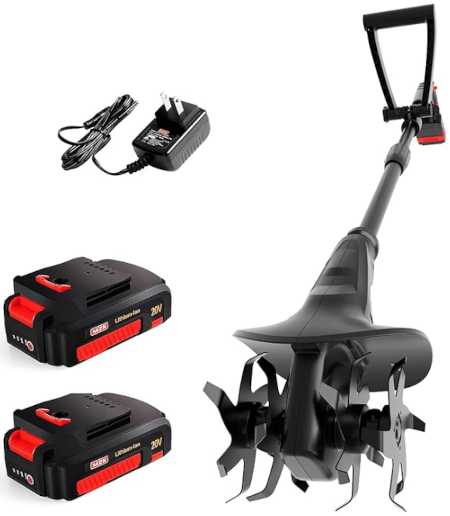
A record can either stand alone or be derived from another record. Here is an example:
using static System.Console;

Tiller till = new Tiller();

till.Make        = "MZK";
till.Model       = "20V";
till.Type        = PowerType.BatteryPowered;
till.BladeLength = 16.0;
till.WorkTypes   = "Lawn/Gardening/Soil Cultivation";
till.Dimensions  = (29.13, 11, 8.26);
till.Price       = 102.77;

WriteLine("Garden Machines: Tiller");
WriteLine("================================================");
WriteLine($"Make:          {till.Make}");
WriteLine($"Model:         {till.Model}");
WriteLine($"Power Type:    {till.Type}");
WriteLine($"Blade Length:  {till.BladeLength} Inches");
WriteLine($"Work Types:    {till.WorkTypes}");
WriteLine($"Dimensions:    {till.Dimensions.Depth}\"D x {till.Dimensions.Width}\"W x {till.Dimensions.Height}\"H");
WriteLine($"Price:         {till.Price:C}");
WriteLine("================================================");
// Parent record
public record GardenMachine
{
    public string? Make { get; set; }
    public string? Model { get; set; }
    public (double Depth, double Width, double Height) Dimensions { get; set; }
    public PowerType Type { get; set; }
    public double Price { get; set; }
}

// Child record inheriting from Tractor
public record Tiller : GardenMachine
{
    public double BladeLength { get; set; }
    public string? WorkTypes { get; set; }
}

public enum PowerType
{
    Cordless,
    Electric,
    BatteryPowered
}
This would produce: Tiller Characteristics ================================================ Make: MZK Model: 20V Power Type: BatteryPowered Blade Length: 16 Inches Work Types: Lawn/Gardening/Soil Cultivation Dimensions: 29.13"D x 11"W x 8.26"H Price: $102.77 ================================================ Press any key to close this window . . . |
 |
A Child Record with Positioned Parameters
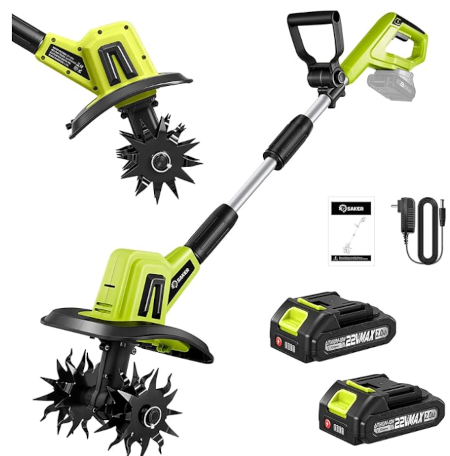
If you want to make your code easy to read, you can create the child record with positioned parameters. In this case, the name of the record is created as a primary constructor, in which case you would provide it with a parameter for each property. Here is an example:
using static System.Console;

Tiller till = new Tiller(0.0, "Soil Preparation, Weeding, and Gardening");

till.Make        = "Saker";
till.Model       = "22V";
till.Type        = PowerType.Cordless;
till.Dimensions  = (23, 10, 10.3);
till.Price       = 114.68;

WriteLine("Garden Machines: Tiller");
WriteLine("========================================================");
WriteLine($"Make:          {till.Make}");
WriteLine($"Model:         {till.Model}");
WriteLine($"Power Type:    {till.Type}");
WriteLine($"Blade Length:  {till.BladeLength} Inches (Unknown)");
WriteLine($"Work Types:    {till.WorkTypes}");
WriteLine($"Dimensions:    {till.Dimensions.Depth}\"D x {till.Dimensions.Width}\"W x {till.Dimensions.Height}\"H");
WriteLine($"Price:         {till.Price:C}");
WriteLine("========================================================");
public record GardenMachine
{
    public string? Make { get; set; }
    public string? Model { get; set; }
    public (double Depth, double Width, double Height) Dimensions { get; set; }
    public PowerType Type { get; set; }
    public double Price { get; set; }
}

public record Tiller(double BladeLength, string? WorkTypes) : GardenMachine;

public enum PowerType
{
    Cordless,
    Electric,
    BatteryPowered
}
This would produce: Garden Machines: Tiller ======================================================== Make: Saker Model: 22V Power Type: Cordless Blade Length: 0 Inches (Unknown) Work Types: Soil Preparation, Weeding, and Gardening Dimensions: 23"D x 10"W x 10.3"H Price: $114.68 ======================================================== Press any key to close this window . . . |
 |
A Parent Record with Positioned Parameters
You can create the parent record as a positioned parameter type, in which case you create the record with a primary constructor and add the desired properties in that constructor. Here is an example:
public record GardenMachine(string? Make, PowerType Type, double Price);
If you create such a record, if you decide to create a record that is derived from it, create the child class with a primary constructor. In that primary constructor, pass the parameters similar to those of the parent record. Here is an example:
public record GardenMachine(string? Make, PowerType Type, double Price);

public record Tiller(string Make, PowerType Type, double Price)
By the way, only the types of the parameters are important and the types must be in the same order as those of the parent record. The names of the parameters can be different. Here is an example:
public record GardenMachine(string? Make, PowerType Type, double Price);

public record Tiller(string Manufacturer, PowerType Source, double Value)
When deriving the type, after the colon of deriving the record, add some parentheses to the parent record. In those parentheses, pass the same arguments (the names of the parameters) as those in the primary constructor of the child record. Here is an example:
using static System.Console;

Tiller till = new Tiller("Prostormer", PowerType.Electric, 124.68);

WriteLine("Garden Machines: Tiller");
WriteLine("================================================");
WriteLine($"Make:              {till.Make}");
WriteLine($"Power Type:        {till.Type}");
WriteLine($"Price:             {till.Price:C}");
WriteLine("================================================");

public record GardenMachine(string? Make, PowerType Type, double Price);

public record Tiller(string Manufacturer,
                     PowerType Source,
                     double Value) : GardenMachine(Manufacturer, Source, Value);

public enum PowerType
{
    Cordless,
    Electric,
    BatteryPowered
}
This would produce:
Garden Machines: Tiller
========================
Make:        Prostormer
Power Type:  Electric
Price:       $124.68
========================

Press any key to close this window . . .
You may realize that, in most cases, the reason you use inheritance is to have a type that extends an existing one; that is, to get a derived object that goes beyond, or is bigger/greater than the parent type. As a result, you usually want to add new members to the child type. When it comes to a record, if you create a record derived from another record, in the primary constructor of the child record, you can add as many new parameters/properties as you want. Here is an example:
using static System.Console;

Tiller till = new Tiller("IncwBo", PowerType.Electric, 6, 16, 9, 124.68);

WriteLine("Garden Machines: Tiller");
WriteLine("==============================");
WriteLine($"Make:              {till.Make}");
WriteLine($"Power Type:        {till.Type}");
WriteLine($"Number of Blades:  {till.Blades}");
WriteLine($"Tilling Width:     {till.TillingWidth} Inches");
WriteLine($"Tilling Depth:     {till.TillingDepth} Inches");
WriteLine($"Price:             {till.Price:C}");
WriteLine("==============================");

public record GardenMachine(string? Make, PowerType Type, double Price);

public record Tiller(string Manufacturer,
                     PowerType Source,
                     int Blades,
                     double TillingWidth,
                     double TillingDepth,
                     double Value) : GardenMachine(Manufacturer, Source, Value);

public enum PowerType
{
    Cordless,
    Electric,
    BatteryPowered
}
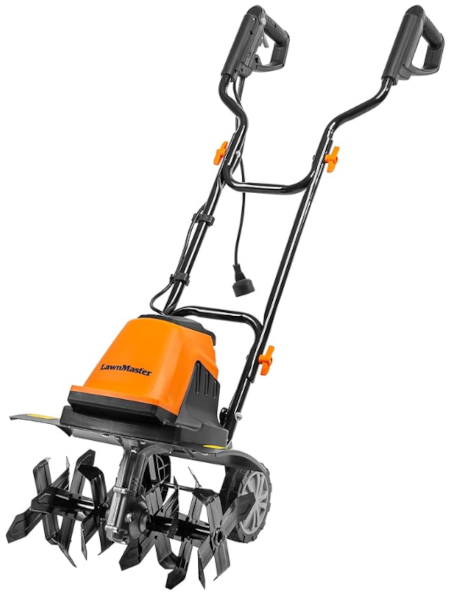
This would produce: Garden Machines: Tiller ============================== Make: IncwBo Power Type: Electric Number of Blades: 6 Tilling Width: 16 Inches Tilling Depth: 9 Inches Price: $124.68 ============================== Press any key to close this window . . . |
 |
You can add one or more members to the body of the derived record. To do this, if you created a regular record, it would have a body. If you created a positioned parameter type, add a body to it. Either way, in the body, add the desired private, internal, or public member(s). When declaring a variable of the record, you can access the internal and/or public member(s) of the record. Here is an example:
using static System.Console;

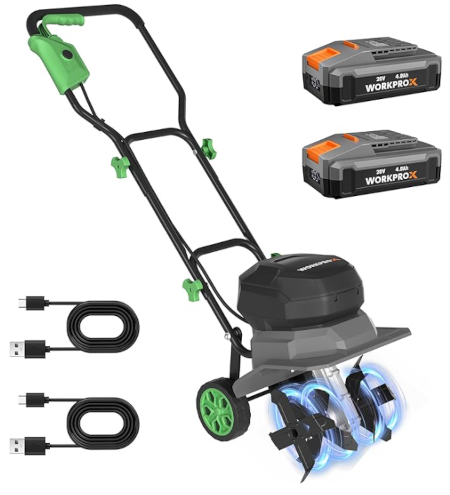
Tiller till = new("WORKPRO",
                  "WX125419AG",
                  PowerType.Cordless,
                  12, 8,
                  (22.44, 12.68, 18.31), 306.27);

till.NumberOfTines = 16;
till.WorkTypes = "Cultivation for Lawn, Garden, Soil, and Yard";

WriteLine("Garden Machines: Tiller");
WriteLine("===============================================================");
WriteLine($"Make:              {till.Make}");
WriteLine("Model:             {0}", till.Model);
WriteLine($"Power Type:        {till.Type}");
WriteLine($"Work Types:        {till.WorkTypes}");
WriteLine($"Tilling Width:     {till.TillingWidth} Inches");
WriteLine($"Tilling Depth:     {till.TillingDepth} Inches");
WriteLine("Number of Tines:   {0}", till.NumberOfTines);
Write($"Dimensions:        {till.Dimensions.Depth}\"D x ");
Write($"{till.Dimensions.Width}\"W x ");
WriteLine($"{till.Dimensions.Height}\"H");
WriteLine($"Price:             {till.Price:C}");
WriteLine("===============================================================");

public record GardenMachine(string Make,
                            string Model,
                            PowerType Type,
                            (double Depth, double Width, double Height) Dimensions,
                            double Price);

public record Tiller(string Manufacturer,
                     string Series,
                     PowerType Source,
                     double TillingWidth,
                     double TillingDepth,
                     (double Depth, double Width, double Height) Size,
                     double Value) : GardenMachine(Manufacturer, Series, Source, Size, Value)
{
    public string? WorkTypes { get; set; }
    public int NumberOfTines { get; set; }
}

public enum PowerType
{
    Cordless,
    Electric,
    BatteryPowered
}
This would produce: Garden Machines: Tiller =============================================================== Make: WORKPRO Model: WX125419AG Power Type: Cordless Work Types: Cultivation for Lawn, Garden, Soil, and Yard Tilling Width: 12 Inches Tilling Depth: 8 Inches Number of Tines: 16 Dimensions: 22.44"D x 12.68"W x 18.31"H Price: $306.27 =============================================================== Press any key to close this window . . . Classes, Records, and Inheritance A class cannot serve as the parent of a record. A record cannot be derived from a class. Inheriting from Object You cannot derive a record from a class. As a result, the following code will produce an error: public class Vehicle { public int Doors { get; set; } } public record Tractor : Vehicle { public string? ModelName { get; set; } public float EnginePower { get; set; } public float LiftCapacity { get; set; } public int MowerHeight { get; set; } public decimal Price { get; set; } } |
 |
This error is because you cannot create a record that is based on a class. There is an exception. Remember that every time you create a class, the class is automatically derived directly or indirectly from the object type. We saw that this concept also applies to structures. It also applies to records. In fact, when you create a record, you can explictly indicate that it derives from the object type. Here is an example:
Title = "Tractor Characteristics";

Tractor machine = new Tractor();

machine.ModelName    = "MW9724";
machine.EnginePower  = 21.5f;
machine.LiftCapacity = 754;
machine.MowerHeight  = 60;
machine.Price        = 13_050;

Console.WriteLine("Tractor Characteristics");
Console.WriteLine("=============================");
Console.WriteLine($"Model Name:     {machine.ModelName}");
Console.WriteLine($"Engine Power:   {machine.EnginePower} hp");
Console.WriteLine($"Lift Capacity:  {machine.ModelName} lbs");
Console.WriteLine($"Mower Height:   {machine.MowerHeight}");
Console.WriteLine($"Price:          {machine.Price:C}");
Console.WriteLine("=============================");

public record Tractor : object
{
    public string? ModelName    { get; set; }
    public float   EnginePower  { get; set; }
    public int     LiftCapacity { get; set; }
    public int     MowerHeight  { get; set; }
    public decimal Price        { get; set; }
}
This would produce::
Tractor Characteristics
=============================
Model Name:     MW9724
Engine Power:   21.5 hp
Lift Capacity:  MW9724 lbs
Mower Height:   60
Price:          $13,050.00
=============================

Press any key to close this window . . .
Probably the primary characteristic of the object class is that ot provides the primary features, mainly methods that all classes would need. One of these methods is the abiliby to find out whether two objects are equal. To make this happen, when you create a class, you can/must override the Equals() method. When it comes to records, the ability to compare two record objects is built in the record concept. Therefore, if you create a record, you cannot (you are not allowed to) override the Equals() method. If you do, you would receive an error.
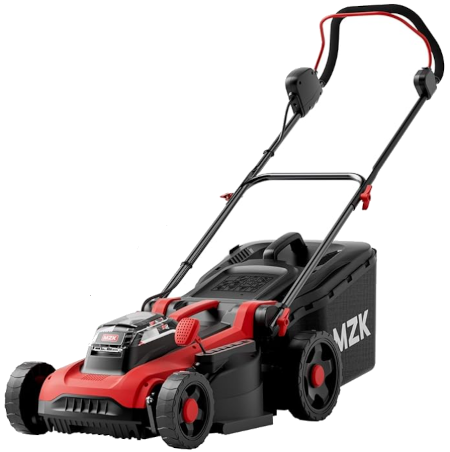
As is the case for all object types (except enumerations) in the C# language, you can create a record that implements an interface. Everything is done exactly as we saw for classes and structures. Here is an example:
using static System.Console;

LawnMower lm = new LawnMower();

lm.Make = "MZK";
lm.Model = "40V";
lm.Type = MowerType.Cordless;
lm.CuttingWidth = 16.0;
lm.Dimensions = (15, 10, 13);
lm.Price = 182.48;

WriteLine("Lawn Mower Characteristics");
WriteLine("=================================");
WriteLine($"Make:          {lm.Make}");
WriteLine($"Model:         {lm.Model}");
WriteLine($"Type:          {lm.Type}");
WriteLine($"Cutting Width: {lm.CuttingWidth} Inches");
WriteLine($"Dimensions:    {lm.Dimensions.Depth}\"D x {lm.Dimensions.Width}\"W x {lm.Dimensions.Height}\"H");
WriteLine($"Price:         {lm.Price:C}");
WriteLine("=================================");
// An interface
public interface ITractor
{
    public string? Make { get; set; }
    public string? Model { get; set; }
    public (int Depth, int Width, int Height) Dimensions { get; set; }
    public double Price { get; set; }
}

// A record that implements the Tractor interface
public record LawnMower : ITractor
{
    public string? Make { get; set; }
    public string? Model { get; set; }
    public (int Depth, int Width, int Height) Dimensions { get; set; }
    public MowerType Type { get; set; }
    public double CuttingWidth { get; set; }
    public double Price { get; set; }
}

public enum MowerType
{
    Push,
    Cordless,
    SelfPropelled,
    Riding
}
This would produce: Lawn Mower Characteristics ================================= Make: MZK Model: 40V Type: Cordless Cutting Width: 16 Inches Dimensions: 15"D x 10"W x 13"H Price: $182.48 ================================= Press any key to close this window . . . |
 |
Other Topics on Records and Inheritance
A record can contain static members. Such members follow the same rules we saw for static members of a class. This means that, to add a static property in a record, precede the data type of the property with the static keyword. You can apply an access keyword (private, protected, internal, or public) to the property. In that case, the static keyword can be written before or after the access keyword. Here are examples:
using static System.Console;

Car.Make = "Honda";
Car.Model = "Civic";

WriteLine("Vehicle Registration");
WriteLine("--------------------");
WriteLine("Make:  {0}", Car.Make);
WriteLine("Model: {0}", Car.Model);
WriteLine("====================");

public record Car
{
    public static string? Make { get; set; }
    static public string? Model { get; set; }
}
This would produce:
Vehicle Registration
---------------------
Make:  Honda
Model: Civic
=====================

Press any key to close this window . . .
Like a class, a record can have one or more static properties. A static property in a record is created the same way we saw for a class. Here are examples:
using static System.Console;

Square sqr = new Square();

WriteLine("=====================================");
WriteLine("Enter the value to process the square");
Write("Side:       ");
Square.Side = double.Parse(ReadLine()!);

WriteLine("=====================================");
WriteLine("Square Values");
WriteLine("-------------------------------------");
WriteLine("Area:      {0}", sqr.Area);
WriteLine("Perimeter: {0}", Square.Perimeter);
WriteLine("=====================================");

public record Square
{
    private static double s;

    public Square()
    {
    }

    public static double Side
    {
        get { return s; }

        set { s = value; }
    }

    public double Area { get { return s * s; } }

    static public double Perimeter { get { return s * 4; } }
}
Here is an example of running the program:
=====================================
Enter the value to process the square
Side:       1997.317
=====================================
Square Values
-------------------------------------
Area:      3989275.198489
Perimeter: 7989.268
=====================================

Press any key to close this window . . .
Unlike a class, a record cannot be made static. This means that you cannot apply the static keyword to the record keyword.
When studying classes, we saw that, in their body, they are equipped with an object named this. That object is also available in the body of a record. As a reminder, the this object is available only within the body of the type and can be used to access any non-static member from another member of the type. Here is an example:
using static System.Console;

Square sqr = new Square();

WriteLine("=====================================");
WriteLine("Enter the value to process the square");
Write("Side:      ");
double length = double.Parse(ReadLine()!);

sqr.Side = length;

WriteLine("=====================================");
WriteLine("Geometry - Square Summary");
WriteLine("-------------------------------------");
WriteLine("Side:      {0}", sqr.Side);
WriteLine("Perimeter: {0}", sqr.Perimeter);
WriteLine("Area:      {0}", sqr.Area);
WriteLine("=====================================");

public record Square
{
    private double s;

    public double Side
    {
        get
        {
            return this.s;
        }

        set
        {
            this.s = value;
        }
    }

    public double Perimeter
    {
        get { return this.s * 4; }
    }

    public double Area
    {
        get { return this.s * this.s; }
    }
}
Here is an example of running the program:
=====================================
Enter the value to process the square
Side:      1337.957
=====================================
Geometry - Square Summary
-------------------------------------
Side:      1337.957
Perimeter: 5351.828
Area:      1790128.9338490004
=====================================

Press any key to close this window . . .
We saw that records support inheritance, as long as both the parent and the child types are records. In the same way, a record that is derived from another record can in turn be used as a parent of another record. Here is an example:
public record Point
{
    public int X { get; set; }
    public int Y { get; set; }
}

public record Squared : Point
{
    public double Side { get; set; }
}

public record Cube : Squared
{
    public double Radius { get; set; }
}
When creating a record, whether a brand new record or it is derived from another record, you can mark it to never serve as the parent or base of another record. As we saw for classes, this operation is referred to as sealing a type. To apply it for a record, when creating the record, preced it with the sealed keyword. Here is an example:
using static System.Console;

Chainsaw machine = new Chainsaw();

machine.Make = "Greenworks";
machine.Model = "80V";
machine.Price = 244.48;

WriteLine("======================");
WriteLine("Chainsaw Values");
WriteLine("----------------------");
WriteLine("Make:      {0}", machine.Make);
WriteLine("Model:     {0}", machine.Model);
WriteLine("Price:     {0}", machine.Price);
WriteLine("======================");

public sealed record Chainsaw
{
    private string? _make;
    private string? _model;
    private double _price;

    public string? Make
    {
        get
        {
            return _make;
        }
        set
        {
            _make = value;
        }
    }
    public string? Model
    {
        get
        {
            return _model;
        }
        set
        {
            _model = value;
        }
    }

    public double Price
    {
        get
        {
            return _price;
        }
        set
        {
            _price = value;
        }
    }
}
This would produce:
Vehicle Registration
---------------------
Make:  Honda
Model: Civic
=====================

Press any key to close this window . . .
In the above example, we created read/write properties. Of course, you can create automatic properties and seal the record if necessary. Here is an example:
public sealed record Chainsaw
{
    public string? Make  { get; set; }
    public string? Model { get; set; }
    public double  Price { get; set; }
}
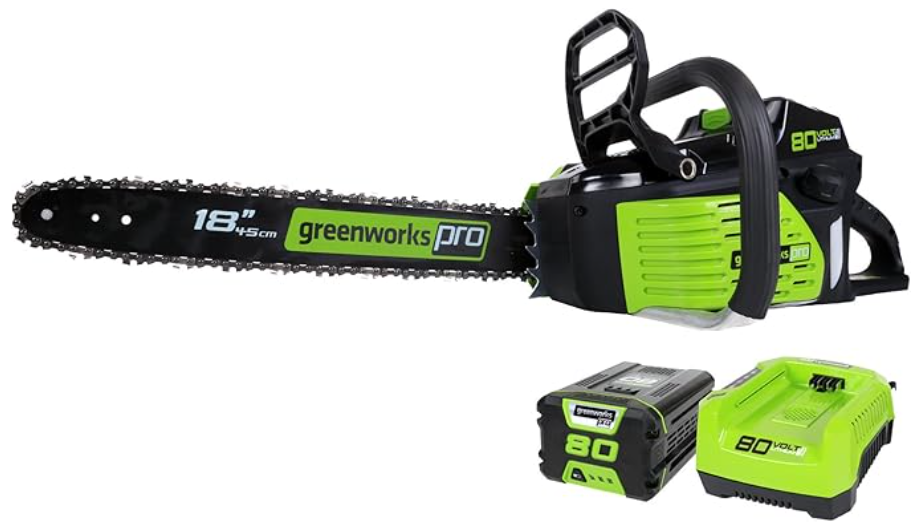
In the same way, if you create a record with positioned parameters, to inheritance from it, simply precede its record keyword with the sealed keyword. Here is an example:
using static System.Console;

Chainsaw machine = new Chainsaw("Greenworks", "80V", PowerType.Cordless, 3.5f, 18.0f, 242.57);

WriteLine("========================");
WriteLine("Chainsaw Characteristics");
WriteLine("------------------------");
WriteLine("Make:          {0}", machine.Make);
WriteLine("Model:         {0}", machine.Model);
WriteLine("Power Type:    {0}", machine.Type);
WriteLine("Horse Power:   {0}", machine.HorsePower);
WriteLine("Chain Length:  {0}", machine.ChainLength);
WriteLine("Price:         ${0}", machine.Price);
WriteLine("========================");

public sealed record Chainsaw(string Make,
                              string? Model,
                              PowerType Type,
                              float HorsePower,
                              float ChainLength,
                              double Price);

public enum PowerType { Cordless, Electric, BatteryPowered }

public record Point(double X, double Y);
public sealed record Square(double X, double Y) : Point(X, Y);
This would produce:
==========================
Chainsaw Characteristics
--------------------------
Make:          Greenworks
Model:         80V
Power Type:    Cordless
Horse Power:   3.5
Chain Length:  18
Price:         $242.57
==========================

Press any key to close this window . . .
 Practical Learning: Ending the Lesson
|
|
|||
| Previous | Copyright © 2026-2026, FunctionX | Saturday 31 December 2023 | Next |
|
|
|||