Introduction to Conditional Statements

Introduction to Conditional Statements
Introduction to Conditions
A Boolean Value A value is characterized as Boolean if that value is said to be true or false. Databases and other programming environments provide operators you can use to perform data analysis. The operators used are called logical operators because they are used to perform comparisons that produce a result of true or false. In Boolean algebra, something is considered true when it holds a value. The value is also considered as 1 or Yes. To support such values, Transact-SQL provides a constant named TRUE. If a value is not considered true, it is referred to as false. To support such values, Transact-SQL provides a constant named FALSE. |
 |
After you have declared a variable, the SQL interpreter reserves a space in the computer memory for it but doesn't put anything in that memory space. At that time, that area of memory doesn't hold a significant value. Also at that time, the variable is considered null.
To support the null value, Transact-SQL provides a constant named NULL. The NULL constant is mostly used for comparison purposes.
A Comparison of Two Values
A comparison consists of establishing a relationship between two values, such as to find out whether both values are equal or one of them is greater than the other, etc. To perform a comparison, you use two operands and an operator as in the following formula:
operand_1 operator operand_2
This is the basic formula of a Boolean expression.
 Practical Learning: Introducing Conditions
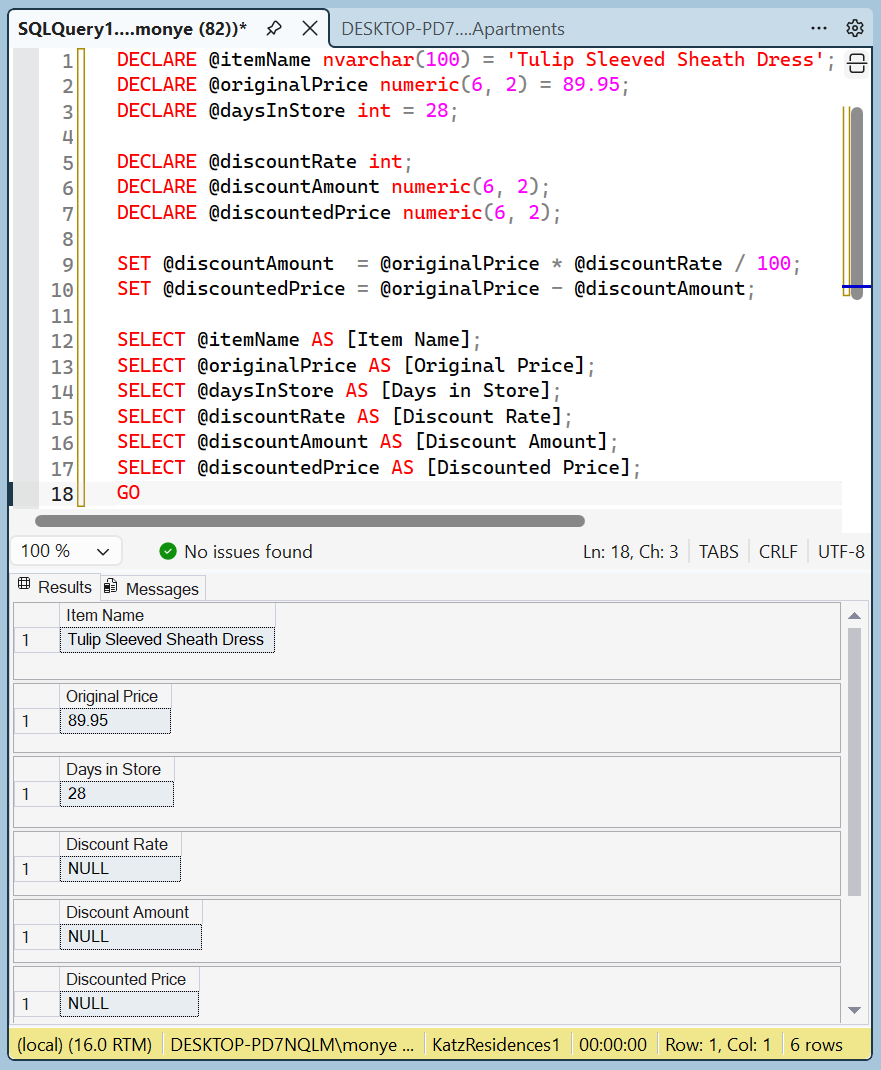
DECLARE @itemName nvarchar(100) = 'Tulip Sleeved Sheath Dress';
DECLARE @originalPrice numeric(6, 2) = 89.95;
DECLARE @daysInStore int = 28;

DECLARE @discountRate int;
DECLARE @discountAmount numeric(6, 2);
DECLARE @discountedPrice numeric(6, 2);

SET @discountAmount  = @originalPrice * @discountRate / 100;
SET @discountedPrice = @originalPrice - @discountAmount;

SELECT @itemName AS [Item Name];
SELECT @originalPrice AS [Original Price];
SELECT @daysInStore AS [Days in Store];
SELECT @discountRate AS [Discount Rate];
SELECT @discountAmount AS [Discount Amount];
SELECT @discountedPrice AS [Discounted Price];
GO
To perform a comparison, the primary keyword you use is named IF. The formula to follow is:
IF condition statement[;]
As you can see, you start with the IF keyword. The condition can have the following formula:
operand_1 Boolean-operator operand_2
An operand can be a value or the name of a variable. The operator is a logical one. The whole expression is the condition. If the expression produces a true result, then the statement would execute.
The Body of a Condition Statement
In the above formula, we saw that you start with the IF keyword, add a space, and a condition. The section after that condition is referred to as the body of the conditional statement. If its statement is short, you can write it on the same line with the IF condition. If the statement is long, you should write it on the next line. In that case, to make your code easy to read, the statement should be indented (four character spaces to the right). This would be done as follows:
IF operand_1 Boolean-operator operand_2
    statement[;]
You can also write the statement on its own line even if the IF condition is short.
Beginning and Ending a Body of a Statement
As is the case in many programming languages, a section that contains a statement may need many lines of code. In Transact-SQL, you may be tempted to write those statements below the IF condition and simply indent them as follows:
IF operand_1 Boolean-operator operand_2
    statement_1[;]
    statement_2[;]
    . . .
    statement_n[;]
In the languages that require indentation (such as F#), that indentation would be enough. In other languages such as SQL, if you write such code, only the first line of code below the IF condition would execute; the other lines would be considered as not belonging to the IF condition. In those languages, you must explicitly indicate the Beginning and end of the section.
To let you indicate the beginning of a section, Transact-SQL (in fact, most SQL implementations) provides a keyword named BEGIN.
To let indicate the end of a section, Transact-SQL (in fact, most SQL implementations) provides a keyword named END. To make your code easier to read:
Based on this, if your condition must include many statements, the formula to use becomes:
IF operand_1 Boolean-operator operand_2
    BEGIN
        statement_1[;]
        statement_2[;]
        . . .
        statement_n[;]
    END
You can also create a body even if the section of code contains only one line of code:
IF operand_1 Boolean-operator operand_2
    BEGIN
        statement[;]
    END
Fundamentals of Boolean Values
Introduction
A value is said to be Boolean if it is true or it is false. In fact, the two available Boolean values are TRUE and FALSE.
If you want to declare a Boolean variable, you can use a data type named BIT. Here is an example of declaring a Boolean variable:
DECLARE @DrinkingUnderAge BIT
To initialize a Boolean variable or to change its value, assign 0 or another natural number to the variable. Here is an example:
DECLARE @rinkingUnderAge BIT = 1;
If you assign 0, the variable is considered to hold a FALSE value. If you assign any natural number, it would be reduced to 1 and considered to hold a TRUE value. Consider the following code:
1> DECLARE @DrinkingUnderAge BIT = 398;
2> SELECT @DrinkingUnderAge AS [Drinking Under Ager];
3> GO
Drinking Under Ager
-------------------
                  1

(1 rows affected)
1> DECLARE @DrinkingUnderAge BIT = 0;
2> SELECT @DrinkingUnderAge AS [Drinking Under Ager];
3> GO
Drinking Under Ager
-------------------
                  0

(1 rows affected)
1> DECLARE @DrinkingUnderAge BIT = 584952;
2> SELECT @DrinkingUnderAge AS [Drinking Under Ager];
3> GO
Drinking Under Ager
-------------------
                  1

(1 rows affected)
Assigning a Logical Expression to a Boolean Variable
A Boolean variable can be initialized with a Boolean expression. This would be done as follows:
@variable-name = operand_1 Boolean-operator operand_2;
To make your code easy to read, you should include the logical expression in parentheses. This can be done as follows:
@variable-name variable = (operand_1 Boolean-operator operand_2);
Fundamentals of Logical Operators
Introduction
A logical comparison is used to establish the logical relationship between two values, a variable and a value, or two variables. There are various operators available to perform such comparisons.
A Value Less Than Another: <
To find out whether one value is lower than another, the operator to use is <. Its formula is:
value_1 < value_2
This operation can be illustrated as follows:
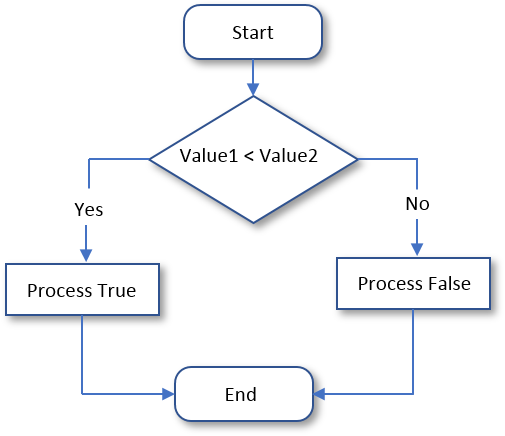
For a "Less Than" operation, the formula of the conditional statement is:
IF operand_1 < operand_2
    statement(s);
Here is an example:
DECLARE @salary numeric = 36000;
DECLARE @employmentStatus NVARCHAR(12) = N'Full-Time';

IF @salary < 40000
    @employmentStatus = "Part-Time";

SELECT @salary AS [Yearly Salary];
SELECT @employmentStatus AS [Employment Status];
GO
This would produce:
Employee Record
-----------------------------
Yearly Salary:     36000
Employment Status: Full-Time
=============================

Press any key to close this window . . .
Practical Learning: Comparing for a Lesser Value
DECLARE @discountRate int;
DECLARE @discountAmount numeric(6, 2);
DECLARE @discountedPrice numeric(6, 2);

DECLARE @itemName nvarchar(100) = 'Tulip Sleeved Sheath Dress';
DECLARE @originalPrice numeric(6, 2) = 89.95;
DECLARE @daysInStore int = 28;

IF @daysInStore < 60
    SET @discountRate = 50;
IF @daysInStore < 45
    SET @discountRate = 35;
IF @daysInStore < 35
    SET @discountRate = 15;
IF @daysInStore < 15
    SET @discountRate = 0;

SET @discountAmount  = @originalPrice * @discountRate / 100;
SET @discountedPrice = @originalPrice - @discountAmount;

SELECT @itemName AS [Item Name],
       @originalPrice AS [Original Price],
       @daysInStore AS [Days in Store],
       @discountRate AS [Discount Rate],
       @discountAmount AS [Discount Amount],
       @discountedPrice AS [Discounted Price];
GODECLARE @discountRate int;
DECLARE @discountAmount numeric(6, 2);
DECLARE @discountedPrice numeric(6, 2);
DECLARE @itemName nvarchar(100) = 'Tulip Sleeved Sheath Dress';
DECLARE @originalPrice numeric(6, 2) = 89.95;
DECLARE @daysInStore int = 46;
IF @daysInStore < 60
SET @discountRate = 50;
IF @daysInStore < 45
SET @discountRate = 35;
IF @daysInStore < 35
SET @discountRate = 15;
IF @daysInStore < 15
SET @discountRate = 0;
SET @discountAmount = @originalPrice * @discountRate / 100;
SET @discountedPrice = @originalPrice - @discountAmount;
SELECT @itemName AS [Item Name],
@originalPrice AS [Original Price],
@daysInStore AS [Days in Store],
@discountRate AS [Discount Rate],
@discountAmount AS [Discount Amount],
@discountedPrice AS [Discounted Price];
GODECLARE @firstName NVARCHAR(12) = N'Michael'; DECLARE @lastName NVARCHAR(12) = N'Carlock'; DECLARE @hSalary NUMERIC(6, 2) = 28.25; -- Time worked DECLARE @mon DECIMAL(5, 2) = 7; DECLARE @tue DECIMAL(5, 2) = 8; DECLARE @wed DECIMAL(5, 2) = 6.5; DECLARE @thu DECIMAL(5, 2) = 8.5; DECLARE @fri DECIMAL(5, 2) = 6.5; DECLARE @timeWorked numeric(6, 2) = @mon + @tue + @wed + @thu + @fri; DECLARE @netPay numeric(6, 2) = @hSalary * @timeWorked; DECLARE @strHourlySalary NvarChar(10) DECLARE @strMonday NvarChar(10) DECLARE @strTuesday NvarChar(10) DECLARE @strWednesday NvarChar(10) DECLARE @strThursday NvarChar(10) DECLARE @strFriday NvarChar(10) DECLARE @strTimeWorked NvarChar(10) DECLARE @strNetPay NvarChar(10) SET @strHourlySalary = @hSalary; SET @strMonday = @mon; SET @strTuesday = @tue; SET @strWednesday = @wed; SET @strThursday = @thu; SET @strFriday = @fri; SET @strTimeWorked = @timeWorked; SET @strNetPay = @netPay; PRINT '======================================================='; PRINT 'FUN DEPARTMENT STORE'; PRINT '======================================================='; PRINT 'Payroll Evaluation'; PRINT '======================================================='; PRINT 'Employee Information'; PRINT '-------------------------------------------------------'; PRINT 'Full Name: ' + @firstName + ' ' + @lastName; PRINT 'Hourly Salary: ' + @strHourlySalary; PRINT '======================================================='; PRINT 'Time Worked Summary'; PRINT '--------+---------+-----------+----------+-------------'; PRINT ' Monday | Tuesday | Wednesday | Thursday | Friday'; PRINT '--------+---------+-----------+----------+-------------'; PRINT ' ' + @strMonday + ' | ' + @strTuesday + ' | ' + @strWednesday + ' | ' + @strThursday + ' | ' + @strFriday; PRINT '========+=========+===========+==========+============='; PRINT ' Pay Summary'; PRINT '-------------------------------------------------------'; PRINT ' Total Time: ' + @strTimeWorked; PRINT '-------------------------------------------------------'; PRINT ' Net Pay: ' + @strNetPay; PRINT '=======================================================';
=======================================================
FUN DEPARTMENT STORE
=======================================================
Payroll Evaluation
=======================================================
Employee Information
-------------------------------------------------------
Full Name:     Michael Carlock
Hourly Salary: 28.25
=======================================================
Time Worked Summary
--------+---------+-----------+----------+-------------
 Monday | Tuesday | Wednesday | Thursday | Friday
--------+---------+-----------+----------+-------------
  7.00  |   8.00  |    6.50   |   8.50   |  6.50
========+=========+===========+==========+=============
                      Pay Summary
-------------------------------------------------------
                      Total Time:  36.50
-------------------------------------------------------
                      Net Pay:     1031.13
=======================================================DECLARE @firstName NVARCHAR(12) = N'Catherine'; DECLARE @lastName NVARCHAR(12) = N'Busbey'; DECLARE @hSalary NUMERIC(6, 2) = 24.37; -- Time worked DECLARE @mon DECIMAL(5, 2) = 9.5; DECLARE @tue DECIMAL(5, 2) = 8; DECLARE @wed DECIMAL(5, 2) = 10.5; DECLARE @thu DECIMAL(5, 2) = 9; DECLARE @fri DECIMAL(5, 2) = 10.5; DECLARE @timeWorked numeric(6, 2) = @mon + @tue + @wed + @thu + @fri; DECLARE @netPay numeric(6, 2) = @hSalary * @timeWorked; DECLARE @strHourlySalary NvarChar(10) DECLARE @strMonday NvarChar(10) DECLARE @strTuesday NvarChar(10) DECLARE @strWednesday NvarChar(10) DECLARE @strThursday NvarChar(10) DECLARE @strFriday NvarChar(10) DECLARE @strTimeWorked NvarChar(10) DECLARE @strNetPay NvarChar(10) SET @strHourlySalary = @hSalary; SET @strMonday = @mon; SET @strTuesday = @tue; SET @strWednesday = @wed; SET @strThursday = @thu; SET @strFriday = @fri; SET @strTimeWorked = @timeWorked; SET @strNetPay = @netPay; PRINT '======================================================='; PRINT 'FUN DEPARTMENT STORE'; PRINT '======================================================='; PRINT 'Payroll Evaluation'; PRINT '======================================================='; PRINT 'Employee Information'; PRINT '-------------------------------------------------------'; PRINT 'Full Name: ' + @firstName + ' ' + @lastName; PRINT 'Hourly Salary: ' + @strHourlySalary; PRINT '======================================================='; PRINT 'Time Worked Summary'; PRINT '--------+---------+-----------+----------+-------------'; PRINT ' Monday | Tuesday | Wednesday | Thursday | Friday'; PRINT '--------+---------+-----------+----------+-------------'; PRINT ' ' + @strMonday + ' | ' + @strTuesday + ' | ' + @strWednesday + ' | ' + @strThursday + ' | ' + @strFriday; PRINT '========+=========+===========+==========+============='; PRINT ' Pay Summary'; PRINT '-------------------------------------------------------'; PRINT ' Total Time: ' + @strTimeWorked; PRINT '-------------------------------------------------------'; PRINT ' Net Pay: ' + @strNetPay; PRINT '=======================================================';
+=+=+=+=+=+=+=+=+=+=+=+=+=+=+=+=+=+=+=+=+=+=+=+=+=+=+=+
FUN DEPARTMENT STORE
=======================================================
Payroll Evaluation
=======================================================
Employee Information
-------------------------------------------------------
Full Name:     Catherine Busbey
Hourly Salary: 24.37
=======================================================
Time Worked Summary
--------+---------+-----------+----------+-------------
 Monday | Tuesday | Wednesday | Thursday | Friday
--------+---------+-----------+----------+-------------
  9.50  |   8.00  |    10.50  |   9.00   |  10.50
========+=========+===========+==========+=============
                      Pay Summary
-------------------------------------------------------
                      Total Time:  47.50
-------------------------------------------------------
                      Net Pay:     1157.58
A Value Greater Than Another: >
To find out whether one value is greater than the other, the operator to use is >. Its formula is:
value1 > value2
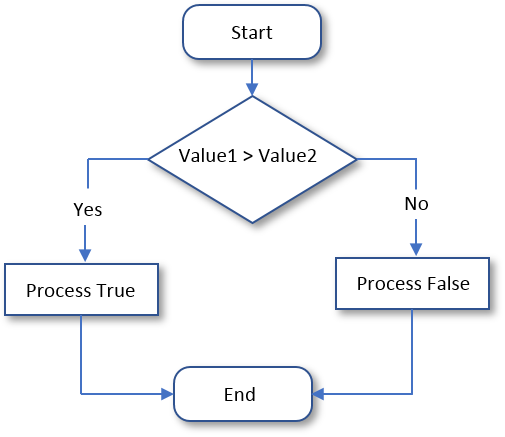
Both operands, in this case value1 and value2, can be variables or the left operand can be a variable while the right operand is a constant. This operation can be illustrated as follows:
Practical Learning: Finding Out Whether a Value is Greater Than Another
DECLARE @firstName NVARCHAR(12)  = N'Michael';
DECLARE @lastName  NVARCHAR(12)  = N'Carlock';
DECLARE @hSalary   NUMERIC(6, 2) = 28.25;

-- Time worked
DECLARE @mon DECIMAL(5, 2) = 7;
DECLARE @tue DECIMAL(5, 2) = 8;
DECLARE @wed DECIMAL(5, 2) = 6.5;
DECLARE @thu DECIMAL(5, 2) = 8.5;
DECLARE @fri DECIMAL(5, 2) = 6.5;

DECLARE @timeWorked numeric(6, 2) = @mon + @tue + @wed + @thu + @fri;

DECLARE @regTime  numeric(6, 2) = @timeWorked;
DECLARE @overtime numeric(6, 2) = 0.00;
DECLARE @overPay  numeric(6, 2) = 0.00;
DECLARE @regPay   numeric(6, 2) = @hSalary * @timeWorked;

IF @timeWorked > 40.00
    BEGIN
        SET @regTime  = 40.00;
        SET @regPay   = @hSalary * 40.00;
        SET @overtime = @timeWorked - 40.00;
        SET @overPay  = @hSalary * 1.50 * @overtime;
    END

DECLARE @netPay numeric(6, 2) = @regPay + @overPay;

DECLARE @strHourlySalary NvarChar(10)
DECLARE @strMonday       NvarChar(10)
DECLARE @strTuesday      NvarChar(10)
DECLARE @strWednesday    NvarChar(10)
DECLARE @strThursday     NvarChar(10)
DECLARE @strFriday       NvarChar(10)
DECLARE @strTimeWorked   NvarChar(10)
DECLARE @strRegularTime  NvarChar(10)
DECLARE @strOvertime     NvarChar(10)
DECLARE @strOvertimePay  NvarChar(10)
DECLARE @strRegularPay   NvarChar(10)
DECLARE @strNetPay       NvarChar(10)

SET @strHourlySalary     = @hSalary;
SET @strMonday           = @mon;
SET @strTuesday          = @tue;
SET @strWednesday        = @wed;
SET @strThursday         = @thu;
SET @strFriday           = @fri;
SET @strTimeWorked       = @timeWorked;
SET @strRegularTime      = @regTime;
SET @strOvertime         = @overtime;
SET @strOvertimePay      = @overPay;
SET @strRegularPay       = @regPay;
SET @strNetPay           = @netPay;

PRINT '=======================================================';
PRINT 'FUN DEPARTMENT STORE';
PRINT '=======================================================';
PRINT 'Payroll Evaluation';
PRINT '=======================================================';
PRINT 'Employee Information';
PRINT '-------------------------------------------------------';
PRINT 'Full Name:     ' + @firstName + ' ' + @lastName;
PRINT 'Hourly Salary: ' + @strHourlySalary;
PRINT '=======================================================';
PRINT 'Time Worked Summary';
PRINT '========+=========+===========+==========+=============';
PRINT ' Monday | Tuesday | Wednesday | Thursday | Friday';
PRINT '--------+---------+-----------+----------+-------------';
PRINT '  ' + @strMonday + '  |   ' + @strTuesday + '  |    ' + @strWednesday + '  |   ' + @strThursday + '   |  ' + @strFriday;
PRINT '========+=========+===========+==========+=============';
PRINT 'Pay Summary                     Time    Pay';
PRINT '-------------------------------------------------------';
PRINT '                      Regular:   ' + @strRegularTime + '   ' + @strRegularPay;
PRINT '-------------------------------------------------------';
PRINT '                      Overtime:   ' + @strOvertime + '      ' + @strOvertimePay;
PRINT '=======================================================';
PRINT '                      Net Pay:          ' + @strNetPay;
PRINT '=======================================================';
=======================================================
FUN DEPARTMENT STORE
=======================================================
Payroll Evaluation
=======================================================
Employee Information
-------------------------------------------------------
Full Name:     Michael Carlock
Hourly Salary: 28.25
=======================================================
Time Worked Summary
========+=========+===========+==========+=============
 Monday | Tuesday | Wednesday | Thursday | Friday
--------+---------+-----------+----------+-------------
  7.00  |   8.00  |    6.50  |   8.50   |  6.50
========+=========+===========+==========+=============
  Pay Summary                     Time    Pay
-------------------------------------------------------
                      Regular:   36.50   1031.13
-------------------------------------------------------
                      Overtime:   0.00      0.00
=======================================================
                      Net Pay:           1031.13
=======================================================DECLARE @firstName NVARCHAR(12) = N'Catherine'; DECLARE @lastName NVARCHAR(12) = N'Busbey'; DECLARE @hSalary NUMERIC(6, 2) = 24.37; -- Time worked DECLARE @mon DECIMAL(5, 2) = 9.5; DECLARE @tue DECIMAL(5, 2) = 8; DECLARE @wed DECIMAL(5, 2) = 10.5; DECLARE @thu DECIMAL(5, 2) = 9; DECLARE @fri DECIMAL(5, 2) = 10.5; DECLARE @timeWorked numeric(6, 2) = @mon + @tue + @wed + @thu + @fri; DECLARE @regTime numeric(6, 2) = @timeWorked; DECLARE @overtime numeric(6, 2) = 0.00; DECLARE @overPay numeric(6, 2) = 0.00; DECLARE @regPay numeric(6, 2) = @hSalary * @timeWorked; IF @timeWorked > 40.00 BEGIN SET @regTime = 40.00; SET @regPay = @hSalary * 40.00; SET @overtime = @timeWorked - 40.00; SET @overPay = @hSalary * 1.50 * @overtime; END DECLARE @netPay numeric(6, 2) = @regPay + @overPay; DECLARE @strHourlySalary NvarChar(10) DECLARE @strMonday NvarChar(10) DECLARE @strTuesday NvarChar(10) DECLARE @strWednesday NvarChar(10) DECLARE @strThursday NvarChar(10) DECLARE @strFriday NvarChar(10) DECLARE @strTimeWorked NvarChar(10) DECLARE @strRegularTime NvarChar(10) DECLARE @strOvertime NvarChar(10) DECLARE @strOvertimePay NvarChar(10) DECLARE @strRegularPay NvarChar(10) DECLARE @strNetPay NvarChar(10) SET @strHourlySalary = @hSalary; SET @strMonday = @mon; SET @strTuesday = @tue; SET @strWednesday = @wed; SET @strThursday = @thu; SET @strFriday = @fri; SET @strTimeWorked = @timeWorked; SET @strRegularTime = @regTime; SET @strOvertime = @overtime; SET @strOvertimePay = @overPay; SET @strRegularPay = @regPay; SET @strNetPay = @netPay; PRINT '======================================================='; PRINT 'FUN DEPARTMENT STORE'; PRINT '======================================================='; PRINT 'Payroll Evaluation'; PRINT '======================================================='; PRINT 'Employee Information'; PRINT '-------------------------------------------------------'; PRINT 'Full Name: ' + @firstName + ' ' + @lastName; PRINT 'Hourly Salary: ' + @strHourlySalary; PRINT '======================================================='; PRINT 'Time Worked Summary'; PRINT '========+=========+===========+==========+============='; PRINT ' Monday | Tuesday | Wednesday | Thursday | Friday'; PRINT '--------+---------+-----------+----------+-------------'; PRINT ' ' + @strMonday + ' | ' + @strTuesday + ' | ' + @strWednesday + ' | ' + @strThursday + ' | ' + @strFriday; PRINT '========+=========+===========+==========+============='; PRINT ' Pay Summary Time Pay'; PRINT '-------------------------------------------------------'; PRINT ' Regular: ' + @strRegularTime + ' ' + @strRegularPay; PRINT '-------------------------------------------------------'; PRINT ' Overtime: ' + @strOvertime + ' ' + @strOvertimePay; PRINT '======================================================='; PRINT ' Net Pay: ' + @strNetPay; PRINT '=======================================================';
=======================================================
FUN DEPARTMENT STORE
=======================================================
Payroll Evaluation
=======================================================
Employee Information
-------------------------------------------------------
Full Name:     Catherine Busbey
Hourly Salary: 24.37
=======================================================
Time Worked Summary
========+=========+===========+==========+=============
 Monday | Tuesday | Wednesday | Thursday | Friday
--------+---------+-----------+----------+-------------
  9.50  |   8.00  |    10.50  |   9.00   |  10.50
========+=========+===========+==========+=============
  Pay Summary                     Time    Pay
-------------------------------------------------------
                      Regular:   40.00   974.80
-------------------------------------------------------
                      Overtime:   7.50   274.16
=======================================================
                      Net Pay:           1248.96
=======================================================
Conditions for Equality
Introduction
We are now familiar with the ability to find out whether one of two values is higher or lower than the other. In some cases, you want to know whether two values share a similarity.
Practical Learning: Introducing Conditions
DECLARE @firstName NVARCHAR(12)  = N'Catherine';
DECLARE @lastName  NVARCHAR(12)  = N'Busbey';
DECLARE @hSalary   NUMERIC(6, 2) = 24.37;

DECLARE @mon DECIMAL(5, 2) = 9.5;
DECLARE @tue DECIMAL(5, 2) = 8;
DECLARE @wed DECIMAL(5, 2) = 10.5;
DECLARE @thu DECIMAL(5, 2) = 9;
DECLARE @fri DECIMAL(5, 2) = 10.5;

DECLARE @timeWorked numeric(6, 2) = @mon + @tue + @wed + @thu + @fri;

DECLARE @regTime  numeric(6, 2) = @timeWorked;
DECLARE @overtime numeric(6, 2) = 0.00;
DECLARE @overPay  numeric(6, 2) = 0.00;
DECLARE @regPay   numeric(6, 2) = @hSalary * @timeWorked;

DECLARE @netPay     numeric(6, 2) = @regPay + @overPay;

DECLARE @strHourlySalary NvarChar(10)
DECLARE @strMonday       NvarChar(10)
DECLARE @strTuesday      NvarChar(10)
DECLARE @strWednesday    NvarChar(10)
DECLARE @strThursday     NvarChar(10)
DECLARE @strFriday       NvarChar(10)
DECLARE @strTimeWorked   NvarChar(10)
DECLARE @strRegularTime  NvarChar(10)
DECLARE @strOvertime     NvarChar(10)
DECLARE @strOvertimePay  NvarChar(10)
DECLARE @strRegularPay   NvarChar(10)
DECLARE @strNetPay       NvarChar(10)

SET     @strHourlySalary = @hSalary;
SET     @strMonday       = @mon;
SET     @strTuesday      = @tue;
SET     @strWednesday    = @wed;
SET     @strThursday     = @thu;
SET     @strFriday       = @fri;
SET     @strTimeWorked   = @timeWorked;
SET     @strRegularTime  = @regTime;
SET     @strOvertime     = @overtime;
SET     @strOvertimePay  = @overPay;
SET     @strRegularPay   = @regPay;
SET     @strNetPay       = @netPay;

PRINT '=======================================================';
PRINT 'FUN DEPARTMENT STORE';
PRINT '=======================================================';
PRINT 'Payroll Evaluation';
PRINT '=======================================================';
PRINT 'Employee Information';
PRINT '-------------------------------------------------------';
PRINT 'Full Name:     ' + @firstName + ' ' + @lastName;
PRINT 'Hourly Salary: ' + @strHourlySalary;
PRINT '=======================================================';
PRINT 'Time Worked Summary';
PRINT '========+=========+===========+==========+=============';
PRINT ' Monday | Tuesday | Wednesday | Thursday | Friday';
PRINT '--------+---------+-----------+----------+-------------';
PRINT '  ' + @strMonday + '  |   ' + @strTuesday + '  |    ' + @strWednesday + '  |   ' + @strThursday + '   |  ' + @strFriday;
PRINT '========+=========+===========+==========+=============';
PRINT 'Pay Summary                     Time    Pay';
PRINT '-------------------------------------------------------';
PRINT '                      Regular:   ' + @strRegularTime + '   ' + @strRegularPay;
PRINT '-------------------------------------------------------';
PRINT '                      Overtime:   ' + @strOvertime + '      ' + @strOvertimePay;
PRINT '=======================================================';
PRINT '                      Net Pay:           ' + @strNetPay;
PRINT '=======================================================';
=======================================================
FUN DEPARTMENT STORE
=======================================================
Payroll Evaluation
=======================================================
Employee Information
-------------------------------------------------------
Full Name:     Catherine Busbey
Hourly Salary: 24.37
=======================================================
Time Worked Summary
========+=========+===========+==========+=============
 Monday | Tuesday | Wednesday | Thursday | Friday
--------+---------+-----------+----------+-------------
  9.50  |   8.00  |    10.50  |   9.00   |  10.50
========+=========+===========+==========+=============
Pay Summary                     Time    Pay
-------------------------------------------------------
                      Regular:   47.50   1157.58
-------------------------------------------------------
                      Overtime:   0.00      0.00
=======================================================
                      Net Pay:           1157.58
=======================================================DECLARE @firstName NVARCHAR(12) = N'Michael'; DECLARE @lastName NVARCHAR(12) = N'Carlock'; DECLARE @hSalary NUMERIC(6, 2) = 28.25; DECLARE @mon DECIMAL(5, 2) = 7; DECLARE @tue DECIMAL(5, 2) = 8; DECLARE @wed DECIMAL(5, 2) = 6.5; DECLARE @thu DECIMAL(5, 2) = 8.5; DECLARE @fri DECIMAL(5, 2) = 6.5; DECLARE @timeWorked numeric(6, 2) = @mon + @tue + @wed + @thu + @fri; DECLARE @regTime numeric(6, 2) = @timeWorked; DECLARE @overtime numeric(6, 2) = 0.00; DECLARE @overPay numeric(6, 2) = 0.00; DECLARE @regPay numeric(6, 2) = @hSalary * @timeWorked; DECLARE @netPay numeric(6, 2) = @regPay + @overPay; DECLARE @strHourlySalary NvarChar(10) DECLARE @strMonday NvarChar(10) DECLARE @strTuesday NvarChar(10) DECLARE @strWednesday NvarChar(10) DECLARE @strThursday NvarChar(10) DECLARE @strFriday NvarChar(10) DECLARE @strTimeWorked NvarChar(10) DECLARE @strRegularTime NvarChar(10) DECLARE @strOvertime NvarChar(10) DECLARE @strOvertimePay NvarChar(10) DECLARE @strRegularPay NvarChar(10) DECLARE @strNetPay NvarChar(10) SET @strHourlySalary = @hSalary; SET @strMonday = @mon; SET @strTuesday = @tue; SET @strWednesday = @wed; SET @strThursday = @thu; SET @strFriday = @fri; SET @strTimeWorked = @timeWorked; SET @strRegularTime = @regTime; SET @strOvertime = @overtime; SET @strOvertimePay = @overPay; SET @strRegularPay = @regPay; SET @strNetPay = @netPay; PRINT '======================================================='; PRINT 'FUN DEPARTMENT STORE'; PRINT '======================================================='; PRINT 'Payroll Evaluation'; PRINT '======================================================='; PRINT 'Employee Information'; PRINT '-------------------------------------------------------'; PRINT 'Full Name: ' + @firstName + ' ' + @lastName; PRINT 'Hourly Salary: ' + @strHourlySalary; PRINT '======================================================='; PRINT 'Time Worked Summary'; PRINT '========+=========+===========+==========+============='; PRINT ' Monday | Tuesday | Wednesday | Thursday | Friday'; PRINT '--------+---------+-----------+----------+-------------'; PRINT ' ' + @strMonday + ' | ' + @strTuesday + ' | ' + @strWednesday + ' | ' + @strThursday + ' | ' + @strFriday; PRINT '========+=========+===========+==========+============='; PRINT 'Pay Summary Time Pay'; PRINT '-------------------------------------------------------'; PRINT ' Regular: ' + @strRegularTime + ' ' + @strRegularPay; PRINT '-------------------------------------------------------'; PRINT ' Overtime: ' + @strOvertime + ' ' + @strOvertimePay; PRINT '======================================================='; PRINT ' Net Pay: ' + @strNetPay; PRINT '=======================================================';
=======================================================
FUN DEPARTMENT STORE
=======================================================
Payroll Evaluation
=======================================================
Employee Information
-------------------------------------------------------
Full Name:     Michael Carlock
Hourly Salary: 28.25
=======================================================
Time Worked Summary
========+=========+===========+==========+=============
 Monday | Tuesday | Wednesday | Thursday | Friday
--------+---------+-----------+----------+-------------
  7.00  |   8.00  |    6.50  |   8.50   |  6.50
========+=========+===========+==========+=============
Pay Summary                     Time    Pay
-------------------------------------------------------
                      Regular:   36.50   1031.13
-------------------------------------------------------
                      Overtime:   0.00      0.00
=======================================================
                      Net Pay:           1031.13
=======================================================To compare two variables for equality, You can use the = operator. The formula to use it is:
value_1 = value_2
The equality operation is used to find out whether two variables (or one variable and a constant) hold the same value. The operation can be illustrated as follows:

Logical Difference
The opposite of the equality operator is to find out whether two values are different. Transact-SQL provides two operators for this operation. They are != and <>. The operation can be illustrated as follows:
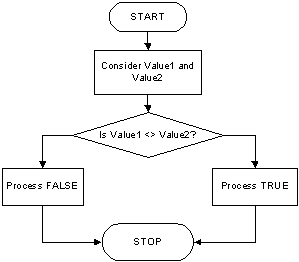
A typical Boolean expression involves two operands separated by a logical operator. Both operands must be of the same type. These rules apply to the logical difference. It can be used on numbers, strings, etc. If both operands are different, the operation produces a True result. If they are the exact same, the operation produces False. Here is an example:
1> DECLARE @certification char = 'yes';
2> DECLARE @employmentStatus NVARCHAR(8) = N'Hired';
3> IF @certification != 'y'
4>     BEGIN
5>         SET @employmentStatus = N'This job requires SQL certification. We will get back to you.';
6>     END
7> PRINT '============================================='
8> SELECT 'Candidate holds SQL certification: ', @certification;
9> SELECT 'Decision Status:                   ', @employmentStatus;
10> GO
=============================================

----------------------------------- -
Candidate holds SQL certification:  y

(1 rows affected)

----------------------------------- --------
Decision Status:                    Hired

(1 rows affected)
Remember that you can use either the != or the <> operator.
Less Than Or Equal To: <=
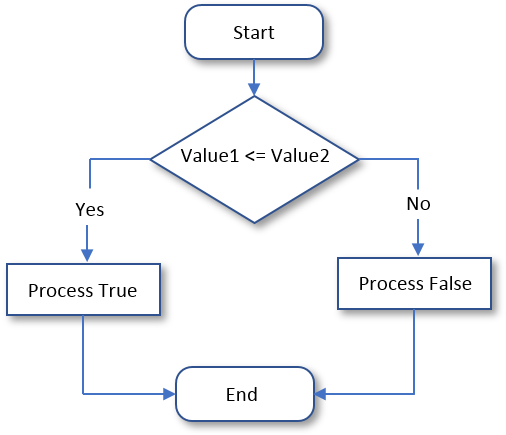
The Equality (=) and the Less Than (<) operations can be combined to compare two values. This allows you to know if two values are the same or if the first value is lower than the second value. The operator used is <=. Its syntax is:
value_1 <= value_2
The <= operation performs a comparison. If both value_1 and value_2 hold the same value, the result is True. If the left operand, in this case value_1, holds a value lower than the second operand, in this case value_2, the result is still True. The <= operation can be illustrated as follows:
Practical Learning: Comparing for a Lesser or Equal Value
DECLARE @firstName NVARCHAR(12)  = N'Michael';
DECLARE @lastName  NVARCHAR(12)  = N'Carlock';
DECLARE @hSalary   NUMERIC(6, 2) = 28.25;

DECLARE @mon DECIMAL(8, 2) = 7;
DECLARE @tue DECIMAL(8, 2) = 8;
DECLARE @wed DECIMAL(8, 2) = 6.5;
DECLARE @thu DECIMAL(8, 2) = 8.5
DECLARE @fri DECIMAL(8, 2) = 6.5;

DECLARE @timeWorked numeric(8, 2) = @mon + @tue + @wed + @thu + @fri;

DECLARE @regTime    numeric(8, 2) = 40.00;
DECLARE @regPay     numeric(8, 2) = @hSalary * 40.00;
DECLARE @overtime   numeric(8, 2) = @timeWorked - 40.00;
DECLARE @overPay    numeric(8, 2) = @hSalary * 1.50 * @overtime;

IF @timeWorked <= 40.00
    BEGIN
        SET @regTime  = @timeWorked;
        SET @regPay   = @hSalary * @timeWorked;
        SET @overtime = 0.00;
        SET @overPay  = 0.00;
    END

DECLARE @netPay numeric(8, 2) = @regPay + @overPay;

DECLARE @strHourlySalary NvarChar(10)
DECLARE @strMonday       NvarChar(10)
DECLARE @strTuesday      NvarChar(10)
DECLARE @strWednesday    NvarChar(10)
DECLARE @strThursday     NvarChar(10)
DECLARE @strFriday       NvarChar(10)
DECLARE @strTimeWorked   NvarChar(10)
DECLARE @strRegularTime  NvarChar(10)
DECLARE @strOvertime     NvarChar(10)
DECLARE @strOvertimePay  NvarChar(10)
DECLARE @strRegularPay   NvarChar(10)
DECLARE @strNetPay       NvarChar(10)

SET     @strHourlySalary = @hSalary;
SET     @strMonday       = @mon;
SET     @strTuesday      = @tue;
SET     @strWednesday    = @wed;
SET     @strThursday     = @thu;
SET     @strFriday       = @fri;
SET     @strTimeWorked   = @timeWorked;
SET     @strRegularTime  = @regTime;
SET     @strOvertime     = @overtime;
SET     @strOvertimePay  = @overPay;
SET     @strRegularPay   = @regPay;
SET     @strNetPay       = @netPay;

PRINT '=======================================================';
PRINT 'FUN DEPARTMENT STORE';
PRINT '=======================================================';
PRINT 'Payroll Evaluation';
PRINT '=======================================================';
PRINT 'Employee Information';
PRINT '-------------------------------------------------------';
PRINT 'Full Name:     ' + @firstName + ' ' + @lastName;
PRINT 'Hourly Salary: ' + @strHourlySalary;
PRINT '=======================================================';
PRINT 'Time Worked Summary';
PRINT '========+=========+===========+==========+=============';
PRINT ' Monday | Tuesday | Wednesday | Thursday | Friday';
PRINT '--------+---------+-----------+----------+-------------';
PRINT '  ' + @strMonday + '  |   ' + @strTuesday + '  |    ' + @strWednesday + '  |   ' + @strThursday + '   |  ' + @strFriday;
PRINT '========+=========+===========+==========+=============';
PRINT 'Pay Summary                     Time    Pay';
PRINT '-------------------------------------------------------';
PRINT '                      Regular:   ' + @strRegularTime + '   ' + @strRegularPay;
PRINT '-------------------------------------------------------';
PRINT '                      Overtime:   ' + @strOvertime + '      ' + @strOvertimePay;
PRINT '=======================================================';
PRINT '                      Net Pay:           ' + @strNetPay;
PRINT '=======================================================';
=======================================================
FUN DEPARTMENT STORE
=======================================================
Payroll Evaluation
=======================================================
Employee Information
-------------------------------------------------------
Full Name:     Michael Carlock
Hourly Salary: 28.25
=======================================================
Time Worked Summary
========+=========+===========+==========+=============
 Monday | Tuesday | Wednesday | Thursday | Friday
--------+---------+-----------+----------+-------------
  7.00  |   8.00  |    6.50  |   8.50   |  6.50
========+=========+===========+==========+=============
Pay Summary                     Time    Pay
-------------------------------------------------------
                      Regular:   36.50   1031.13
-------------------------------------------------------
                      Overtime:   0.00      0.00
=======================================================
                      Net Pay:           1031.13
=======================================================DECLARE @firstName NVARCHAR(12) = N'Catherine'; DECLARE @lastName NVARCHAR(12) = N'Busbey'; DECLARE @hSalary NUMERIC(6, 2) = 24.37; -- Time worked DECLARE @mon DECIMAL(6, 2) = 9.5; DECLARE @tue DECIMAL(6, 2) = 8; DECLARE @wed DECIMAL(6, 2) = 10.5; DECLARE @thu DECIMAL(6, 2) = 9 DECLARE @fri DECIMAL(6, 2) = 10.5; DECLARE @timeWorked numeric(8, 2) = @mon + @tue + @wed + @thu + @fri; DECLARE @regTime numeric(8, 2) = 40.00; DECLARE @overtime numeric(8, 2) = @hSalary * 40.00; DECLARE @overPay numeric(8, 2) = @timeWorked - 40.00; DECLARE @regPay numeric(8, 2) = @hSalary * 1.50 * @overtime; IF @timeWorked <= 40.00 BEGIN SET @regTime = @timeWorked; SET @regPay = @hSalary * @timeWorked; SET @overtime = 0.00; SET @overPay = 0.00; END DECLARE @netPay numeric(8, 2) = @regPay + @overPay; DECLARE @strHourlySalary NvarChar(10) DECLARE @strMonday NvarChar(10) DECLARE @strTuesday NvarChar(10) DECLARE @strWednesday NvarChar(10) DECLARE @strThursday NvarChar(10) DECLARE @strFriday NvarChar(10) DECLARE @strTimeWorked NvarChar(10) DECLARE @strRegularTime NvarChar(10) DECLARE @strOvertime NvarChar(10) DECLARE @strOvertimePay NvarChar(10) DECLARE @strRegularPay NvarChar(10) DECLARE @strNetPay NvarChar(10) SET @strHourlySalary = @hSalary; SET @strMonday = @mon; SET @strTuesday = @tue; SET @strWednesday = @wed; SET @strThursday = @thu; SET @strFriday = @fri; SET @strTimeWorked = @timeWorked; SET @strRegularTime = @regTime; SET @strOvertime = @overtime; SET @strOvertimePay = @overPay; SET @strRegularPay = @regPay; SET @strNetPay = @netPay; PRINT '======================================================='; PRINT 'FUN DEPARTMENT STORE'; PRINT '======================================================='; PRINT 'Payroll Evaluation'; PRINT '======================================================='; PRINT 'Employee Information'; PRINT '-------------------------------------------------------'; PRINT 'Full Name: ' + @firstName + ' ' + @lastName; PRINT 'Hourly Salary: ' + @strHourlySalary; PRINT '======================================================='; PRINT 'Time Worked Summary'; PRINT '========+=========+===========+==========+============='; PRINT ' Monday | Tuesday | Wednesday | Thursday | Friday'; PRINT '--------+---------+-----------+----------+-------------'; PRINT ' ' + @strMonday + ' | ' + @strTuesday + ' | ' + @strWednesday + ' | ' + @strThursday + ' | ' + @strFriday; PRINT '========+=========+===========+==========+============='; PRINT 'Pay Summary Time Pay'; PRINT '-------------------------------------------------------'; PRINT ' Regular: ' + @strRegularTime + ' ' + @strRegularPay; PRINT '-------------------------------------------------------'; PRINT ' Overtime: ' + @strOvertime + ' ' + @strOvertimePay; PRINT '======================================================='; PRINT ' Net Pay: ' + @strNetPay; PRINT '=======================================================';
=======================================================
FUN DEPARTMENT STORE
+=+=+=+=+=+=+=+=+=+=+=+=+=+=+=+=+=+=+=+=+=+=+=+=+=+=+=+
Payroll Evaluation
=======================================================
Employee Information
-------------------------------------------------------
Full Name:     Catherine Busbey
Hourly Salary: 24.37
=======================================================
Time Worked Summary
--------+---------+-----------+----------+-------------
 Monday | Tuesday | Wednesday | Thursday | Friday
--------+---------+-----------+----------+-------------
  9.50  |   8.00  |    10.50   |   9.00   |  10.50
========+=========+===========+==========+=============
                                 Time    Pay
-------------------------------------------------------
                     Regular:    40.00   974.80
-------------------------------------------------------
                     Overtime:    7.50   274.16
=======================================================
                      Net Pay:           1248.96
=======================================================
A Value Greater Than or Equal to Another: >=
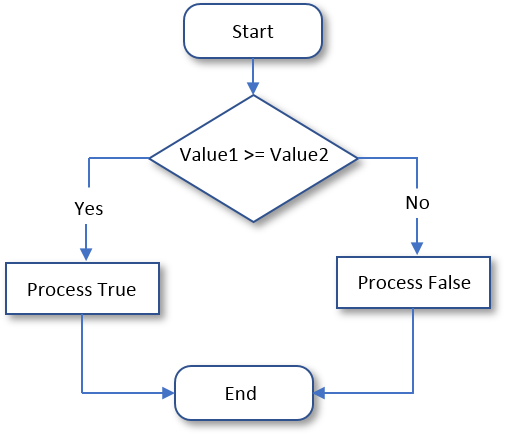
The greater than or the equality operators can be combined to produce an operator as follows: >=. This is the "greater than or equal to" operator. The formula to follow is:
value_1 >= value_2
This operation can be illustrated as follows:
Conditional Statements and Databases
Conditional Statements and Data Entry
In the previous lesson, we saw that you can prepare some values from variables or from performing some operations on variables to get new values, and once a value is ready, you can use it as the value of a table. In the same way, if you had first declared some variables or got some values one way or another, you can first check some condition(s) on a value and decide whether or not to use that value for data entry.
Conditional Statements and Data Selection
In the previous lesson, you saw that you can get a value from a table using a SELECT statement. You saw that, after getting a value, you can store it in a variable and involve that variable in an operation of your choice. Here are examples:
CREATE TABLE Employees
(
    EmployeeNumber  nchar(7),
    FirstName       nvarchar(15),
    LastName        nvarchar(15),
    HourlySalary    decimal(8, 2)
);
GO

CREATE TABLE TimeSheets
(
    TimeSheetNumber int,
    EmployeeNumber  nchar(7),
    Monday          decimal(8, 2),
    Tuesday         decimal(8, 2),
    Wednesday       decimal(8, 2),
    Thursday        decimal(8, 2),
    Friday          decimal(8, 2)
);
GO

INSERT INTO Employees(EmployeeNumber,    FirstName,   LastName, HourlySalary)
VALUES(                    N'379-473', N'Catherine', N'Busbey', 24.37       );
GO
INSERT INTO TimeSheets(TimeSheetNumber, EmployeeNumber, Monday, Tuesday, Wednesday, Thursday, Friday)
VALUES(                         100001,     N'379-473',   9.50,   8.00,      10.50,     9.00,  10.50);
GO

DECLARE @emplNbr   nchar(7);
DECLARE @firstName NVARCHAR(15);
DECLARE @lastName  NVARCHAR(15);
DECLARE @hSalary   NUMERIC(5, 2);

DECLARE @tsNbr     int;
DECLARE @mon       DECIMAL(5, 2);
DECLARE @tue       DECIMAL(5, 2);
DECLARE @wed       DECIMAL(5, 2);
DECLARE @thu       DECIMAL(5, 2);
DECLARE @fri       DECIMAL(5, 2);

SELECT @emplNbr   = EmployeeNumber  FROM Employees;
SELECT @firstName = FirstName       FROM Employees;
SELECT @lastName  = LastName        FROM Employees;
SELECT @hSalary   = HourlySalary    FROM Employees;

SELECT @tsNbr     = TimeSheetNumber FROM TimeSheets;
SELECT @mon       = Monday          FROM TimeSheets;
SELECT @tue       = Tuesday         FROM TimeSheets;
SELECT @wed       = Wednesday       FROM TimeSheets;
SELECT @thu       = Thursday        FROM TimeSheets;
SELECT @fri       = Friday          FROM TimeSheets;

DECLARE @timeWorked numeric(6, 2) = @mon + @tue + @wed + @thu + @fri;

DECLARE @regTime    numeric(8, 2) = 40.00;
DECLARE @regPay     numeric(8, 2) = @hSalary * 40.00;
DECLARE @overtime   numeric(8, 2) = @timeWorked - 40.00;
DECLARE @overPay    numeric(8, 2) = @hSalary * 1.50 * @overtime;

DECLARE @netPay numeric(8, 2) = @regPay + @overPay;
In the same way, after selecting a value from a table and storing that value in a variable, you can use a conditional statement to validate such a value. Here is an example:
CREATE TABLE Employees
(
    EmployeeNumber  nchar(7),
    FirstName       nvarchar(15),
    LastName        nvarchar(15),
    HourlySalary    decimal(8, 2)
);
GO

CREATE TABLE TimeSheets
(
    TimeSheetNumber int,
    EmployeeNumber  nchar(7),
    Monday          decimal(8, 2),
    Tuesday         decimal(8, 2),
    Wednesday       decimal(8, 2),
    Thursday        decimal(8, 2),
    Friday          decimal(8, 2)
);
GO

INSERT INTO Employees(EmployeeNumber,    FirstName,   LastName, HourlySalary)
VALUES(                    N'379-473', N'Catherine', N'Busbey', 24.37       );
GO
INSERT INTO TimeSheets(TimeSheetNumber, EmployeeNumber, Monday, Tuesday, Wednesday, Thursday, Friday)
VALUES(                         100001,     N'379-473',   9.50,   8.00,      10.50,     9.00,  10.50);
GO

DECLARE @emplNbr   nchar(7);
DECLARE @firstName NVARCHAR(15);
DECLARE @lastName  NVARCHAR(15);
DECLARE @hSalary   NUMERIC(5, 2);

DECLARE @tsNbr     int;
DECLARE @mon       DECIMAL(5, 2);
DECLARE @tue       DECIMAL(5, 2);
DECLARE @wed       DECIMAL(5, 2);
DECLARE @thu       DECIMAL(5, 2);
DECLARE @fri       DECIMAL(5, 2);

SELECT @emplNbr   = EmployeeNumber  FROM Employees;
SELECT @firstName = FirstName       FROM Employees;
SELECT @lastName  = LastName        FROM Employees;
SELECT @hSalary   = HourlySalary    FROM Employees;

SELECT @tsNbr     = TimeSheetNumber FROM TimeSheets;
SELECT @mon       = Monday          FROM TimeSheets;
SELECT @tue       = Tuesday         FROM TimeSheets;
SELECT @wed       = Wednesday       FROM TimeSheets;
SELECT @thu       = Thursday        FROM TimeSheets;
SELECT @fri       = Friday          FROM TimeSheets;

DECLARE @timeWorked numeric(6, 2) = @mon + @tue + @wed + @thu + @fri;

DECLARE @regTime    numeric(8, 2) = 40.00;
DECLARE @regPay     numeric(8, 2) = @hSalary * 40.00;
DECLARE @overtime   numeric(8, 2) = @timeWorked - 40.00;
DECLARE @overPay    numeric(8, 2) = @hSalary * 1.50 * @overtime;

IF @timeWorked <= 40.00
    BEGIN
        SET @regTime  = @timeWorked;
        SET @regPay   = @hSalary * @timeWorked;
        SET @overtime = 0.00;
        SET @overPay  = 0.00;
    END

DECLARE @netPay numeric(8, 2) = @regPay + @overPay;

DECLARE @strTimeSheetNumber NvarChar(10)
DECLARE @strHourlySalary    NvarChar(10)
DECLARE @strMonday          NvarChar(10)
DECLARE @strTuesday         NvarChar(10)
DECLARE @strWednesday       NvarChar(10)
DECLARE @strThursday        NvarChar(10)
DECLARE @strFriday          NvarChar(10)
DECLARE @strTimeWorked      NvarChar(10)
DECLARE @strRegularTime     NvarChar(10)
DECLARE @strOvertime        NvarChar(10)
DECLARE @strOvertimePay     NvarChar(10)
DECLARE @strRegularPay      NvarChar(10)
DECLARE @strNetPay          NvarChar(10)

SET     @strHourlySalary = @hSalary;
SET     @strTimeSheetNumber = @tsNbr;
SET     @strMonday       = @mon;
SET     @strTuesday      = @tue;
SET     @strWednesday    = @wed;
SET     @strThursday     = @thu;
SET     @strFriday       = @fri;
SET     @strTimeWorked   = @timeWorked;
SET     @strRegularTime  = @regTime;
SET     @strOvertime     = @overtime;
SET     @strOvertimePay  = @overPay;
SET     @strRegularPay   = @regPay;
SET     @strNetPay       = @netPay;

PRINT '=======================================================';
PRINT 'FUN DEPARTMENT STORE';
PRINT '=======================================================';
PRINT 'Payroll Evaluation';
PRINT '=======================================================';
PRINT 'Employee Information';
PRINT '-------------------------------------------------------';
PRINT 'Full Name:     ' + @firstName + ' ' + @lastName;
PRINT 'Hourly Salary: ' + @strHourlySalary;
PRINT '=======================================================';
PRINT 'Time Worked Summary';
PRINT 'Time Sheet #:  ' + @strTimeSheetNumber;
PRINT '========+=========+===========+==========+=============';
PRINT ' Monday | Tuesday | Wednesday | Thursday | Friday';
PRINT '--------+---------+-----------+----------+-------------';
PRINT '  ' + @strMonday + '  |   ' + @strTuesday + '  |    ' + @strWednesday + '  |   ' + @strThursday + '   |  ' + @strFriday;
PRINT '========+=========+===========+==========+=============';
PRINT 'Pay Summary                      Time     Pay';
PRINT '-------------------------------------------------------';
PRINT '                      Regular:   ' + @strRegularTime + '    ' + @strRegularPay;
PRINT '-------------------------------------------------------';
PRINT '                      Overtime:   ' + @strOvertime + '    ' + @strOvertimePay;
PRINT '=======================================================';
PRINT '                      Net Pay:           ' + @strNetPay;
PRINT '=======================================================';
This would produce:
+=+=+=+=+=+=+=+=+=+=+=+=+=+=+=+=+=+=+=+=+=+=+=+=+=+=+=+
FUN DEPARTMENT STORE
=======================================================
Payroll Evaluation
=======================================================
Employee Information
-------------------------------------------------------
Employee #:    379473
Full Name:     Michael Carlock
Hourly Salary: 28.25
=======================================================
Payroll Summary
Payroll #:     100001
========+=========+===========+==========+=============
 Monday | Tuesday | Wednesday | Thursday | Friday
--------+---------+-----------+----------+-------------
  9.00  |   10.50  |    9.50   |   8.50   |  8.00
========+=========+===========+==========+=============
                      Pay Summary
========+=========+===========+==========+=============
                                 Time    Pay
-------------------------------------------------------
                     Regular:    40.00   1130.00
-------------------------------------------------------
                     Overtime:    5.50   233.06
=======================================================
                      Net Pay:     1363.06
=======================================================
Practical Learning: Ending the Lesson
|
|
|||
| Previous | Copyright © 2007-2026, FunctionX | Last Update: Tuesday 11 August 2026, 15:14 | Next |
|
|
|||