Introduction to Date Values

Introduction to Date Values
Foundations of Date Values
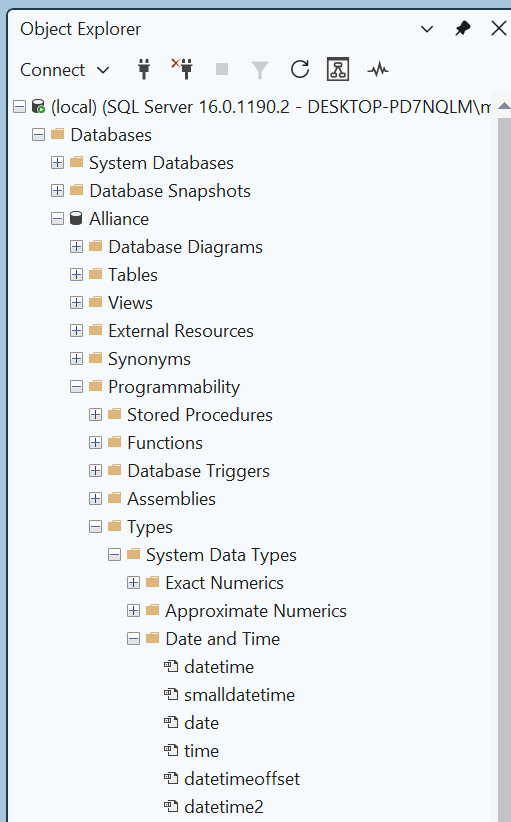
As you can see, Microsoft SQL Server supports various data types for date values:
The primary data type that Microsoft SQL Server supports for date values is named DATE. This data type counts dates starting from January 1st, 0001 up to December 31st, 9999.
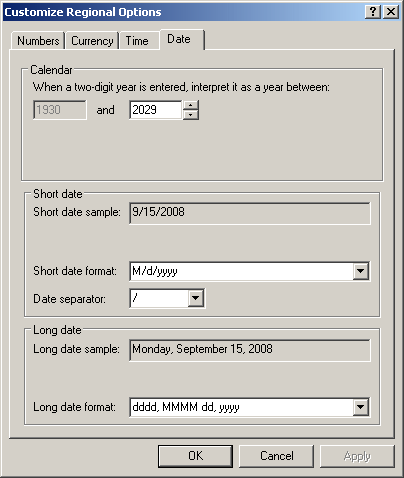
There are various rules you must follow to represent a date value. The rules can be checked in the Date tab of the Customize Regional Options accessible from the Regional and Language Options of the Control Panel:
Creating a Date Value
To start a date value, you can declare a variable of type DATE. To do that, first open a Query Editor. Then:
Here is an example of declaring a date variable:
DECLARE @OneDay DATE;
To initialize the variable, you can assign a string to it. The string can contain a long natural number. Here is an example:
DECLARE @OneDay DATE = N'10360610';
Printing a Date Value
After providing a date value in a variable, you can use a PRINT() function or a SELECT statement to read or display that value. Here is an example:
DECLARE @OneDay DATE = N'10360610';

PRINT CONCAT('Some date value: ', @OneDay);
GO
This would produce:
Some date value: 1036-06-10
Fondamental SQL Functions for Date Values
Parsing an Expression or Value
In Lesson 12, we were introduced to the PARSE function as a way to validate a numeric value. That function can also be used to date value. Remember that the syntax of this function is:
PARSE ( string_value AS data_type [ USING culture ] )
The function takes one argument, that is passed as a string. If you are dealing with date values, if you want to know whether some value is a date, you can pass the data_type as date (or datetime2) and pass that value as argument. In this case, the value must follow the rules of a date value as specified in the Date tab in the Customize Regional Options accessible from the Regional and Language Options of the Control Panel.
Remember that if the PARSE() function is not able to determine the type or if the value of the argument doesn't follow the rule of the date data type, the function may produce an error. As an alternative, you can call the TRY_PARSE() function.
In Lesson 12, we saw a function named CAST() with the following syntax:
CAST ( expression AS data-type [ ( length ) ] )
 |
This function can be used to case a date value. Remember that if the CAST() function is not good to cast the expression, you can use the TRY_CAST function whose syntax is: In Lesson 12, we were introduced to the CONVERT() function whose syntax is: CONVERT(data-type [ ( length ) ] , expression [ , style ]) If the conversion is performed on a date value, the style argument is a number that indicates how that conversion must proceed. |
Remember that an alternative to CONVERT() function is the TRY_CONVERT function whose syntax is:
TRY_CONVERT ( data_type [ ( length ) ], expression [, style ] )
Introduction to Date Formats
Introduction
The number we provided for a date is a valid date value, but it can be difficult to read. As a better option, the value you provide in the single-quotes should use one of the following formulas:
YYYYMMDD
YYYY-MM-DD
MM-DD-YY
MM-DD-YYYY
MM/DD/YY
MM/DD/YYYY
DD-MMM-YY
DD-MMMM-YY
DD-MMM-YYYY
DD-MMMM-YYYY
The Year, the Month, and the Day as One Unit
You can start the value of a date with a 4-year digit. If you use the first formula, YYYYMMDD, you must provide 4 digits for the year, immediately followed by 2 digits for the month, immediately followed by 2 digits for the day. An example would be
DECLARE @OneDay DATE;
SET @OneDay = N'10360610';
SELECT @OneDay AS [Day to Prevail];
GO
In US English, this represents October 6th, 1036:
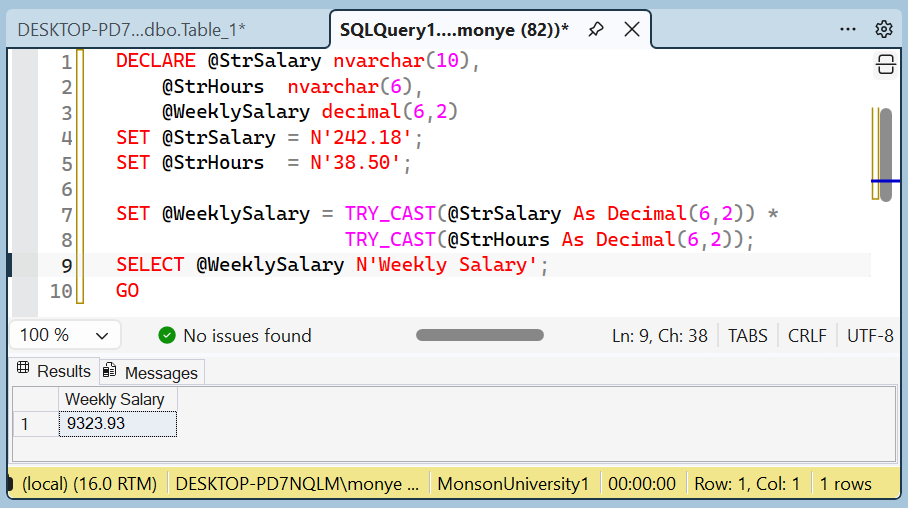
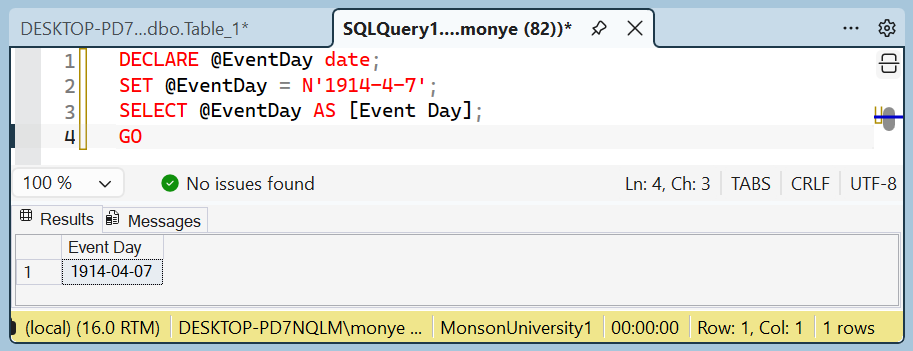
You can provide the value in one unit with 6 digits. In this case, the left 2 digits would be considered the year in the current century. Instead of providing the whole value in one combination of digits, you can use the second formula, YYYY-MM-DD, which is the default date format in Microsoft SQL Server. Once again you must provide 4 digits for the year, followed by the "-" separator, followed by 1 or 2 digits for the month, followed by the "-" separator, followed by 1 or 2 digits for the day. An example is:
DECLARE @EventDay date;
SET @EventDay = N'1914-4-7';
SELECT @EventDay AS [Event Day];
GO
This would produce:
If you are using a command prompt or PowerShell, make sure you include the value in single-quotes. To apply Unicode rules, start with the N prefix. Here is an example:
1> DECLARE @IndependenceDay DATETIME;

2> SET @IndependenceDay = N'01/01/1960';
3> SELECT @IndependenceDay AS [Independence Day];
4> GO
Independence Day
-----------------------
1960-01-01 00:00:00.000

(1 rows affected)
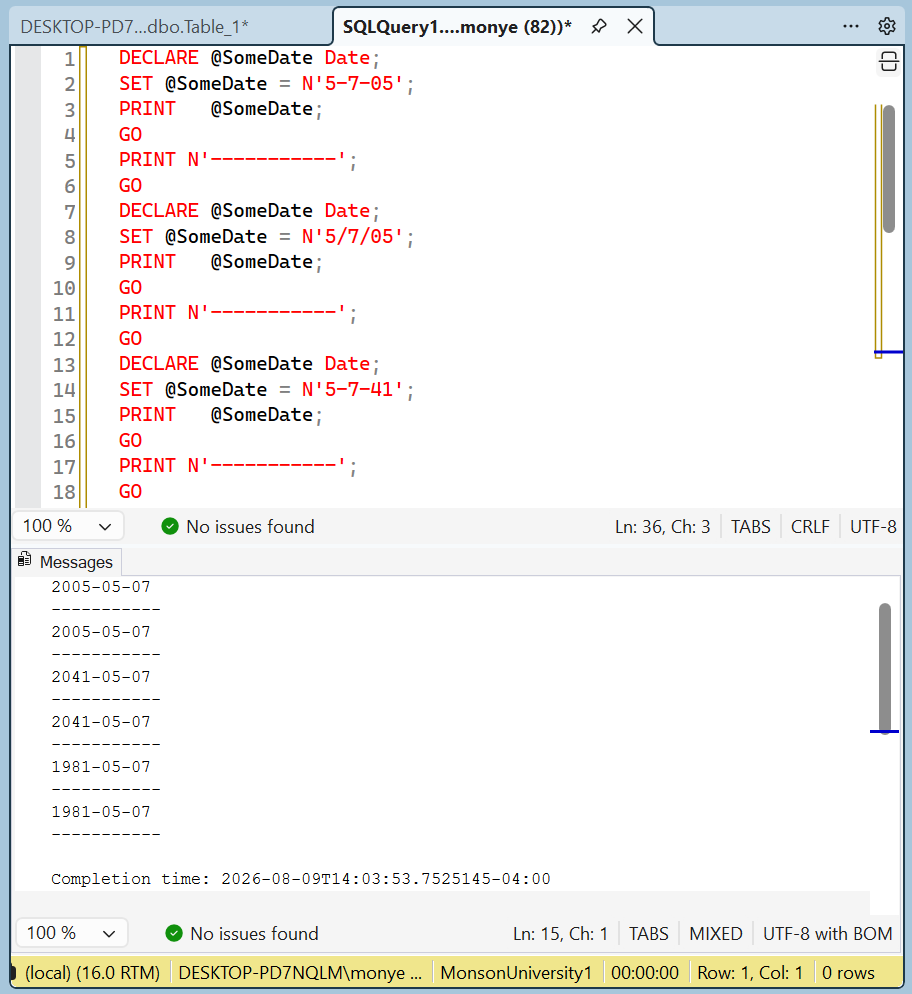
We saw that if you use the MM-DD-YY or MM/DD/YY, you can provide a year with 2 digits. In this case:
 Practical Learning: Using Date Variables
DECLARE @SomeDate Date;
SET	@SomeDate = N'5-7-05';
PRINT	@SomeDate;
GO
PRINT N'-----------';
GO
DECLARE @SomeDate Date;
SET	@SomeDate = N'5/7/05';
PRINT	@SomeDate;
GO
PRINT N'-----------';
GO
DECLARE @SomeDate Date;
SET	@SomeDate = N'5-7-41';
PRINT	@SomeDate;
GO
PRINT N'-----------';
GO
DECLARE @SomeDate Date;
SET	@SomeDate = N'5/7/41';
PRINT	@SomeDate;
GO
PRINT N'-----------';
GO
DECLARE @SomeDate Date;
SET	@SomeDate = N'5-7-81';
PRINT	@SomeDate;
GO
PRINT N'-----------';
GO
DECLARE @SomeDate Date;
SET	@SomeDate = N'5/7/81';
PRINT	@SomeDate;
GO
PRINT N'-----------';
GO
DECLARE @FirstName    nvarchar(20),
        @LastName     nvarchar(20),
        @FullName     nvarchar(40),
        @DateHired    date,
        @EmplStatus   int,
        @IsMarried    bit,
        @WeeklyHours  decimal(6,2),
        @HourlySalary SmallMoney,
        @WeeklySalary SmallMoney;
SET @FirstName    = N'Samuel';
SET @LastName     = N'Weinberg';
SET @FullName     = @LastName + N', ' + @FirstName;
SET @DateHired    = N'12/05/1998';
SET @IsMarried    = 1;
SET @EmplStatus   = 2;
SET @WeeklyHours  = 36.50;
SET @HourlySalary = 15.72;
SET @WeeklySalary = @WeeklyHours * @HourlySalary;
SELECT @FullName As [Full Name],
       @DateHired AS [Date Hired],
       @EmplStatus AS [Empl Status],
       @IsMarried AS [Married?],
       @WeeklyHours AS Hours,
       @HourlySalary AS Hourly,
       @WeeklySalary AS Weekly;
GO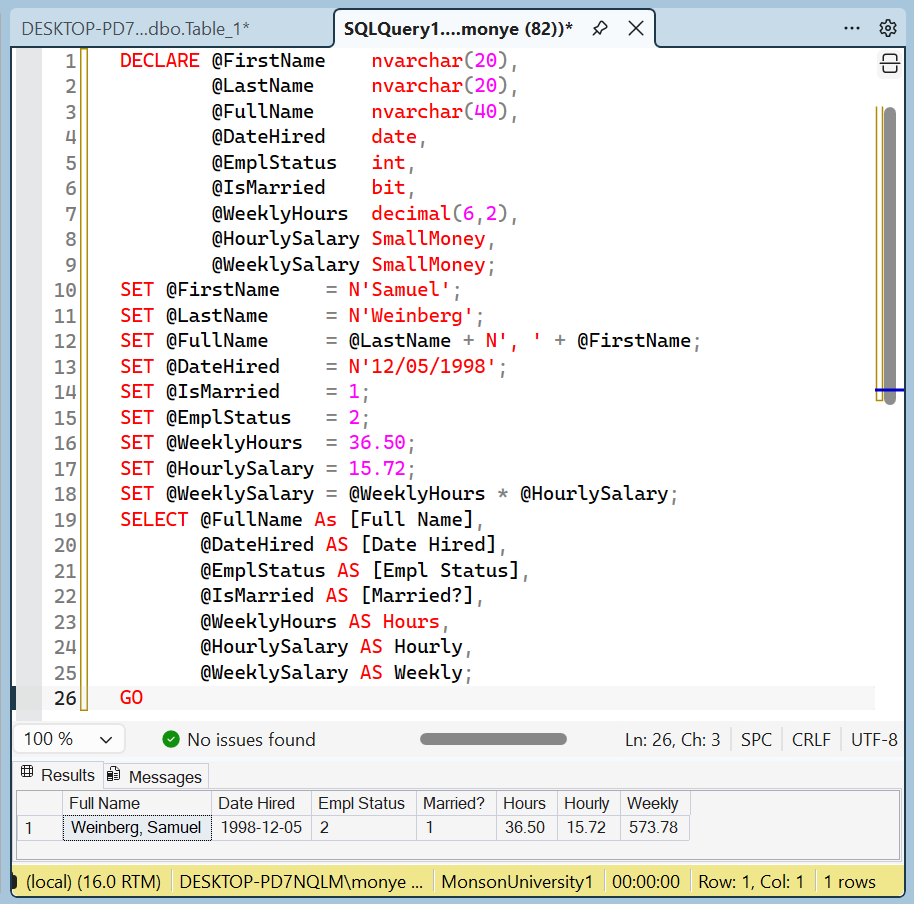
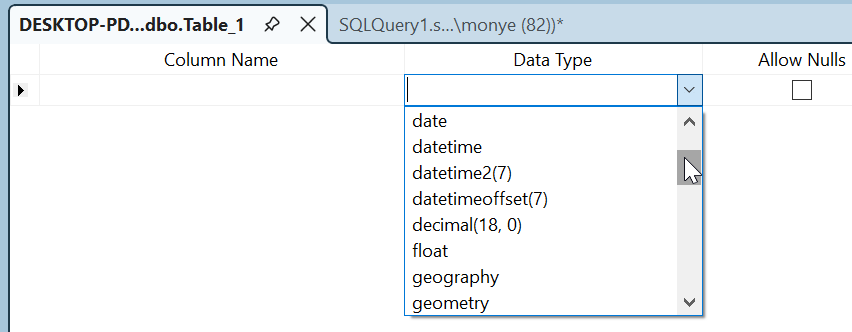
If you are visually creating a column and you want it to use date values, select date in the Data Type combo box of the column:
To create a date-based column with SQL code, apply the DATE data type.
|
||||
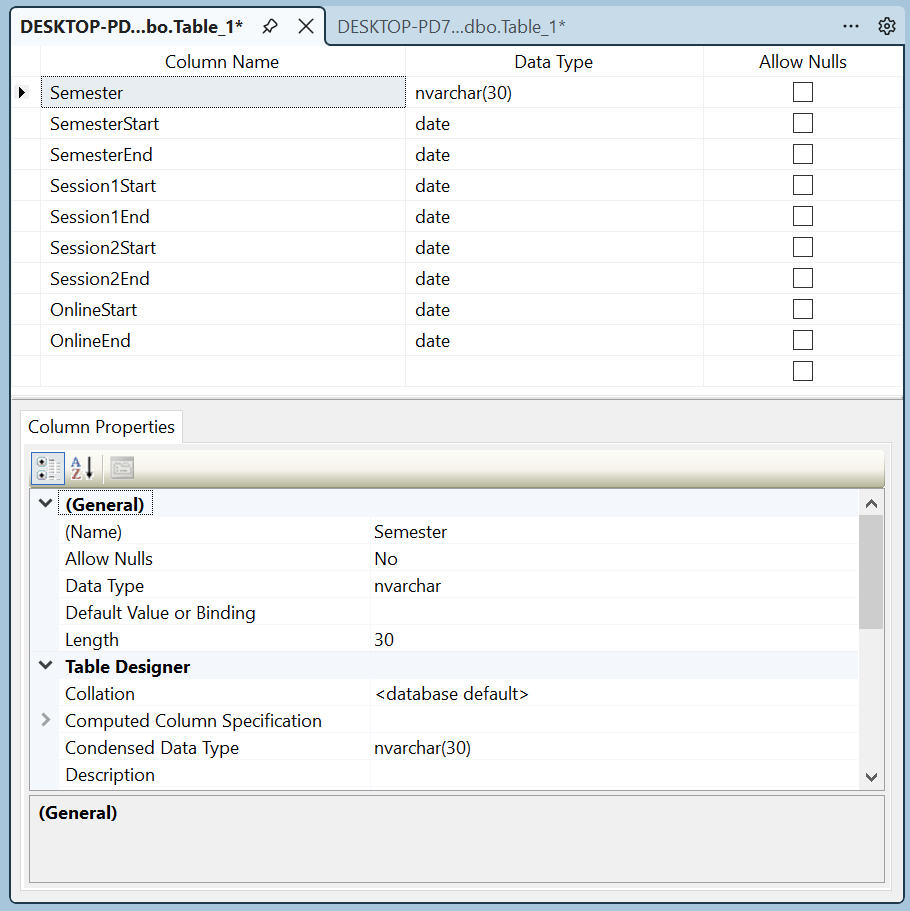
Practical Learning: Creating Date-Based Columns
USE master;
GO
DROP DATABASE MonsonUniversity;
GO
CREATE DATABASE MonsonUniversity;
GO
USE MonsonUniversity;
GO
CREATE SCHEMA Academics;
GO
CREATE SCHEMA Administration;
GO
| Coloumn Name | Data Type | Allow Nulls |
| Semester | nvarchar(30) | Unchecked |
| SemesterStart | date | Unchecked |
| SemesterEnd | date | Unchecked |
| Session1Start | date | Unchecked |
| Session1End | date | Unchecked |
| Session2Start | date | Unchecked |
| Session2End | date | Unchecked |
| OnlineStart | date | Unchecked |
| OnlineEnd | date | Unchecked |
CREATE DATABASE FunDepartmentStore;
GO
USE FunDepartmentStore;
GO
CREATE SCHEMA Inventory;
GO
CREATE TABLE Inventory.StoreItems
(
    ItemNumber int,
    DateEntered date,
    Manufacturer nvarchar(50),
    Category nvarchar(32),
    SubCategory nvarchar(40),
    ItemName nvarchar(80),
    ItemSize nvarchar(32),
    UnitPrice money,
    DiscountRate decimal(6, 2)
);
GO
Data Entry With a Date-Based Column
A date-based column uses various formulas for its values. Data entry depends on whether you are working visually or with SQL code. If you are working in a Table window, to specify the value of a DATE-based field, use one of the following formulas:
MM-DD-YY
MM-DD-YYYY
MM/DD/YY
MM/DD/YYYY
DD-MMM-YY
DD-MMMM-YY
DD-MMM-YYYY
DD-MMMM-YYYY
YYYY-MM-DD
If you are performing data entry programmatically, use one of the above formulas plus the following:
YYYYMMDD
Practical Learning: Creating Date-Based Values
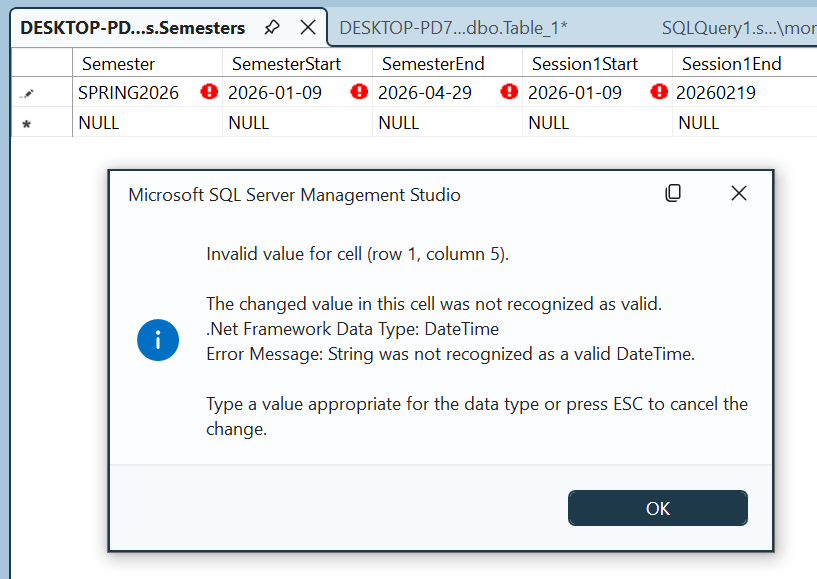
USE MonsonUniversity;
GO
INSERT INTO Academics.Semesters(Semester, SemesterStart, SemesterEnd, Session1Start, Session1End, Session2Start, Session2End, OnlineStart, OnlineEnd)
VALUES(N'SUMMER 2026', N'05-14-26', N'08-19-2026', N'05/14/26', N'07/08/2026', N'16-JUL-26', N'19-JULY-2026', N'15-MAY-26', N'07-AUGUST-2026'),
      (N'FALL 2026',   N'20260917', N'20261216', N'20260920', N'20261014', N'20261022', N'20261216', N'20260920', N'20261014'),
      (N'SPRING 2027', N'20270107', N'20270428', N'20270107', N'20270217', N'20270225', N'20270428', N'20270107', N'20270317'),
      (N'SUMMER 2027', N'20270513', N'20270818', N'20270513', N'20270707', N'20270715', N'20270818', N'20270513', N'20270707'),
      (N'FALL 2027',   N'20270916', N'20271215', N'20270919', N'20271013', N'20271021', N'20271215', N'20270919', N'20271013');
GO , the Show Criteria Pane button
  , and the Show SQL Pane button
Data Analysis On Date Values
Sorting Date Fields
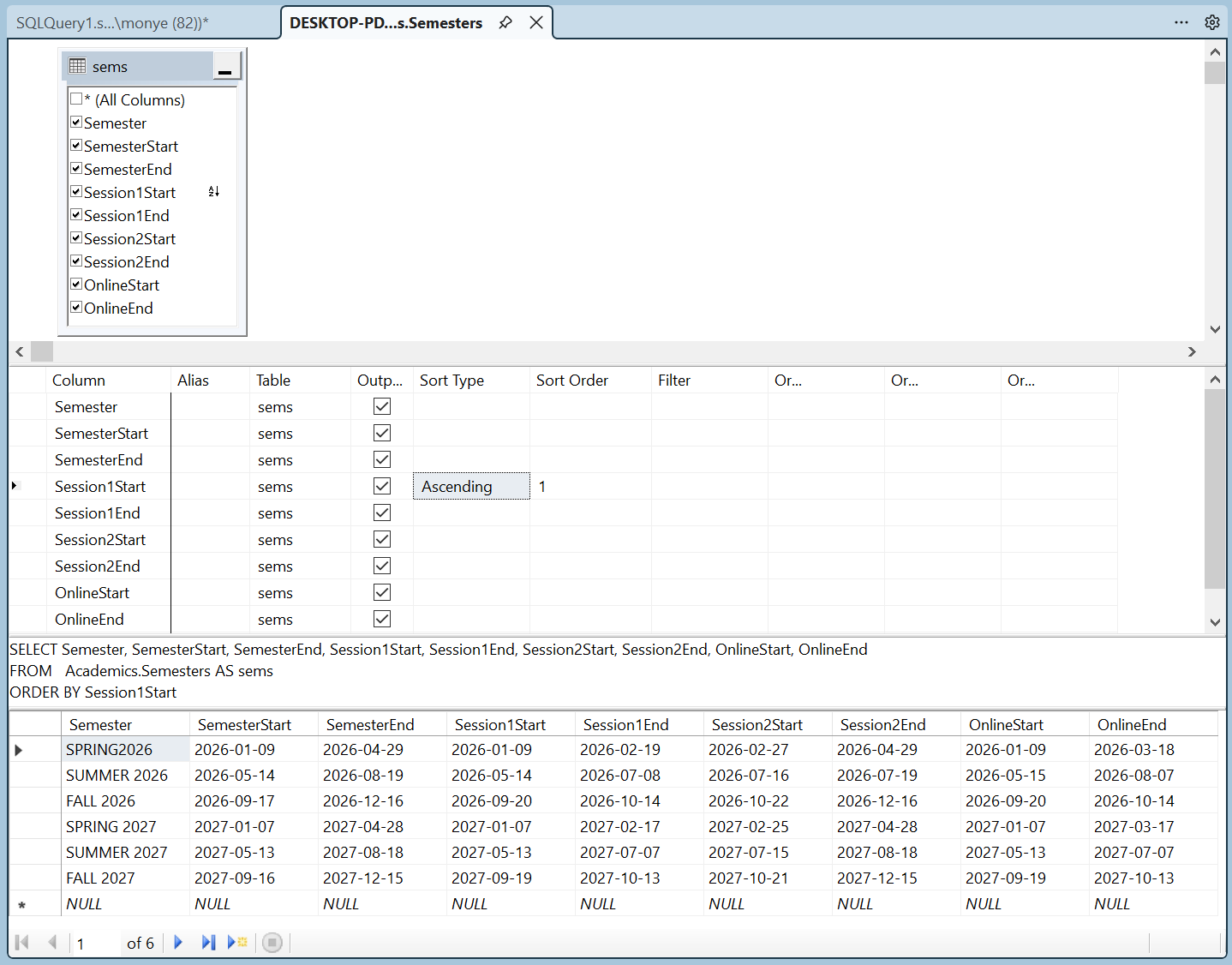
If you sort records from a column that uses a date-based data type, if the column has null sections, the records with null would show first. The values of a date field are sorted in chronological order. If the values use only date values, the records that occur first would come up first. If two records have the same value, the record that was created first would also come before the other.
Practical Learning: Sorting Date Fields
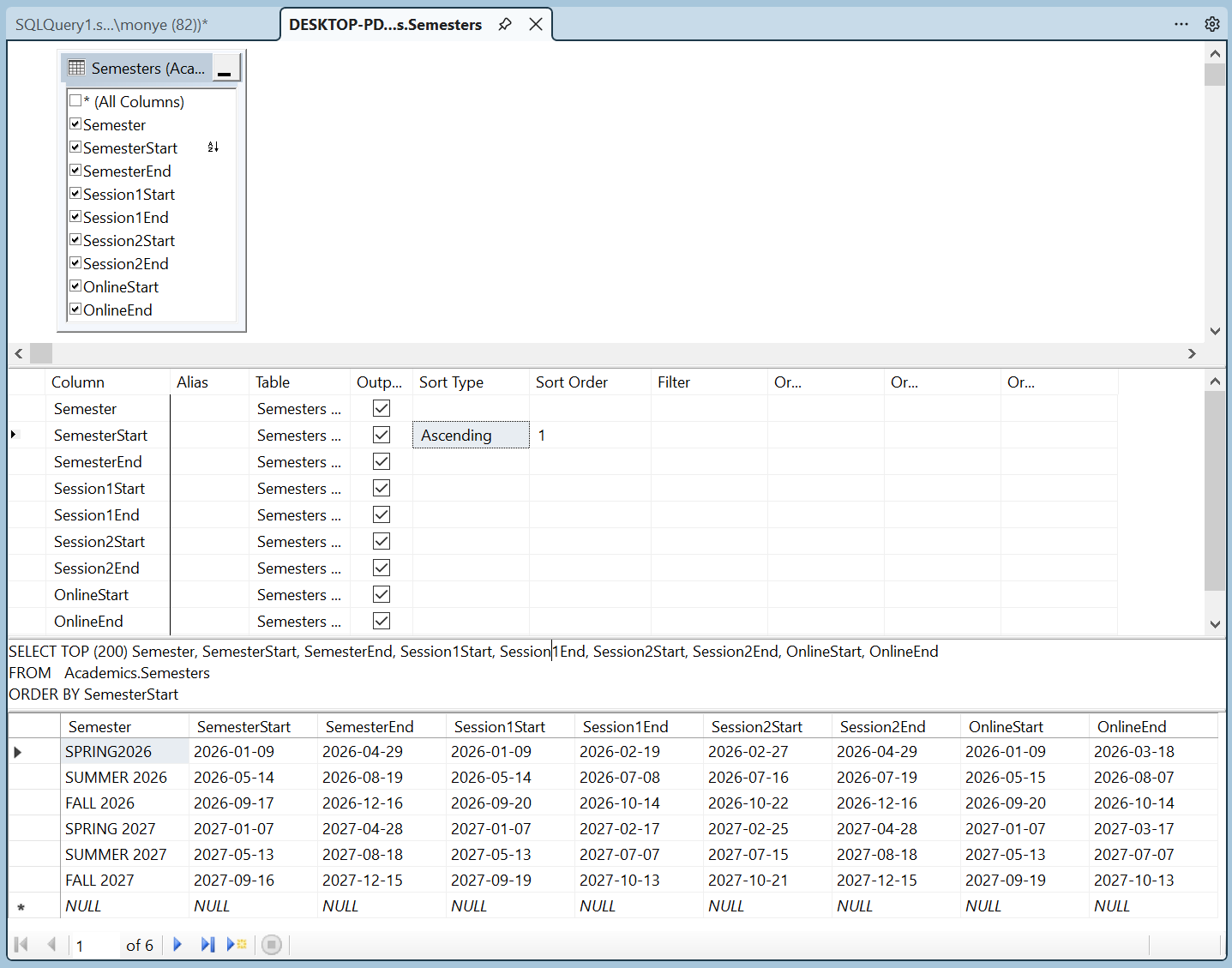
SELECT ALL sems.*
FROM Academics.Semesters sems
ORDER BY Session1Start
Filtering Date-Based Columns
Remember that Transact-SQL supports all types of logical operators to perform comparisons. These can be done of date values:
You can use any of the filter opeator we saw, such as BETWEEN or IN. You can also use conjunctions, disjunctions, and their combinations. You can also use a built-in function with any of the operators we know already. Here is an example:
SELECT FirstName, LastName, Gender, DateOfBirth, SingleParentHome
FROM   Registration.Students
WHERE  (DateOfBirth BETWEEN TRY_CONVERT(date, N'1995-01-01', 102) AND
			    TRY_CONVERT(date, N'1999-12-31', 102))
Practical Learning: Checking a Condition
DECLARE @DateHired As date,
	@CurrentDate As date
SET @DateHired = N'1996/10/04'
SET @CurrentDate  = N'2007/04/11'
IF @DateHired < @CurrentDate
    PRINT N'You have the experience required for a new promotion in this job';
GO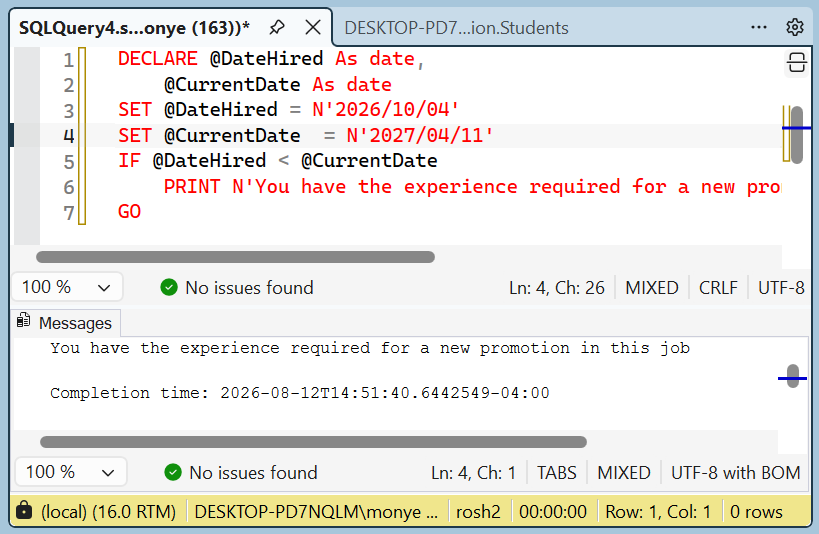
DECLARE @DateHired As date,
	@CurrentDate As date
SET @DateHired = N'1996/10/04'
SET @CurrentDate  = N'2007/04/16'
IF @DateHired > @CurrentDate
	PRINT N'You have the necessary experience for a new promotion.'
GO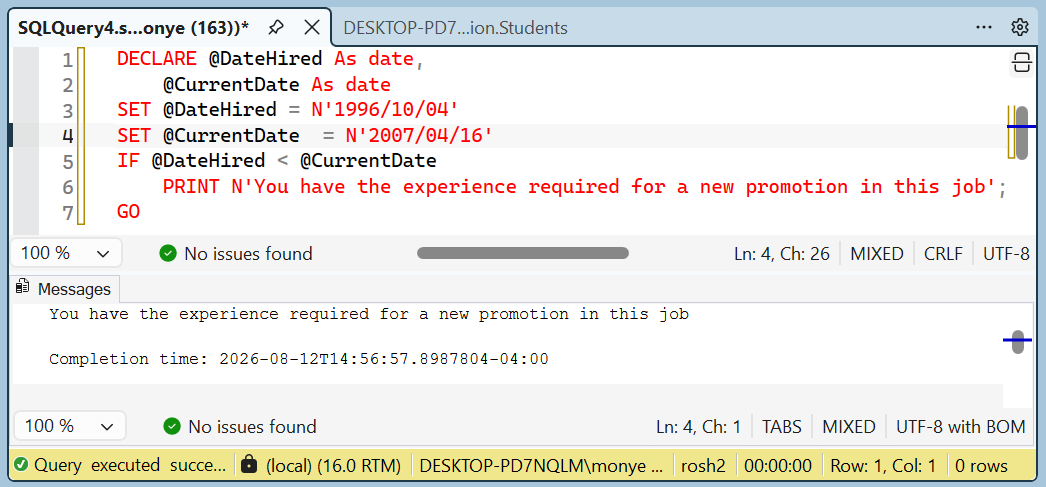
Introduction to Date Values and Functions
Overview
You have the option to create your own functions to use in a database. Still, Transact-SQL provides many built-in functions that you should first investigate before creating your own.
Creating a Date
We saw that there are so many ways to show a date value it can be confusing. In the same way, it can be confusing to compose a date. For example, what does 04-08-01 represents? It could be April 7, 2001. I could be August 4, 2001. I could be August 1st, 2004. To assist you with formulating a date by specifying a day, a month, and a year, Transact-SQL provides a function named DATEFROMPARTS. Its syntax is:
DATE DATEFROMPARTS(int year, int month, int day)
This function allows you to create a date if you have the year, the month, and the day.
Practical Learning: Introduction Date/Time Values
USE MonsonUniversity;
GO
INSERT INTO Academics.Semesters(Semester, SemesterStart, SemesterEnd,
				Session1Start, Session1End, Session2Start, Session2End,
			        OnlineStart, OnlineEnd)
VALUES(N'SPRING 2014', DATEFROMPARTS(2014, 1, 6),   DATEFROMPARTS(2014, 04, 27), DATEFROMPARTS(2014, 01, 06), N'20140216', N'20140224', N'20140427', N'20140106', N'20140323'),
      (N'SUMMER 2014', DATEFROMPARTS(2014, 5, 12),  DATEFROMPARTS(2014, 08, 17), DATEFROMPARTS(2014, 05, 12), N'20140706', N'20140714', N'20140810', N'20140512', N'20140706'),
      (N'FALL 2014',   DATEFROMPARTS(2014, 09, 15), DATEFROMPARTS(2014, 12, 21), DATEFROMPARTS(2014, 09, 25), N'20141013', N'20141020', N'20141221', N'20140925', N'20141013');
GOSELECT sems.Semester,
sems.SemesterStart,
sems.SemesterEnd,
sems.Session1Start,
sems.Session1End,
sems.Session2Start,
sems.Session2End,
sems.OnlineStart,
sems.OnlineEnd
FROM Academics.Semesters sems
ORDER BY sems.SemesterStart;
GOTo let you get the current date (and time) of the computer that a user is using, Transact-SQL provides a function named GETDATE. Its syntax is:
GETDATE();
To get a date with more precision, call the SYSDATETIME function. Its syntax is:
SYSDATETIME();
Imagine you have a database named AutoRepairShop and it has a table used to create repair orders for customers:
CREATE TABLE RepairOrders
(
    ReceiptNumber int,
    CustomerName varchar(50),
    CustomerPhone varchar(20),
    RepairDate datetime2
);
GO
When performing data entry for this table, you can let the user enter the customer name and phone number. On the other hand, you can assist the user by programmatically entering the current date. To do this, you would call the SYSDATETIME() or the GETDATE() function. Here are examples:
INSERT INTO RepairOrders(ReceiptNumber, CustomerName, CustomerPhone, RepairDate)
	    VALUES(100001, N'Annette Berceau', N'301-988-4615', SYSDATETIME());
GO
INSERT INTO RepairOrders(ReceiptNumber, CustomerPhone, CustomerName, RepairDate)
	    VALUES(100002, N'(240) 601-3795', N'Paulino Santiago', SYSDATETIME());
GO
INSERT INTO RepairOrders(ReceiptNumber, CustomerName, RepairDate, CustomerPhone)
	    VALUES(100003, N'Alicia Katts', SYSDATETIME(), N'(301) 527-3095');
GO
INSERT INTO RepairOrders(ReceiptNumber, RepairDate, CustomerPhone, CustomerName)
	    VALUES(100004, SYSDATETIME(), N'703-927-4002', N'Bertrand Nguyen');
GO
Converting a String to Date
As mentioned already, to let you convert a string to a date value, Transact-SQL provides the TRY_PARSE() and TRY_CONVERT() functions. These functions take a string as argument and they scan that argument. If it is a valid date, the function returns it. If not, the functions returns NULL.
Here is an example:
SELECT FirstName, LastName, Gender, DateOfBirth, SingleParentHome
FROM   Registration.Students
WHERE  (DateOfBirth BETWEEN TRY_CONVERT(date, N'1995-01-01', 102) AND
			    TRY_CONVERT(date, N'1999-12-31', 102))
Formatting and Controlling the Display of Dates
Introduction
Transact-SQL and Microsoft Windows provide extensive support in the way a variable produces, or a column displays, the value of a date. In Transact-SQL, this is done using the the FORMAT() function. Its syntax is:
FORMAT(value, nvarchar format [, culture ] ) RETURNS nvarchar
This function takes two required arguments. The third is optional. If you are formatting a date, the first argument must have the original value. The second argument specifies how the formatting must be carried. A date value is made of one or many sections. If it contains many sections, they are separated by symbols, almost any, such as a period or a comma. In US English, the standard separators are / (forward slash) or - (dash). We will review the letters to use and their combinations.
Displaying the Numeric Day
The days of months are numbered from 1 to 31, depending on the month. One way you can display the day is to use dd (lowercase):
DECLARE @DateValue DATE,
        @StrValue nvarchar(50);
SET @DateValue = N'20120604';
SET @StrValue = FORMAT(@DateValue, N'dd');
SELECT @DateValue AS Original;
SELECT @StrValue AS Formatted;
GO
This would produce:
1> DECLARE @DateValue DATE,
2> @StrValue NVarChar(50);
3> SET @DateValue = N'20260604';
4> SET @StrValue = FORMAT(@DateValue, N'dd');
5> SELECT @DateValue AS Original;
6> SELECT @StrValue AS Formatted;
7> GO
Original
----------------
      2026-06-04

(1 rows affected)
Formatted
--------------------------------------------------
04

(1 rows affected)
1>
Displaying Weekday Names
The names of the week use two formats: 3 letters or full name. To display a name with 3 letters, use "ddd" in the format argument. The names will be Sun, Mon, Tue, Wed, Thu, Fri, or Sat. Here is an example:
DECLARE @DateValue DATE,
@StrValue nvarchar(50);
SET @DateValue = N'20120604';
SET @StrValue = FORMAT(@DateValue, N'ddd');
SELECT @DateValue AS Original;
SELECT @StrValue AS Formatted;
GO
This would produce:
1> DECLARE @DateValue DATE,
2> @StrValue NVarChar(50);
3> SET @DateValue = N'20260604';
4> SET @StrValue = FORMAT(@DateValue, N'ddd');
5> SELECT @DateValue AS Original;
6> SELECT @StrValue AS Formatted;
7> GO
Original
----------------
      2026-06-04

(1 rows affected)
Formatted
--------------------------------------------------
Thu

(1 rows affected)>
To display the complete name of a weekday, pass "dddd"� by itself or include it in a complete format string. Here is an example:
DECLARE @DateValue DATE,
        @StrValue nvarchar(50);
SET @DateValue = N'20120604';
SET @StrValue = FORMAT(@DateValue, N'dddd');
SELECT @DateValue AS Original;
SELECT @StrValue AS Formatted;
GO
This would produce:
1> DECLARE @DateValue DATE,
2> @StrValue NVarChar(50);
3> SET @DateValue = N'20260604';
4> SET @StrValue = FORMAT(@DateValue, N'dddd');
5> SELECT @DateValue AS Original;
6> SELECT @StrValue AS Formatted;
7> GO
Original
----------------
      2026-06-04

(1 rows affected)
Formatted
--------------------------------------------------
Thursday

(1 rows affected)
To display the weekday and the numeric day of the month, you can create a format that combines both constants. When creating this string, the constants must be separated inside the string so the compiler would know which format to apply and where. To separate the formats, you can use (almost) any character but you should conform to those used in your regional settings. One of the most regularly used separators on dates is the comma but the simplest separator is an empty space. Here is an example:
DECLARE @DateValue DATE,
        @StrValue nvarchar(50);
SET @DateValue = N'20120604';
SET @StrValue = FORMAT(@DateValue, N'ddd dd');
SELECT @DateValue AS Original;
SELECT @StrValue AS Formatted;
GO
This would produce:
1> DECLARE @DateValue DATE,
2> @StrValue NVarChar(50);
3> SET @DateValue = N'20260604';
4> SET @StrValue = FORMAT(@DateValue, N'ddd dd');
5> SELECT @DateValue AS Original;
6> SELECT @StrValue AS Formatted;
7> GO
Original
----------------
      2026-06-04

(1 rows affected)
Formatted
--------------------------------------------------
Thu 04

(1 rows affected)
Practical Learning: Displaying Weekdays
SELECT sems.Semester,
       FORMAT(sems.SemesterStart, N'dddd') "Semester starts on",
       sems.SemesterStart,
       sems.SemesterEnd,
       FORMAT(sems.SemesterEnd, N'dddd') "Semester ends on",
       sems.Session1Start, sems.Session1End, sems.Session2Start,
       sems.Session2End, sems.OnlineStart, sems.OnlineEnd
FROM Academics.Semesters sems
ORDER BY sems.SemesterStart;
GODisplaying Numeric Months
Months are displayed using two categories: a number or a name. The months are numbered as follows: 1=January, 2=February, 3=March, 4=April, 5=May, 6=June, 7=July, 8=August, 9=September, 10=October, 11=November, and 12=December.
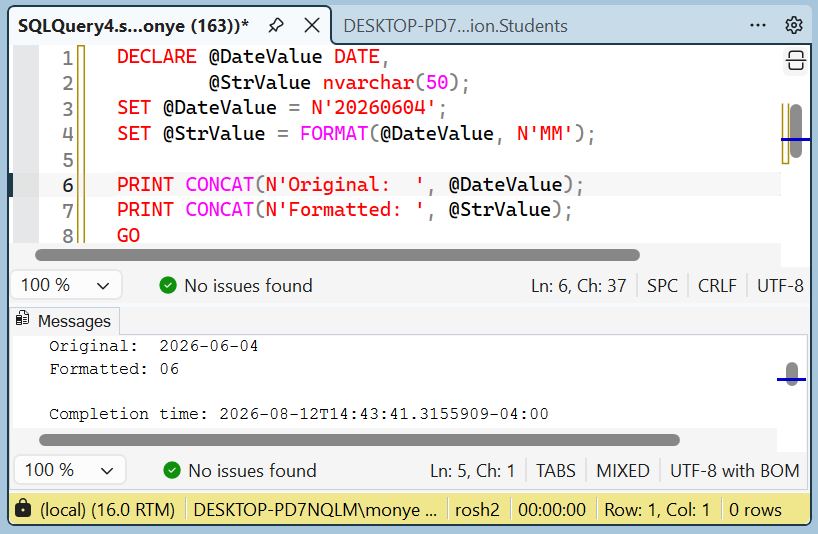
To display only the number of the month, pass the format argument as MM (uppercase). In this case, the month is provided as an integer with 2 digits. If the number is between 1 and 9, it displays with a leading 0. Here is an example:
DECLARE @DateValue DATE,
        @StrValue nvarchar(50);
SET @DateValue = N'20260604';
SET @StrValue = FORMAT(@DateValue, N'MM');

PRINT CONCAT(N'Original:  ', @DateValue);
PRINT CONCAT(N'Formatted: ', @StrValue);
GO
This would produce:
If you are passing an expression that should produce at least one more part such as the day, you can include M (uppercase). The difference becomes as follows:
DECLARE @DateValue DATE,
        @StrValue nvarchar(50);
SET @DateValue = N'20120604';
SET @StrValue = FORMAT(@DateValue, N'd-M');

PRINT CONCAT(N'Original:  ', @DateValue);
PRINT CONCAT(N'Formatted: ', @StrValue);
GO
This would produce:
Original:  2012-06-04
Formatted: 4-6
Following the rules we applied to display a combination of a weekday and a month's numeric day, you can display a month and the month's numeric value. This time, instead of an empty space, you should use a character that would indicate that the date is displaying a combination of month and day (or day and month). The common character to use is the one that conforms to the regional settings of your computer. In the US English, this would be the forward slash "/"�. Here is an example:
DECLARE @DateValue DATE,
        @StrValue nvarchar(50);
SET @DateValue = N'20121004';
SET @StrValue = FORMAT(@DateValue, N'M/dd');
SELECT @DateValue AS Original;
SELECT @StrValue AS Formatted;
GO
In the same way you can combine a weekday (short or long name) followed by the combination of day/month (or month/day) as you see fit. Here is an example:
DECLARE @DateValue DATE,
        @StrValue nvarchar(50);
SET @DateValue = N'20121004';
SET @StrValue = FORMAT(@DateValue, N'ddd M/dd');
SELECT @DateValue AS Original;
SELECT @StrValue AS Formatted;
GO
You can also use this format when constructing a combined date:
DECLARE @DateValue DATE,
        @StrValue nvarchar(50);
SET @DateValue = N'20121004';
SET @StrValue = FORMAT(@DateValue, N'dddd dd-MM');
SELECT @DateValue AS Original;
SELECT @StrValue AS Formatted;
GO
Displaying the Name of a Month
You can display a month by its name using one of two formats: short or long name. The short names of months are: Jan, Feb, Mar, Apr, May, Jun, Jul, Aug, Sep, Oct, Nov, and Dec. To display the short name of a month, pass the format as MMM (uppercase). You can pass MMM by itself to get just the short name of the month. Here is an example:
DECLARE @DateValue DATE,
        @StrValue nvarchar(50);
SET @DateValue = N'20120604';
SET @StrValue = FORMAT(@DateValue, N'MMM');
SELECT @DateValue AS Original;
SELECT @StrValue AS Formatted;
GO
As an alternative, you can include MMM in a combination that produces the other parts. Here is an example:
DECLARE @DateValue DATE,
        @StrValue nvarchar(50);
SET @DateValue = N'20120604';
SET @StrValue = FORMAT(@DateValue, N'dddd, dd-MMM');
PRINT CONCAT(N'Original:  ', @DateValue);
PRINT CONCAT(N'Formatted: ', @StrValue);
GO
This would produce:
Original:  2012-06-04
Formatted: Monday, 04-Jun
The long names of months are January, February, March, April, May, June, July, August, September, October, November, or December. To display the long name of a month, pass MMMM (uppercase) as the format. You can pass this constant as itself or along with the other parts. Here is an example:
DECLARE @DateValue DATE,
        @StrValue nvarchar(50);
SET @DateValue = N'20121004';
SET @StrValue = FORMAT(@DateValue, N'dddd, d MMMM');
SELECT @DateValue AS Original;
SELECT @StrValue AS Formatted;
GO
Practical Learning: Displaying Months
SELECT sems.Semester,
       FORMAT(sems.SemesterStart, N'MMMM') "Semester spans from",
       FORMAT(sems.SemesterEnd, N'MMMM') "Semester spans to",
       FORMAT(sems.SemesterStart, N'dddd') "Semester starts on",
       sems.SemesterStart,
       sems.SemesterEnd,
       FORMAT(sems.SemesterEnd, N'dddd') "Semester ends on",
       sems.Session1Start, sems.Session1End, sems.Session2Start,
       sems.Session2End, sems.OnlineStart, sems.OnlineEnd
FROM Academics.Semesters sems
ORDER BY sems.SemesterStart;
GODisplaying the Year of a Date
If you want to display the year in two digits, pass yy (lowercases) as the format. When used by itself, yy produces the year of the date argument. The year is provided with 2 digits. Here is an example:
DECLARE @DateValue DATE,
        @StrValue nvarchar(50);
SET @DateValue = N'20060604';
SET @StrValue = FORMAT(@DateValue, N'yy');
PRINT CONCAT(N'Original:  ', @DateValue);
PRINT CONCAT(N'Formatted: ', @StrValue);
GO
This would produce:
Original:  2006-06-04
Formatted: 06
In a combination with the day, the month, and the year, use yy to display the year with 2 digits. Examples are 06 or 14 or 68. We have already reviewed how the number is interpreted.
Whether passed by itself or in an expression that contains the other parts, yyy (lowercase) or yyyy (lowercase) produces a year in 4 digits.
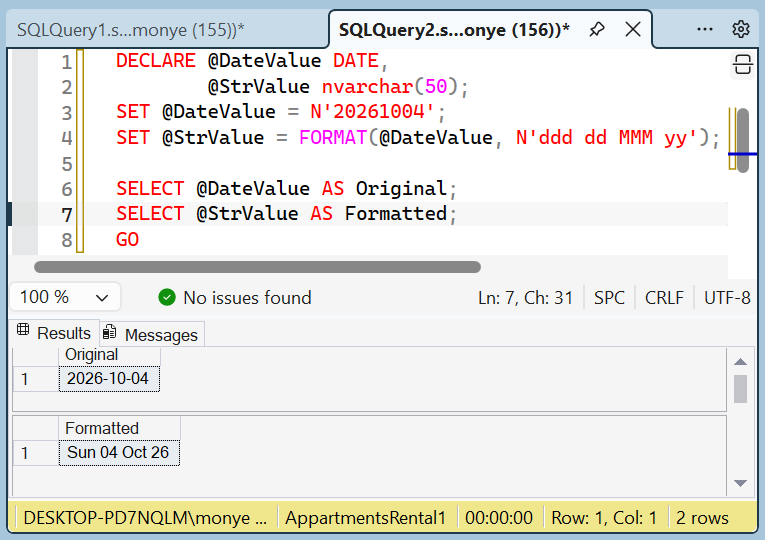
From what we have seen so far, you can display a complete date using any format of your choice, such as the day, the month, and the year. Here is an example that shows the short weekday, the short name of the month, and the 2-digit year:
DECLARE @DateValue DATE,
        @StrValue nvarchar(50);
SET @DateValue = N'20261004';
SET @StrValue = FORMAT(@DateValue, N'ddd dd MMM yy');
SELECT @DateValue AS Original;
SELECT @StrValue AS Formatted;
GO
This would produce:
Here is an example the displays the long name of the day and the long name of the month:
DECLARE @DateValue DATE,
        @StrValue nvarchar(50);
SET @DateValue = N'20121004';
SET @StrValue = FORMAT(@DateValue, N'dddd d MMMM yy');
PRINT CONCAT(N'Original:  ', @DateValue);
PRINT CONCAT(N'Formatted: ', @StrValue);
GO
This would produce:
Original:  2026-10-04
Formatted: Sunday 4 October 26
A year value represented with two digits is hardly explicit, unless you have a good reason for using it. The alternative is to use all four digits to display a year. This format is created with the yyy (lowercase) or yyyy (lowercase). Here is an example:
DECLARE @DateValue DATE,
        @StrValue nvarchar(50);
SET @DateValue = N'20121004';
SET @StrValue = FORMAT(@DateValue, N'yyy');
PRINT CONCAT(N'Original:  ', @DateValue);
PRINT CONCAT(N'Formatted: ', @StrValue);
GO
This would produce:
Original:  2026-10-04
Formatted: 2026
Now we know how to create a short or a complete date value using the appropriate letters and the desired combination. Here is an example:
DECLARE @DateValue DATE,
        @StrValue nvarchar(50);
SET @DateValue = N'20121004';
SET @StrValue = FORMAT(@DateValue, N'dddd, MMMM dd, yyyy');
PRINT CONCAT(N'Original:  ', @DateValue);
PRINT CONCAT(N'Formatted: ', @StrValue);
GO
This would produce:
Original:  2026-10-04
Formatted: Sunday, October 04, 2026
Practical Learning: Displaying the Year of a Date
SELECT sems.Semester,
       FORMAT(sems.SemesterStart, N'yyyy') Year,
       FORMAT(sems.SemesterStart, N'MMMM') "Semester spans from",
       FORMAT(sems.SemesterEnd, N'MMMM') "Semester spans to",
       FORMAT(sems.SemesterStart, N'dddd') "Semester starts on",
       sems.SemesterStart,
       sems.SemesterEnd,
       sems.Session1Start, sems.Session1End, sems.Session2Start,
       sems.Session2End, sems.OnlineStart, sems.OnlineEnd
FROM Academics.Semesters sems
ORDER BY sems.SemesterStart;
GOThe Month and Year Format
You can pass the format as m or M. If you pass only m or M as the format, the function produces the long name of the month followed by the year in 2 digits. Here is an example:
DECLARE @DateValue DATE,
        @StrValue nvarchar(50);
SET @DateValue = N'20060604';
SET @StrValue = FORMAT(@DateValue, N'm');
SELECT @DateValue AS Original;
SELECT @StrValue AS Formatted;
GO
This would produce:

As an alternative, you can pass the format as y (lowercase) or Y (uppercase) only. In this case, the function would produce the full name of the month, followed by a comma, and the year in 4 digits:
DECLARE @DateValue DATE,
        @StrValue nvarchar(50);
SET @DateValue = N'20121004';
SET @StrValue = FORMAT(@DateValue, N'y');
SELECT @DateValue AS Original;
SELECT @StrValue AS Formatted;
GO
This would produce:

The Short Date Format
The standard way to display a date is called the short date format. It is defined in the Short Date section of the Date property page of the Customize Regional Options accessible from the Regional and Language Options of the Control Panel:
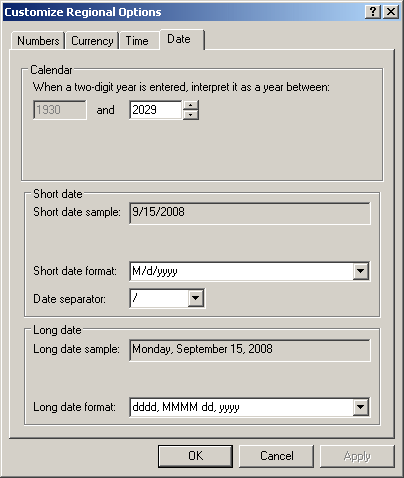
To display a date in the short date format, pass the second value as d (lowercase). In US English, the short date format is M/d/yyyy. The month is provided in digits. If the month and the day use a number from 1 to 9, it doesn't use a leading 0. Here is an example:
DECLARE @DateValue DATE,
        @StrValue nvarchar(50);
SET @DateValue = N'20060604';
SET @StrValue = FORMAT(@DateValue, N'd');
SELECT @DateValue AS Original;
SELECT @StrValue AS Formatted;
GO
This would produce:

If d (lowercase) is used in a combination with letters for the month and year, the day is provided as 1 (for days from 1 to 9) or 2 (for days from 1 to 12) digits.
An alternative is to pass G (uppercase) as the format argument:
Another alternative is to pass the format as g (lowercase):
The Long Date Format
Another common way to display a date is called the long date format. It is defined in the Long Date section of the Date property page of the Customize Regional Options. To display a date in the long date format, pass the second value as D (uppercase). In US English, the short date format is dddd, MMMM dd, yyyy. The weekday and the month are provided in full names. The day is provided with a leading 0 if its number is between 1 to 9. Here is an example:
DECLARE @DateValue DATE,
        @StrValue nvarchar(50);
SET @DateValue = N'20060604';
SET @StrValue = FORMAT(@DateValue, N'D');
SELECT @DateValue AS Original;
SELECT @StrValue AS Formatted;
GO
This would produce:

D (uppercase) should not be used in a combination with letters for the month, the day, and the year.
An alternative is to use f (lowercase). If f is passed by itself, the function produces the long date format followed by 12:00 AM Here is an example:
DECLARE @DateValue DATE,
        @StrValue nvarchar(50);
SET @DateValue = N'20060604';
SET @StrValue = FORMAT(@DateValue, N'f');
SELECT @DateValue AS Original;
SELECT @StrValue AS Formatted;
GO
This would produce:

The letter f should not be used along with the other letters and symbols. One more alternative is to pass F (uppercase) as argument:
Practical Learning: Showing Long Date Formats
SELECT sems.Semester,
       FORMAT(sems.SemesterStart, N'yyyy') Year,
       FORMAT(sems.SemesterStart, N'MMMM') "Semester spans from",
       FORMAT(sems.SemesterEnd, N'MMMM') "Semester spans to",
       FORMAT(sems.SemesterStart, N'D') "Start of Semester",
       FORMAT(sems.SemesterEnd, N'D') "End of Semester",
       FORMAT(sems.Session1Start, N'D') "Start of Session 1",
       FORMAT(sems.Session1End, N'D') "End of Session 1",
       FORMAT(sems.Session2Start, N'D') "Start of Session 2",
       FORMAT(sems.Session2End, N'D') "End of Session 2",
       FORMAT(sems.OnlineStart, N'D') "End of Online Sessions"
FROM Academics.Semesters sems
ORDER BY sems.SemesterStart;
GOOperations on Dates
Adding a Value to a Date
Date addition consists of adding a number of days, a number of months, or a number of years, to a date value. The function used to perform this operation is DATEADD. Its syntax is:
DATEADD(TypeOfValue, valueToAdd, DateOrTimeReferenced)
The first argument specifies the type of value that will be added. It can be one of the following values:
| TypeOfValue | Description | ||
| Year | yy | yyyy | A number of years will be added to the date value |
| quarter | q | A number of quarters of a year will be added to the date value | |
| Month | m | mm | A number of months will be added to the date value |
| dayofyear | y | dy | A number of days of a year will be added to the date value |
| Day | d | dd | A number of days will be added to the date value |
| Week | wk | ww | A number of weeks will be added to the date value |
The second argument is the number of TypeOfValue to be added. It should be a constant integer. The third argument is the original value on which the operation will be performed. Here is an example that adds a number of years to a date value:
DECLARE @Original date,
	@Result date;
SET     @Original = N'20121204';
SET     @Result = DATEADD(yy, 2, @Original);
SELECT @Original [Original Date];
SELECT @Result [2 Years Later];
GO
This would produce:

Here is an example that adds 2 quarters to a date:
DECLARE @Original date,
	@Result date;
SET     @Original = N'20121204';
SET     @Result = DATEADD(Quarter, 2, @Original);
SELECT @Original [Original Date];
SELECT @Result [2 Years Later];
GO
This would produce

Here is an example that adds 5 months to a date:
DECLARE @Original date,
	@Result date;
SET     @Original = N'20121004';
SET     @Result = DATEADD(m, 5, @Original);
SELECT @Original [Original Date];
SELECT @Result [2 Years Later];
GO
This would produce

Practical Learning: Adding a Value to a Date
/* Instead of specifying a deterministic date of birth, we will supply
   a number of days to this function and, based on day this script is
   run, the function will subtract the number of days from that date.
   That's how we will get the date of birth of a student. */

CREATE FUNCTION Administration.SetDateOfBirth(@days int)
RETURNS Date
AS
BEGIN
	RETURN DATEADD(d, @days, SYSDATETIME());
END
GO
CREATE TABLE Academics.UndergraduateStudents
(
    StudentNumber nvarchar(8) not null,
    FirstName nvarchar(20),
    MiddleName nvarchar(20),
    LastName nvarchar(20),
    BirthDate date,
    Gender nvarchar(5) default N'N/A'
);
GO
INSERT INTO Academics.UndergraduateStudents(StudentNumber, FirstName, MiddleName, LastName, BirthDate, Gender)
VALUES(N'88130480', N'Marie', N'Annette', N'Robinson', Administration.SetDateOfBirth(-6817), N'F'),
      (N'24795711', N'Roger', N'Dermot',  N'Baker',    Administration.SetDateOfBirth(-6570), N'M');
GO
INSERT INTO Academics.UndergraduateStudents(StudentNumber, FirstName, LastName, BirthDate, Gender)
VALUES(N'18073572', N'Patrick', N'Wisne', Administration.SetDateOfBirth(-11012), N'M');
GO
INSERT INTO Academics.UndergraduateStudents(StudentNumber, FirstName, LastName, BirthDate)
VALUES(N'94759284', N'Chris', N'Harpers', Administration.SetDateOfBirth(-10570));
GO
INSERT INTO Academics.UndergraduateStudents(StudentNumber, FirstName, MiddleName, LastName, BirthDate, Gender)
VALUES(N'22803048', N'Gary', N'Jonathan', N'Jones', Administration.SetDateOfBirth(-19926), N'M'),
      (N'97394285', N'Jessica', N'Danielle', N'Weisburgh', Administration.SetDateOfBirth(-12081), N'F'),
      (N'97596002', N'Laurent', N'Frank', N'Simonson', Administration.SetDateOfBirth(-17503), N'M'),
      (N'94708257', N'Christopher', N'Sheldon', N'Dale', Administration.SetDateOfBirth(-6570),  N'M'),
      (N'48009520', N'Diane', N'Kathy', N'Paglia', Administration.SetDateOfBirth(-13840), N'F'),
      (N'13048039', N'Joseph', N'Christian', N'Riback', Administration.SetDateOfBirth(-7909),  N'M'),
      (N'92270397', N'Patrick', N'Jonathan', N'Brzeniak', Administration.SetDateOfBirth(-17361), N'M');
GO
INSERT INTO Academics.UndergraduateStudents(StudentNumber, FirstName, LastName, BirthDate, Gender)
VALUES(N'70840584', N'Tracy', N'Sikorowski', Administration.SetDateOfBirth(-11650), N'M');
GOFinding the Difference of Two Date Values
To find the difference between two dates, you can call the DATEDIFF() function. Its syntax is:
DATEDIFF(TypeOfValue, StartDate, EndDate)
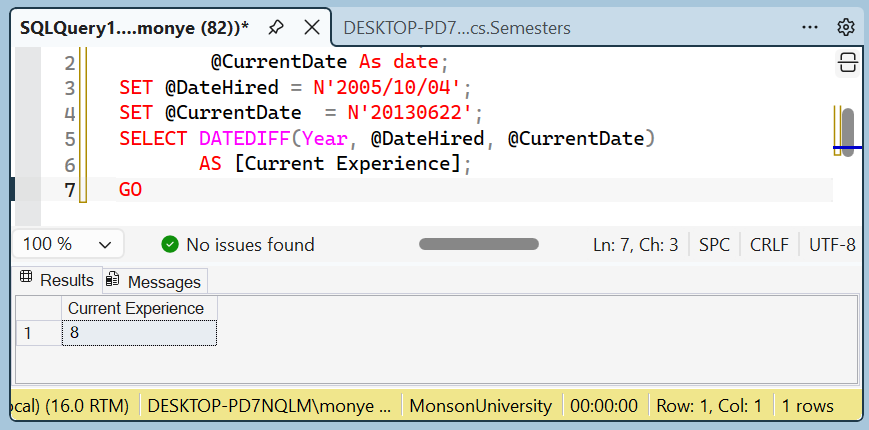
The first argument specifies the type of value the function must produce. This argument uses the same value as those of the DATEADD() function. The second argument is the starting date. The third argument is the end date. Here is an example that calculates the number of years that an employee has been with the company:
DECLARE @DateHired As date,
        @CurrentDate As date;
SET @DateHired = N'2005/10/04';
SET @CurrentDate  = N'20130622';
SELECT DATEDIFF(Year, @DateHired, @CurrentDate)
       AS [Current Experience];
GO
This would produce:
Immediate If
Consider the following table:
USE master
GO

IF  EXISTS (
	SELECT name
		FROM sys.databases
		WHERE name = N'PublicLibrary'
)
DROP DATABASE PublicLibrary
GO
CREATE DATABASE PublicLibrary
GO

USE PublicLibrary;
GO

CREATE SCHEMA Administration;
GO
CREATE TABLE Administration.Members
(
    MemberNumber nchar(11),
    FirstName nvarchar(25),
    LastName nvarchar(25),
    Gender int,
    DateOfBirth date
);
GO

INSERT INTO Administration.Members
VALUES(N'93757-49411', N'Joshua', N'Ransome', 1, N'20020412');
GO
INSERT INTO Administration.Members(MemberNumber, FirstName, LastName, Gender)
VALUES(N'20304-70592', N'Chris', N'Drews', 3);
GO
INSERT INTO Administration.Members
VALUES(N'13594-60857', N'Ephraim', N'Chance', 1, N'19440824'),
	  (N'29283-47597', N'Jeannette', N'Gong', 2, N'19781104');
GO
INSERT INTO Administration.Members(MemberNumber, FirstName, LastName, DateOfBirth)
VALUES(N'39485-00741', N'Bobbie', N'Womack', N'19840602');
GO
INSERT INTO Administration.Members(MemberNumber, FirstName,
		LastName, Gender, DateOfBirth)
VALUES(N'83758-30737', N'Mathilda', N'Bambeck', 2, N'19940816');
GO
Here is a list of the records:
USE PublicLibrary;
GO

SELECT mbrs.MemberNumber [Mbr #],
       mbrs.FirstName [First Name],
       mbrs.LastName [Last Name],
       mbrs.Gender,
       mbrs.DateOfBirth [Date of Birth],
       DATEDIFF(Year, mbrs.DateOfBirth, SYSDATETIME()) Age
FROM Administration.Members mbrs;
GO
This would produce:

The immediate-if function, named IIF, is used to take action depending on the outcome of a condition. Its syntax is:
IIF(Conditional Expression, What To Do If True, What To Do If False) RETURNS sql_variant;
The IIF() function takes three arguments. The first is a conditional statement expressed using any of the logical operators we reviewed. The conditional statement is true, the function returns the second argument and stops. If the conditional statement is false, the function ignores the second argument and returns the third argument.
Here are examples of calling the IIF() function:
SELECT mbrs.MemberNumber [Mbr #],
       mbrs.FirstName [First Name],
       mbrs.LastName [Last Name],
       mbrs.Gender,
       mbrs.DateOfBirth [Date of Birth],
       DATEDIFF(Year, mbrs.DateOfBirth, SYSDATETIME()) Age,
       IIF(DATEDIFF(Year, DateOfBirth, SYSDATETIME()) <= 18, N'Teen', N'Adult') "Membership Category"
FROM Administration.Members mbrs;
GO
This would produce:

One way to expand the IIF() function is to nest one inside of another. To do that, you can replace one of the consequences (What To Do If True or What To Do If False) with an IIF() function. Here are examples:
USE PublicLibrary;
GO

SELECT mbrs.MemberNumber [Mbr #],
       mbrs.FirstName [First Name],
       mbrs.LastName [Last Name],
  IIF(mbrs.Gender = 1, N'Male', IIF(mbrs.Gender = 2, N'Female', N'Unknown')) Gender,
       mbrs.DateOfBirth [Date of Birth],
       DATEDIFF(Year, mbrs.DateOfBirth, SYSDATETIME()) Age,
       IIF(DATEDIFF(Year, DateOfBirth, SYSDATETIME()) <= 18,
	   N'Teen',
	   IIF(DATEDIFF(Year, DateOfBirth, SYSDATETIME()) <= 65,
	       N'Adult',
               N'Senior')) "Membership Category"
FROM Administration.Members mbrs;
GO
This would produce:

Practical Learning: Finding the Difference in Date Values
SELECT Students.StudentNumber [Student #],
       Students.FirstName [First Name],
       Students.MiddleName [Middle Name],
       Students.LastName [Last Name],
       Students.BirthDate,
       DATEDIFF(yyyy, BirthDate, SYSDATETIME()) Age,
       Students.Gender
FROM Academics.UndergraduateStudents Students;
GOSELECT Students.StudentNumber [Student #],
Students.FirstName [First Name],
Students.MiddleName [Middle Name],
Students.LastName [Last Name],
FORMAT(Students.BirthDate, N'f'),
DATEDIFF(yyyy, BirthDate, SYSDATETIME()) Age,
CASE Students.Gender
WHEN N'M' THEN N'Male'
WHEN N'F' THEN N'Female'
ELSE N'Unknomn'
END Gender
FROM Academics.UndergraduateStudents Students;
GO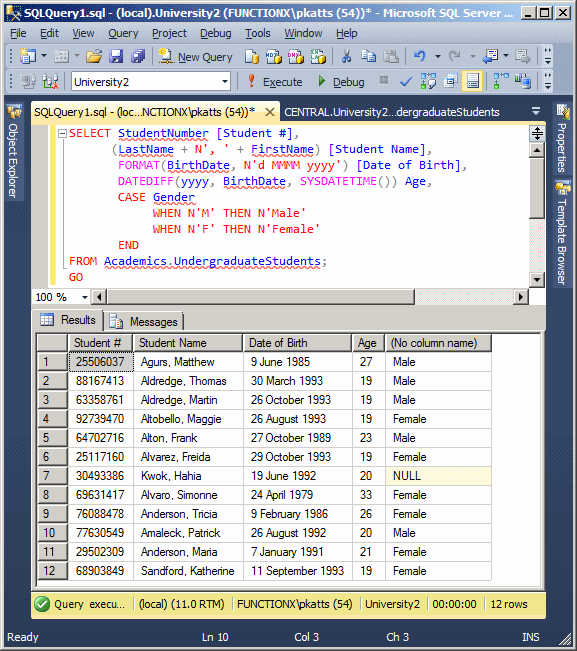
Getting the Parts of a Date
Introduction to the Part Name of a Date Value
Transact-SQL provides various options to get the day, the month, or the year of an existing date value. The values are gotten using some functions. One of the functions used is named DATENAME. Its syntax is:
integer/nvarchar DATENAME(integer ReturnedValue, date value);
ReturnedValue specifies the value to get from the date. The second argument is the date that holds the value from which the value will be produced. The date value must be a valid date. If the date value is not valid, the function would produce an error. For example, 20110229 would return an error since the month of February in 2011 did not have 29 days.
Besides DATENAME(), Transact-SQL provides the DATEPART() function. Its syntax is:
DATEPART(int DatePart, date value)
The value argument uses the same constants as for the DATENAME() function. The constants provided for ReturnedValue or value are not case-sensitive. This means that year, YEAR, and Year would work the same.
Transact-SQL provides additional functions to get the day, the month, and the year of a date.
Getting the Day of a Date
A typical date combines a day, a month, and a year. The day is a numeric value within the month. To get the day in the month of a date value, you have various options. Transact-SQL provides the DAY() function whose syntax is:
int DAY(date value);
This function takes a date as argument and produces its day. Here is an example:
DECLARE @DateValue DATE,
        @Result int;
SET @DateValue = N'20121004';
SET @Result = DAY(@DateValue);
SELECT @DateValue AS Original;
SELECT @Result AS Result;
GO
As an alternative, you can call the DATENAME() function and pass the ReturnedValue as Day (or day), d, or dd. Here is an example:
DECLARE @DateValue DATE,
        @Result int;
SET @DateValue = N'20121004';
SET @Result = DATENAME(dd, @DateValue);
SELECT @DateValue AS Original;
SELECT @Result AS Result;
GO
One more alternative is to call the DATEPART() function and pass Day (or day), d, or dd as the value. Here is an example:
DECLARE @DateValue DATE,
        @StrValue int;
SET @DateValue = N'20120425';
SET @StrValue = DATEPART(Day, @DateValue);
SELECT @DateValue AS Original;
SELECT @StrValue AS Formatted;
GO
In this case, both functions produce the same result.
Getting the Month Name of a Date
A regular date contains a month. To get the numeric month of a date value, you have two options. You can use Transact-SQL's MONTH() function. Its syntax is:
int MONTH(date value);
This function takes a date as argument and produces the month. Here is an example:
DECLARE @DateValue DATE,
        @Result int;
SET @DateValue = N'20121004';
SET @Result = MONTH(@DateValue);
SELECT @DateValue AS Original;
SELECT @Result AS Result;
GO
Notice that the MONTH() function returns an integer. Besides MONTH(), Transact-SQL provides the DATENAME() function. To get the month, pass the ReturnedValue as Month (or month), m, or mm. This means that you must consider the ReturnedValue as a string. Here is an example:
DECLARE @DateValue DATE,
        @Result nvarchar(30);
SET @DateValue = N'20121004';
SET @Result = DATENAME(mm, @DateValue);
SELECT @DateValue AS Original;
SELECT @Result AS Result;
GO
This would produce:

You can also use the DATEPART() function to get the month. In this case, you would pass the same argument as for the DATENAME() function.. Here is an example:
DECLARE @DateValue DATE,
        @StrValue int;
SET @DateValue = N'20120425';
SET @StrValue = DATEPART(Month, @DateValue);
SELECT @DateValue AS Original;
SELECT @StrValue AS Formatted;
GO
Getting the Year of a Date
To let you get the year of a date, Transact-SQL provides the YEAR() function. Its syntax is:
int YEAR(date value);
Here is an example:
DECLARE @DateValue DATE,
        @Result int;
SET @DateValue = N'20121004';
SET @Result = YEAR(@DateValue);
SELECT @DateValue AS Original;
SELECT @Result AS Result;
GO
This would produce:

Another way to get the year value is to call the DATENAME() function. In this case, pass the ReturnedValue argument as Year (or year), yy or, yyyy. In this case, the function returns an integer. Here is an example:
DECLARE @DateValue DATE,
        @Result int;
SET @DateValue = N'20121004';
SET @Result = DATENAME(yy, @DateValue);
SELECT @DateValue AS Original;
SELECT @Result AS Formatted;
GO
In the same way, you can call the DATEPART() function to get the year. You would pass the argument as yy or yyyy, just as done for the DATENAME() function. Here is an example:
DECLARE @DateValue DATE,
        @StrValue int;
SET @DateValue = N'20120425';
SET @StrValue = DATEPART(mm, @DateValue);
SELECT @DateValue AS Original;
SELECT @StrValue AS Formatted;
GO
The result is the same.
Getting the Quarter of a Year
A year is made of four parts that each has 3 consecutive months. Each one of those parts is called a quarter. A quarter is represent with a small integer. The first quarter that contains January, February, and March has a value of 1. To get the quarter of a year of a date, you can call the DATENAME() or the DATEPART() function. In this case, pass the ReturnedValue or the value argument as Quarter (or quarter), q or, qq. In both cases, the function returns an integer. Here is an example:
DECLARE @DateValue DATE,
        @Result nvarchar(30);
SET @DateValue = N'20120714';
SET @Result = DATENAME(q, @DateValue);
SELECT @DateValue AS Original;
SELECT @Result AS Result;
GO
This would produce:

Getting the Week of a Year
A year is divided in 52 or 53 parts named weeks. Each week is made of 7 consecutive days. A week is represented as a small integer. To get the numeric week of a date, call either the DATENAME() or the DATEPART() function. Pass the ReturnedValue or the value argument as week, wk or, ww. Here is an example:
DECLARE @DateValue DATE,
        @Result nvarchar(30);
SET @DateValue = N'20121231';
SET @Result = DATENAME(Week, @DateValue);
SELECT @DateValue AS Original;
SELECT @Result AS Result;
GO
This would produce:

Getting the Weekday of a Week
As mentioned already, a week is made of 7 consecutive days and each or those days has a name.known as the weekday. To get the weekday of a date, call either the DATENAME() or the DATEPART() function. Pass the ReturnedValue or the value argument as Weekday or dw. Here is an example:
DECLARE @DateValue DATE,
        @Result nvarchar(30);
SET @DateValue = N'20121231';
SET @Result = DATENAME(Weekday, @DateValue);
SELECT @DateValue AS Original;
SELECT @Result AS Result;
GO
This would produce:

Practical Learning: Ending the Lesson
|
|
|||
| Previous | Copyright © 2008-2026, FunctionX | Last Update: Sunday 09 August 2026, 12:06 | Next |
|
|
|||

