TypeScript Application: Payroll Evaluation - 1 Week

TypeScript Application: Payroll Evaluation - 1 Week
Introduction
 Practical Learning: Creating the Application
html {
  font-size: 14px;
}

@media (min-width: 768px) {
  html {
    font-size: 16px;
  }
}

.btn:focus, .btn:active:focus, .btn-link.nav-link:focus, .form-control:focus, .form-check-input:focus {
  box-shadow: 0 0 0 0.1rem white, 0 0 0 0.25rem #258cfb;
}

html {
  position: relative;
  min-height: 100%;
}

body {
  margin-bottom: 60px;
}

.form-floating > .form-control-plaintext::placeholder, .form-floating > .form-control::placeholder {
  color: var(--bs-secondary-color);
  text-align: end;
}

.form-floating > .form-control-plaintext:focus::placeholder, .form-floating > .form-control:focus::placeholder {
  text-align: start;
}

.small       { width: 100px; }
.large-text  { width: 120px; }
.delimiter   { margin: auto;
               width: 700px; }

.common-font {
    font-family: Georgia, Garamond, 'Times New Roman', serif;
}@{
ViewData["Title"] = "Home Page";
}
<h2 class="common-font text-center fw-bold">Payroll Evaluation</h2>
<hr />
<div class="delimiter common-font">
<form name="PayrollEvaluation" method="post">
<table class="table table-striped">
<tr>
<td class="large-text fw-bold">Hourly Salary:</td>
<td><input class="form-control small" id="hourlySalary" /></td>
<td> </td>
<td> </td>
<td> </td>
<td> </td>
</tr>
<tr>
<td class="large-text fw-bold">Days</td>
<td class="fw-bold text-center">Monday</td>
<td class="fw-bold text-center">Tuesday</td>
<td class="fw-bold text-center">Wednesday</td>
<td class="fw-bold text-center">Thursday</td>
<td class="fw-bold text-center">Friday</td>
</tr>
<tr>
<td class="fw-bold">Time Worked:</td>
<td><input type="number" class="form-control small" id="monday" /></td>
<td><input type="number" class="form-control small" id="tuesday" /></td>
<td><input type="number" class="form-control small" id="wednesday" /></td>
<td><input type="number" class="form-control small" id="thursday" /></td>
<td><input type="number" class="form-control small" id="friday" /></td>
</tr>
<tr>
<td> </td>
<td class="text-center" colspan="5">
<input type="button" id="btnCalculate" class="btn btn-primary"
style="width: 500px" value="Calculate" onclick="calculate()" />
</td>
</tr>
<tr>
<td class="fw-bold">Regular Time:</td>
<td><span id="regularTimeMonday"></span></td>
<td><span id="regularTimeTuesday"></span></td>
<td><span id="regularTimeWednesday"></span></td>
<td><span id="regularTimeThursday"></span></td>
<td><span id="regularTimeFriday"></span></td>
</tr>
<tr>
<td class="fw-bold">Overtime:</td>
<td><span id="overtimeMonday"></span></td>
<td><span id="overtimeTuesday"></span></td>
<td><span id="overtimeWednesday"></span></td>
<td><span id="overtimeThursday"></span></td>
<td><span id="overtimeFriday"></span></td>
</tr>
<tr>
<td class="fw-bold">Regular Pay:</td>
<td><span id="regularPayMonday"></span></td>
<td><span id="regularPayTuesday"></span></td>
<td><span id="regularPayWednesday"></span></td>
<td><span id="regularPayThursday"></span></td>
<td><span id="regularPayFriday"></span></td>
</tr>
<tr>
<td class="fw-bold">Overtime Pay:</td>
<td><span id="overtimePayMonday"></span></td>
<td><span id="overtimePayTuesday"></span></td>
<td><span id="overtimePayWednesday"></span></td>
<td><span id="overtimePayThursday"></span></td>
<td><span id="overtimePayFriday"></span></td>
</tr>
<tr>
<td colspan="4"> </td>
<td class="fw-bold">Net Pay:</td>
<td><span id="netPay"></span></td>
</tr>
</table>
</form>
</div>
<script src="~/js/TimeSheetEvaluation.js"></script>function calculate() {
const hSalary: number = Number((document.querySelector("#hourlySalary") as HTMLInputElement).value || 0);
const monTime: number = Number((document.querySelector("#monday") as HTMLInputElement).value || 0);
const tueTime: number = Number((document.querySelector("#tuesday") as HTMLInputElement).value || 0);
const wedTime: number = Number((document.querySelector("#wednesday") as HTMLInputElement).value || 0);
const thuTime: number = Number((document.querySelector("#thursday") as HTMLInputElement).value || 0);
const friTime: number = Number((document.querySelector("#friday") as HTMLInputElement).value || 0);
let overtimeSalary: number = hSalary * 1.50;
let regTimeMon: number = 0.00;
let overtimeMon: number = 0.00;
let regPayMon: number = 0.00;
let ovrPayMon: number = 0.00;
let regTimeTue: number = 0.00;
let overtimeTue: number = 0.00;
let regPayTue: number = 0.00;
let ovrPayTue: number = 0.00;
let regTimeWed: number = 0.00;
let overtimeWed: number = 0.00;
let regPayWed: number = 0.00;
let ovrPayWed: number = 0.00;
let regTimeThu: number = 0.00;
let overtimeThu: number = 0.00;
let regPayThu: number = 0.00;
let ovrPayThu: number = 0.00;
let regTimeFri: number = 0.00;
let overtimeFri: number = 0.00;
let regPayFri: number = 0.00;
let ovrPayFri: number = 0.00;
if (monTime <= 8.00) {
ovrPayMon = 0.00;
overtimeMon = 0.00;
regTimeMon = monTime;
regPayMon = monTime * hSalary;
} else {
regTimeMon = 8.00;
regPayMon = 8.00 * hSalary;
overtimeMon = monTime - 8.00;
ovrPayMon = (monTime - 8.00) * overtimeSalary;
}
if (tueTime <= 8.00) {
ovrPayTue = 0.00;
overtimeTue = 0.00;
regTimeTue = tueTime;
regPayTue = tueTime * hSalary;
} else {
regTimeTue = 8.00;
regPayTue = 8.00 * hSalary;
overtimeTue = tueTime - 8.00;
ovrPayTue = (tueTime - 8.00) * overtimeSalary;
}
if (wedTime <= 8.00) {
ovrPayWed = 0.00;
overtimeWed = 0.00;
regTimeWed = wedTime;
regPayWed = wedTime * hSalary;
} else {
regTimeWed = 8.00;
regPayWed = 8.00 * hSalary;
overtimeWed = wedTime - 8.00;
ovrPayWed = (wedTime - 8.00) * overtimeSalary;
}
if (thuTime <= 8.00) {
ovrPayThu = 0.00;
overtimeThu = 0.00;
regTimeThu = thuTime;
regPayThu = thuTime * hSalary;
} else {
regTimeThu = 8.00;
regPayThu = 8.00 * hSalary;
overtimeThu = thuTime - 8.00;
ovrPayThu = (thuTime - 8.00) * overtimeSalary;
}
if (friTime <= 8.00) {
ovrPayFri = 0.00;
overtimeFri = 0.00;
regTimeFri = friTime;
regPayFri = friTime * hSalary;
} else {
regTimeFri = 8.00;
regPayFri = 8.00 * hSalary;
overtimeFri = friTime - 8.00;
ovrPayFri = (friTime - 8.00) * overtimeSalary;
}
let netPay: number = regPayMon + regPayTue + regPayWed + regPayThu + regPayFri +
ovrPayMon + ovrPayTue + ovrPayWed + ovrPayThu + ovrPayFri;
document.getElementById("regularTimeMonday").innerHTML = regTimeMon.toFixed(2);
document.getElementById("regularTimeTuesday").innerHTML = regTimeTue.toFixed(2);
document.getElementById("regularTimeWednesday").innerHTML = regTimeWed.toFixed(2);
document.getElementById("regularTimeThursday").innerHTML = regTimeThu.toFixed(2);
document.getElementById("regularTimeFriday").innerHTML = regTimeFri.toFixed(2);
document.getElementById("overtimeMonday").innerHTML = overtimeMon.toFixed(2);
document.getElementById("overtimeTuesday").innerHTML = overtimeTue.toFixed(2);
document.getElementById("overtimeWednesday").innerHTML = overtimeWed.toFixed(2);
document.getElementById("overtimeThursday").innerHTML = overtimeThu.toFixed(2);
document.getElementById("overtimeFriday").innerHTML = overtimeFri.toFixed(2);
document.getElementById("regularPayMonday").innerHTML = regPayMon.toFixed(2);
document.getElementById("regularPayTuesday").innerHTML = regPayTue.toFixed(2);
document.getElementById("regularPayWednesday").innerHTML = regPayWed.toFixed(2);
document.getElementById("regularPayThursday").innerHTML = regPayThu.toFixed(2);
document.getElementById("regularPayFriday").innerHTML = regPayFri.toFixed(2);
document.getElementById("overtimePayMonday").innerHTML = ovrPayMon.toFixed(2);
document.getElementById("overtimePayTuesday").innerHTML = ovrPayTue.toFixed(2);
document.getElementById("overtimePayWednesday").innerHTML = ovrPayWed.toFixed(2);
document.getElementById("overtimePayThursday").innerHTML = ovrPayThu.toFixed(2);
document.getElementById("overtimePayFriday").innerHTML = ovrPayFri.toFixed(2);
document.getElementById("netPay").innerHTML = netPay.toFixed(2);
}{
"compilerOptions": {
"noImplicitAny": false,
"noEmitOnError": true,
"removeComments": false,
"sourceMap": true,
"target": "es5"
},
"exclude": [
"node_modules",
"wwwroot"
],
"files": [
"TimeSheetEvaluation.ts"
],
"compileOnSave": true
}
First Name:    Michael
Last Name:     Carlock
Hourly Salary: 28.46
Monday:        7
Tuesday:       8
Wednesday:     6.5
Thursday:      8.5
Friday:        7.5


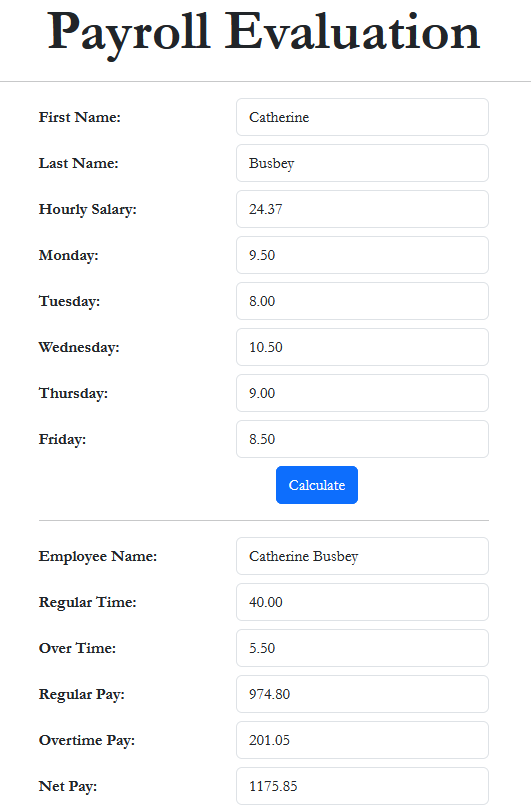
First Name:    Catherine
Last Name:     Busbey
Hourly Salary: 24.37
Monday:        9.5
Tuesday:       8
Wednesday:     10.5
Thursday:      9
Friday:        8.5
|
|
|||
| Home | Copyright © 2021-2026, FunctionX | Monday 13 April 2026, 19:11 | Home |
|
|
|||