College Park Auto-Parts - XML Serialization

College Park Auto-Parts - XML Serialization
Setting Up the Application
Introduction
Serialization consists of saving one or more values to a computer stream. An example is to save an object, an instance of a class. This characteristic allows you to create a text-based database. For an example, we will create an application for a company that sells automobile parts and other accessories.
 Practical Learning: Introducing the Application
namespace CollegeParkAutoParts2.Models
{
    public enum Answer { No = 0, Yes = 1, Cancel = 2, Unknown = 3 }

    internal static class MsgBox
    {
        public static void Regular(string message)
        {
            MessageBox.Show(message,
                            "College Park Auto-Parts",
                            MessageBoxButtons.OK,
                            MessageBoxIcon.Information);
        }

        public static Answer Question(string message)
        {
            DialogResult result = MessageBox.Show(message,
                                                  "College Park Auto-Parts",
                                                  MessageBoxButtons.YesNoCancel,
                                                  MessageBoxIcon.Question);

            switch (result)
            {
                case DialogResult.Yes:
                    return Answer.Yes;
                case DialogResult.No:
                    return Answer.No;
                case DialogResult.Cancel:
                    return Answer.Cancel;
                default:
                    return Answer.Unknown;
            }
        }
    }
}
Parts Manufacturers
The company for which we are building the application sells automobile parts. The primary piece of information you should provide for an automobile part is the manufacturer. In this section, we will create that can allow an employee to create a name for a manufacturer.
Practical Learning: Introducing Parts Manufacturers
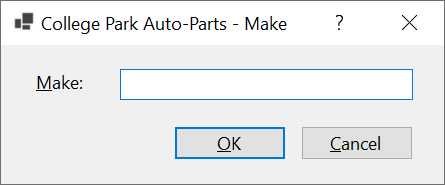
| Control | Text | Name | Other Properties | |
| Label |  |
&Make: | ||
| TextBox |  |
txtMake | Modifiers: Public | |
| Button |  |
&OK | btnOK | DialogResult: OK |
| Button | |
&Cancel | btnCancel | DialogResult: Cancel |
Form Characteristics
| Form Property | Value |
| FormBorderStyle | FixedDialog |
| Text | Make |
| StartPosition | CenterScreen |
| AcceptButton | btnOK |
| CancelButton | btnCancel |
| MaximizeBox | False |
| MinimizeBox | False |
| ShowInTaskbar | False |
Parts Models
The second valuable piece of information you should provide about an object sold in a store is the model. In this section, we will create a form that an employee can use to provide that information.
Practical Learning: Introducing Parts Models
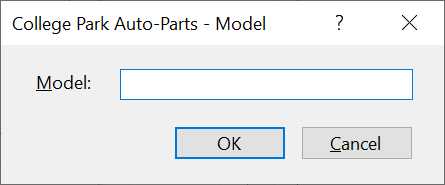
| Control | Text | Name | Other Properties | |
| Label | |
&Model: | ||
| TextBox | |
txtModel | Modifiers: Public | |
| Button | |
&OK | btnOK | DialogResult: OK |
| Button | |
&Cancel | btnCancel | DialogResult: Cancel |
Form Characteristics
| Form Property | Value |
| FormBorderStyle | FixedDialog |
| Text | Category Editor |
| StartPosition | CenterScreen |
| AcceptButton | btnOK |
| CancelButton | btnCancel |
| MaximizeBox | False |
| MinimizeBox | False |
| ShowInTaskbar | False |
Parts Categories
A company can make objects that use the same model but some options can different items of the same model. To allow a user to provide such information, we will create a form.
Practical Learning: Introducing Parts Categories
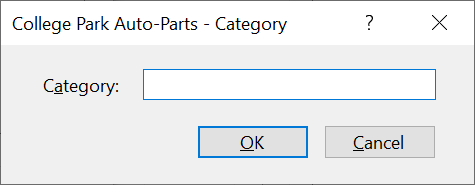
| Control | Text | Name | Other Properties | |
| Label | |
C&ategory: | ||
| TextBox | |
txtCategory | Modifiers: Public | |
| Button | |
&OK | btnOK | DialogResult: OK |
| Button | |
&Cancel | btnCancel | DialogResult: Cancel |
Form Characteristics
| Form Property | Value |
| FormBorderStyle | FixedDialog |
| Text | Category |
| StartPosition | CenterScreen |
| AcceptButton | btnOK |
| CancelButton | btnCancel |
| MaximizeBox | False |
| MinimizeBox | False |
| ShowInTaskbar | False |
A Class for Auto-Parts
To keep our application simple, we will conside that the business is mainly selling only automobile parts. Each part will be represented by some characteristics that we will list in a class.
Practical Learning: Creating a Class for Auto-Parts
namespace CollegeParkAutoParts2.Models
{
    public class AutoPart
    {
        public long    PartNumber  { set; get; }
        public int     Year        { set; get; }
        public string? Make        { get; set; }
        public string? Model       { get; set; }
        public string? Category    { get; set; }
        public string? PartName    { get; set; }
        public double  UnitPrice   { get; set; }
        public string? PictureFile { get; set; }
    }
}
A New Store Item
A store item is an object that a store sells. When it comes to a company that sells automobile parts, the employees must create records for what the company is selling. For that reason, we will create a form that can be used to create records for the items sold in the store.
Practical Learning: Creating an Auto-Part

| Control | (Name) | Text | Other Properties | |
| Label | |
&Part #: | ||
| Text Box | |
txtPartNumber | ||
| Button | |
btnSelectPicture | &Select Picture... | |
| Label | |
lblPictureFile | . | |
| Label | |
&Year: | ||
| Combo Box |  |
cbxYears | ||
| Picture Box |  |
pbxPartImage | BorderStyle: FixedSingle: SizeMode: AutoSize |
|
| Label | |
&Make: | ||
| Combo Box | |
cbxMakes | ||
| Button | |
btnNewMake | New M&ke... | |
| Label | |
M&odel: | ||
| Combo Box | |
cbxModels | ||
| Button | |
New Mo&del | ||
| Label | |
Ca&tegory: | ||
| Combo Box | |
cbxCategories | ||
| Button | |
btnNewCategory | New Cat&egory... | |
| Label | |
Part Na&me: | ||
| Text Box | |
txtPartName | ScrollBars: Vertical Multiline: True |
|
| Label | |
&Unit Price | ||
| Text Box | |
txtUnitPrice | ||
| Label | |
_________________ | ||
| Button | |
btnSaveAutoPart | Sa&ve Auto-Part | |
| Button | |
btnClose | &Close | |
| OpenFileDialog |  |
ofdPictureFile | ||
using CollegeParkAutoParts2.Models;
using System.Xml.Serialization;

namespace CollegeParkAutoParts2
{
    public partial class StoreItemNew : Form
    {
        List<AutoPart> AutoParts { get; set; } = new List<AutoPart>();

        public StoreItemNew()
        {
            InitializeComponent();
        }

        private void InitializeAutoParts()
        {
            string strFileName = @"C:\College Park Auto-Parts\AutoParts.xml";
            XmlSerializer xsAutoParts = new XmlSerializer(typeof(List<AutoPart>));

            for (int year = DateTime.Today.Year + 1; year >= DateTime.Today.Year - 20; year--)
                cbxYears.Items.Add(year);

            if (File.Exists(strFileName))
            {
                Random rndNumber = new();

                cbxMakes.Items.Clear();
                cbxModels.Items.Clear();
                cbxCategories.Items.Clear();
                txtPartName.Text = string.Empty;
                txtUnitPrice.Text = string.Empty;
                txtPartNumber.Text = rndNumber.Next(100000, 999999).ToString();

                using (FileStream fsAutoParts = new FileStream(strFileName,
                                                                FileMode.Open,
                                                                FileAccess.Read,
                                                                FileShare.Read))
                {
                    AutoParts = (List<AutoPart>)xsAutoParts.Deserialize(fsAutoParts)!;

                    for (int i = 0; i < AutoParts.Count; i++)
                    {
                        if (!cbxMakes.Items.Contains(AutoParts[i].Make))
                            cbxMakes.Items.Add(AutoParts[i].Make!);
                    }

                    for (int i = 0; i < AutoParts.Count; i++)
                    {
                        if (!cbxCategories.Items.Contains(AutoParts[i].Category))
                            cbxCategories.Items.Add(AutoParts[i].Category!);
                    }
                }
            }

            lblPictureFile.Text = @"C:\College Park Auto-Parts\Generic.png";
            pbxPartImage.Image = Image.FromFile(@"C:\College Park Auto-Parts\Generic.png");

            Width = pbxPartImage.Right + 40;
            Height = pbxPartImage.Bottom + 75;
        }

        private void StoreItemNew_Load(object sender, EventArgs e)
        {
            InitializeAutoParts();
        }
    }
}private void btnSelectPicture_Click(object sender, EventArgs e)
{
if (ofdPictureFile.ShowDialog() == DialogResult.OK)
{
lblPictureFile.Text = ofdPictureFile.FileName;
pbxPartImage.Image = Image.FromFile(ofdPictureFile.FileName);
}
else
{
pbxPartImage.Image = Image.FromFile(@"C:\College Park Auto-Parts1\Generic.png");
}
Width = pbxPartImage.Right + 40;
Height = pbxPartImage.Bottom + 75;
}private void cbxMakes_SelectedIndexChanged(object sender, EventArgs e)
{
cbxModels.Items.Clear();
cbxModels.Text = string.Empty;
foreach (AutoPart part in AutoParts)
{
if (part.Make == cbxMakes.Text)
{
if (!cbxModels.Items.Contains(part.Model))
{
cbxModels.Items.Add(part.Model!);
}
}
}
}private void btnNewMake_Click(object sender, EventArgs e)
{
Make editor = new Make();
if (editor.ShowDialog() == DialogResult.OK)
{
if (editor.txtMake.Text.Length > 0)
{
string strMake = editor.txtMake.Text;
if (cbxMakes.Items.Contains(strMake))
{
MsgBox.Regular(strMake + " is already in the list.");
}
else
{
cbxMakes.Items.Add(strMake);
}
cbxMakes.Text = strMake;
}
}
}private void btnNewModel_Click(object sender, EventArgs e)
{
Model editor = new();
if (editor.ShowDialog() == DialogResult.OK)
{
if (editor.txtModel.Text.Length > 0)
{
string strModel = editor.txtModel.Text;
if (cbxModels.Items.Contains(strModel))
{
MsgBox.Regular(strModel + " is already in the list.");
}
else
{
cbxModels.Items.Add(strModel);
}
cbxModels.Text = strModel;
}
}
}private void btnNewCategory_Click(object sender, EventArgs e)
{
var editor = new Category();
if (editor.ShowDialog() == DialogResult.OK)
{
if (editor.txtCategory.Text.Length > 0)
{
string strCategory = editor.txtCategory.Text;
if (cbxCategories.Items.Contains(strCategory))
{
MsgBox.Regular(strCategory + " is already in the list.");
}
else
{
cbxCategories.Items.Add(strCategory);
}
cbxCategories.Text = strCategory;
}
}
}using CollegeParkAutoParts2.Models;
using System.Xml.Serialization;
namespace CollegeParkAutoParts2
{
public partial class StoreItemNew : Form
{
/* This property is used to hold the list of auto-parts of our application.
* (We didn't have to use a global variable. We could have used local variables.) */
List<AutoPart> AutoParts { get; set; } = new List<AutoPart>();
public StoreItemNew()
{
InitializeComponent();
}
/* This function is used to reset the form.
* It can be called when necessary. */
private void InitializeAutoParts()
{
// This file is the repository of our database
string strFileName = @"C:\College Park Auto-Parts1\AutoParts.xml";
// We will use XML serialization to manage the records of our database
XmlSerializer xsAutoParts = new XmlSerializer(typeof(List<AutoPart>));
cbxYears.Items.Clear();
/* Show the years in the top combo box.
* We will consider only the cars made in the last 20 years. */
for (int year = DateTime.Today.Year + 1; year >= DateTime.Today.Year - 20; year--)
{
cbxYears.Items.Add(year);
}
// Check whether the file that holds the store inventory was created already
if (File.Exists(strFileName))
{
cbxMakes.Items.Clear();
cbxModels.Items.Clear();
cbxCategories.Items.Clear();
txtPartName.Text = string.Empty;
txtUnitPrice.Text = string.Empty;
txtPartNumber.Text = string.Empty;
// If the inventory file exists, open it
using (FileStream fsAutoParts = new FileStream(strFileName,
FileMode.Open,
FileAccess.Read,
FileShare.Read))
{
// Retrieve the list of items from file
AutoParts = (List<AutoPart>)xsAutoParts.Deserialize(fsAutoParts)!;
// Display the cars manufacturers in the combo box
for (int i = 0; i < AutoParts.Count; i++)
{
// Make sure the list box doesn't yet have the category being added
if (!cbxMakes.Items.Contains(AutoParts[i].Make))
{
cbxMakes.Items.Add(AutoParts[i].Make!);
}
}
// Display the categories in the box
for (int i = 0; i < AutoParts.Count; i++)
{
// Make sure the list box doesn't yet have the category being added
if (!cbxCategories.Items.Contains(AutoParts[i].Category))
{
cbxCategories.Items.Add(AutoParts[i].Category!);
}
}
}
}
lblPictureFile.Text = @"C:\College Park Auto-Parts1\Generic.png";
pbxPartImage.Image = Image.FromFile(@"C:\College Park Auto-Parts1\Generic.png");
Width = pbxPartImage.Right + 40;
Height = pbxPartImage.Bottom + 75;
}
private void StoreItemNew_Load(object sender, EventArgs e)
{
InitializeAutoParts();
}
private void btnSelectPicture_Click(object sender, EventArgs e)
{
    if (ofdPictureFile.ShowDialog() == DialogResult.OK)
    {
        lblPictureFile.Text = ofdPictureFile.FileName;
        pbxPartImage.Image = Image.FromFile(ofdPictureFile.FileName);
    }
    else
    {
        pbxPartImage.Image = Image.FromFile(@"C:\College Park Auto-Parts1\Generic.png");
    }

    Width = pbxPartImage.Right + 40;
    Height = pbxPartImage.Bottom + 75;
}
private void cbxMakes_SelectedIndexChanged(object sender, EventArgs e)
{
cbxModels.Text = "";
cbxModels.Items.Clear();
foreach (AutoPart part in AutoParts)
{
if (part.Make == cbxMakes.Text)
{
if (!cbxModels.Items.Contains(part.Model))
{
cbxModels.Items.Add(part.Model!);
}
}
}
}
private void btnNewMake_Click(object sender, EventArgs e)
{
Make editor = new Make();
if (editor.ShowDialog() == DialogResult.OK)
{
if (editor.txtMake.Text.Length > 0)
{
string strMake = editor.txtMake.Text;
// Make sure the manufacturer is not yet in the list
if (cbxMakes.Items.Contains(strMake))
{
MsgBox.Regular(strMake + " is already in the list.");
}
else
{
// Since this is a new category, add it to the combo box
cbxMakes.Items.Add(strMake);
}
cbxMakes.Text = strMake;
}
}
}
private void btnNewModel_Click(object sender, EventArgs e)
{
Model editor = new();
if (editor.ShowDialog() == DialogResult.OK)
{
if (editor.txtModel.Text.Length > 0)
{
string strModel = editor.txtModel.Text;
// Make sure the category is not yet in the list
if (cbxModels.Items.Contains(strModel))
{
MsgBox.Regular(strModel + " is already in the list.");
}
else
{
// Since this is a new category, add it to the combo box
cbxModels.Items.Add(strModel);
}
cbxModels.Text = strModel;
}
}
}
private void btnNewCategory_Click(object sender, EventArgs e)
{
var editor = new Category();
if (editor.ShowDialog() == DialogResult.OK)
{
if (editor.txtCategory.Text.Length > 0)
{
string strCategory = editor.txtCategory.Text;
// Make sure the category is not yet in the list
if (cbxCategories.Items.Contains(strCategory))
{
MsgBox.Regular(strCategory + " is already in the list.");
}
else
{
// Since this is a new category, add it to the combo box
cbxCategories.Items.Add(strCategory);
}
cbxCategories.Text = strCategory;
}
}
}
private void btnSaveAutoPart_Click(object sender, EventArgs e)
{
// Make sure the user had selected a year
if (string.IsNullOrEmpty(cbxYears.Text))
{
MsgBox.Regular("You must specify the year.");
return;
}
// Make sure the user had selected a make
if (string.IsNullOrEmpty(cbxMakes.Text))
{
MsgBox.Regular("You must specify the car name.");
return;
}
// Make sure the user had selected a model
if (string.IsNullOrEmpty(cbxModels.Text))
{
MsgBox.Regular("You must specify the model of the car.");
return;
}
// Make sure the user had entered a name/description
if (string.IsNullOrEmpty(txtPartName.Text))
{
MsgBox.Regular("You must enter the name (or a " +
"short description) for the part.");
txtPartName.Focus();
return;
}
// Make sure the user had typed a price for the item
if (string.IsNullOrEmpty(txtUnitPrice.Text))
{
MsgBox.Regular("You must enter the price of the item.");
txtUnitPrice.Focus();
return;
}
string strFileName = @"C:\College Park Auto-Parts1\AutoParts.xml";
XmlSerializer xsAutoParts = new XmlSerializer(typeof(List<AutoPart>));
if (File.Exists(strFileName))
{
// If the inventory file exists, open it
using (FileStream fsAutoParts = new(strFileName, FileMode.Open,
FileAccess.Read, FileShare.Read))
{
// Retrieve the list of items from file
AutoParts = (List<AutoPart>)xsAutoParts.Deserialize(fsAutoParts)!;
}
}
AutoPart part = new AutoPart();
part.PartNumber = long.Parse(txtPartNumber.Text);
part.Year = int.Parse(cbxYears.Text);
part.Make = cbxMakes.Text;
part.Model = cbxModels.Text;
part.Category = cbxCategories.Text;
part.PartName = txtPartName.Text;
part.UnitPrice = double.Parse(txtUnitPrice.Text);
part.PictureFile = lblPictureFile.Text;
// Call the Add method of our collection class to add the part
AutoParts.Add(part);
TextWriter twAutoParts = new StreamWriter(strFileName);
xsAutoParts.Serialize(twAutoParts, AutoParts);
twAutoParts.Close();
InitializeAutoParts();
}
private void btnClose_Click(object sender, EventArgs e)
{
Close();
}
}
}Application Design
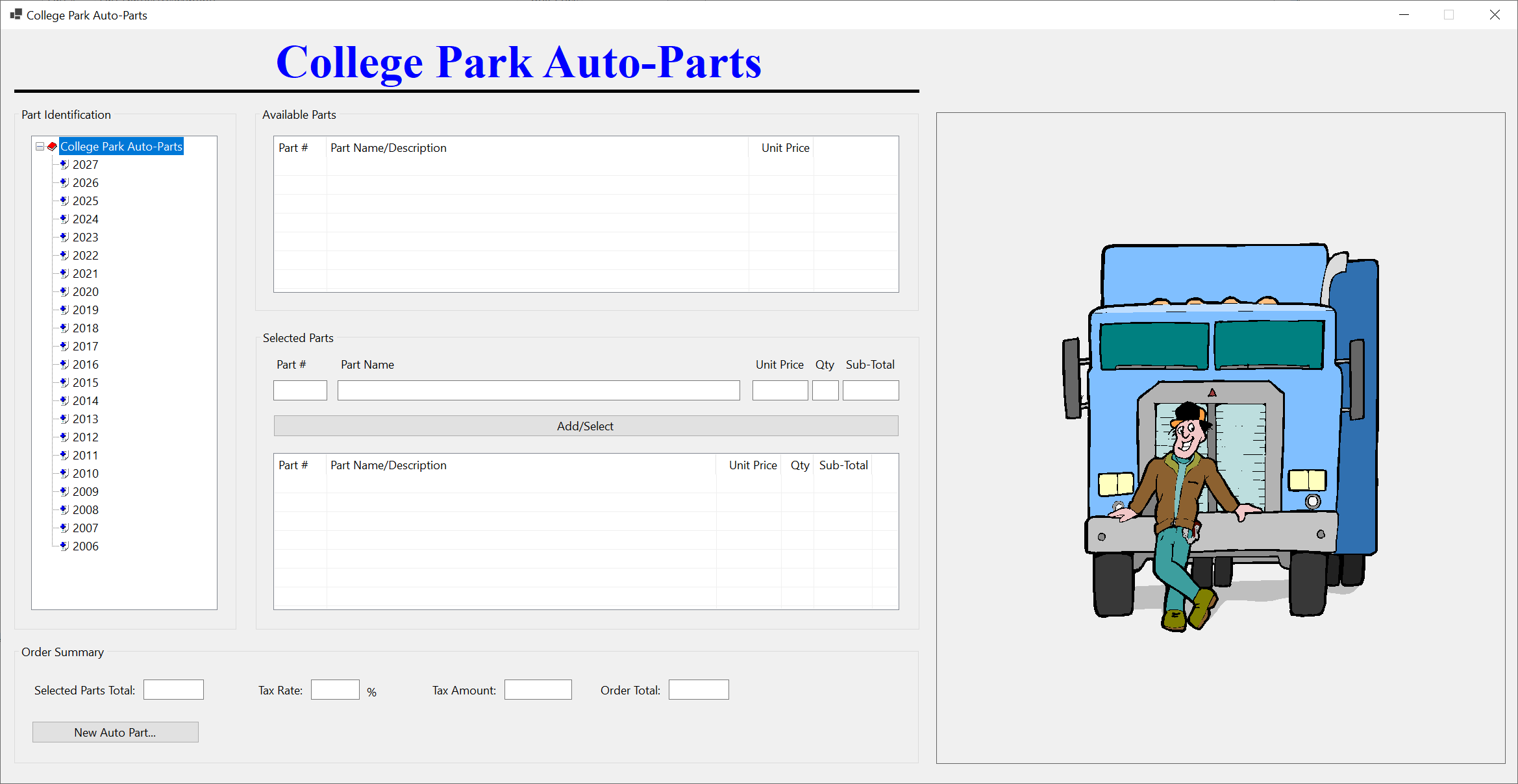
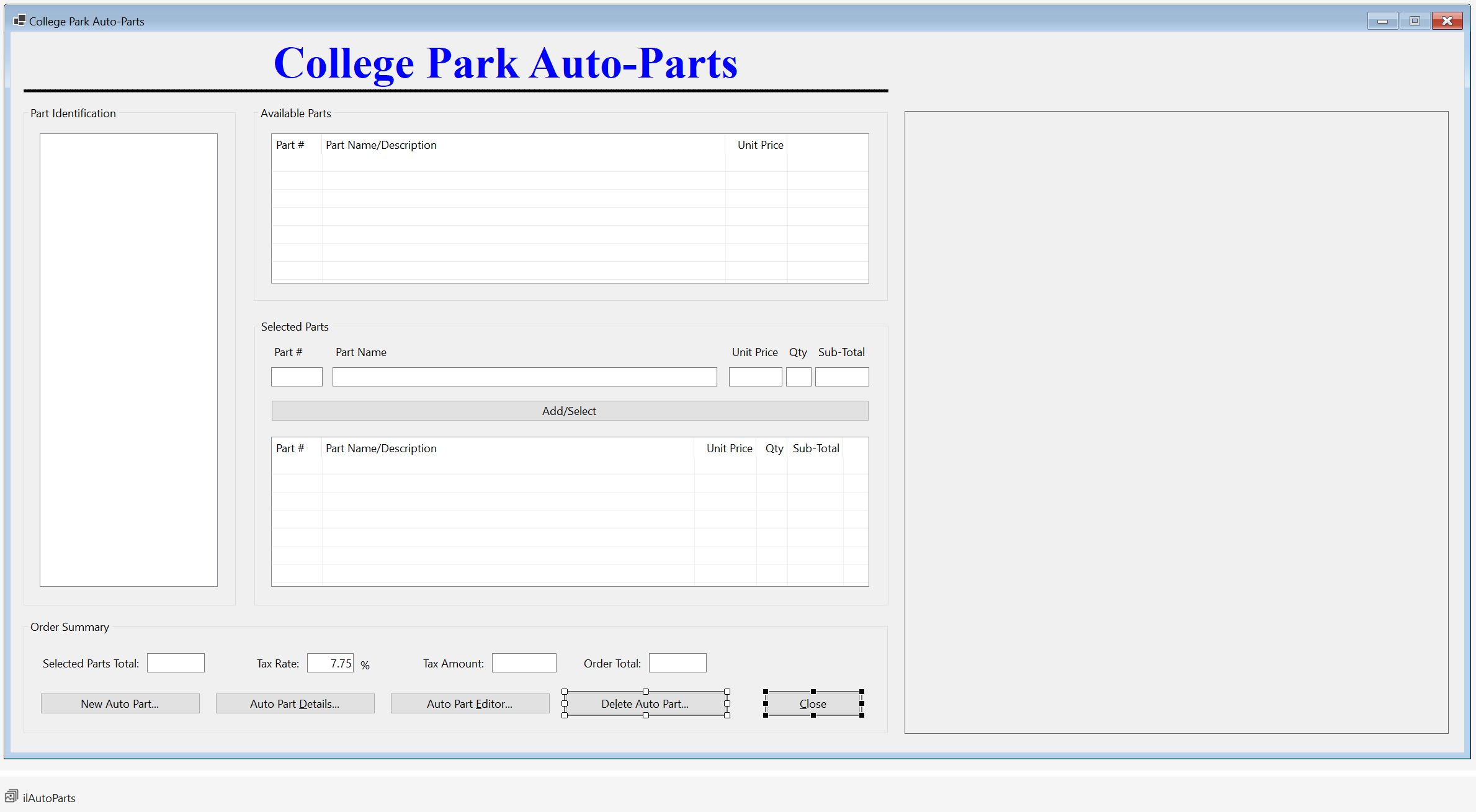
Our application will have a central form from which all the regular operations are performed. To start, we will design it to show the user interface that will allow the employees to interact with the application.
Practical Learning: Designing the Application
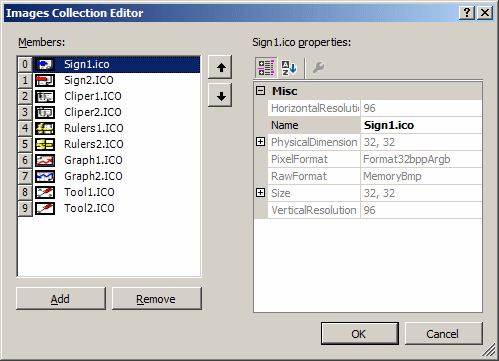
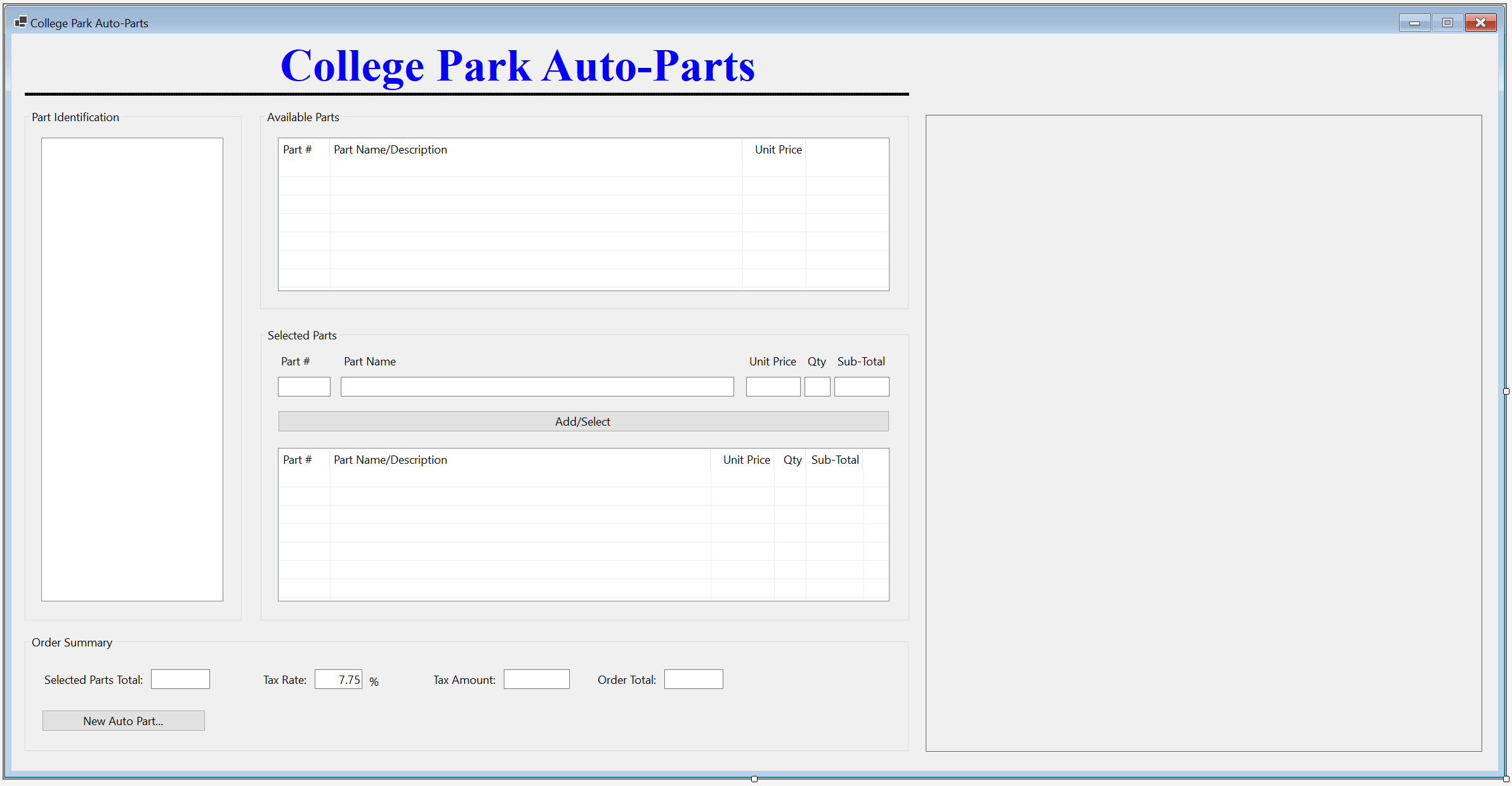
| Control | (Name) | Text | Other Properties | |||||||||||||||||||||||||
| Label | |
College Park Auto-Parts | Font: Times New Roman, 24pt, style=Bold ForeColor: Blue |
|||||||||||||||||||||||||
| PictureBox | |
BackColor: Black Size -> Height: 5 |
||||||||||||||||||||||||||
| GroupBox |  |
Part Identification | ||||||||||||||||||||||||||
| TreeView |  |
tvwAutoParts | ImageList: AutoPartsImages | |||||||||||||||||||||||||
| GroupBox | |
Available Parts | ||||||||||||||||||||||||||
| ListView |  |
lvwAvailableParts | View: Details FullRowSelect: True GridLines: True |
|||||||||||||||||||||||||
| Columns |
|
|||||||||||||||||||||||||||
| PictureBox | |
pbxPartImage | BorderStyle: FixedSingle SizeMode: AutoSize |
|||||||||||||||||||||||||
| GroupBox | |
Selected Parts | ||||||||||||||||||||||||||
| Label | |
Part # | ||||||||||||||||||||||||||
| Label | |
Part Name | ||||||||||||||||||||||||||
| Label | |
Unit Price | ||||||||||||||||||||||||||
| Label | |
Qty | ||||||||||||||||||||||||||
| Label | |
Sub-Total | ||||||||||||||||||||||||||
| Text Box | |
txtPartNumber | ||||||||||||||||||||||||||
| Text Box | |
txtPartName | ||||||||||||||||||||||||||
| Text Box | |
txtUnitPrice | TextAlign: Right | |||||||||||||||||||||||||
| Text Box | |
txtQuantity | TextAlign: Right | |||||||||||||||||||||||||
| Text Box | |
txtSubTotal | TextAlign: Right | |||||||||||||||||||||||||
| Button | |
btnAdd | Add/Select | |||||||||||||||||||||||||
| ListView | |
lvwSelectedParts | View: Details FullRowSelect: True GridLines: True |
|||||||||||||||||||||||||
| Columns |
|
|||||||||||||||||||||||||||
| GroupBox | |
Order Summary | ||||||||||||||||||||||||||
| Button | |
btnNewAutoPart | New Auto Part... | |||||||||||||||||||||||||
| Label | |
Selected Parts Total: | ||||||||||||||||||||||||||
| Text Box | |
txtSelectedPartsTotal | TextAlign: Right | |||||||||||||||||||||||||
| Label | |
Tax Rate: | ||||||||||||||||||||||||||
| Text Box | |
txtTaxRate | TextAlign: Right | |||||||||||||||||||||||||
| Label | |
Tax Amount: | ||||||||||||||||||||||||||
| Text Box | |
txtTaxAmount | TextAlign: Right | |||||||||||||||||||||||||
| Label | |
Order Total: | ||||||||||||||||||||||||||
| Text Box | |
txtOrderTotal | TextAlign: Right | |||||||||||||||||||||||||
using System.Xml.Serialization;
namespace CollegeParkAutoParts
{
public partial class StoreInvetory : Form
{
/* We will need a list of auto-parts.
* For demonstration purpose, we are creating the list as a property
* (but a global list is not necessary; we could have used local list variables).*/
public List<AutoPart> AutoParts { get; set; } = new List<AutoPart>();
public StoreInvetory()
{
InitializeComponent();
}
// This function is used to reset the form
void InitializeAutoParts()
{
// When the form must be reset, removes all nodes from the tree view
tvwAutoParts.Nodes.Clear();
// Create the root node of the tree view
TreeNode nodRoot = tvwAutoParts.Nodes.Add("College Park Auto-Parts",
"College Park Auto-Parts", 0, 1);
/* Add the cars years to the tree view.
* Our application will deal only with the cars in the last 21 years. */
for (int years = DateTime.Today.Year + 1; years >= DateTime.Today.Year - 20; years--)
nodRoot.Nodes.Add(years.ToString(), years.ToString(), 2, 3);
// Select the root node
tvwAutoParts.SelectedNode = nodRoot;
// Expand the root node
tvwAutoParts.ExpandAll();
// AutoParts = new List<AutoPart>();
// This is the file that holds the list of auto parts
string strFileName = @"C:\College Park Auto-Parts\AutoParts.xml";
XmlSerializer xsAutoParts = new(typeof(List<AutoPart>));
if (File.Exists(strFileName))
{
// If the inventory file exists, open it
using (FileStream fsAutoParts = new FileStream(strFileName,
FileMode.Open,
FileAccess.Read,
FileShare.Read))
{
// Retrieve the list of items from file
AutoParts = (List<AutoPart>)xsAutoParts.Deserialize(fsAutoParts)!;
// Show the makes nodes
foreach (TreeNode nodYear in nodRoot.Nodes)
{
List<string> lstMakes = new List<string>();
foreach (AutoPart part in AutoParts)
{
if (nodYear.Text == part.Year.ToString())
{
if (!lstMakes.Contains(part.Make!))
lstMakes.Add(part.Make!);
}
}
foreach (string strMake in lstMakes)
nodYear.Nodes.Add(strMake, strMake, 4, 5);
}
// Showing the models nodes
foreach (TreeNode nodYear in nodRoot.Nodes)
{
foreach (TreeNode nodMake in nodYear.Nodes)
{
List<string> lstModels = new List<string>();
foreach (AutoPart part in AutoParts)
{
if( (nodYear.Text == part.Year.ToString() ) &
(nodMake.Text == part.Make))
{
if (!lstModels.Contains(part.Model!))
lstModels.Add(part.Model!);
}
}
foreach (string strModel in lstModels)
nodMake.Nodes.Add(strModel, strModel, 6, 7);
}
}
// Showing the categories nodes
foreach (TreeNode nodYear in nodRoot.Nodes)
{
foreach (TreeNode nodMake in nodYear.Nodes)
{
foreach (TreeNode nodModel in nodMake.Nodes)
{
List<string> lstCategories = new List<string>();
foreach (AutoPart part in AutoParts)
{
if ((nodYear.Text == part.Year.ToString()) &
(nodMake.Text == part.Make) &
(nodModel.Text == part.Model))
{
if (!lstCategories.Contains(part.Category!))
lstCategories.Add(part.Category!);
}
}
foreach (string strCategory in lstCategories)
nodModel.Nodes.Add(strCategory, strCategory, 8, 9);
}
}
}
}
}
lvwSelectedParts.Items.Clear();
lvwAvailableParts.Items.Clear();
txtTaxRate.Text = string.Empty;
txtPartName.Text = string.Empty;
txtQuantity.Text = string.Empty;
txtSubTotal.Text = string.Empty;
txtUnitPrice.Text = string.Empty;
txtTaxAmount.Text = string.Empty;
txtOrderTotal.Text = string.Empty;
txtPartNumber.Text = string.Empty;
txtSelectedPartsTotal.Text = string.Empty;
pbxPartImage.Image = Image.FromFile(@"C:\College Park Auto-Parts\Generic.png");
Width = pbxPartImage.Right + 40;
}
private void StoreInvetory_Load(object sender, EventArgs e)
{
InitializeAutoParts();
}
}
}
private void lvwAvailableParts_ItemSelectionChanged(object sender, ListViewItemSelectionChangedEventArgs e)
{
bool pictureFound = false;
string strFileName = @"C:\College Park Auto-Parts1\AutoParts.xml";
XmlSerializer xsAutoParts = new XmlSerializer(typeof(List<AutoPart>));
if (File.Exists(strFileName))
{
using (FileStream fsAutoParts = new FileStream(strFileName,
FileMode.Open,
FileAccess.Read,
FileShare.Read))
{
AutoParts = (List<AutoPart>)xsAutoParts.Deserialize(fsAutoParts)!;
foreach (AutoPart part in AutoParts)
{
if (part.PartNumber == long.Parse(e.Item!.SubItems[0].Text))
{
pictureFound = true;
pbxPartImage.Image = Image.FromFile(part.PictureFile!);
break;
}
}
}
}
if (pictureFound == false)
{
pbxPartImage.Image = Image.FromFile(@"C:\College Park Auto-Parts1\Generic.png");
}
Width = pbxPartImage.Right + 40;
Height = pbxPartImage.Bottom + 75;
}private void lvwAvailableParts_DoubleClick(object sender, EventArgs e)
{
ListViewItem lviAutoPart = lvwAvailableParts.SelectedItems[0];
if ((lvwAvailableParts.SelectedItems.Count == 0) ||
(lvwAvailableParts.SelectedItems.Count > 1))
return;
txtPartNumber.Text = lviAutoPart.Text;
txtPartName.Text = lviAutoPart.SubItems[1].Text;
txtUnitPrice.Text = lviAutoPart.SubItems[2].Text;
txtQuantity.Text = "1";
txtSubTotal.Text = lviAutoPart.SubItems[2].Text;
txtQuantity.Focus();
}private void txtUnitPrice_Leave(object sender, EventArgs e)
{
double subTotal;
double unitPrice = 0D;
double quantity = 0.00d;
try
{
unitPrice = double.Parse(txtUnitPrice.Text);
}
catch (FormatException)
{
MsgBox.Regular("Invalid Unit Price!");
}
try
{
quantity = int.Parse(txtQuantity.Text);
}
catch (FormatException)
{
MsgBox.Regular("Invalid Quandtity!");
}
subTotal = unitPrice * quantity;
txtSubTotal.Text = subTotal.ToString("F");
}private void txtPartNumber_Leave(object sender, EventArgs e)
{
bool found = false;
foreach (AutoPart part in AutoParts)
{
if (part.PartNumber == long.Parse(txtPartNumber.Text))
{
txtPartName.Text = part.PartName;
txtUnitPrice.Text = part.UnitPrice.ToString("F");
if (string.IsNullOrEmpty(txtQuantity.Text))
txtQuantity.Text = "1";
txtSubTotal.Text = part.UnitPrice.ToString("F");
txtQuantity.Focus();
found = true;
break;
}
}
if (found == false)
{
txtPartName.Text = "";
txtUnitPrice.Text = "0.00";
txtQuantity.Text = "0";
txtSubTotal.Text = "0.00";
MsgBox.Regular("There is no part with that number.");
}
}private void CalculateOrder() { double partsTotal = 0.00D; double taxRate = 0.00D; double taxAmount, orderTotal; if (string.IsNullOrEmpty(txtTaxRate.Text)) txtTaxRate.Text = "7.25"; foreach (ListViewItem lvi in lvwSelectedParts.Items) { ListViewItem.ListViewSubItem SubItem = lvi.SubItems[4]; partsTotal += double.Parse(SubItem.Text); } try { taxRate = double.Parse(txtTaxRate.Text) / 100; } catch (FormatException) { MsgBox.Regular("Invalid Tax Rate"); } taxAmount = partsTotal * taxRate; orderTotal = partsTotal + taxAmount; txtSelectedPartsTotal.Text = partsTotal.ToString("F"); txtTaxAmount.Text = taxAmount.ToString("F"); txtOrderTotal.Text = orderTotal.ToString("F"); } void btnAdd_Click(object sender, EventArgs e) { if (string.IsNullOrEmpty(txtPartNumber.Text)) { MsgBox.Regular("There is no part to be added to the order."); return; } foreach (AutoPart part in AutoParts) { if (part.PartNumber == long.Parse(txtPartNumber.Text)) { ListViewItem lviSelectedPart = new ListViewItem(part.PartNumber.ToString()); lviSelectedPart.SubItems.Add(part.PartName); lviSelectedPart.SubItems.Add(part.UnitPrice.ToString()); lviSelectedPart.SubItems.Add(txtQuantity.Text); lviSelectedPart.SubItems.Add(txtSubTotal.Text); lvwSelectedParts.Items.Add(lviSelectedPart); } } CalculateOrder(); }
private void lvwSelectedParts_DoubleClick(object sender, EventArgs e)
{
ListViewItem lviSelectedPart = lvwSelectedParts.SelectedItems[0];
if ((lvwSelectedParts.SelectedItems.Count == 0) ||
(lvwSelectedParts.SelectedItems.Count > 1))
return;
txtPartNumber.Text = lviSelectedPart.Text;
txtPartName.Text = lviSelectedPart.SubItems[1].Text;
txtUnitPrice.Text = lviSelectedPart.SubItems[2].Text;
txtQuantity.Text = lviSelectedPart.SubItems[3].Text;
txtSubTotal.Text = lviSelectedPart.SubItems[4].Text;
lvwSelectedParts.Items.Remove(lviSelectedPart);
CalculateOrder();
}private void tvwAutoParts_NodeMouseClick(object sender, TreeNodeMouseClickEventArgs e)
{
TreeNode nodClicked = e.Node!;
if (nodClicked.Level == 4)
lvwAvailableParts.Items.Clear();
try
{
foreach (AutoPart part in AutoParts)
{
if ((part.Category == nodClicked.Text) &&
(part.Model == nodClicked.Parent!.Text) &&
(part.Make == nodClicked.Parent.Parent!.Text) &&
(part.Year.ToString() == nodClicked.Parent.Parent.Parent!.Text))
{
ListViewItem lviAutoPart = new ListViewItem(part.PartNumber.ToString());
lviAutoPart.SubItems.Add(part.PartName);
lviAutoPart.SubItems.Add(part.UnitPrice.ToString("F"));
lvwAvailableParts.Items.Add(lviAutoPart);
}
}
}
catch (NullReferenceException)
{
}
}private void btnNewAutoPart_Click(object sender, EventArgs e)
{
StoreItemNew nsi = new StoreItemNew();
nsi.ShowDialog();
InitializeAutoParts();
}
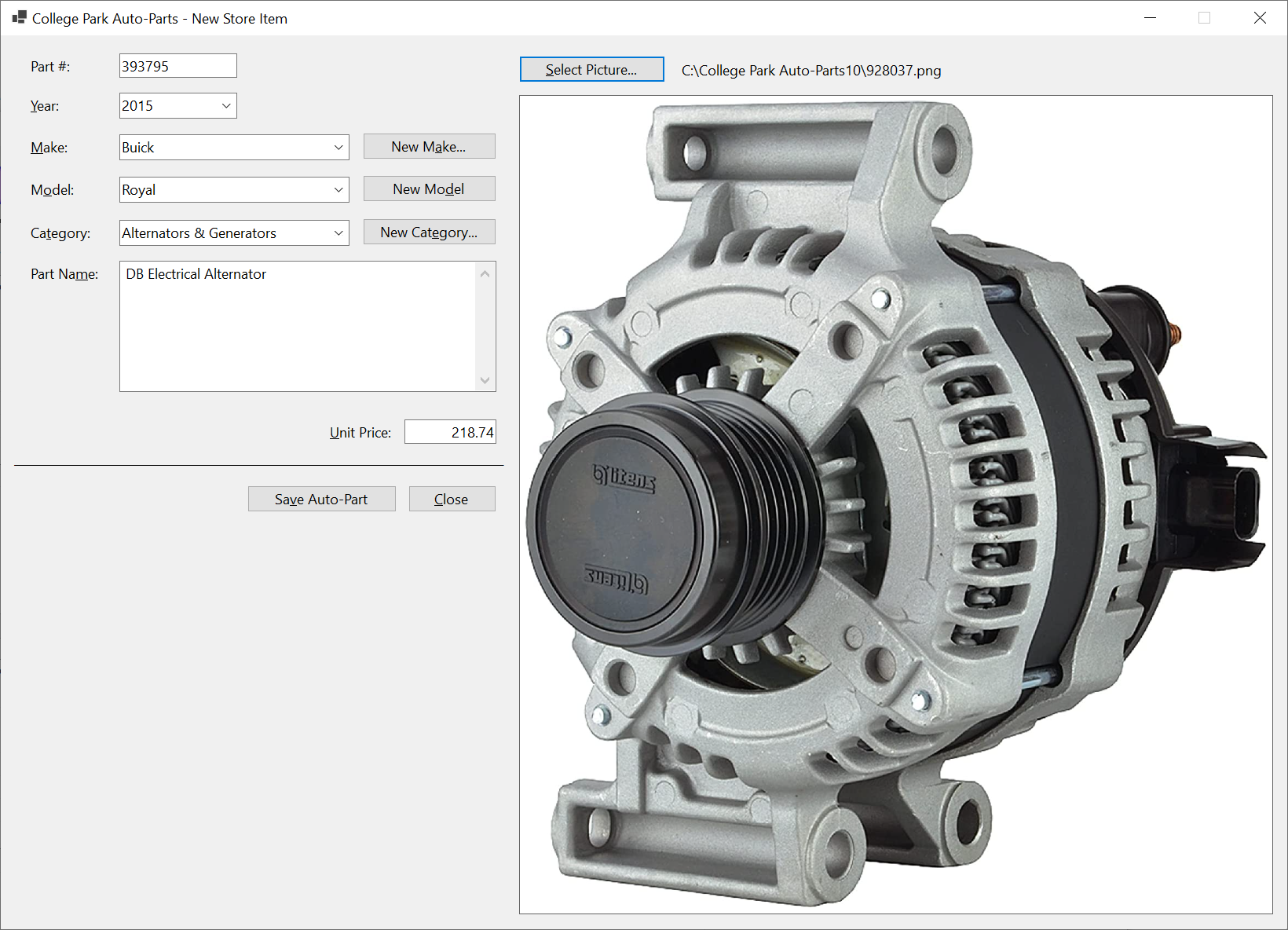
| Part # | Year | Make | Model | Category | Item Name | Unit Price | Picture File |
| 393795 | 2015 | Buick | Regal | Alternators & Generators | DB Electrical Alternator | 218.74 | 928037 |
| 155975 | 2010 | Buick | Lacrosse | Hub Assemblies | Front/Rear Wheel Hub Bearing Assembly | 94.98 | 155975 |
| 928374 | 2018 | Chevrolet | Express 3500 | Shocks, Struts & Suspension | Suspension Kit (Front; with 3 Groove Pitman Arm) | 142.44 | 304031 |
| 730283 | 2020 | Jeep | Wrangler Unlimited Sahara | Oil Filters | Hydraulic Cylinder Timing Belt Tensioner | 14.15 | 730283 |
| 290741 | 2015 | Ford | F-150 XL 3.5L V6 Flex Regular Cab 2 Full-Size Doors | Shocks, Struts & Suspension | Front Strut and Coil Spring Assembly - Set of 2 | 245.68 | 290741 |
| 740248 | 2013 | Chevrolet | Equinox | Bearings & Seals | Wheel hub bearing Assembly | 99.95 | 740248 |
| 283759 | 2012 | Dodge | Charger 3.6L | Starters | DB Electrical SND0787 Starter | 212.58 | 283759 |
| 799428 | 2012 | Cadillac | XTS | Bearings & Seals | Front/Rear Wheel Hub Bearing Assembly 5 Lugs w/ABS | 79.97 | 799428 |
| 648203 | 2018 | Honda | CRV | Alternator | Alternator | 202.47 | 593804 |
| 502853 | 2014 | GMC | Terrain | Bearings & Seals | Wheel Hub Bearing Assembly | 48.85 | 927944 |
| 520384 | 2020 | Jeep | Wrangler Unlimited Sahara | Drum Brake | Rear Dynamic Friction Company True-Arc Brake Shoes | 42.22 | 520384 |
| 727394 | 2018 | Toyota | Corolla SE 1.8L L4 Gas | Alternators | DB Electrical 400-40169 Alternator Compatible With/Replacement For 125 Internal Fan Type Decoupler Pulley Type Internal Regulator CW Rotation | 215.84 | 727394 |
| 927944 | 2017 | Chevrolet | Equinox | Bearings & Seals | Wheel Hub Bearing Assembly | 48.85 | 927944 |
| 749471 | 2019 | Toyota | Prius | Shocks, Struts & Suspension | 2-Piece Suspension Strut and Coil Spring Kit (593024) | 299.97 | 593024 |
| 927307 | 2014 | Buick | Regal | Alternators & Generators | DB Electrical Alternator | 218.74 | 928037 |
| 304031 | 2017 | Chevrolet | Express 2500 | Shocks, Struts & Suspension | Suspension Kit (Front; with 3 Groove Pitman Arm) | 142.44 | 304031 |
| 497249 | 2013 | GMC | Sierra 1500 | Drum Brake | ACDelco Gold 17960BF1 Bonded Rear Drum Brake Shoe Set | 58.92 | 497249 |
| 973947 | 2012 | Honda | Accord | Brake Kits | R1 Concepts Front Rear Brakes and Rotors Kit |Front Rear Brake Pads| Brake Rotors and Pads| Ceramic Brake Pads and Rotors | 292.84 | 973947 |
| 182694 | 2016 | Chevrolet | Impala | Bearings & Seals | Wheel Hub Bearing Assembly | 48.85 | 927944 |
| 497249 | 2013 | Chevrolet | Silverado 1500 | Drum Brake | ACDelco Gold 17960BF1 Bonded Rear Drum Brake Shoe Set | 58.92 | 497249 |
| 297149 | 2020 | Jeep | Wrangler | Air Filters | ACDelco Gold A3408C Air Filter | 22.83 | 297149 |
| 927397 | 2016 | Chevrolet | Impala | Bearings & Seals | Front/Rear Wheel Hub Bearing Assembly 5 Lugs w/ABS | 79.97 | 799428 |
| 392972 | 2020 | Toyota | Prius AWD-e | Shocks, Struts & Suspension | 2-Piece Suspension Strut and Coil Spring Kit (593024) | 299.97 | 593024 |
| 928037 | 2017 | Buick | Regal | Alternators & Generators | DB Electrical Alternator | 218.74 | 928037 |
| 502481 | 2016 | Chevrolet | Equinox | Bearings & Seals | Wheel hub bearing Assembly | 99.95 | 740248 |
| 593804 | 2019 | Honda | Accord LX 1.5L L4 Gas | Alternator | Alternator | 202.47 | 593804 |
| 293748 | 2014 | Toyota | Corolla SE 1.8L L4 Gas | Alternators | DB Electrical 400-40169 Alternator Compatible With/Replacement For 125 Internal Fan Type Decoupler Pulley Type Internal Regulator CW Rotation | 215.84 | 727394 |
| 639704 | 2021 | Kia | Sorento | Brake Kits | Rear Brakes and Rotors Kit |Rear Brake Pads| Brake Rotors and Pads| Optimum OEp Brake Pads and Rotors | 125.15 | 639704 |
| 829385 | 2020 | Jeep | Wrangler Unlimited Sahara | Drum Brake | Centric Brake Shoe | 22.05 | 829385 |
| 484695 | 2014 | GMC | Terrain | Bearings & Seals | Front/Rear Wheel Hub Bearing Assembly 5 Lugs w/ABS | 79.97 | 799428 |
| 807204 | 2016 | Chevrolet | Camaro | Alternators & Generators | DB Electrical Alternator | 218.74 | 928037 |
| 939283 | 2015 | Chevrolet | Equinox | Bearings & Seals | Wheel Hub Bearing Assembly | 48.85 | 927944 |
| 738628 | 2021 | Toyota | Prius AWD-e | Shocks, Struts & Suspension | 2-Piece Suspension Strut and Coil Spring Kit (593024) | 299.97 | 593024 |
| 186950 | 2017 | Honda | CRV | Alternator | Alternator | 202.47 | 593804 |
| 329573 | 2012 | Chevrolet | Equinox | Bearings & Seals | Front/Rear Wheel Hub Bearing Assembly 5 Lugs w/ABS | 79.97 | 799428 |
| 594085 | 2015 | Buick | Regal | Bearings & Seals | Front/Rear Wheel Hub Bearing Assembly 5 Lugs w/ABS | 79.97 | 799428 |
| 928405 | 2018 | Chevrolet | Camaro | Alternators & Generators | DB Electrical Alternator | 218.74 | 928037 |
| 927937 | 2012 | Ford | Focus SE | Starters | Duralast Starter 19481 | 188.88 | 927937 |
| 283948 | 2018 | GMC | Savana 3500 | Shocks, Struts & Suspension | Suspension Kit (Front; with 3 Groove Pitman Arm) | 142.44 | 304031 |
| 495116 | 2020 | Chrysler | Voyager | Brake Kits | Power Stop K7845 Rear Z23 Carbon Fiber Brake Pads with Drilled & Slotted Brake Rotors Kit | 269.75 | 293748 |
| 180400 | 2012 | Cadillac | CTS FWD | Bearings & Seals | Front/Rear Wheel Hub Bearing Assembly 5 Lugs w/ABS | 79.97 | 799428 |
| 593024 | 2021 | Toyota | Prius | Shocks, Struts & Suspension | 2-Piece Suspension Strut and Coil Spring Kit (593024) | 299.97 | 593024 |
| 302839 | 2014 | Chevrolet | Equinox | Bearings & Seals | Wheel Hub Bearing Assembly | 48.85 | 927944 |
| 649394 | 2020 | Jeep | Wrangler Unlimited Sahara | Brake Kits | Power Stop K7940 Front Z23 Evolution Sport Brake Upgrade Kit | 354.46 | 495116 |
| 820684 | 2015 | Buick | LaCrosse | Bearings & Seals | Front/Rear Wheel Hub Bearing Assembly 5 Lugs w/ABS | 79.97 | 799428 |
Store Item Details
In our application, we will provide a form that an employee can use to view the information related to a certain auto part.
Practical Learning: Getting the Details of an Auto Part

| Control | (Name) | Text | Other Properties | |
| Label | |
&Part #: | ||
| Text Box | |
txtPartNumber | ||
| Button | |
btnFindAutoPart | &Find Auto-Part | |
| Label | |
lblPictureFile | Generic | |
| Label | |
&Year: | ||
| Text Box | |
txtYear | ||
| Picture Box | |
pbxPartImage | BorderStyle: FixedSingle: SizeMode: AutoSize |
|
| Label | |
&Make: | ||
| Text Box | |
txtMake | ||
| Label | |
M&odel: | ||
| Text Box | |
txtModel | ||
| Label | |
Ca&tegory: | ||
| Text Box | |
txtCategory | ||
| Label | |
Part Na&me: | ||
| Text Box | |
txtPartName | ScrollBars: Vertical Multiline: True |
|
| Label | |
&Unit Price | ||
| Text Box | |
txtUnitPrice | ||
| Label | |
____________________ | ||
| Button | |
btnClose | &Close | |
using CollegeParkAutoParts1.Models;
using System.Xml.Serialization;
namespace CollegeParkAutoParts1
{
public partial class StoreItemDetails : Form
{
List<AutoPart> AutoParts { get; set; } = new List<AutoPart>();
public StoreItemDetails()
{
InitializeComponent();
}
private void btnFindStoreItem_Click(object sender, EventArgs e)
{
if (string.IsNullOrEmpty(txtPartNumber.Text))
{
MsgBox.Regular("You must enter a (valid) number for an auto-part.");
return;
}
bool foundAutoPart = false;
string strFileName = @"C:\College Park Auto-Parts10\AutoParts.xml";
XmlSerializer xsAutoParts = new XmlSerializer(typeof(List<AutoPart>));
if (File.Exists(strFileName))
{
using (FileStream fsAutoParts = new(strFileName, FileMode.Open, FileAccess.Read, FileShare.Read))
{
AutoParts = (List<AutoPart>)xsAutoParts.Deserialize(fsAutoParts)!;
for (int i = 0; i < AutoParts.Count; i++)
{
if (AutoParts[i].PartNumber.Equals(long.Parse(txtPartNumber.Text)))
{
foundAutoPart = true;
txtMake.Text = AutoParts[i].Make;
txtModel.Text = AutoParts[i].Model;
txtCategory.Text = AutoParts[i].Category;
txtPartName.Text = AutoParts[i].PartName;
txtYear.Text = AutoParts[i].Year.ToString();
txtUnitPrice.Text = AutoParts[i].UnitPrice.ToString("F");
pbxPartImage.Image = Image.FromFile(AutoParts[i].PictureFile!);
lblPictureFile.Text = AutoParts[i].PictureFile;
break;
}
}
}
}
if (foundAutoPart == false)
{
MsgBox.Regular("There is no auto-part with that number in our records.");
lblPictureFile.Text = @"C:\College Park Auto-Parts10\Generic.png";
pbxPartImage.Image = Image.FromFile(@"C:\College Park Auto-Parts10\Generic.png");
}
Width = pbxPartImage.Right + 40;
Height = pbxPartImage.Bottom + 75;
}
}
}using CollegeParkAutoParts1.Models;
using System.Xml.Serialization;
namespace CollegeParkAutoParts1
{
public partial class StoreItemDetails : Form
{
/* The list of auto-parts of our database will be retrieved using a collection class.
* This property will hold the list of auto-parts. */
List<AutoPart> AutoParts { get; set; } = new List<AutoPart>();
public StoreItemDetails()
{
InitializeComponent();
}
private void btnFindStoreItem_Click(object sender, EventArgs e)
{
/* When the user clicks the Find Store Item button, make sure the user typed something.
* If the Part # text box is empty (meaning the user didn't type a number), ...*/
if (string.IsNullOrEmpty(txtPartNumber.Text))
{
// ... display a message box to the user, ...
MsgBox.Regular("You must enter a (valid) number for an auto-part.");
// ... and stop everything
return;
}
// This Boolean variable will allow us to know if an auto part was found.
bool foundAutoPart = false;
/* Our list of auto-parts is stored in an XML file.
* Let's get a reference to that file. */
string strFileName = @"C:\College Park Auto-Parts10\AutoParts.xml";
/* We process our records through XML serialization.
* Create a reference for XML serialization that is initialized with a collection class*/
XmlSerializer xsAutoParts = new XmlSerializer(typeof(List<AutoPart>));
// Before doing anything, check whether a file of auto-parts exists
if (File.Exists(strFileName))
{
// Create a stream reference for our file of au-parts
using (FileStream fsAutoParts = new(strFileName, FileMode.Open, FileAccess.Read, FileShare.Read))
{
/* If the file of auto-parts exists, open that file, get the list of
* auto-parts, and store that list in our collection variable. */
AutoParts = (List<AutoPart>)xsAutoParts.Deserialize(fsAutoParts)!;
// Now that the list of auto-parts exists, navigate to each item of the list
for (int i = 0; i < AutoParts.Count; i++)
{
/* When you reach an auto-part, check whether its part number is
* the same as the number the user typed.*/
if (AutoParts[i].PartNumber.Equals(long.Parse(txtPartNumber.Text)))
{
// If the auto-part was found, make a not by updating our Boolean variable
foundAutoPart = true;
// Get the values of the auto-part and display them in the Windows controls
txtMake.Text = AutoParts[i].Make;
txtModel.Text = AutoParts[i].Model;
txtCategory.Text = AutoParts[i].Category;
txtPartName.Text = AutoParts[i].PartName;
txtYear.Text = AutoParts[i].Year.ToString();
txtUnitPrice.Text = AutoParts[i].UnitPrice.ToString("F");
pbxPartImage.Image = Image.FromFile(AutoParts[i].PictureFile!);
lblPictureFile.Text = AutoParts[i].PictureFile;
/* Since an auto-part was found
* and its values have been displayed, stop searching. */
break;
}
}
}
}
// Check the value of our Boolean variable. If that value is false, ...
if (foundAutoPart == false)
{
// ... it means no auto-part was found. Display a message box to the user
MsgBox.Regular("There is no auto-part with that number in our records.");
lblPictureFile.Text = @"C:\College Park Auto-Parts10\Generic.png";
pbxPartImage.Image = Image.FromFile(@"C:\College Park Auto-Parts10\Generic.png");
}
Width = pbxPartImage.Right + 40;
Height = pbxPartImage.Bottom + 75;
}
private void btnClose_Click(object sender, EventArgs e)
{
Close();
}
}
}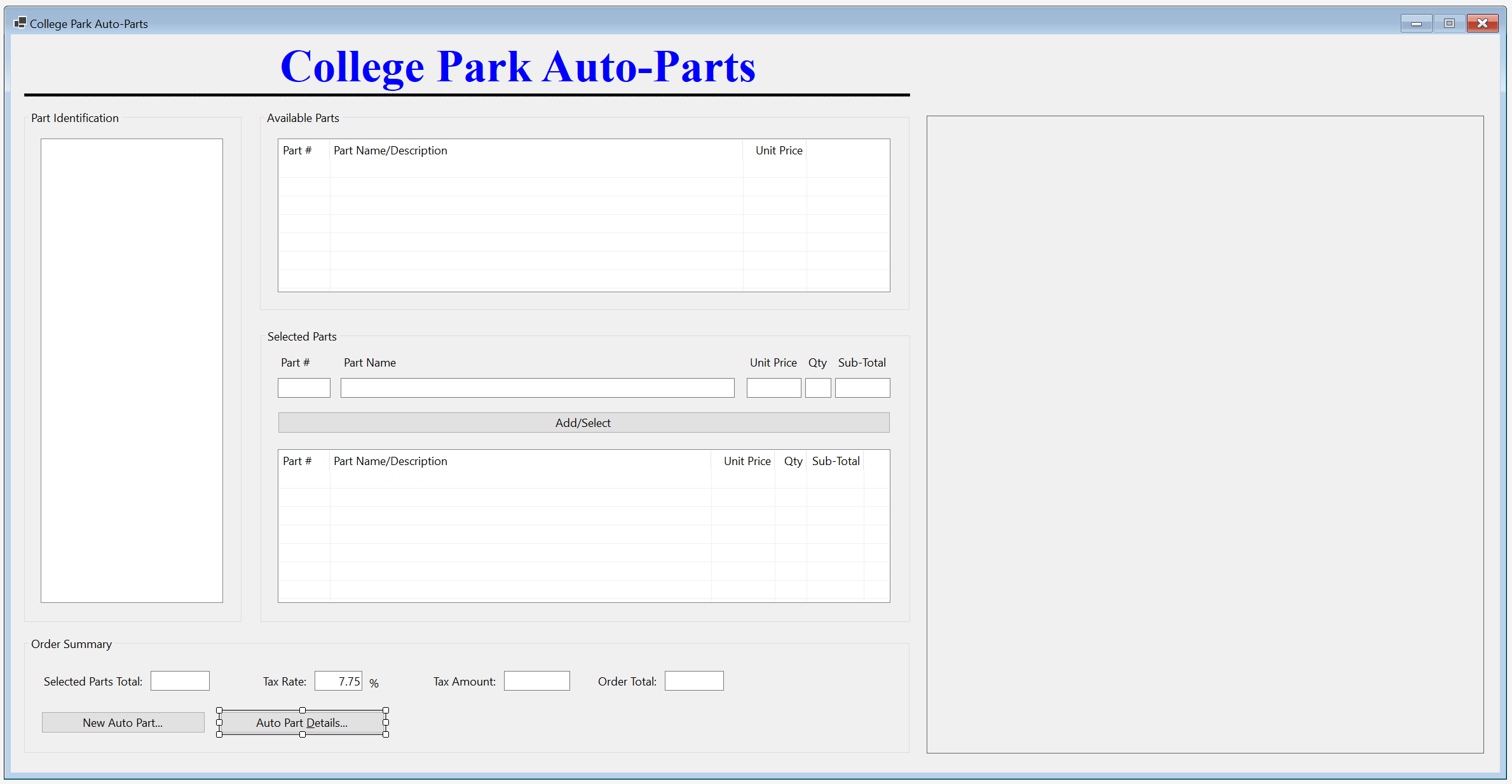
| Control | (Name) | Text | |
| Button | |
btnAutoPartDetails | Auto Part &Details... |
private void btnAutoPartDetails_Click(object sender, EventArgs e)
{
StoreItemDetails details = new StoreItemDetails();
details.Show();
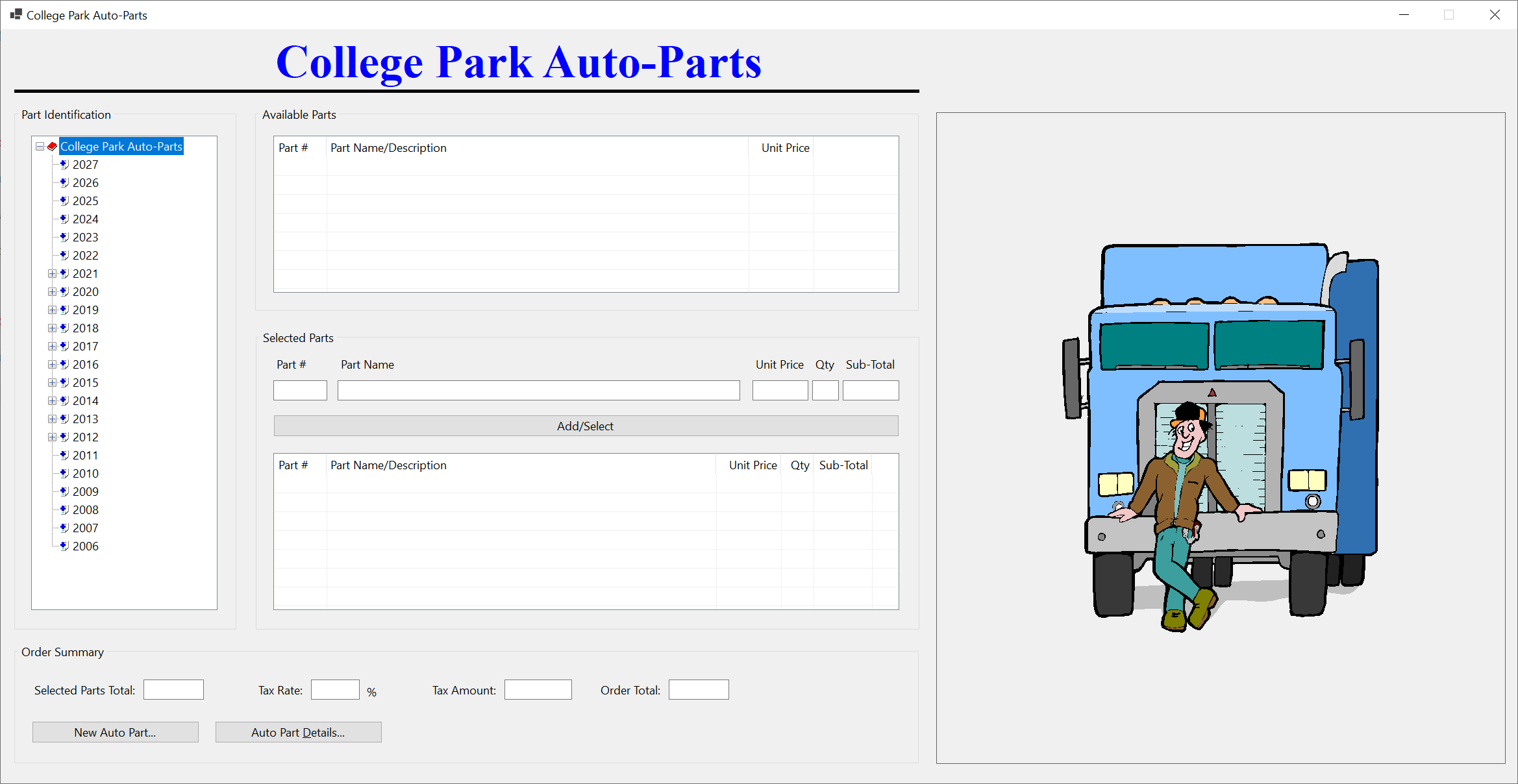
}


Store Item EdItor
Updating a record consists of changing one or more of its details. To support this operation in our application, we will create an appropriate form.
Practical Learning: Creating a Store Item Editor

| Control | (Name) | Text | |
| Button | |
btnFindStoreItem | &Find Store Item |
| Button | |
btnUpdateAutoPart | Up&date Auto-Part |
using CollegeParkAutoParts1.Models;
using System.Xml.Serialization;
namespace CollegeParkAutoParts1
{
public partial class StoreItemEditor : Form
{
List<AutoPart> AutoParts { get; set; } = new List<AutoPart>();
public StoreItemEditor()
{
InitializeComponent();
}
private void InitializeAutoPart()
{
string strFileName = @"C:\College Park Auto-Parts10\AutoParts.xml";
XmlSerializer xsAutoParts = new XmlSerializer(typeof(List<AutoPart>));
cbxYears.Items.Clear();
for (int year = DateTime.Today.Year + 1; year >= DateTime.Today.Year - 20; year--)
{
cbxYears.Items.Add(year);
}
if (File.Exists(strFileName))
{
cbxMakes.Items.Clear();
cbxModels.Items.Clear();
cbxCategories.Items.Clear();
txtPartName.Text = string.Empty;
txtUnitPrice.Text = string.Empty;
txtPartNumber.Text = string.Empty;
using (FileStream fsAutoParts = new FileStream(strFileName,
FileMode.Open,
FileAccess.Read,
FileShare.Read))
{
AutoParts = (List<AutoPart>)xsAutoParts.Deserialize(fsAutoParts)!;
for (int i = 0; i < AutoParts.Count; i++)
{
if (!cbxMakes.Items.Contains(AutoParts[i].Make))
{
cbxMakes.Items.Add(AutoParts[i].Make!);
}
}
for (int i = 0; i < AutoParts.Count; i++)
{
if (!cbxCategories.Items.Contains(AutoParts[i].Category))
{
cbxCategories.Items.Add(AutoParts[i].Category!);
}
}
}
}
lblPictureFile.Text = @"C:\College Park Auto-Parts10\Generic.png";
pbxPartImage.Image = Image.FromFile(@"C:\College Park Auto-Parts10\Generic.png");
Width = pbxPartImage.Right + 40;
Height = pbxPartImage.Bottom + 75;
}
private void StoreItemEditor_Load(object sender, EventArgs e)
{
InitializeAutoPart();
}
}
}private void btnFindStoreItem_Click(object sender, EventArgs e)
{
if (string.IsNullOrEmpty(txtPartNumber.Text))
{
MsgBox.Regular("You must enter a (valid) number for an auto-part.");
return;
}
bool foundAutoPart = false;
string strFileName = @"C:\College Park Auto-Parts10\AutoParts.xml";
XmlSerializer xsAutoParts = new XmlSerializer(typeof(List<AutoPart>));
if (File.Exists(strFileName))
{
using (FileStream fsAutoParts = new(strFileName, FileMode.Open, FileAccess.Read, FileShare.Read))
{
AutoParts = (List<AutoPart>)xsAutoParts.Deserialize(fsAutoParts)!;
for (int i = 0; i < AutoParts.Count; i++)
{
if (AutoParts[i].PartNumber.Equals(long.Parse(txtPartNumber.Text)))
{
foundAutoPart = true;
cbxMakes.Text = AutoParts[i].Make;
cbxModels.Text = AutoParts[i].Model;
cbxCategories.Text = AutoParts[i].Category;
txtPartName.Text = AutoParts[i].PartName;
cbxYears.Text = AutoParts[i].Year.ToString();
txtUnitPrice.Text = AutoParts[i].UnitPrice.ToString("F");
pbxPartImage.Image = Image.FromFile(AutoParts[i].PictureFile!);
lblPictureFile.Text = AutoParts[i].PictureFile;
break;
}
}
}
}
if (foundAutoPart == false)
{
MsgBox.Regular("There is no auto-part with that number in our records.");
lblPictureFile.Text = @"C:\College Park Auto-Parts\Generic.png";
pbxPartImage.Image = Image.FromFile(@"C:\College Park Auto-Parts\Generic.png");
}
Width = pbxPartImage.Right + 40;
Height = pbxPartImage.Bottom + 75;
}private void btnSelectPicture_Click(object sender, EventArgs e)
{
if (ofdPictureFile.ShowDialog() == DialogResult.OK)
{
lblPictureFile.Text = ofdPictureFile.FileName;
pbxPartImage.Image = Image.FromFile(ofdPictureFile.FileName);
}
else
{
pbxPartImage.Image = Image.FromFile(@"C:\College Park Auto-Parts10\Generic.png");
}
Width = pbxPartImage.Right + 40;
Height = pbxPartImage.Bottom + 75;
}private void cbxMakes_SelectedIndexChanged(object sender, EventArgs e)
{
cbxModels.Items.Clear();
cbxModels.Text = string.Empty;
foreach (AutoPart part in AutoParts)
{
if (part.Make == cbxMakes.Text)
{
if (!cbxModels.Items.Contains(part.Model))
{
cbxModels.Items.Add(part.Model!);
}
}
}
}private void btnNewMake_Click(object sender, EventArgs e)
{
Make editor = new Make();
if (editor.ShowDialog() == DialogResult.OK)
{
if (editor.txtMake.Text.Length > 0)
{
string strMake = editor.txtMake.Text;
if (cbxMakes.Items.Contains(strMake))
{
MsgBox.Regular(strMake + " is already in the list.");
}
else
{
cbxMakes.Items.Add(strMake);
}
cbxMakes.Text = strMake;
}
}
}private void btnNewModel_Click(object sender, EventArgs e)
{
Model editor = new();
if (editor.ShowDialog() == DialogResult.OK)
{
if (editor.txtModel.Text.Length > 0)
{
string strModel = editor.txtModel.Text;
if (cbxModels.Items.Contains(strModel))
{
MsgBox.Regular(strModel + " is already in the list.");
}
else
{
cbxModels.Items.Add(strModel);
}
cbxModels.Text = strModel;
}
}
}private void btnNewCategory_Click(object sender, EventArgs e)
{
var editor = new Category();
if (editor.ShowDialog() == DialogResult.OK)
{
if (editor.txtCategory.Text.Length > 0)
{
string strCategory = editor.txtCategory.Text;
if (cbxCategories.Items.Contains(strCategory))
{
MsgBox.Regular(strCategory + " is already in the list.");
}
else
{
cbxCategories.Items.Add(strCategory);
}
cbxCategories.Text = strCategory;
}
}
}private void btnUpdateAutoPart_Click(object sender, EventArgs e)
{
string strFileName = @"C:\College Park Auto-Parts10\AutoParts.xml";
XmlSerializer xsAutoParts = new XmlSerializer(typeof(List<AutoPart>));
if (File.Exists(strFileName))
{
using (FileStream fsAutoParts = new FileStream(strFileName,
FileMode.Open,
FileAccess.Read,
FileShare.Read))
{
AutoParts = (List<AutoPart>)xsAutoParts.Deserialize(fsAutoParts)!;
}
}
for (int i = 0; i < AutoParts.Count; i++)
{
if (AutoParts[i].PartNumber.Equals(long.Parse(txtPartNumber.Text)))
{
AutoParts[i].Year = Convert.ToInt32(cbxYears.Text);
AutoParts[i].Make = cbxMakes.Text;
AutoParts[i].Model = cbxModels.Text;
AutoParts[i].Category = cbxCategories.Text;
AutoParts[i].PartName = txtPartName.Text;
AutoParts[i].UnitPrice = Convert.ToDouble(txtUnitPrice.Text);
AutoParts[i].PictureFile = lblPictureFile.Text;
TextWriter twAutoParts = new StreamWriter(strFileName);
xsAutoParts.Serialize(twAutoParts, AutoParts);
twAutoParts.Close();
break;
}
}
InitializeAutoPart();
}using CollegeParkAutoParts1.Models;
using System.Xml.Serialization;
namespace CollegeParkAutoParts1
{
public partial class StoreItemEditor : Form
{
/* This property is used to hold the list of auto-parts of our application.
* (We didn't have to use a global variable. We could have used local variables.) */
List<AutoPart> AutoParts { get; set; } = new List<AutoPart>();
public StoreItemEditor()
{
InitializeComponent();
}
/* This function is used to reset the form.
* It can be called when necessary. */
private void InitializeAutoPart()
{
// This file is the repository of our database
string strFileName = @"C:\College Park Auto-Parts10\AutoParts.xml";
// We will use XML serialization to manage the records of our database
XmlSerializer xsAutoParts = new XmlSerializer(typeof(List<AutoPart>));
cbxYears.Items.Clear();
/* Show the years in the top combo box.
* We will consider only the cars made in the last 20 years. */
for (int year = DateTime.Today.Year + 1; year >= DateTime.Today.Year - 20; year--)
{
cbxYears.Items.Add(year);
}
// Check whether the file that holds the store inventory was created already
if (File.Exists(strFileName))
{
cbxMakes.Items.Clear();
cbxModels.Items.Clear();
cbxCategories.Items.Clear();
txtPartName.Text = string.Empty;
txtUnitPrice.Text = string.Empty;
txtPartNumber.Text = string.Empty;
// If the inventory file exists, open it
using (FileStream fsAutoParts = new FileStream(strFileName,
FileMode.Open,
FileAccess.Read,
FileShare.Read))
{
// Retrieve the list of items from file
AutoParts = (List<AutoPart>)xsAutoParts.Deserialize(fsAutoParts)!;
// Display the cars manufacturers in the combo box
for (int i = 0; i < AutoParts.Count; i++)
{
// Make sure the list box doesn't yet have the category being added
if (!cbxMakes.Items.Contains(AutoParts[i].Make))
{
cbxMakes.Items.Add(AutoParts[i].Make!);
}
}
// Display the categories in the box
for (int i = 0; i < AutoParts.Count; i++)
{
// Make sure the list box doesn't yet have the category being added
if (!cbxCategories.Items.Contains(AutoParts[i].Category))
{
cbxCategories.Items.Add(AutoParts[i].Category!);
}
}
}
}
// Display the path of the default picture file of the auto part in the top-right label
lblPictureFile.Text = @"C:\College Park Auto-Parts10\Generic.png";
// Display the default auto-part image in the picture box
pbxPartImage.Image = Image.FromFile(@"C:\College Park Auto-Parts10\Generic.png");
// Resize the form to show the whole auto-part image
Width = pbxPartImage.Right + 40;
Height = pbxPartImage.Bottom + 75;
}
private void StoreItemEditor_Load(object sender, EventArgs e)
{
InitializeAutoPart();
}
private void btnFindStoreItem_Click(object sender, EventArgs e)
{
/* When the user clicks the Find Store Item button, make sure the user typed something.
* If the Part # text box is empty (meaning the user didn't type a number), ...*/
if (string.IsNullOrEmpty(txtPartNumber.Text))
{
// ... display a message box to the user, ...
MsgBox.Regular("You must enter a (valid) number for an auto-part.");
// ... and stop everything
return;
}
// This Boolean variable will allow us to know if an auto part was found.
bool foundAutoPart = false;
/* Our list of auto-parts is stored in an XML file.
* Let's get a reference to that file. */
string strFileName = @"C:\College Park Auto-Parts10\AutoParts.xml";
/* We process our records through XML serialization.
* Create a reference for XML serialization that is initialized with a collection class*/
XmlSerializer xsAutoParts = new XmlSerializer(typeof(List<AutoPart>));
// Before doing anything, check whether a file of auto-parts exists
if (File.Exists(strFileName))
{
// Create a stream reference for our file of au-parts
using (FileStream fsAutoParts = new(strFileName, FileMode.Open, FileAccess.Read, FileShare.Read))
{
/* If the file of auto-parts exists, open that file, get the list of
* auto-parts, and store that list in our collection variable. */
AutoParts = (List<AutoPart>)xsAutoParts.Deserialize(fsAutoParts)!;
// Now that the list of auto-parts exists, navigate to each item of the list
for (int i = 0; i < AutoParts.Count; i++)
{
/* When you reach an auto-part, check whether its part number is
* the same as the number the user typed.*/
if (AutoParts[i].PartNumber.Equals(long.Parse(txtPartNumber.Text)))
{
// If the auto-part was found, make a not by updating our Boolean variable
foundAutoPart = true;
cbxMakes.Text = AutoParts[i].Make;
cbxModels.Text = AutoParts[i].Model;
cbxCategories.Text = AutoParts[i].Category;
txtPartName.Text = AutoParts[i].PartName;
cbxYears.Text = AutoParts[i].Year.ToString();
txtUnitPrice.Text = AutoParts[i].UnitPrice.ToString("F");
pbxPartImage.Image = Image.FromFile(AutoParts[i].PictureFile!);
lblPictureFile.Text = AutoParts[i].PictureFile;
/* Since an auto-part was found
* and its values have been displayed, stop searching. */
break;
}
}
}
}
// Check the value of our Boolean variable. If that value is false, ...
if (foundAutoPart == false)
{
// ... it means no auto-part was found. Display a message box to the user
MsgBox.Regular("There is no auto-part with that number in our records.");
lblPictureFile.Text = @"C:\College Park Auto-Parts\Generic.png";
pbxPartImage.Image = Image.FromFile(@"C:\College Park Auto-Parts\Generic.png");
}
Width = pbxPartImage.Right + 40;
Height = pbxPartImage.Bottom + 75;
}
private void btnSelectPicture_Click(object sender, EventArgs e)
{
// When the user clicks the Select Picture button, display the Open File Dialog box
if (ofdPictureFile.ShowDialog() == DialogResult.OK)
{
/* If the user selects a picture and clicks OK, ...
* display the path of the picture file in the top-right label, ...*/
lblPictureFile.Text = ofdPictureFile.FileName;
// ... display the auto picture in the picture box
pbxPartImage.Image = Image.FromFile(ofdPictureFile.FileName);
}
else
{
// If the user didn't select a valid picture, display the default one
pbxPartImage.Image = Image.FromFile(@"C:\College Park Auto-Parts10\Generic.png");
}
// Resize the form to show the whole auto-part image
Width = pbxPartImage.Right + 40;
Height = pbxPartImage.Bottom + 75;
}
private void cbxMakes_SelectedIndexChanged(object sender, EventArgs e)
{
    cbxModels.Items.Clear();
    cbxModels.Text = string.Empty;

    foreach (AutoPart part in AutoParts)
    {
        if (part.Make == cbxMakes.Text)
        {
            if (!cbxModels.Items.Contains(part.Model))
            {
                cbxModels.Items.Add(part.Model!);
            }
        }
    }
}
private void btnNewMake_Click(object sender, EventArgs e)
{
    Make editor = new Make();

    if (editor.ShowDialog() == DialogResult.OK)
    {
        if (editor.txtMake.Text.Length > 0)
        {
            string strMake = editor.txtMake.Text;

            if (cbxMakes.Items.Contains(strMake))
            {
                MsgBox.Regular(strMake + " is already in the list.");
            }
            else
            {
                cbxMakes.Items.Add(strMake);
            }

            cbxMakes.Text = strMake;
        }
    }
}
private void btnNewModel_Click(object sender, EventArgs e)
{
    Model editor = new();

    if (editor.ShowDialog() == DialogResult.OK)
    {
        if (editor.txtModel.Text.Length > 0)
        {
            string strModel = editor.txtModel.Text;

            if (cbxModels.Items.Contains(strModel))
            {
                MsgBox.Regular(strModel + " is already in the list.");
            }
            else
            {
                cbxModels.Items.Add(strModel);
            }

            cbxModels.Text = strModel;
        }
    }
}
private void btnNewCategory_Click(object sender, EventArgs e)
{
    var editor = new Category();

    if (editor.ShowDialog() == DialogResult.OK)
    {
        if (editor.txtCategory.Text.Length > 0)
        {
            string strCategory = editor.txtCategory.Text;

            if (cbxCategories.Items.Contains(strCategory))
            {
                MsgBox.Regular(strCategory + " is already in the list.");
            }
            else
            {
                cbxCategories.Items.Add(strCategory);
            }

            cbxCategories.Text = strCategory;
        }
    }
}
private void btnUpdateAutoPart_Click(object sender, EventArgs e)
{
string strFileName = @"C:\College Park Auto-Parts10\AutoParts.xml";
XmlSerializer xsAutoParts = new XmlSerializer(typeof(List<AutoPart>));
if (File.Exists(strFileName))
{
using (FileStream fsAutoParts = new FileStream(strFileName,
FileMode.Open,
FileAccess.Read,
FileShare.Read))
{
AutoParts = (List<AutoPart>)xsAutoParts.Deserialize(fsAutoParts)!;
}
}
for (int i = 0; i < AutoParts.Count; i++)
{
if (AutoParts[i].PartNumber.Equals(long.Parse(txtPartNumber.Text)))
{
AutoParts[i].Year = Convert.ToInt32(cbxYears.Text);
AutoParts[i].Make = cbxMakes.Text;
AutoParts[i].Model = cbxModels.Text;
AutoParts[i].Category = cbxCategories.Text;
AutoParts[i].PartName = txtPartName.Text;
AutoParts[i].UnitPrice = Convert.ToDouble(txtUnitPrice.Text);
AutoParts[i].PictureFile = lblPictureFile.Text;
TextWriter twAutoParts = new StreamWriter(strFileName);
xsAutoParts.Serialize(twAutoParts, AutoParts);
twAutoParts.Close();
break;
}
}
InitializeAutoPart();
}
private void btnClose_Click(object sender, EventArgs e)
{
Close();
}
}
}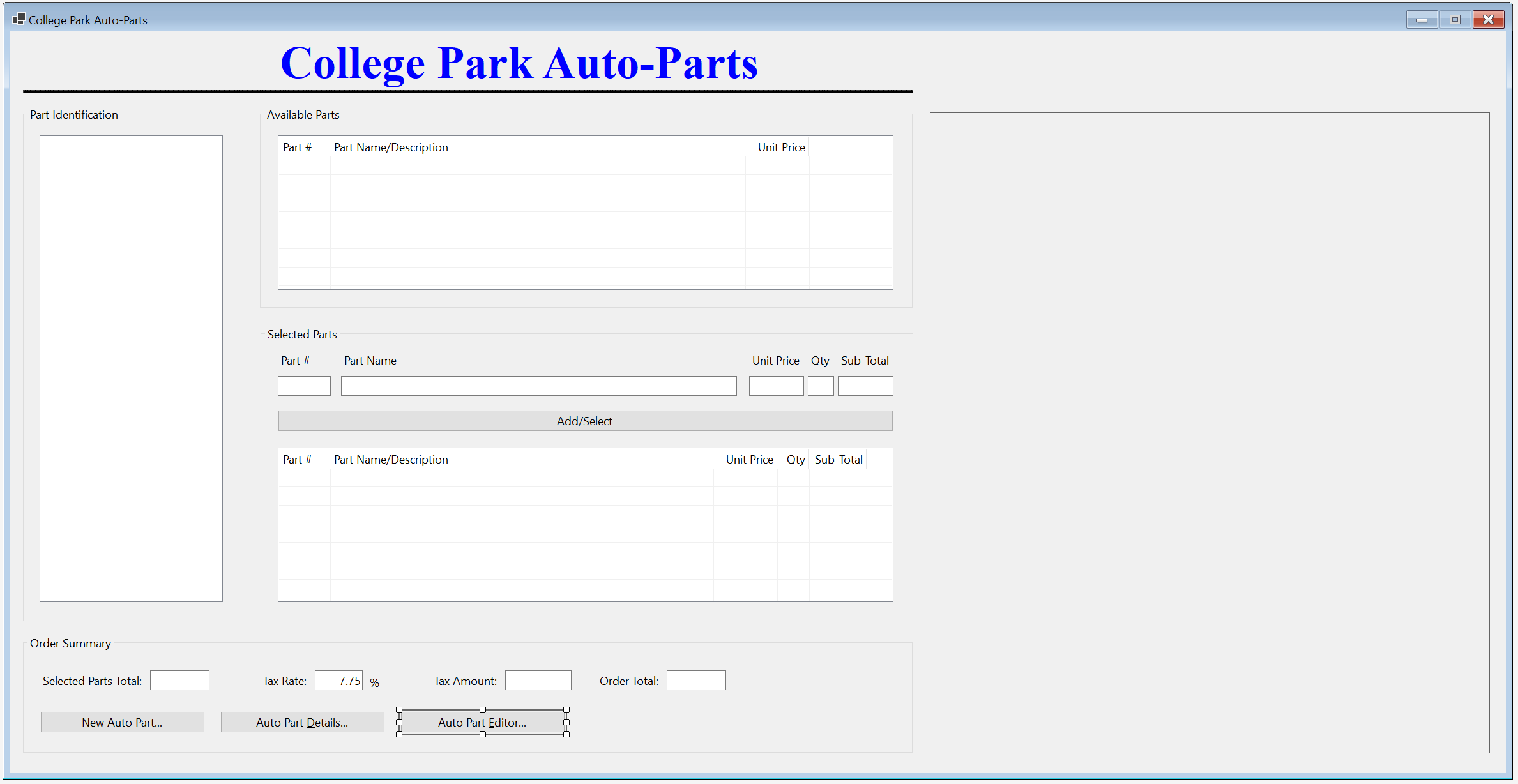
| Control | (Name) | Text | |
| Button | |
btnUpdateAutoPart | Update Auto Part... |
private void btnAutoPartEditor_Click(object sender, EventArgs e)
{
StoreItemEditor editor = new StoreItemEditor();
editor.ShowDialog();
InitializeAutoParts();
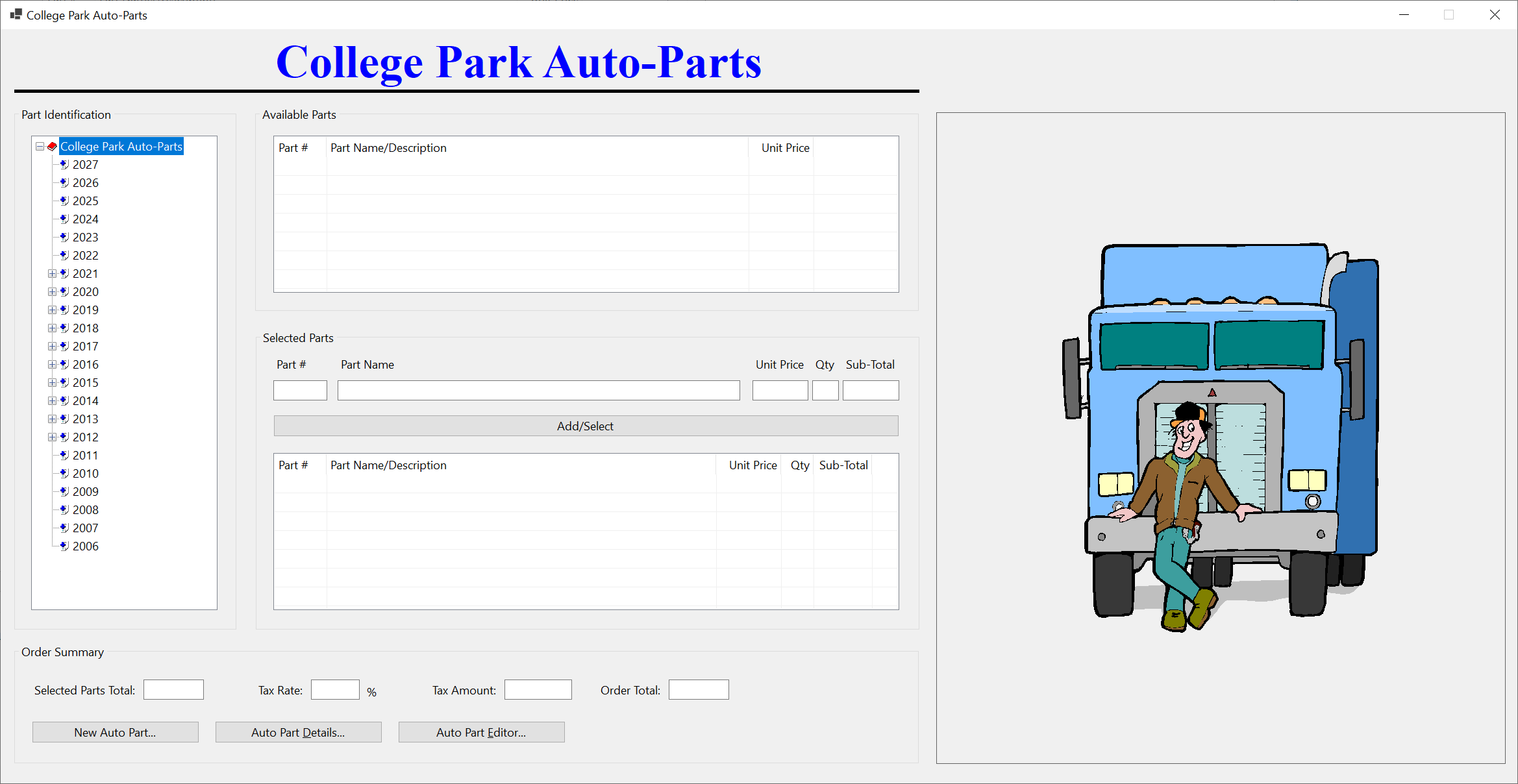
}


Year: 2025 Model: Envista Part Name: Multi-Part Front and Rear Wheel Bearing Assembly Unit Price: 122.86
Store Item Deletion
In a typical database application, when an item is not necessary anymore, its records can be removed. To support this operation, we will create an appropriate form.
Practical Learning: Delting a Store Item

| Control | (Name) | Text | |
| Button | |
btnDeleteAutoPart | Delete Auto Part... |
| Button | |
btnClose | Close |
using CollegeParkAutoParts1.Models;
using System.Xml.Serialization;
namespace CollegeParkAutoParts1
{
public partial class StoreItemDelete : Form
{
List<AutoPart> AutoParts { get; set; } = new List<AutoPart>();
public StoreItemDelete()
{
InitializeComponent();
}
private void btnFindStoreItem_Click(object sender, EventArgs e)
{
/* When the user clicks the Find Store Item button, make sure the user typed something.
* If the Part # text box is empty (meaning the user didn't type a number), ...*/
if (string.IsNullOrEmpty(txtPartNumber.Text))
{
// ... display a message box to the user, ...
MsgBox.Regular("You must enter a (valid) number for an auto-part.");
// ... and stop everything
return;
}
// This Boolean variable will allow us to know if an auto part was found.
bool foundAutoPart = false;
/* Our list of auto-parts is stored in an XML file.
* Let's get a reference to that file. */
string strFileName = @"C:\College Park Auto-Parts10\AutoParts.xml";
/* We process our records through XML serialization.
* Create a reference for XML serialization that is initialized with a collection class*/
XmlSerializer xsAutoParts = new XmlSerializer(typeof(List<AutoPart>));
// Before doing anything, check whether a file of auto-parts exists
if (File.Exists(strFileName))
{
// Create a stream reference for our file of au-parts
using (FileStream fsAutoParts = new(strFileName, FileMode.Open, FileAccess.Read, FileShare.Read))
{
/* If the file of auto-parts exists, open that file, get the list of
* auto-parts, and store that list in our collection variable. */
AutoParts = (List<AutoPart>)xsAutoParts.Deserialize(fsAutoParts)!;
// Now that the list of auto-parts exists, navigate to each item of the list
for (int i = 0; i < AutoParts.Count; i++)
{
/* When you reach an auto-part, check whether its part number is
* the same as the number the user typed.*/
if (AutoParts[i].PartNumber.Equals(long.Parse(txtPartNumber.Text)))
{
// If the auto-part was found, make a not by updating our Boolean variable
foundAutoPart = true;
// Get the values of the auto-part and display them in the Windows controls
txtMake.Text = AutoParts[i].Make;
txtModel.Text = AutoParts[i].Model;
txtCategory.Text = AutoParts[i].Category;
txtPartName.Text = AutoParts[i].PartName;
txtYear.Text = AutoParts[i].Year.ToString();
txtUnitPrice.Text = AutoParts[i].UnitPrice.ToString("F");
pbxPartImage.Image = Image.FromFile(AutoParts[i].PictureFile!);
lblPictureFile.Text = AutoParts[i].PictureFile;
/* Since an auto-part was found
* and its values have been displayed, stop searching. */
break;
}
}
}
}
// Check the value of our Boolean variable. If that value is false, ...
if (foundAutoPart == false)
{
// ... it means no auto-part was found. Display a message box to the user
MsgBox.Regular("There is no auto-part with that number in our records.");
lblPictureFile.Text = @"C:\College Park Auto-Parts10\Generic.png";
pbxPartImage.Image = Image.FromFile(@"C:\College Park Auto-Parts10\Generic.png");
}
Width = pbxPartImage.Right + 40;
Height = pbxPartImage.Bottom + 75;
}
}
}private void btnDeleteAutoPart_Click(object sender, EventArgs e)
{
XmlSerializer xsAutoParts = new(typeof(List<AutoPart>));
string strFileName = @"C:\College Park Auto-Parts10\AutoParts.xml";
if (File.Exists(strFileName))
{
using FileStream fsAutoParts = new(strFileName, FileMode.Open,
FileAccess.Read, FileShare.Read);
AutoParts = (List<AutoPart>)xsAutoParts.Deserialize(fsAutoParts)!;
}
for (int i = 0; i < AutoParts.Count; i++)
{
if (AutoParts[i].PartNumber.Equals(long.Parse(txtPartNumber.Text)))
{
AutoParts.Remove(AutoParts[i]);
TextWriter twAutoParts = new StreamWriter(strFileName);
xsAutoParts.Serialize(twAutoParts, AutoParts);
twAutoParts.Close();
break;
}
}
InitializeAutoPart();
}private void btnClose_Click(object sender, EventArgs e)
{
Close();
}
| Control | (Name) | Text | |
| Label | |
btnDeleteAutoPart | Delete Auto-Part |
| Button | |
btnClose | Close |
private void btnDeleteAutoPart_Click(object sender, EventArgs e)
{
StoreItemDelete delete = new StoreItemDelete();
delete.ShowDialog();
InitializeAutoParts();
}using CollegeParkAutoParts1.Models;
using System.Xml.Serialization;
namespace CollegeParkAutoParts1
{
public partial class StoreInventory : Form
{
/* We will need a list of auto-parts.
* For demonstration purpose, we are creating the list as a property
* (but a global list is not necessary; we could have used local list variables).*/
public List<AutoPart> AutoParts { get; set; } = new List<AutoPart>();
public StoreInventory()
{
InitializeComponent();
}
// This function is used to reset the form
void InitializeAutoParts()
{
// When the form must be reset, removes all nodes from the tree view
tvwAutoParts.Nodes.Clear();
// Create the root node of the tree view
TreeNode nodRoot = tvwAutoParts.Nodes.Add("College Park Auto-Parts",
"College Park Auto-Parts", 0, 1);
/* Add the cars years to the tree view.
* Our application will deal only with the cars in the last 21 years. */
for (int years = DateTime.Today.Year + 1; years >= DateTime.Today.Year - 20; years--)
{
nodRoot.Nodes.Add(years.ToString(), years.ToString(), 2, 3);
}
// Select the root node
tvwAutoParts.SelectedNode = nodRoot;
// Expand the root node
tvwAutoParts.ExpandAll();
// AutoParts = new List<AutoPart>();
// This is the file that holds the list of auto parts
string strFileName = @"C:\College Park Auto-Parts10\AutoParts.xml";
// Create an XmlSerializer object to retrieve the list of auto parts from file
XmlSerializer xsAutoParts = new(typeof(List<AutoPart>));
if (File.Exists(strFileName))
{
// If the inventory file exists, open it
using (FileStream fsAutoParts = new FileStream(strFileName,
FileMode.Open,
FileAccess.Read,
FileShare.Read))
{
// Retrieve the list of items from file
AutoParts = (List<AutoPart>)xsAutoParts.Deserialize(fsAutoParts)!;
// Show the makes nodes
foreach (TreeNode nodYear in nodRoot.Nodes)
{
// Start a new list of car manufacturers
List<string> lstMakes = new List<string>();
// Visit each item from the AutoParts list
foreach (AutoPart part in AutoParts)
{
// When you get to an auto part with the same year as the year of the node, ...
if (nodYear.Text == part.Year.ToString())
{
// ... add the make to the list of makes
if (!lstMakes.Contains(part.Make!))
{
lstMakes.Add(part.Make!);
}
}
}
// For the current year node in the tree view, and from the list of auto-parts, ...
foreach (string strMake in lstMakes)
{
// ... add the make as a node to the tree view
nodYear.Nodes.Add(strMake, strMake, 4, 5);
}
}
// Show the models that correspond to the makes and years nodes
foreach (TreeNode nodYear in nodRoot.Nodes)
{
foreach (TreeNode nodMake in nodYear.Nodes)
{
List<string> lstModels = new List<string>();
foreach (AutoPart part in AutoParts)
{
if ((nodYear.Text == part.Year.ToString()) &
(nodMake.Text == part.Make))
{
if (!lstModels.Contains(part.Model!))
lstModels.Add(part.Model!);
}
}
foreach (string strModel in lstModels)
nodMake.Nodes.Add(strModel, strModel, 6, 7);
}
}
// Show the categories of items
foreach (TreeNode nodYear in nodRoot.Nodes)
{
foreach (TreeNode nodMake in nodYear.Nodes)
{
foreach (TreeNode nodModel in nodMake.Nodes)
{
List<string> lstCategories = new List<string>();
foreach (AutoPart part in AutoParts)
{
if ((nodYear.Text == part.Year.ToString()) &
(nodMake.Text == part.Make) &
(nodModel.Text == part.Model))
{
if (!lstCategories.Contains(part.Category!))
lstCategories.Add(part.Category!);
}
}
foreach (string strCategory in lstCategories)
nodModel.Nodes.Add(strCategory, strCategory, 8, 9);
}
}
}
}
}
// Reset the form
lvwSelectedParts.Items.Clear();
lvwAvailableParts.Items.Clear();
txtTaxRate.Text = string.Empty;
txtPartName.Text = string.Empty;
txtQuantity.Text = string.Empty;
txtSubTotal.Text = string.Empty;
txtUnitPrice.Text = string.Empty;
txtTaxAmount.Text = string.Empty;
txtOrderTotal.Text = string.Empty;
txtPartNumber.Text = string.Empty;
txtSelectedPartsTotal.Text = string.Empty;
pbxPartImage.Image = Image.FromFile(@"C:\College Park Auto-Parts10\Generic.png");
Width = pbxPartImage.Right + 40;
}
private void StoreInventory_Load(object sender, EventArgs e)
{
InitializeAutoParts();
}
private void lvwAvailableParts_ItemSelectionChanged(object sender, ListViewItemSelectionChangedEventArgs e)
{
bool pictureFound = false;
string strFileName = @"C:\College Park Auto-Parts10\AutoParts.xml";
XmlSerializer xsAutoParts = new XmlSerializer(typeof(List<AutoPart>));
if (File.Exists(strFileName))
{
using (FileStream fsAutoParts = new FileStream(strFileName,
FileMode.Open,
FileAccess.Read,
FileShare.Read))
{
AutoParts = (List<AutoPart>)xsAutoParts.Deserialize(fsAutoParts)!;
foreach (AutoPart part in AutoParts)
{
if (part.PartNumber == long.Parse(e.Item!.SubItems[0].Text))
{
pictureFound = true;
pbxPartImage.Image = Image.FromFile(part.PictureFile!);
break;
}
}
}
}
if (pictureFound == false)
{
pbxPartImage.Image = Image.FromFile(@"C:\College Park Auto-Parts10\Generic.png");
}
Width = pbxPartImage.Right + 40;
Height = pbxPartImage.Bottom + 75;
}
private void lvwAvailableParts_DoubleClick(object sender, EventArgs e)
{
    ListViewItem lviAutoPart = lvwAvailableParts.SelectedItems[0];

    if ((lvwAvailableParts.SelectedItems.Count == 0) ||
        (lvwAvailableParts.SelectedItems.Count > 1))
        return;

    txtPartNumber.Text = lviAutoPart.Text;
    txtPartName.Text = lviAutoPart.SubItems[1].Text;
    txtUnitPrice.Text = lviAutoPart.SubItems[2].Text;

    txtQuantity.Text = "1";
    txtSubTotal.Text = lviAutoPart.SubItems[2].Text;

    txtQuantity.Focus();
}
private void txtUnitPrice_Leave(object sender, EventArgs e)
{
    double subTotal;
    double unitPrice = 0D;
    double quantity = 0.00d;

    try
    {
        unitPrice = double.Parse(txtUnitPrice.Text);
    }
    catch (FormatException)
    {
        MsgBox.Regular("Invalid Unit Price!");
    }

    try
    {
        quantity = int.Parse(txtQuantity.Text);
    }
    catch (FormatException)
    {
        MsgBox.Regular("Invalid Quandtity!");
    }

    subTotal = unitPrice * quantity;
    txtSubTotal.Text = subTotal.ToString("F");
}
private void txtPartNumber_Leave(object sender, EventArgs e)
{
    bool found = false;

    foreach (AutoPart part in AutoParts)
    {
        if (part.PartNumber == long.Parse(txtPartNumber.Text))
        {
            txtPartName.Text = part.PartName;
            txtUnitPrice.Text = part.UnitPrice.ToString("F");

            if (string.IsNullOrEmpty(txtQuantity.Text))
                txtQuantity.Text = "1";

            txtSubTotal.Text = part.UnitPrice.ToString("F");

            txtQuantity.Focus();

            found = true;
            break;
        }
    }

    if (found == false)
    {
        txtPartName.Text = "";
        txtUnitPrice.Text = "0.00";
        txtQuantity.Text = "0";
        txtSubTotal.Text = "0.00";

        MsgBox.Regular("There is no part with that number.");
    }
}
private void CalculateOrder()
{
double partsTotal = 0.00D;
double taxRate = 0.00D;
double taxAmount, orderTotal;
if (string.IsNullOrEmpty(txtTaxRate.Text))
txtTaxRate.Text = "7.25";
foreach (ListViewItem lvi in lvwSelectedParts.Items)
{
ListViewItem.ListViewSubItem SubItem = lvi.SubItems[4];
partsTotal += double.Parse(SubItem.Text);
}
try
{
taxRate = double.Parse(txtTaxRate.Text) / 100;
}
catch (FormatException)
{
MsgBox.Regular("Invalid Tax Rate");
}
taxAmount = partsTotal * taxRate;
orderTotal = partsTotal + taxAmount;
txtSelectedPartsTotal.Text = partsTotal.ToString("F");
txtTaxAmount.Text = taxAmount.ToString("F");
txtOrderTotal.Text = orderTotal.ToString("F");
}
private void btnAdd_Click(object sender, EventArgs e)
{
if (string.IsNullOrEmpty(txtPartNumber.Text))
{
MsgBox.Regular("There is no part to be added to the order.");
return;
}
foreach (AutoPart part in AutoParts)
{
if (part.PartNumber == long.Parse(txtPartNumber.Text))
{
ListViewItem lviSelectedPart = new ListViewItem(part.PartNumber.ToString());
lviSelectedPart.SubItems.Add(part.PartName);
lviSelectedPart.SubItems.Add(part.UnitPrice.ToString());
lviSelectedPart.SubItems.Add(txtQuantity.Text);
lviSelectedPart.SubItems.Add(txtSubTotal.Text);
lvwSelectedParts.Items.Add(lviSelectedPart);
}
}
CalculateOrder();
}
private void lvwSelectedParts_DoubleClick(object sender, EventArgs e)
{
    ListViewItem lviSelectedPart = lvwSelectedParts.SelectedItems[0];

    if ((lvwSelectedParts.SelectedItems.Count == 0) ||
        (lvwSelectedParts.SelectedItems.Count > 1))
        return;

    txtPartNumber.Text = lviSelectedPart.Text;
    txtPartName.Text = lviSelectedPart.SubItems[1].Text;
    txtUnitPrice.Text = lviSelectedPart.SubItems[2].Text;
    txtQuantity.Text = lviSelectedPart.SubItems[3].Text;
    txtSubTotal.Text = lviSelectedPart.SubItems[4].Text;

    lvwSelectedParts.Items.Remove(lviSelectedPart);
    CalculateOrder();
}
private void tvwAutoParts_NodeMouseClick(object sender, TreeNodeMouseClickEventArgs e)
{
    TreeNode nodClicked = e.Node!;

    if (nodClicked.Level == 4)
        lvwAvailableParts.Items.Clear();

    try
    {
        foreach (AutoPart part in AutoParts)
        {
            if ((part.Category == nodClicked.Text) &&
                (part.Model == nodClicked.Parent!.Text) &&
                (part.Make == nodClicked.Parent.Parent!.Text) &&
                (part.Year.ToString() == nodClicked.Parent.Parent.Parent!.Text))
            {
                ListViewItem lviAutoPart = new ListViewItem(part.PartNumber.ToString());

                lviAutoPart.SubItems.Add(part.PartName);
                lviAutoPart.SubItems.Add(part.UnitPrice.ToString("F"));
                lvwAvailableParts.Items.Add(lviAutoPart);
            }
        }
    }
    catch (NullReferenceException)
    {
    }
}
private void btnNewAutoPart_Click(object sender, EventArgs e)
{
StoreItemNew @new = new StoreItemNew();
@new.ShowDialog();
InitializeAutoParts();
}
private void btnAutoPartDetails_Click(object sender, EventArgs e)
{
    StoreItemDetails details = new StoreItemDetails();

    details.Show();
}
private void btnAutoPartEditor_Click(object sender, EventArgs e)
{
    StoreItemEditor editor = new StoreItemEditor();

    editor.ShowDialog();

    InitializeAutoParts();
}
private void btnDeleteAutoPart_Click(object sender, EventArgs e)
{
StoreItemDelete delete = new StoreItemDelete();
delete.ShowDialog();
InitializeAutoParts();
}
private void btnClose_Click(object sender, EventArgs e)
{
    Close();
}
}
}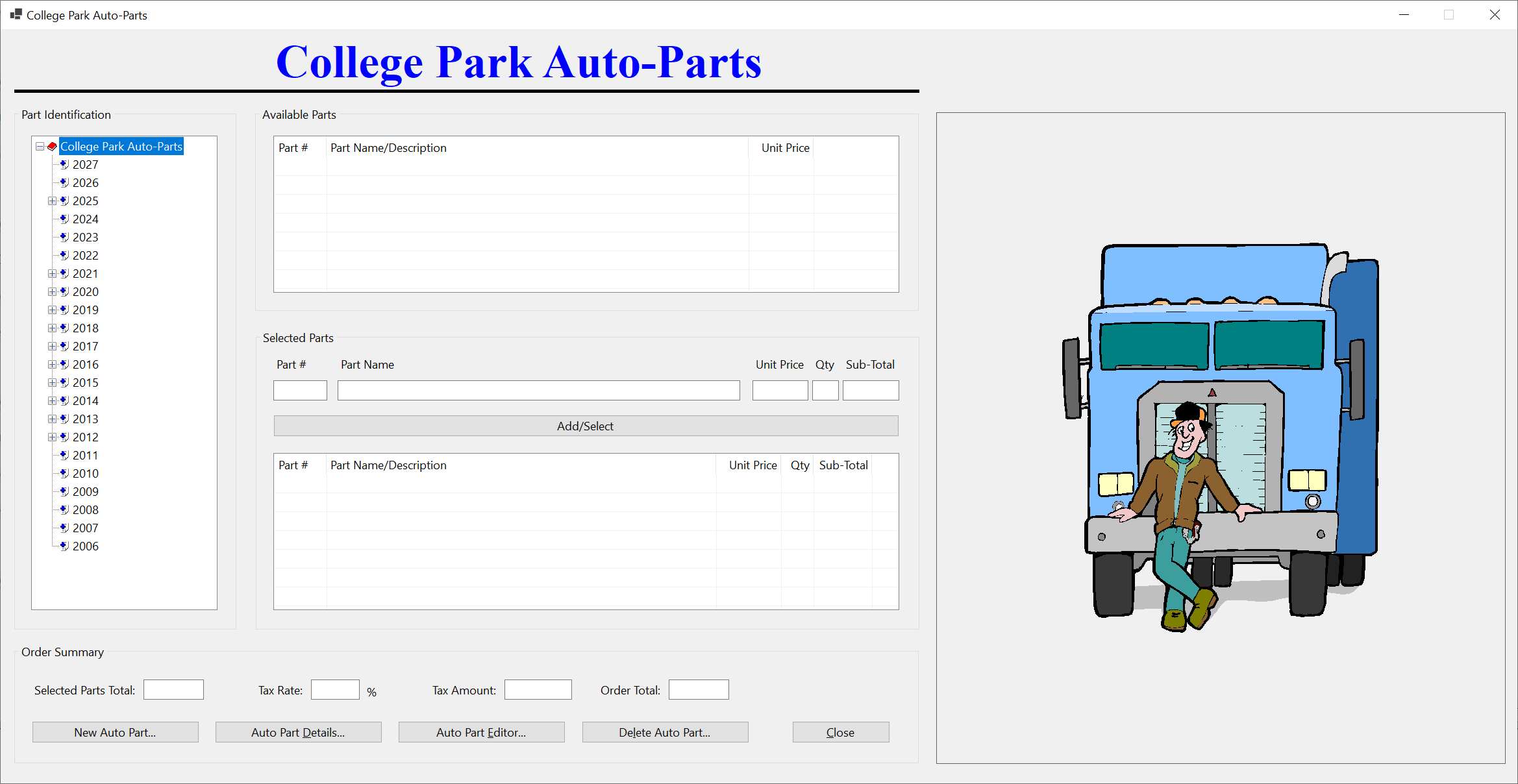


Example Application: Stellar Water Point
| Home | Copyright © 2010-2026, FunctionX | Last Update: Friday 02 December 2022 | Home |