ASP.NET MVC/jQuery Application: Stellar Water Point

ASP.NET MVC/jQuery Application: Stellar Water Point
Starting the Application
Introduction
A water distribution company delivers water to homes and commercial buildings. In this exercise, we will create an ASP.NET MVC application for a fictitious company that distributes and sells water. This version of the application will use jQuery to perform some front-end operations.
 Practical Learning: Introducing XML Node Maintenance
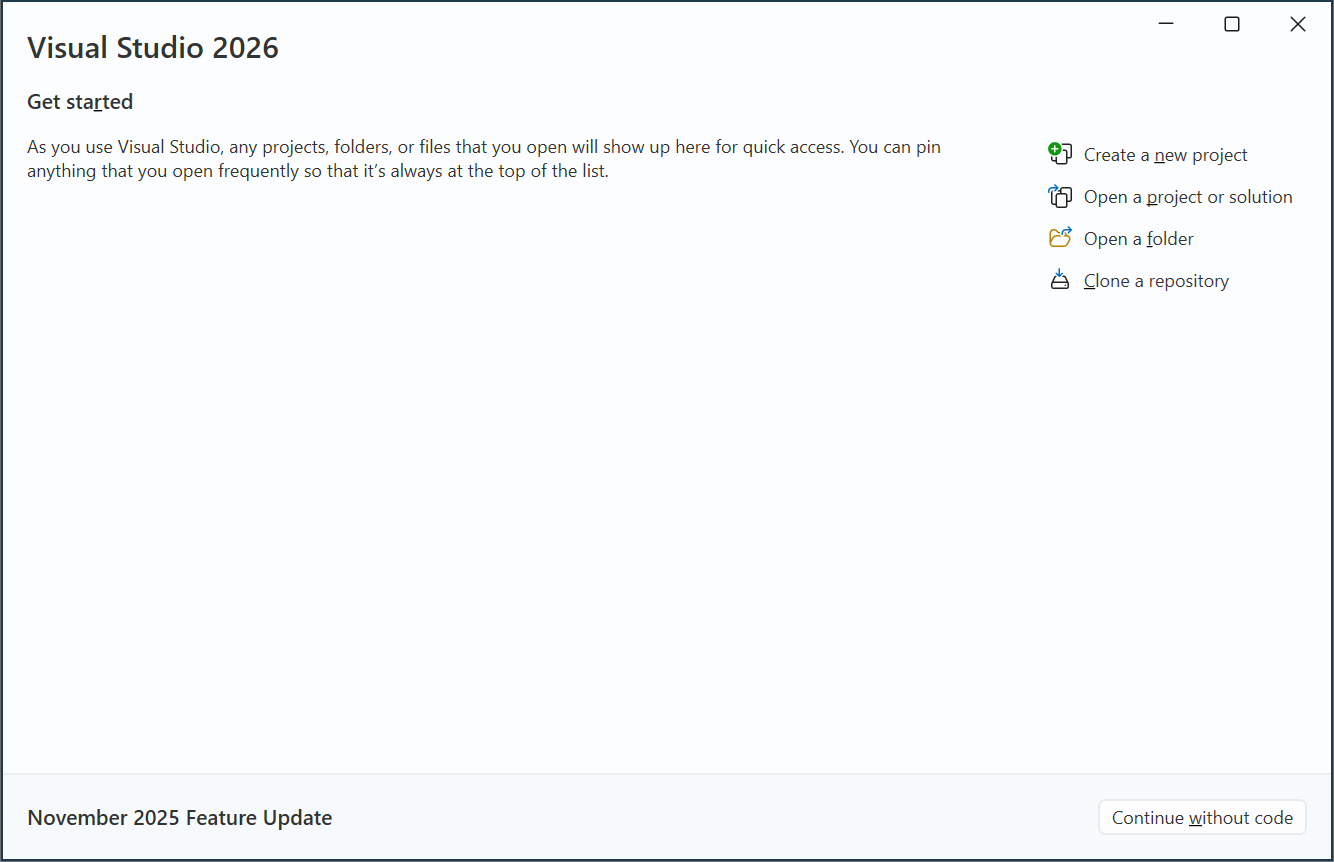
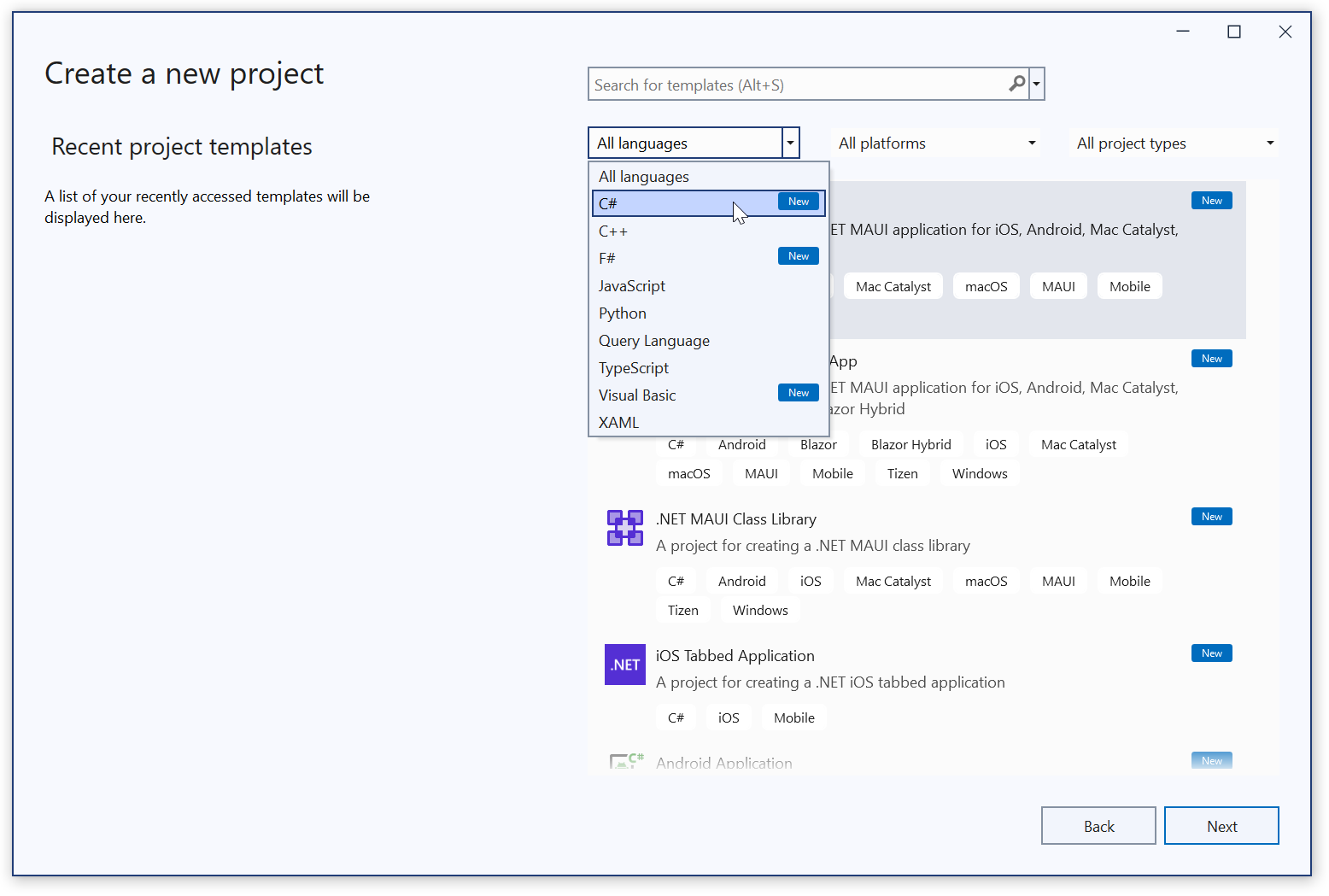
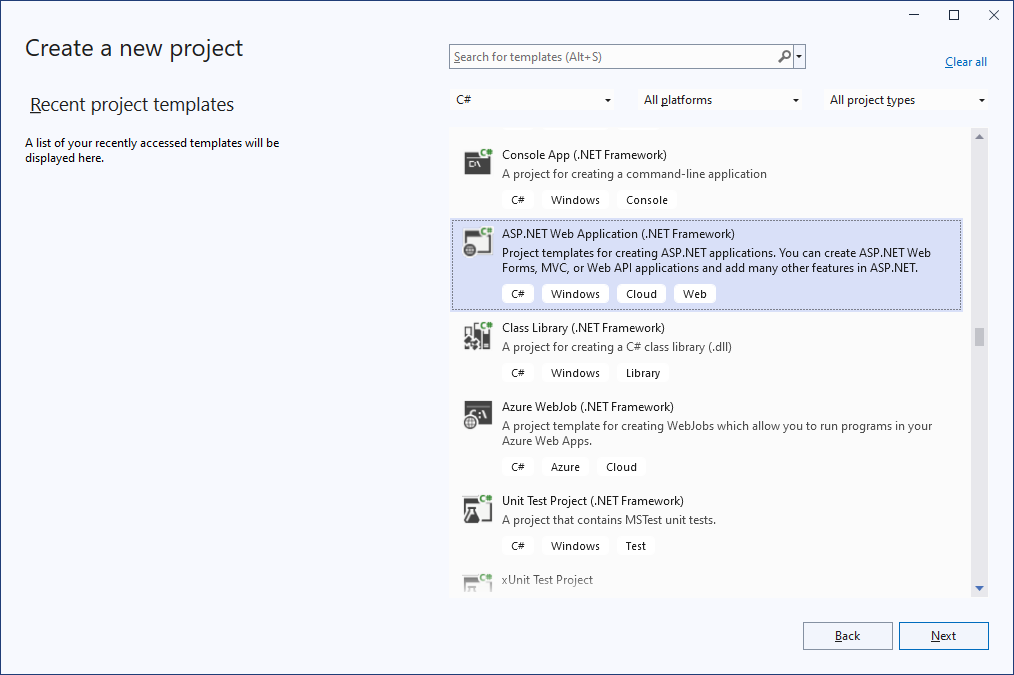
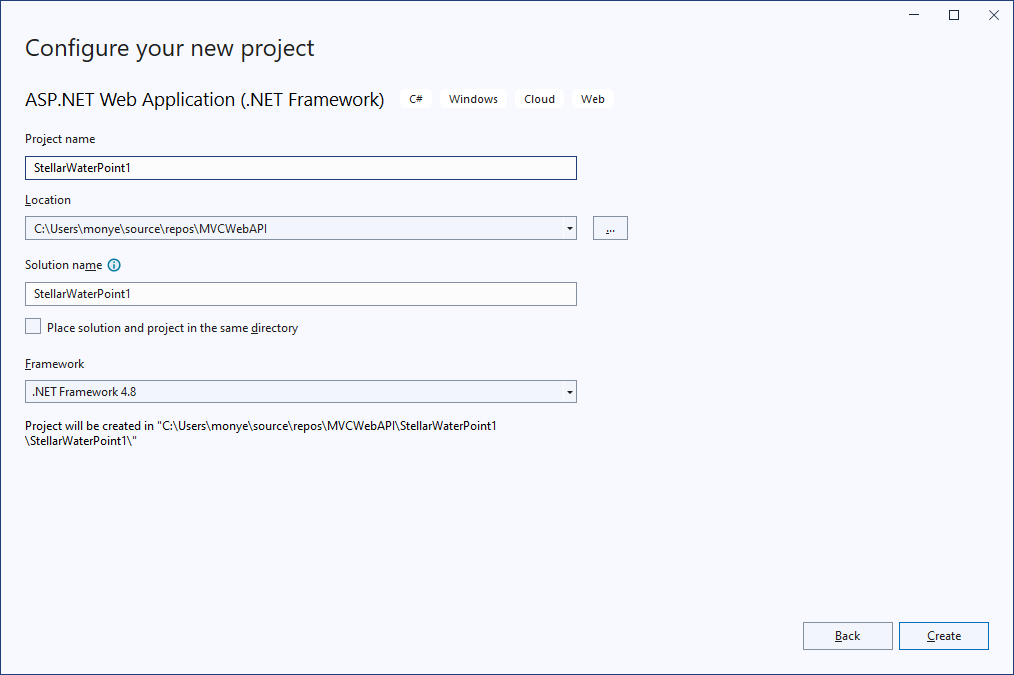

 |
 |
 |
 |
 |
 |
/* Set padding to keep content from hitting the edges */
.body-content {
    margin-top: 15px;
    padding-left: 15px;
    padding-right: 15px;
}

/* Set width on the form input elements since they're 100% wide by default */
input,
select,
textarea {
    max-width: 280px;
}

.bg-dark        { --bs-bg-opacity: 1;
                  background-color: #800000 !important;          }

.box-shadow     { box-shadow: 6px 6px 2px 1px rgba(2, 2, 5, .2); }

.bordered       { border: 1px solid black; }

.common-font    { font-family: Garamond, Georgia, Cambria, 'Times New Roman', Times, serif }

.encloser-small { margin: auto;
                  width:  400px; }

.encloser-large { margin: auto;
                  width:  600px; }

.enclosing {
    margin: auto;
    width: 500px;
}

.stellar        { font-weight: bold;
                  text-decoration: none;
                  color: maroon;
                  font-family: Garamond, Georgia, Cambria, 'Times New Roman', Times, serif; }

a.stellar:focus { color: red; }
a.stellar:hover { color: navy;
                  text-decoration: underline; }

.navbar-brand   { font-weight: bold;
                  color: #FFD800;             }

.navbar-brand:hover, .navbar-brand:focus {
                  font-weight: bold;
                  color:       #FFFFFF;       }

.nav-link       { font-weight: bold;
                  color:       yellow;        }
.nav-link       { font-weight: bold;
                  color:       #FFFFFF;       }

.btn-maroon {
    --bs-btn-color: #fff;
    --bs-btn-bg: #800000;
    --bs-btn-border-color: #800000;
    --bs-btn-hover-color: #fff;
    --bs-btn-hover-bg: #bb2d3b;
    --bs-btn-hover-border-color: #b02a37;
    --bs-btn-focus-shadow-rgb: 225, 83, 97;
    --bs-btn-active-color: #fff;
    --bs-btn-active-bg: #b02a37;
    --bs-btn-active-border-color: #a52834;
    --bs-btn-active-shadow: inset 0 3px 5px rgba(0, 0, 0, 0.125);
    --bs-btn-disabled-color: #fff;
    --bs-btn-disabled-bg: #800000;
    --bs-btn-disabled-border-color: #800000;
}
Setting Up the Site
.
Practical Learning: Setting Up the Ŝite
<!DOCTYPE html>
<html>
<head>
<meta charset="utf-8" />
<meta name="viewport" content="width=device-width" />
<title>@ViewBag.Title - Stellar Water Point</title>
@Styles.Render("~/Content/css")
@Scripts.Render("~/bundles/modernizr")
</head>
<body>
<nav class="common-font navbar navbar-expand-sm navbar-toggleable-sm navbar-dark bg-dark">
<div class="container">
@Html.ActionLink("Stellar Water Point", "Index", "Home", new { area = "" }, new { @class = "navbar-brand" })
<button type="button" class="navbar-toggler" data-bs-toggle="collapse" data-bs-target=".navbar-collapse" title="Toggle navigation" aria-controls="navbarSupportedContent"
aria-expanded="false" aria-label="Toggle navigation">
<span class="navbar-toggler-icon"></span>
</button>
<div class="collapse navbar-collapse d-sm-inline-flex justify-content-between">
<ul class="navbar-nav flex-grow-1">
<li>@Html.ActionLink("Water Bills", "Index", "WaterBills", new { area = "" }, new { @class = "nav-link" })</li>
<li>@Html.ActionLink("Customers", "Index", "Customers", new { area = "" }, new { @class = "nav-link" })</li>
<li>@Html.ActionLink("Water Meters", "Index", "WaterMeters", new { area = "" }, new { @class = "nav-link" })</li>
<li>@Html.ActionLink("API", "Index", "Help", new { area = "" }, new { @class = "nav-link" })</li>
</ul>
</div>
</div>
</nav>
<div class="container body-content">
@RenderBody()
<hr />
<footer>
<p class="text-center common-font">© @DateTime.Now.Year - Stellar Water Point</p>
</footer>
</div>
@Scripts.Render("~/bundles/jquery")
@Scripts.Render("~/bundles/bootstrap")
@RenderSection("scripts", required: false)
</body>
</html><main class="common-font">
<section class="row" aria-labelledby="aspnetTitle">
<div class="text-center">
<h1 class="display-4 fw-bold">Stellar Water Point</h1>
<p class="lead text-muted">Stellar Water Point is a community-based company that commercially distributes water to customers in need. Our water process is socially responsible and community oriented.</p>
</div>
</section>
<div class="row">
<section class="col-md-4" aria-labelledby="gettingStartedTitle">
<div class="card mb-4 box-shadow">
<img class="bordered card-img-top" src="../Images/WaterBills.png" alt="Water Bills">
<div class="card-body">
<h5><a class="nav-link text-dark fw-bold" href="/WaterBills/Index">Water Bills</a></h5>
<hr />
<p class="card-text">Water bills are processed in a timely and responsible manner, applying only the strictest, regular, and lawful rules.</p>
</div>
</div>
</section>
<section class="col-md-4" aria-labelledby="librariesTitle">
<div class="card mb-4 box-shadow">
<img class="bordered card-img-top" src="../Images/Customers.png" alt="Customers Accounts">
<div class="card-body">
<h5><a class="nav-link text-dark fw-bold" href="/Customers/Index">Customers Accounts</a></h5>
<hr />
<p class="card-text">Water bills are sent in a trimester-base to our customers who holds an account with us, all for good service.</p>
</div>
</div>
</section>
<section class="col-md-4" aria-labelledby="hostingTitle">
<div class="card mb-4 box-shadow">
<img class="bordered card-img-top" src="../Images/WaterMeter.png" alt="Water Meters">
<div class="card-body">
<h5><a class="nav-link text-dark fw-bold" href="/WaterMeters/Index">Water Meters</a></h5>
<hr />
<p class="card-text">We use industry standard water meters that are regularly government inspected for their accuracy and precision.</p>
</div>
</div>
</section>
</div>
<div class="row">
<section class="col-md-4" aria-labelledby="gettingStartedTitle">
<div class="card mb-4">
<img class="card-img-top bordered" src="../Images/Community.png" alt="Community Services">
<div class="card-body">
<h5><a class="nav-link text-dark fw-bold" href="/StellarWaterPoint">Community Services</a></h5>
<hr />
<p class="card-text">Stellar Water Point is a community-oriented company that works withn various local activities and authorities.</p>
</div>
</div>
</section>
<section class="col-md-4" aria-labelledby="librariesTitle">
<div class="card mb-4">
<img class="card-img-top bordered" src="../Images/LegalAffairs.png" alt="Legal Affairs">
<div class="card-body">
<h5><a class="nav-link text-dark fw-bold" href="/StellarWaterPoint">Legal Affairs</a></h5>
<hr />
<p class="card-text">Issues of regulations and government affairs are addressed here. This is available for employees, contractors, etc.</p>
</div>
</div>
</section>
<section class="col-md-4" aria-labelledby="hostingTitle">
<div class="card mb-4">
<img class="card-img-top bordered" src="../Images/Employees.png" alt="Employees Portal">
<div class="card-body">
<h5><a class="nav-link text-dark fw-bold" href="/StellarWaterPoint">Employees Portal</a></h5>
<hr />
<p class="card-text">This is a central area form employees to access the company resources such as time sheets, payroll, benefits, etc.</p>
</div>
</div>
</section>
</div>
</main>The Database
Our application needs a database. We will first create it as a Microsoft SQL Server database. To make it easy to use, in Microsoft Visual Studio, we will use the Entity Framework to convert the database tables into classes and for better intergration with views.
Practical Learning: Creating the Database


CREATE TABLE WaterMeters
(
	WaterMeterId INT IDENTITY(1, 1),
	MeterNumber  NVARCHAR(15) NOT NULL,
	Make         NVARCHAR(25) NULL,
	Model        NVARCHAR(20) NOT NULL,
	MeterSize    NVARCHAR(15) NULL,
	CONSTRAINT   PK_WaterMeters PRIMARY KEY(WaterMeterId)
);
GO

CREATE TABLE AccountsTypes
(
	AccountTypeId         INT IDENTITY(1, 1),
	AccountType           NVARCHAR(5)   NOT NULL,
	AccountType           NVARCHAR(200) NULL,
	CONSTRAINT            PK_AccountsTypes PRIMARY KEY(AccountTypeId)
);
GO

CREATE TABLE Customers
(
	CustomerId    int identity(1, 1),
	AccountNumber nvarchar(15),
	AccountName   nvarchar(200),
	AccountType   nvarchar(5),
	MeterNumber   nvarchar(15),
	[Address]     nvarchar(150),
	City          nvarchar(25),
	County        nvarchar(35),
	[State]       nvarchar(35),
	ZIPCode       nvarchar(12),
	CONSTRAINT    PK_Customers PRIMARY KEY(CustomerId)
);
GO

CREATE TABLE WaterBills
(
	WaterBillId           INT IDENTITY(1, 1),
	WaterBillNumber       INT,
	AccountNumber         NVARCHAR(15),
	MeterReadingStartDate DATE,
	MeterReadingEndDate   DATE,
	BillingDays           INT,
	CounterReadingStart   INT,
	CounterReadingEnd     INT,
	TotalHCF              INT,
	TotalGallons          INT,
	FirstTierConsumption  DECIMAL(8, 2),
	SecondTierConsumption DECIMAL(8, 2),
	LastTierConsumption   DECIMAL(8, 2),
	WaterCharges          DECIMAL(8, 2),
	SewerCharges          DECIMAL(8, 2),
	EnvironmentCharges    DECIMAL(8, 2),
	ServiceCharges        DECIMAL(8, 2),
	TotalCharges          DECIMAL(8, 2),
	LocalTaxes            DECIMAL(8, 2),
	StateTaxes            DECIMAL(8, 2),
	PaymentDueDate        DATE,
	AmountDue             DECIMAL(8, 2),
	LatePaymentDueDate    DATE,
	LateAmountDue         DECIMAL(8, 2),
	CONSTRAINT            PK_WaterBills PRIMARY KEY(WaterBillId)
);
GO
-- =================================================================================

INSERT INTO AccountsTypes(AccountType, AccountType)
VALUES(N'OTH', N'Other'),
      (N'BUS', N'General Business'),
      (N'RES', N'Residential Household'),
      (N'SGO', N'Social/Government/Non-Profit Organization'),
      (N'UUO', N'Unidentified or Unclassified Type of Organization'),
      (N'WAT', N'Water Intensive Business (Laudromat, Hair Salon, Restaurant, etc');
GOAdding Support for the Database
Practical Learning: Adding the Entity Framework
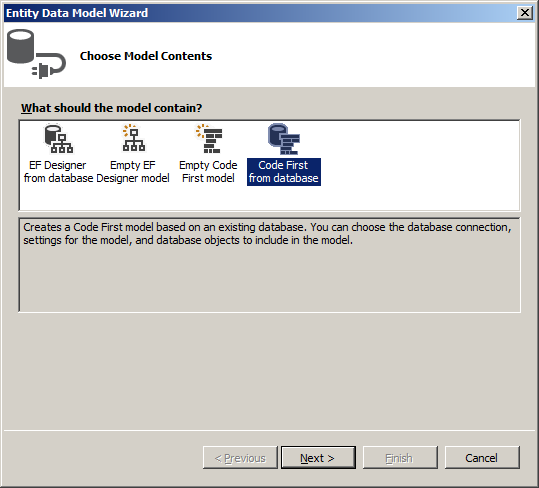
Applying a Code First Entity Framework
Practical Learning: Applying a Code First Entity Framework
Water Meters
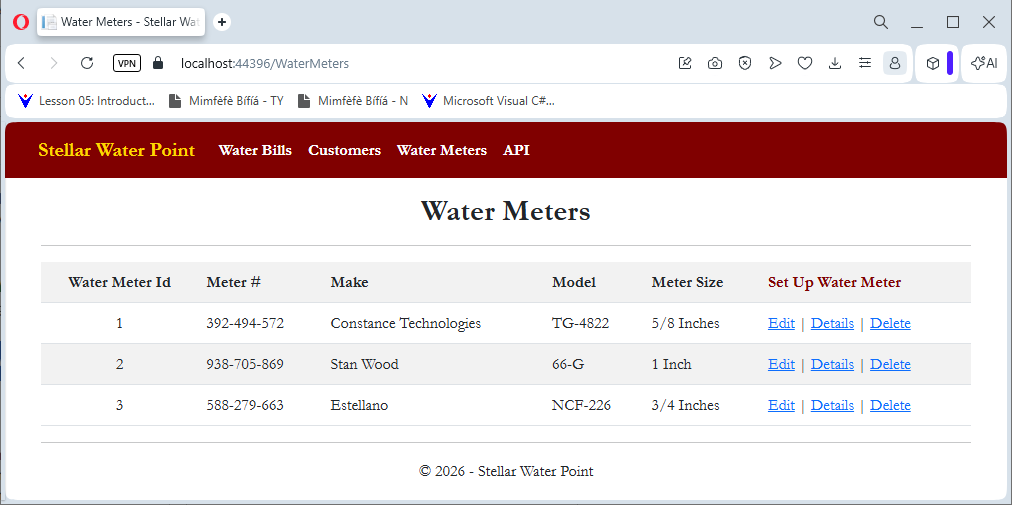
Displaying Water Meters
Utility companies use a device that measure what their customers consume. For example a water utility company installs water meters in residences and commercial buildings to find out how much water has been used. In this section, we will create a view that allows an employee to keep track of water consumption.
Practical Learning: Displaying Water Meters
namespace StellarWaterPoint11.Models
{
    using System.ComponentModel;
    using System.ComponentModel.DataAnnotations;

    public partial class WaterMeter
    {
        [Key]
        [DisplayName("Water Meter Id")]
        public int WaterMeterId { get; set; }

        [Required]
        [StringLength(15)]
        [DisplayName("Meter #")]
        public string MeterNumber { get; set; }

        [StringLength(25)]
        public string Make { get; set; }

        [Required]
        [StringLength(20)]
        public string Model { get; set; }

        [StringLength(15)]
        [DisplayName("Meter Size")]
        public string MeterSize { get; set; }
    }
}
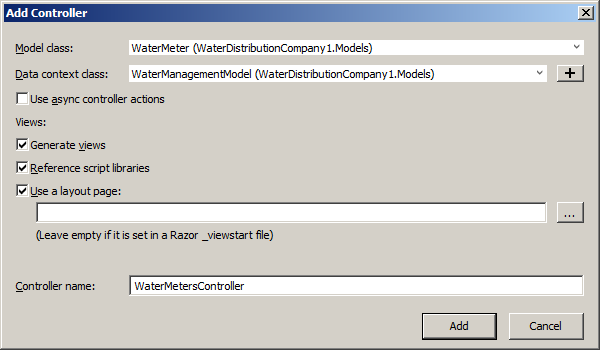
using StellarWaterPoint11.Models;
using System.Data.Entity;
using System.Linq;
using System.Net;
using System.Web.Mvc;

namespace StellarWaterPoint11.Controllers
{
    public class WaterMetersController : Controller
    {
        private WaterManagementModel db = new WaterManagementModel();

        // GET: WaterMeters
        public ActionResult Index()
        {
            return View(db.WaterMeters.ToList());
        }

        // GET: WaterMeters/Details/5
        public ActionResult Details(int? id)
        {
            if (id == null)
            {
                return new HttpStatusCodeResult(HttpStatusCode.BadRequest);
            }
            WaterMeter waterMeter = db.WaterMeters.Find(id);
            if (waterMeter == null)
            {
                return HttpNotFound();
            }
            return View(waterMeter);
        }

        // GET: WaterMeters/Create
        public ActionResult Create()
        {
            return View();
        }

        // POST: WaterMeters/Create
        // To protect from overposting attacks, enable the specific properties you want to bind to, for
        // more details see https://go.microsoft.com/fwlink/?LinkId=317598.
        [HttpPost]
        [ValidateAntiForgeryToken]
        public ActionResult Create([Bind(Include = "WaterMeterId,MeterNumber,Make,Model,MeterSize")] WaterMeter waterMeter)
        {
            if (ModelState.IsValid)
            {
                db.WaterMeters.Add(waterMeter);
                db.SaveChanges();
                return RedirectToAction("Index");
            }

            return View(waterMeter);
        }

        // GET: WaterMeters/Edit/5
        public ActionResult Edit(int? id)
        {
            if (id == null)
            {
                return new HttpStatusCodeResult(HttpStatusCode.BadRequest);
            }
            WaterMeter waterMeter = db.WaterMeters.Find(id);
            if (waterMeter == null)
            {
                return HttpNotFound();
            }
            return View(waterMeter);
        }

        // POST: WaterMeters/Edit/5
        // To protect from overposting attacks, enable the specific properties you want to bind to, for
        // more details see https://go.microsoft.com/fwlink/?LinkId=317598.
        [HttpPost]
        [ValidateAntiForgeryToken]
        public ActionResult Edit([Bind(Include = "WaterMeterId,MeterNumber,Make,Model,MeterSize")] WaterMeter waterMeter)
        {
            if (ModelState.IsValid)
            {
                db.Entry(waterMeter).State = EntityState.Modified;
                db.SaveChanges();
                return RedirectToAction("Index");
            }
            return View(waterMeter);
        }

        // GET: WaterMeters/Delete/5
        public ActionResult Delete(int? id)
        {
            if (id == null)
            {
                return new HttpStatusCodeResult(HttpStatusCode.BadRequest);
            }
            WaterMeter waterMeter = db.WaterMeters.Find(id);
            if (waterMeter == null)
            {
                return HttpNotFound();
            }
            return View(waterMeter);
        }

        // POST: WaterMeters/Delete/5
        [HttpPost, ActionName("Delete")]
        [ValidateAntiForgeryToken]
        public ActionResult DeleteConfirmed(int id)
        {
            WaterMeter waterMeter = db.WaterMeters.Find(id);
            db.WaterMeters.Remove(waterMeter);
            db.SaveChanges();
            return RedirectToAction("Index");
        }

        protected override void Dispose(bool disposing)
        {
            if (disposing)
            {
                db.Dispose();
            }
            base.Dispose(disposing);
        }
    }
}@model IEnumerable<StellarWaterPoint11.Models.WaterMeter>
@{
ViewBag.Title = "Water Meters";
}
<h2 class="text-center common-font fw-bold">Water Meters</h2>
<hr />
<table class="table table-striped common-font">
<tr>
<th class="text-center">@Html.DisplayNameFor(model => model.WaterMeterId)</th>
<th>@Html.DisplayNameFor(model => model.MeterNumber)</th>
<th>@Html.DisplayNameFor(model => model.Make)</th>
<th>@Html.DisplayNameFor(model => model.Model)</th>
<th>@Html.DisplayNameFor(model => model.MeterSize)</th>
<th>@Html.ActionLink("Set Up Water Meter", "Create", null, htmlAttributes: new { @class = "stellar" })</th>
</tr>
@foreach (var item in Model)
{
<tr>
<td class="text-center">@Html.DisplayFor(modelItem => item.WaterMeterId)</td>
<td>@Html.DisplayFor(modelItem => item.MeterNumber)</td>
<td>@Html.DisplayFor(modelItem => item.Make)</td>
<td>@Html.DisplayFor(modelItem => item.Model)</td>
<td>@Html.DisplayFor(modelItem => item.MeterSize)</td>
<td>
@Html.ActionLink("Edit", "Edit", new { id = item.WaterMeterId }) |
@Html.ActionLink("Details", "Details", new { id = item.WaterMeterId }) |
@Html.ActionLink("Delete", "Delete", new { id = item.WaterMeterId })
</td>
</tr>
}
</table>

A Water Meter Record
.
Practical Learning: Creating Water Meters
@model StellarWaterPoint11.Models.WaterMeter

@{
    ViewBag.Title = "Create Water Meter";
}

<h2 class="text-center common-font fw-bold">Create Water Meter</h2>

<hr />

@using (Html.BeginForm())
{
    @Html.AntiForgeryToken()

    <div class="form-horizontal encloser-small common-font">
        @Html.ValidationSummary(true, "", new { @class = "text-danger" })

        <div class="row mb-2">
            @Html.LabelFor(model => model.MeterNumber, htmlAttributes: new { @class = "col-form-label col-sm-5 fw-bold" })
            <div class="col-sm-7">
                @Html.EditorFor(model => model.MeterNumber, new { htmlAttributes = new { @class = "form-control" } })
                @Html.ValidationMessageFor(model => model.MeterNumber, "", new { @class = "text-danger" })
            </div>
        </div>

        <div class="row mb-2">
            @Html.LabelFor(model => model.Make, htmlAttributes: new { @class = "col-form-label col-sm-5 fw-bold" })
            <div class="col-sm-7">
                @Html.EditorFor(model => model.Make, new { htmlAttributes = new { @class = "form-control" } })
                @Html.ValidationMessageFor(model => model.Make, "", new { @class = "text-danger" })
            </div>
        </div>

        <div class="row mb-2">
            @Html.LabelFor(model => model.Model, htmlAttributes: new { @class = "col-form-label col-sm-5 fw-bold" })
            <div class="col-sm-7">
                @Html.EditorFor(model => model.Model, new { htmlAttributes = new { @class = "form-control" } })
                @Html.ValidationMessageFor(model => model.Model, "", new { @class = "text-danger" })
            </div>
        </div>

        <div class="row mb-2">
            @Html.LabelFor(model => model.MeterSize, htmlAttributes: new { @class = "col-form-label col-sm-5 fw-bold" })
            <div class="col-sm-7">
                @Html.EditorFor(model => model.MeterSize, new { htmlAttributes = new { @class = "form-control" } })
                @Html.ValidationMessageFor(model => model.MeterSize, "", new { @class = "text-danger" })
            </div>
        </div>

        <hr />

        <div class="row mb-2">
            <label class="control-label col-md-5">
                @Html.ActionLink("View Water Meters", "Index", null, htmlAttributes: new { @class = "stellar" })
            </label>
            <div class="col-md-offset-2 col-md-7 text-center">
                <input type="submit" value="Save Water Meter" class="btn btn-maroon" />
            </div>
        </div>
    </div>
}

@section Scripts {
    @Scripts.Render("~/bundles/jqueryval")
}
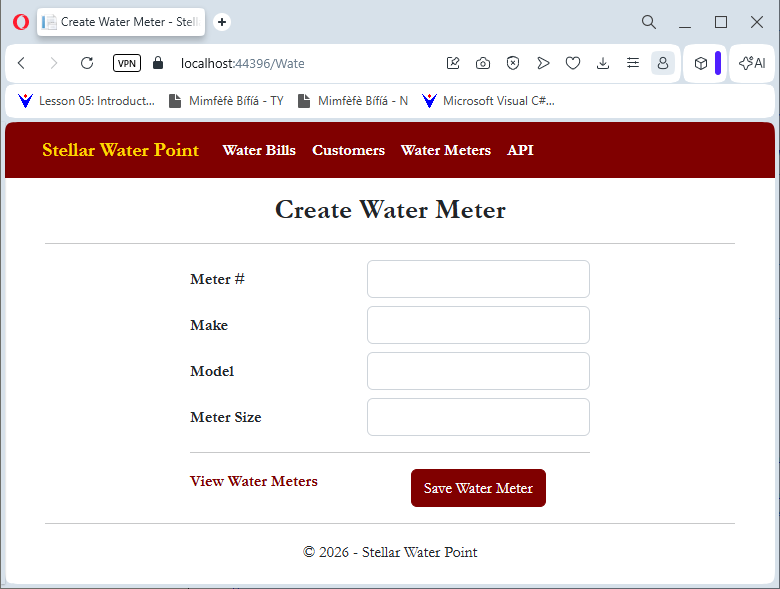
| Meter # | Make | Model | Meter Size |
| 392-494-572 | Constance Technologies | TG-4822 | 5/8 Inches |
| 938-705-869 | Stan Wood | 66-G | 1 Inch |
| 588-279-663 | Estellano | NCF-226 | 3/4 Inches |
Water Meter Details
.
Practical Learning: Viewing the Details of a Water Meter
@model StellarWaterPoint11.Models.WaterMeter

@{
    ViewBag.Title = "Water Meter Details";
}

<h2 class="text-center common-font fw-bold">Water Meter Details</h2>

<hr />

<div class="encloser-small common-font">
    <table class="table table-striped common-font">
        <tr>
            <th>@Html.DisplayNameFor(model => model.WaterMeterId)</th>
            <td>@Html.DisplayFor(model => model.WaterMeterId)</td>
        </tr>
        <tr>
            <th>@Html.DisplayNameFor(model => model.MeterNumber)</th>
            <td>@Html.DisplayFor(model => model.MeterNumber)</td>
        </tr>
        <tr>
            <th>@Html.DisplayNameFor(model => model.Make)</th>
            <td>@Html.DisplayFor(model => model.Make)</td>
        </tr>
        <tr>
            <th>@Html.DisplayNameFor(model => model.Model)</th>
            <td>@Html.DisplayFor(model => model.Model)</td>
        </tr>
        <tr>
            <th>@Html.DisplayNameFor(model => model.MeterSize)</th>
            <td>@Html.DisplayFor(model => model.MeterSize)</td>
        </tr>
    </table>

    <hr />

    <p class="text-center">
        @Html.ActionLink("Edit/Update Water Meter Details", "Edit",
                         new { id = Model.WaterMeterId },
                         htmlAttributes: new { @class = "stellar" }) |
        @Html.ActionLink("Water Meters", "Index", null,
                         htmlAttributes: new { @class = "stellar" })
    </p>
</div>

Updating a Water Meter record
One of the routine operations performed on a database is to change the details of a record. To support this operation for a water meter, we will create a form that can be used to update the information of a water meter.
Practical Learning: Updating a Water Meter
@model StellarWaterPoint11.Models.WaterMeter

@{
    ViewBag.Title = "Edit Water Meter";
}

<h2 class="text-center common-font fw-bold">Edit/Update Water Meter</h2>

<hr />

@using (Html.BeginForm())
{
    @Html.AntiForgeryToken()

    <div class="form-horizontal encloser-small common-font">
        @Html.ValidationSummary(true, "", new { @class = "text-danger" })
        @Html.HiddenFor(model => model.WaterMeterId)

        <div class="row mb-2">
            @Html.LabelFor(model => model.MeterNumber, htmlAttributes: new { @class = "col-form-label col-sm-5 fw-bold" })
            <div class="col-sm-7">
                @Html.EditorFor(model => model.MeterNumber, new { htmlAttributes = new { @class = "form-control" } })
                @Html.ValidationMessageFor(model => model.MeterNumber, "", new { @class = "text-danger" })
            </div>
        </div>

        <div class="row mb-2">
            @Html.LabelFor(model => model.Make, htmlAttributes: new { @class = "col-form-label col-sm-5 fw-bold" })
            <div class="col-sm-7">
                @Html.EditorFor(model => model.Make, new { htmlAttributes = new { @class = "form-control" } })
                @Html.ValidationMessageFor(model => model.Make, "", new { @class = "text-danger" })
            </div>
        </div>

        <div class="row mb-2">
            @Html.LabelFor(model => model.Model, htmlAttributes: new { @class = "col-form-label col-sm-5 fw-bold" })
            <div class="col-sm-7">
                @Html.EditorFor(model => model.Model, new { htmlAttributes = new { @class = "form-control" } })
                @Html.ValidationMessageFor(model => model.Model, "", new { @class = "text-danger" })
            </div>
        </div>

        <div class="row mb-2">
            @Html.LabelFor(model => model.MeterSize, htmlAttributes: new { @class = "col-form-label col-sm-5 fw-bold" })
            <div class="col-sm-7">
                @Html.EditorFor(model => model.MeterSize, new { htmlAttributes = new { @class = "form-control" } })
                @Html.ValidationMessageFor(model => model.MeterSize, "", new { @class = "text-danger" })
            </div>
        </div>

        <hr />

        <div class="row mb-2">
            <label class="control-label col-md-5">
                @Html.ActionLink("View Water Meters", "Index", null, htmlAttributes: new { @class = "stellar" })
            </label>
            <div class="col-md-offset-2 col-md-7 text-center">
                <input type="submit" value="Update Water Meter" class="btn btn-maroon" />
            </div>
        </div>
    </div>
}

@section Scripts {
    @Scripts.Render("~/bundles/jqueryval")
}
| Meter #: | 938-725-869 |
| Make: | Stanford Trend |
| Model: | 266G |
| Meter Size: | 1 1/2 Inches |

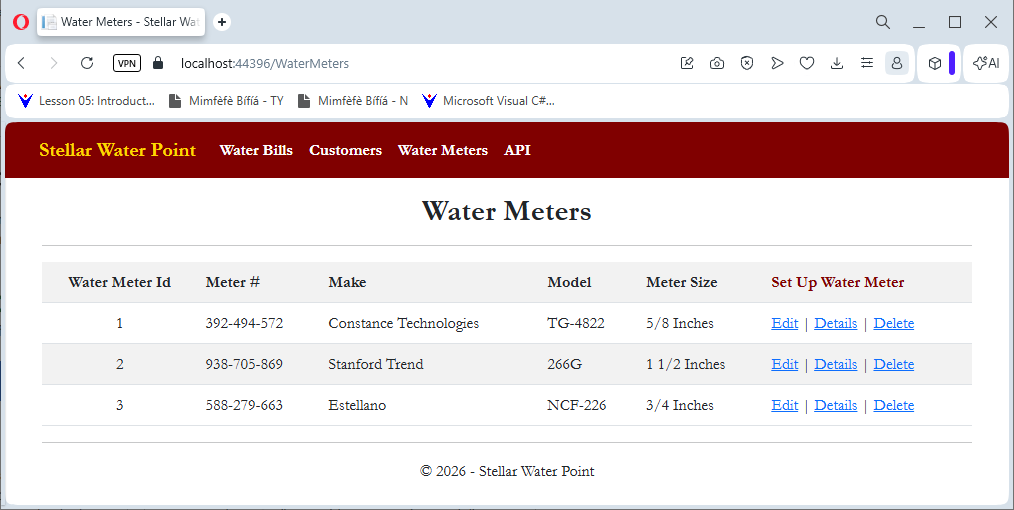
Deleting a Water Meter
.
Practical Learning: Deleting a Water Meter Record
@model StellarWaterPoint11.Models.WaterMeter

@{
    ViewBag.Title = "Delete Water Meter";
}

<h2 class="text-center common-font fw-bold">Water Meter Deletion</h2>

<hr />

<div class="encloser-small common-font">
    <table class="table table-striped common-font">
        <tr>
            <th>@Html.DisplayNameFor(model => model.WaterMeterId)</th>
            <td>@Html.DisplayFor(model => model.WaterMeterId)</td>
        </tr>
        <tr>
            <th>@Html.DisplayNameFor(model => model.MeterNumber)</th>
            <td>@Html.DisplayFor(model => model.MeterNumber)</td>
        </tr>
        <tr>
            <th>@Html.DisplayNameFor(model => model.Make)</th>
            <td>@Html.DisplayFor(model => model.Make)</td>
        </tr>
        <tr>
            <th>@Html.DisplayNameFor(model => model.Model)</th>
            <td>@Html.DisplayFor(model => model.Model)</td>
        </tr>
        <tr>
            <th>@Html.DisplayNameFor(model => model.MeterSize)</th>
            <td>@Html.DisplayFor(model => model.MeterSize)</td>
        </tr>
    </table>

    <hr />

    <h3 class="common-font text-center">Do you want to delete this water meter (you cannot undo the action)?</h3>

    <hr />

    @using (Html.BeginForm())
    {
        @Html.AntiForgeryToken()

        <div class="row mb-2">
            <div class="col-form-label col-sm-5 fw-bold">
                @Html.ActionLink("Water Meters", "Index", null, htmlAttributes: new { @class = "stellar" })
            </div>
            <div class="col-sm-7 text-center">
                <input type="submit" value="Yes, delete this Water Meter" class="btn btn-maroon" />
            </div>
        </div>

    }
</div>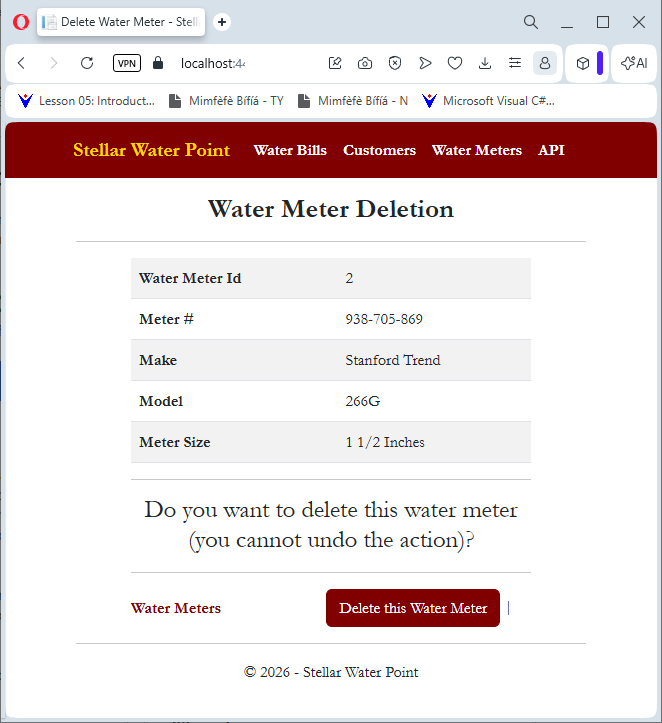
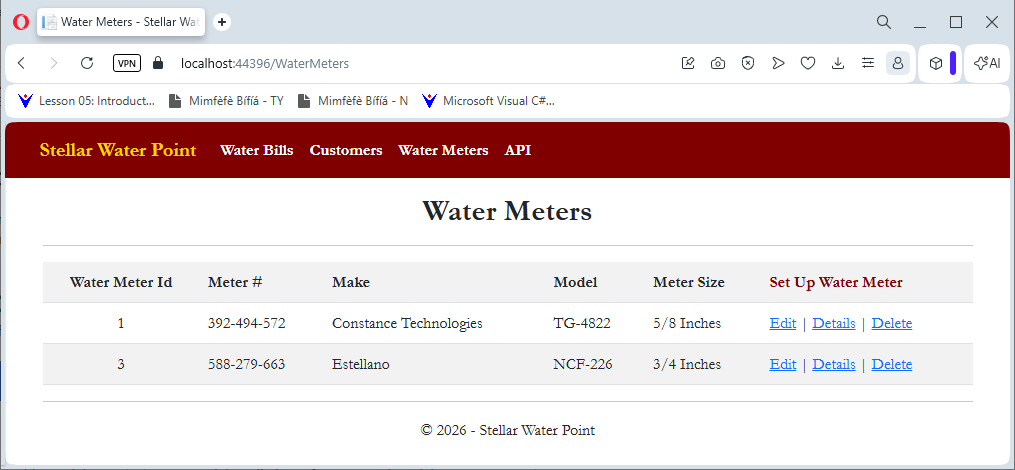
USE StellarWaterPoint1;
GO
DROP TABLE WaterMeters;
GO
CREATE TABLE WaterMeters
(
	WaterMeterId INT IDENTITY(1, 1),
	MeterNumber  NVARCHAR(15) NOT NULL,
	Make         NVARCHAR(25) NULL,
	Model        NVARCHAR(20) NOT NULL,
	MeterSize    NVARCHAR(15) NULL,
	CONSTRAINT   PK_WaterMeters PRIMARY KEY(WaterMeterId)
);
GO

INSERT INTO WaterMeters(MeterNumber, Make, Model, MeterSize)
VALUES(N'392-494-572', N'Constance Technologies', N'TG-4822', N'5/8 Inches'),
      (N'938-725-869', N'Stanford Trend', N'266G', N'1 1/2 Inches'),
      (N'588-279-663', N'Estellano', N'NCF-226', N'4 Inches'),
      (N'186-962-805', N'Lansome', N'2800', N'1 1/2 Inches'),
      (N'379-386-979', N'Planetra', N'P-2020', N'4 Inches'),
      (N'580-742-825', N'Kensa Sons', N'KS2000A', N'1 3/4 Inches'),
      (N'849-351-444', N'Raynes Energica', N'a1088', N'2 Inches'),
      (N'304-805-869', N'Estellano', N'NCF-226', N'1 Inch'),
      (N'208-428-308', N'Constance Technologies', N'808D', N'3/4 Inches'),
      (N'738-588-249', N'Warrington', N'W4242', N'5/8 Inches'),
      (N'496-813-794', N'Estellano', N'NCF-226', N'3/4 Inches'),
      (N'862-715-006', N'Warrington', N'W-4040', N'1/2 Inch'),
      (N'649-358-184', N'Raynes Energica', N'b1700', N'1 1/2 Inches'),
      (N'928-317-924', N'Gongola', N'GN1000', N'2 Inch'),
      (N'595-753-147', N'Grass Grill', N'CRC-1000', N'1 Inch'),
      (N'799-528-461', N'Kensa Sons', N'K-584-L', N'3/4 Inches'),
      (N'386-468-057', N'Estellano', N'NCF-226', N'3/4 Inches'),
      (N'938-275-294', N'Constance Technologies', N'TT-8822', N'4 Inches'),
      (N'288-427-585', N'Planetra', N'P-2020', N'1/2 Inch'),
      (N'497-584-700', N'Raynes Energica', N'QG505', N'4 Inches'),
      (N'394-835-297', N'Raynes Energica', N'i2022', N'3/4 Inches'),
      (N'847-252-246', N'Master Stream', N'2000-MS', N'1 1/2 Inches'),
      (N'349-725-848', N'Planetra', N'P-8000', N'4 Inches'),
      (N'713-942-058', N'Master Stream', N'3366-MS', N'3/4 Inches'),
      (N'747-581-379', N'Warrington', N'W4242', N'5/8 Inches'),
      (N'582-755-263', N'Kensa Sons', N'KS2000A', N'1 Inch'),
      (N'827-260-758', N'Raynes Energica', N'a1088', N'1-1/4 Inch'),
      (N'837-806-836', N'Lansome', N'7400', N'5/8 Inches'),
      (N'297-585-947', N'Estellano', N'GGH-662', N'3/4 Inches'),
      (N'207-964-835', N'Constance Technologies', N'TG-6220', N'5/8 Inches'),
      (N'296-837-495', N'Raynes Energica', N'QG505', N'4 Inches'),
      (N'468-359-486', N'Grass Grill', N'KLP-8822', N'1-1/4 Inch'),
      (N'931-486-003', N'Planetra', N'P-2020', N'1/2 Inch'),
      (N'483-770-648', N'Warren', N'WWW', N'0.1 Inches'),
      (N'592-824-957', N'Kensa Sons', N'D-497-H', N'3/4 Inches'),
      (N'293-835-704', N'Gongola', N'GOL1000', N'1/2 Inch'),
      (N'739-777-749', N'Warrington', N'W2200W', N'3/4 Inches'),
      (N'374-886-284', N'Raynes Energica', N'i2022', N'3/4 Inches'),
      (N'186-959-757', N'Kensa Sons', N'M-686-G', N'1 1/2 Inches'),
      (N'594-827-359', N'Planetra', N'P-8000', N'1 Inch'),
      (N'285-973-947', N'Estellano', N'NCF-226', N'3/4 Inches'),
      (N'394-739-242', N'Master Stream', N'9393-TT', N'5/8 Inches'),
      (N'529-283-752', N'Constance Technologies', N'404T', N'3/4 Inches'),
      (N'295-770-695', N'Warrington', N'W-2286', N'1-1/4 Inch'),
      (N'739-749-737', N'Kensa Sons', N'KS2000A', N'1 Inch'),
      (N'947-528-317', N'Gondola', N'GDL-5000', N'1 Inch'),
      (N'630-207-055', N'Lansome', N'2800', N'3/4 Inches'),
      (N'827-508-248', N'Standard Trend', N'428T', N'3/4 Inches'),
      (N'293-924-869', N'Grass Grill', N'CRC-2020', N'1/2 Inch'),
      (N'928-247-580', N'Gondola', N'GOL2000', N'0.34 Inch'),
      (N'682-537-380', N'Planetra', N'P-2020', N'1-1/4 Inch'),
      (N'470-628-850', N'Estellano', N'WRT-482', N'3/4 Inches'),
      (N'649-373-505', N'Constance Technologies', N'BD-7000', N'5/8 Inches'),
      (N'306-842-497', N'Lansome', N'9000', N'3/4 Inches');
GOCustomers
Introduction
.
Practical Learning: Creating Customers
namespace StellarWaterPoint11.Models
{
    using System.ComponentModel;
    using System.ComponentModel.DataAnnotations;

    public partial class Customer
    {
        [Key]
        [DisplayName("Customer Id")]
        public int CustomerId       { get; set; }

        [StringLength(15)]
        [DisplayName("Account #")]
        public string AccountNumber { get; set; }

        [StringLength(150)]
        [DisplayName("Account Name")]
        public string AccountName   { get; set; }

        [StringLength(15)]
        [DisplayName("Meter #")]
        public string MeterNumber   { get; set; }

        [StringLength(5)]
        [DisplayName("Account Type")]
        public string AccountType   { get; set; }

        [StringLength(150)]
        public string Address       { get; set; }

        [StringLength(25)]
        public string City          { get; set; }

        [StringLength(35)]
        public string County        { get; set; }

        [StringLength(35)]
        public string State         { get; set; }

        [StringLength(12)]
        [DisplayName("ZIP-Code")]
        public string ZIPCode       { get; set; }
    }
}
using StellarWaterPoint1.Models;
using System.Data.Entity;
using System.Data.Entity.Infrastructure;
using System.Linq;
using System.Net;
using System.Web.Http;
using System.Web.Http.Description;

namespace StellarWaterPoint1.Controllers
{
    public class WaterMeteringController : ApiController
    {
        private WaterManagementModel db = new WaterManagementModel();

        // GET: api/WaterMetering
        public IQueryable<WaterMeter> GetWaterMeters()
        {
            return db.WaterMeters;
        }

        // GET: api/WaterMetering/5
        [ResponseType(typeof(WaterMeter))]
        public IHttpActionResult GetWaterMeter(int id)
        {
            WaterMeter waterMeter = db.WaterMeters.Find(id);
            if (waterMeter == null)
            {
                return NotFound();
            }

            return Ok(waterMeter);
        }

        // PUT: api/WaterMetering/5
        [ResponseType(typeof(void))]
        public IHttpActionResult PutWaterMeter(int id, WaterMeter waterMeter)
        {
            if (!ModelState.IsValid)
            {
                return BadRequest(ModelState);
            }

            if (id != waterMeter.WaterMeterId)
            {
                return BadRequest();
            }

            db.Entry(waterMeter).State = EntityState.Modified;

            try
            {
                db.SaveChanges();
            }
            catch (DbUpdateConcurrencyException)
            {
                if (!WaterMeterExists(id))
                {
                    return NotFound();
                }
                else
                {
                    throw;
                }
            }

            return StatusCode(HttpStatusCode.NoContent);
        }

        // POST: api/WaterMetering
        [ResponseType(typeof(WaterMeter))]
        public IHttpActionResult PostWaterMeter(WaterMeter waterMeter)
        {
            if (!ModelState.IsValid)
            {
                return BadRequest(ModelState);
            }

            db.WaterMeters.Add(waterMeter);
            db.SaveChanges();

            return CreatedAtRoute("DefaultApi", new { id = waterMeter.WaterMeterId }, waterMeter);
        }

        // DELETE: api/WaterMetering/5
        [ResponseType(typeof(WaterMeter))]
        public IHttpActionResult DeleteWaterMeter(int id)
        {
            WaterMeter waterMeter = db.WaterMeters.Find(id);
            if (waterMeter == null)
            {
                return NotFound();
            }

            db.WaterMeters.Remove(waterMeter);
            db.SaveChanges();

            return Ok(waterMeter);
        }

        protected override void Dispose(bool disposing)
        {
            if (disposing)
            {
                db.Dispose();
            }
            base.Dispose(disposing);
        }

        private bool WaterMeterExists(int id)
        {
            return db.WaterMeters.Count(e => e.WaterMeterId == id) > 0;
        }
    }
}
using StellarWaterPoint1.Models;
using System.Data.Entity;
using System.Data.Entity.Infrastructure;
using System.Linq;
using System.Net;
using System.Web.Http;
using System.Web.Http.Description;

namespace StellarWaterPoint1.Controllers
{
    public class TypesOfAccountsController : ApiController
    {
        private WaterManagementModel db = new WaterManagementModel();

        // GET: api/TypesOfAccounts
        public IQueryable<AccountsType> GetAccountsTypes()
        {
            return db.AccountsTypes;
        }

        // GET: api/TypesOfAccounts/5
        [ResponseType(typeof(AccountsType))]
        public IHttpActionResult GetAccountsType(int id)
        {
            AccountsType accountsType = db.AccountsTypes.Find(id);
            if (accountsType == null)
            {
                return NotFound();
            }

            return Ok(accountsType);
        }

        // PUT: api/TypesOfAccounts/5
        [ResponseType(typeof(void))]
        public IHttpActionResult PutAccountsType(int id, AccountsType accountsType)
        {
            if (!ModelState.IsValid)
            {
                return BadRequest(ModelState);
            }

            if (id != accountsType.AccountTypeId)
            {
                return BadRequest();
            }

            db.Entry(accountsType).State = EntityState.Modified;

            try
            {
                db.SaveChanges();
            }
            catch (DbUpdateConcurrencyException)
            {
                if (!AccountsTypeExists(id))
                {
                    return NotFound();
                }
                else
                {
                    throw;
                }
            }

            return StatusCode(HttpStatusCode.NoContent);
        }

        // POST: api/TypesOfAccounts
        [ResponseType(typeof(AccountsType))]
        public IHttpActionResult PostAccountsType(AccountsType accountsType)
        {
            if (!ModelState.IsValid)
            {
                return BadRequest(ModelState);
            }

            db.AccountsTypes.Add(accountsType);
            db.SaveChanges();

            return CreatedAtRoute("DefaultApi", new { id = accountsType.AccountTypeId }, accountsType);
        }

        // DELETE: api/TypesOfAccounts/5
        [ResponseType(typeof(AccountsType))]
        public IHttpActionResult DeleteAccountsType(int id)
        {
            AccountsType accountsType = db.AccountsTypes.Find(id);
            if (accountsType == null)
            {
                return NotFound();
            }

            db.AccountsTypes.Remove(accountsType);
            db.SaveChanges();

            return Ok(accountsType);
        }

        protected override void Dispose(bool disposing)
        {
            if (disposing)
            {
                db.Dispose();
            }
            base.Dispose(disposing);
        }

        private bool AccountsTypeExists(int id)
        {
            return db.AccountsTypes.Count(e => e.AccountTypeId == id) > 0;
        }
    }
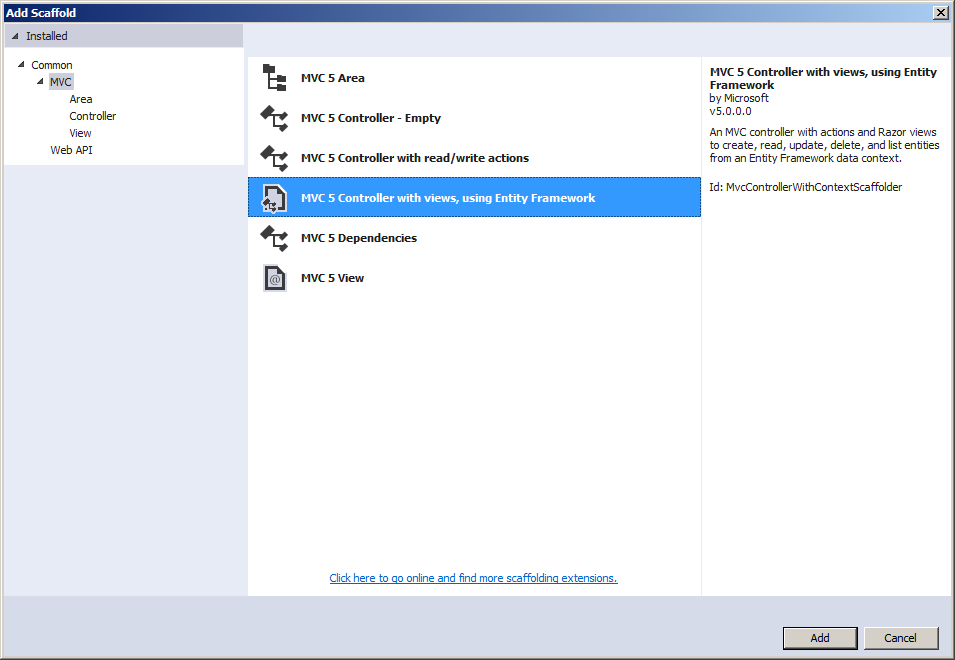
}
using Microsoft.Ajax.Utilities;
using StellarWaterPoint11.Models;
using System.Collections.Generic;
using System.Data.Entity;
using System.Linq;
using System.Net;
using System.Web.Mvc;

namespace StellarWaterPoint11.Controllers
{
    public class CustomersController : Controller
    {
        private WaterManagementModel db = new WaterManagementModel();

        // GET: Customers
        public ActionResult Index()
        {
            return View(db.Customers.ToList());
        }

        // GET: Customers/Details/5
        public ActionResult Details(int? id)
        {
            if (id == null)
            {
                return new HttpStatusCodeResult(HttpStatusCode.BadRequest);
            }

            Customer customer = db.Customers.Find(id);
            if (customer == null)
            {
                return HttpNotFound();
            }

            string strMeterDetails = string.Empty;

            foreach (var mtr in db.WaterMeters)
            {
                if(mtr.MeterNumber == customer.MeterNumber)
                {
                    strMeterDetails = mtr.Make + " " + mtr.Model + " (Mtr Size: " + mtr.MeterSize + ")";
                    break;
                }
            }

            ViewBag.MeterDetails = strMeterDetails;

            string strAccountType = string.Empty;

            foreach (var type in db.AccountsTypes)
            {
                if(type.AccountType == customer.AccountType)
                {
                    strAccountType = type.AccountType + " - " + type.AccountType;
                    break;
                }

            }

            ViewBag.AccountType = strAccountType;

            return View(customer);
        }

        // GET: Customers/Create
        public ActionResult Create()
        {
            List<SelectListItem> acntsTypes = new List<SelectListItem>();

            foreach (var type in db.AccountsTypes)
            {
                acntsTypes.Add(new SelectListItem() { Text = type.AccountType + " - " + type.TypeDefinition, Value = type.AccountType });
            }

            ViewBag.AccountType = acntsTypes;

            return View();
        }

        // POST: Customers/Create
        // To protect from overposting attacks, enable the specific properties you want to bind to, for
        // more details see https://go.microsoft.com/fwlink/?LinkId=317598.
        [HttpPost]
        [ValidateAntiForgeryToken]
        public ActionResult Create([Bind(Include = "CustomerId,AccountNumber,AccountName,MeterNumber,AccountType,Address,City,County,State,ZIPCode")] Customer customer)
        {

            if (ModelState.IsValid)
            {
                db.Customers.Add(customer);
                db.SaveChanges();
                return RedirectToAction("Index");
            }

            return View(customer);
        }

        // GET: Customers/Edit/5
        public ActionResult Edit(int? id)
        {
            if (id == null)
            {
                return new HttpStatusCodeResult(HttpStatusCode.BadRequest);
            }

            Customer customer = db.Customers.Find(id);

            List<SelectListItem> acntsTypes = new List<SelectListItem>();

            foreach (var type in db.AccountsTypes)
            {
                acntsTypes.Add(new SelectListItem() { Text = type.AccountType + " - " + type.TypeDefinition, Value = type.AccountType, Selected = (customer.AccountType == type.AccountType) });
            }

            ViewBag.AccountType = acntsTypes;

            if (customer == null)
            {
                return HttpNotFound();
            }
            return View(customer);
        }

        // POST: Customers/Edit/5
        // To protect from overposting attacks, enable the specific properties you want to bind to, for
        // more details see https://go.microsoft.com/fwlink/?LinkId=317598.
        [HttpPost]
        [ValidateAntiForgeryToken]
        public ActionResult Edit([Bind(Include = "CustomerId,AccountNumber,AccountName,MeterNumber,AccountType,Address,City,County,State,ZIPCode")] Customer customer)
        {
            if (ModelState.IsValid)
            {
                db.Entry(customer).State = EntityState.Modified;
                db.SaveChanges();
                return RedirectToAction("Index");
            }
            return View(customer);
        }

        // GET: Customers/Delete/5
        public ActionResult Delete(int? id)
        {
            if (id == null)
            {
                return new HttpStatusCodeResult(HttpStatusCode.BadRequest);
            }
            Customer customer = db.Customers.Find(id);

            string strMeterDetails = string.Empty;

            foreach (var mtr in db.WaterMeters)
            {
                if (mtr.MeterNumber == customer.MeterNumber)
                {
                    strMeterDetails = mtr.Make + " " + mtr.Model + " (Mtr Size: " + mtr.MeterSize + ")";
                    break;
                }
            }

            ViewBag.MeterDetails = strMeterDetails;

            string strAccountType = string.Empty;

            foreach (var type in db.AccountsTypes)
            {
                if (type.AccountType == customer.AccountType)
                {
                    strAccountType = type.AccountType + " - " + type.AccountType;
                    break;
                }

            }

            ViewBag.AccountType = strAccountType;

            if (customer == null)
            {
                return HttpNotFound();
            }
            return View(customer);
        }

        // POST: Customers/Delete/5
        [HttpPost, ActionName("Delete")]
        [ValidateAntiForgeryToken]
        public ActionResult DeleteConfirmed(int id)
        {
            Customer customer = db.Customers.Find(id);
            db.Customers.Remove(customer);
            db.SaveChanges();
            return RedirectToAction("Index");
        }

        protected override void Dispose(bool disposing)
        {
            if (disposing)
            {
                db.Dispose();
            }
            base.Dispose(disposing);
        }
    }
}@model IEnumerable<StellarWaterPoint11.Models.Customer>
@{
ViewBag.Title = "Customers";
}
<h2 class="common-font fw-bold text-center">Customers</h2>
<hr />
<table class="table common-font table-striped">
<tr>
<th class="text-center">@Html.DisplayNameFor(model => model.CustomerId)</th>
<th>@Html.DisplayNameFor(model => model.AccountNumber)</th>
<th>@Html.DisplayNameFor(model => model.AccountName)</th>
<th>@Html.DisplayNameFor(model => model.MeterNumber)</th>
<th>@Html.DisplayNameFor(model => model.AccountType)</th>
<th>@Html.DisplayNameFor(model => model.Address)</th>
<th>@Html.DisplayNameFor(model => model.City)</th>
<th>@Html.DisplayNameFor(model => model.County)</th>
<th>@Html.DisplayNameFor(model => model.State)</th>
<th>@Html.DisplayNameFor(model => model.ZIPCode)</th>
<th>@Html.ActionLink("Create Customer Account", "Create", null, htmlAttributes: new { @class = "stellar" })</th>
</tr>
@foreach (var item in Model) {
<tr>
<td class="text-center">@Html.DisplayFor(modelItem => item.CustomerId)</td>
<td>@Html.DisplayFor(modelItem => item.AccountNumber)</td>
<td>@Html.DisplayFor(modelItem => item.AccountName)</td>
<td>@Html.DisplayFor(modelItem => item.MeterNumber)</td>
<td>@Html.DisplayFor(modelItem => item.AccountType)</td>
<td>@Html.DisplayFor(modelItem => item.Address)</td>
<td>@Html.DisplayFor(modelItem => item.City)</td>
<td>@Html.DisplayFor(modelItem => item.County)</td>
<td>@Html.DisplayFor(modelItem => item.State)</td>
<td>@Html.DisplayFor(modelItem => item.ZIPCode)</td>
<td>
@Html.ActionLink("Edit", "Edit", new { id = item.CustomerId }) |
@Html.ActionLink("Details", "Details", new { id = item.CustomerId }) |
@Html.ActionLink("Delete", "Delete", new { id = item.CustomerId })
</td>
</tr>
}
</table>

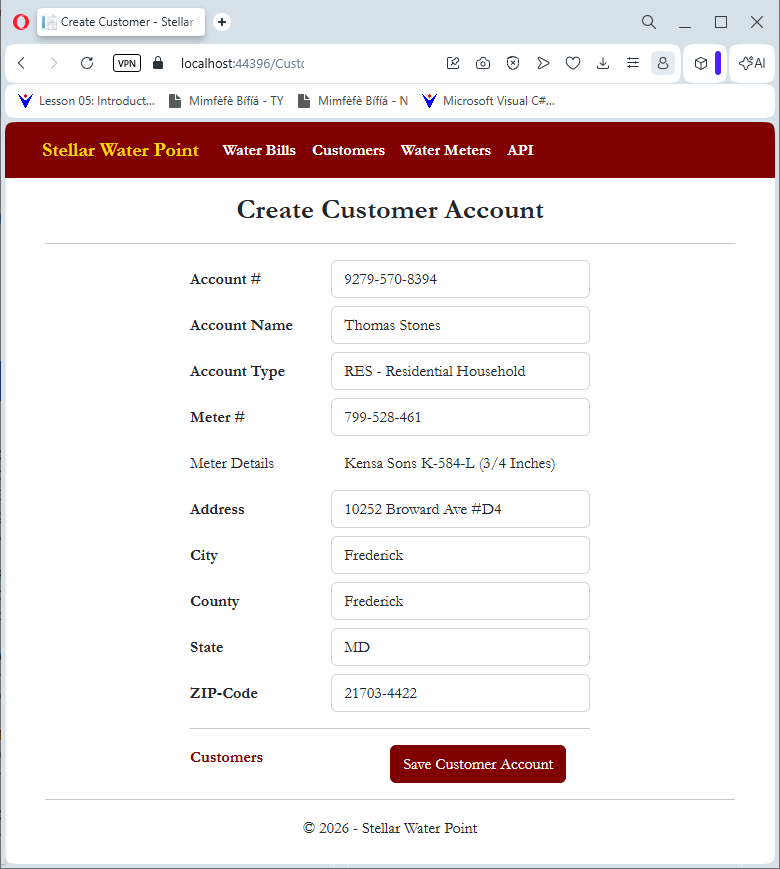
A Customer Account
.
Practical Learning: Creating Water Meters
@model StellarWaterPoint11.Models.Customer

@{
    ViewBag.Title = "Create Customer";
}

<h2 class="common-font fw-bold text-center">Create Customer Account</h2>

<hr />

@using (Html.BeginForm())
{
    @Html.AntiForgeryToken()

    <div class="form-horizontal common-font encloser-small">
        @Html.ValidationSummary(true, "", new { @class = "text-danger" })

        <div class="row mb-2">
            @Html.LabelFor(model => model.AccountNumber, htmlAttributes: new { @class = "col-form-label col-sm-4 fw-bold" })
            <div class="col-sm-8">
                @Html.EditorFor(model => model.AccountNumber, new { htmlAttributes = new { @class = "form-control" } })
                @Html.ValidationMessageFor(model => model.AccountNumber, "", new { @class = "text-danger" })
            </div>
        </div>

        <div class="row mb-2">
            @Html.LabelFor(model => model.AccountName, htmlAttributes: new { @class = "col-form-label col-sm-4 fw-bold" })
            <div class="col-sm-8">
                @Html.EditorFor(model => model.AccountName, new { htmlAttributes = new { @class = "form-control" } })
                @Html.ValidationMessageFor(model => model.AccountName, "", new { @class = "text-danger" })
            </div>
        </div>

        <div class="row mb-2">
            @Html.LabelFor(model => model.MeterNumber, htmlAttributes: new { @class = "col-form-label col-sm-4 fw-bold" })
            <div class="col-sm-8">
                @Html.EditorFor(model => model.MeterNumber, new { htmlAttributes = new { @class = "form-control", id = "mtrNbr" } })
                @Html.ValidationMessageFor(model => model.MeterNumber, "", new { @class = "text-danger" })
            </div>
        </div>

        <div class="row mb-2">
            <label class="col-form-label col-sm-4">Meter Details</label>
            <div class="col-sm-8">
                <span id="mtrDetails" class="form-control" style="border: 1px solid #FFF;"></span>
            </div>
        </div>

        <div class="row mb-2">
            @Html.LabelFor(model => model.AccountType, htmlAttributes: new { @class = "col-form-label col-sm-4 fw-bold" })
            <div class="col-sm-8">
                @Html.DropDownList("AccountType", ViewBag.AccountType as SelectList, htmlAttributes: new { @class = "form-control" })
                @Html.ValidationMessageFor(model => model.AccountType, "", new { @class = "text-danger" })
            </div>
        </div>

        <div class="row mb-2">
            @Html.LabelFor(model => model.Address, htmlAttributes: new { @class = "col-form-label col-sm-4 fw-bold" })
            <div class="col-sm-8">
                @Html.EditorFor(model => model.Address, new { htmlAttributes = new { @class = "form-control" } })
                @Html.ValidationMessageFor(model => model.Address, "", new { @class = "text-danger" })
            </div>
        </div>

        <div class="row mb-2">
            @Html.LabelFor(model => model.City, htmlAttributes: new { @class = "col-form-label col-sm-4 fw-bold" })
            <div class="col-sm-8">
                @Html.EditorFor(model => model.City, new { htmlAttributes = new { @class = "form-control" } })
                @Html.ValidationMessageFor(model => model.City, "", new { @class = "text-danger" })
            </div>
        </div>

        <div class="row mb-2">
            @Html.LabelFor(model => model.County, htmlAttributes: new { @class = "col-form-label col-sm-4 fw-bold" })
            <div class="col-sm-8">
                @Html.EditorFor(model => model.County, new { htmlAttributes = new { @class = "form-control" } })
                @Html.ValidationMessageFor(model => model.County, "", new { @class = "text-danger" })
            </div>
        </div>

        <div class="row mb-2">
            @Html.LabelFor(model => model.State, htmlAttributes: new { @class = "col-form-label col-sm-4 fw-bold" })
            <div class="col-sm-8">
                @Html.EditorFor(model => model.State, new { htmlAttributes = new { @class = "form-control" } })
                @Html.ValidationMessageFor(model => model.State, "", new { @class = "text-danger" })
            </div>
        </div>

        <div class="row mb-2">
            @Html.LabelFor(model => model.ZIPCode, htmlAttributes: new { @class = "col-form-label col-sm-4 fw-bold" })
            <div class="col-sm-8">
                @Html.EditorFor(model => model.ZIPCode, new { htmlAttributes = new { @class = "form-control" } })
                @Html.ValidationMessageFor(model => model.ZIPCode, "", new { @class = "text-danger" })
            </div>
        </div>

        <hr />

        <div class="row mb-2">
            <label class="control-label col-md-5">
                @Html.ActionLink("Customers", "Index", null, htmlAttributes: new { @class = "stellar" })
            </label>
            <div class="col-md-offset-2 col-sm-7 text-center">
                <input type="submit" value="Save Customer Account" class="btn btn-maroon" />
            </div>
        </div>
    </div>
}

@section Scripts {
    @Scripts.Render("~/bundles/jqueryval")

    <script type="text/javascript">
    $(document).ready(function () {
        $("#mtrNbr").blur(function (event) {
            $.ajax({
                method: "GET",
                dataType: "json",
                url: "/api/WaterMetering",
                success: function (data) {
                    $.each(data, function (index, meter) {
                        if (meter["MeterNumber"] === $("#mtrNbr").val()) {
                            $("#mtrDetails").text(meter["Make"] + " " + meter["Model"] + " (" + meter["MeterSize"] + ")");
                        } // if
                    }); // $.each
                } // Success
            }); // $.ajax
        }); // Lost Focus Event
    }); // Document.Ready
    </script>
}
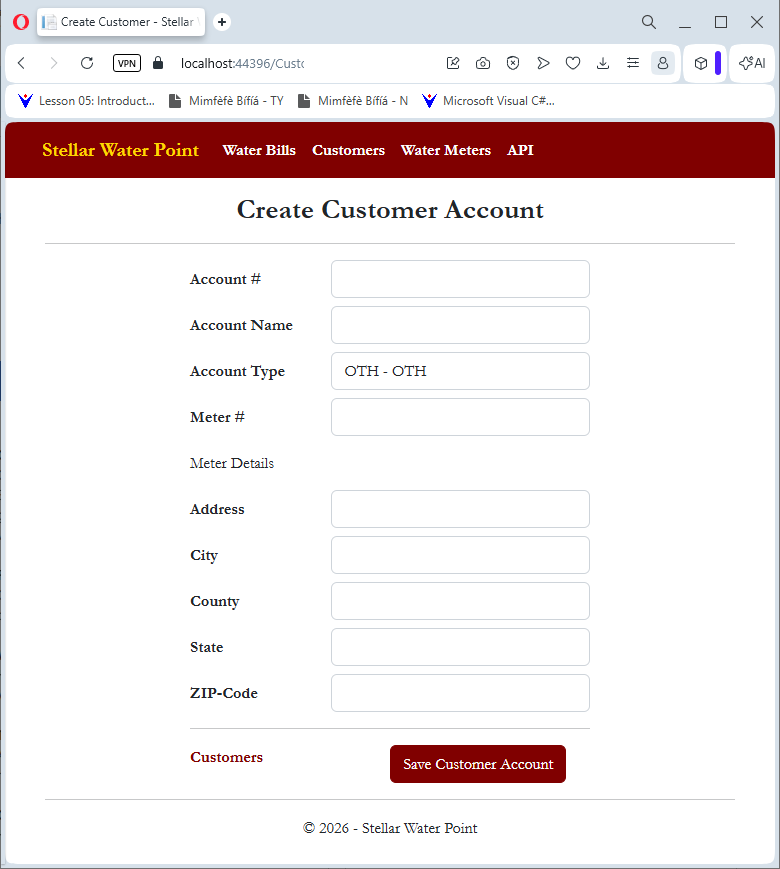
Account #:    9279-570-8394
Account Name: Thomas Stones
Account Type: RES - Residential Household
Meter #:      799-528-461
Address:      10252 Broward Ave #D4
City:         Frederick
County:       Frederick
State:        MD
ZIP-Code:     21703-4422
| Account # | Account Name | Meter # | Account Type | Address | City | County | State | ZIP-Code |
| 4086-938-4783 | Hernola Dough | 594-827-359 | UUO - Unidentified or Unclassified Type of Organization | 10 10 Hexagonal Drv | Winston | Yoke | Penn | 11402-4411 |
| 7080-583-5947 | Sunny Yard | 827-508-248 | WAT - Water Intensive Business(Laudromat, Hair Salon, Restaurant, etc | 663 Sherry Wood East Street | Shimpstown | Franklin | PA | 17236-2626 |

The Details of a Customer Account
.
Practical Learning: Viewing the Details of a Customer Account
@model StellarWaterPoint11.Models.Customer

@{
    ViewBag.Title = "Customer Details";
}

<h2 class="common-font fw-bold text-center">Customer Account Details</h2>

<hr />

<div class="common-font encloser-small">
    <table class="table table-striped common-font">
        <tr>
            <th>@Html.DisplayNameFor(model => model.CustomerId)</th>
            <td>@Html.DisplayFor(model => model.CustomerId)</td>
        </tr>
        <tr>
            <th>@Html.DisplayNameFor(model => model.AccountNumber)</th>
            <td>@Html.DisplayFor(model => model.AccountNumber)</td>
        </tr>
        <tr>
            <th>@Html.DisplayNameFor(model => model.AccountName)</th>
            <td>@Html.DisplayFor(model => model.AccountName)</td>
        </tr>
        <tr>
            <th>@Html.DisplayNameFor(model => model.MeterNumber)</th>
            <td>@Html.DisplayFor(model => model.MeterNumber)</td>
        </tr>
        <tr>
            <th>Meter Details</th>
            <td>@ViewBag.MeterDetails</td>
        </tr>
        <tr>
            <th>@Html.DisplayNameFor(model => model.AccountType)</th>
            <td>@ViewBag.AccountType</td>
        </tr>
        <tr>
            <th>@Html.DisplayNameFor(model => model.Address)</th>
            <td>@Html.DisplayFor(model => model.Address)</td>
        </tr>
        <tr>
            <th>@Html.DisplayNameFor(model => model.City)</th>
            <td>@Html.DisplayFor(model => model.City)</td>
        </tr>
        <tr>
            <th>@Html.DisplayNameFor(model => model.County)</th>
            <td>@Html.DisplayFor(model => model.County)</td>
        </tr>
        <tr>
            <th>@Html.DisplayNameFor(model => model.State)</th>
            <td>@Html.DisplayFor(model => model.State)</td>
        </tr>
        <tr>
            <th>@Html.DisplayNameFor(model => model.ZIPCode)</th>
            <td>@Html.DisplayFor(model => model.ZIPCode)</td>
        </tr>
    </table>

    <hr />

    <p class="text-center">
        @Html.ActionLink("Edit/Update Customer Account", "Edit",
                         new { id = Model.CustomerId },
                         htmlAttributes: new { @class = "stellar" }) ::
        @Html.ActionLink("Customers Accounts", "Index", null,
                         htmlAttributes: new { @class = "stellar" })
    </p>
</div>

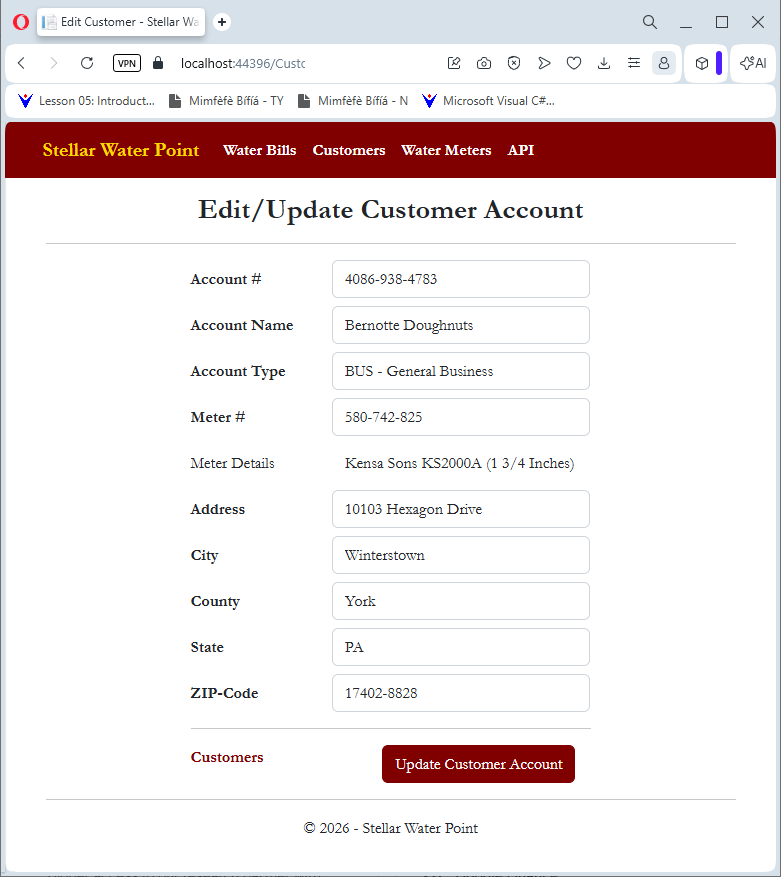
Updating a Customer Account
.
Practical Learning: Updating a Customer Account
@model StellarWaterPoint11.Models.Customer

@{
    ViewBag.Title = "Edit Customer";
}

<h2 class="common-font fw-bold text-center">Edit/Update Customer Account</h2>

<hr />

@using (Html.BeginForm())
{
    @Html.AntiForgeryToken()

<div class="form-horizontal common-font encloser-small">
    @Html.ValidationSummary(true, "", new { @class = "text-danger" })

    @Html.HiddenFor(model => model.CustomerId)

    <div class="row mb-2">
        @Html.LabelFor(model => model.AccountNumber, htmlAttributes: new { @class = "col-form-label col-sm-4 fw-bold" })
        <div class="col-sm-8">
            @Html.EditorFor(model => model.AccountNumber, new { htmlAttributes = new { @class = "form-control" } })
            @Html.ValidationMessageFor(model => model.AccountNumber, "", new { @class = "text-danger" })
        </div>
    </div>

    <div class="row mb-2">
        @Html.LabelFor(model => model.AccountName, htmlAttributes: new { @class = "col-form-label col-sm-4 fw-bold" })
        <div class="col-sm-8">
            @Html.EditorFor(model => model.AccountName, new { htmlAttributes = new { @class = "form-control" } })
            @Html.ValidationMessageFor(model => model.AccountName, "", new { @class = "text-danger" })
        </div>
    </div>

    <div class="row mb-2">
        @Html.LabelFor(model => model.MeterNumber, htmlAttributes: new { @class = "col-form-label col-sm-4 fw-bold" })
        <div class="col-sm-8">
            @Html.EditorFor(model => model.MeterNumber, new { htmlAttributes = new { @class = "form-control", id = "mtrNbr" } })
            @Html.ValidationMessageFor(model => model.MeterNumber, "", new { @class = "text-danger" })
        </div>
    </div>

    <div class="row mb-2">
        <label class="col-form-label col-sm-4">Meter Details</label>
        <div class="col-sm-8">
            <span id="mtrDetails" class="form-control" style="border: 1px solid #FFF;"></span>
        </div>
    </div>

    <div class="row mb-2">
        @Html.LabelFor(model => model.AccountType, htmlAttributes: new { @class = "col-form-label col-sm-4 fw-bold" })
        <div class="col-sm-8">
            @Html.DropDownList("AccountType", ViewBag.AccountType as SelectList, htmlAttributes: new { @class = "form-control", id = "acntType" })
            @Html.ValidationMessageFor(model => model.AccountType, "", new { @class = "text-danger" })
        </div>
    </div>

    <div class="row mb-2">
        @Html.LabelFor(model => model.Address, htmlAttributes: new { @class = "col-form-label col-sm-4 fw-bold" })
        <div class="col-sm-8">
            @Html.EditorFor(model => model.Address, new { htmlAttributes = new { @class = "form-control" } })
            @Html.ValidationMessageFor(model => model.Address, "", new { @class = "text-danger" })
        </div>
    </div>

    <div class="row mb-2">
        @Html.LabelFor(model => model.City, htmlAttributes: new { @class = "col-form-label col-sm-4 fw-bold" })
        <div class="col-sm-8">
            @Html.EditorFor(model => model.City, new { htmlAttributes = new { @class = "form-control" } })
            @Html.ValidationMessageFor(model => model.City, "", new { @class = "text-danger" })
        </div>
    </div>

    <div class="row mb-2">
        @Html.LabelFor(model => model.County, htmlAttributes: new { @class = "col-form-label col-sm-4 fw-bold" })
        <div class="col-sm-8">
            @Html.EditorFor(model => model.County, new { htmlAttributes = new { @class = "form-control" } })
            @Html.ValidationMessageFor(model => model.County, "", new { @class = "text-danger" })
        </div>
    </div>

    <div class="row mb-2">
        @Html.LabelFor(model => model.State, htmlAttributes: new { @class = "col-form-label col-sm-4 fw-bold" })
        <div class="col-sm-8">
            @Html.EditorFor(model => model.State, new { htmlAttributes = new { @class = "form-control" } })
            @Html.ValidationMessageFor(model => model.State, "", new { @class = "text-danger" })
        </div>
    </div>

    <div class="row mb-2">
        @Html.LabelFor(model => model.ZIPCode, htmlAttributes: new { @class = "col-form-label col-sm-4 fw-bold" })
        <div class="col-sm-8">
            @Html.EditorFor(model => model.ZIPCode, new { htmlAttributes = new { @class = "form-control" } })
            @Html.ValidationMessageFor(model => model.ZIPCode, "", new { @class = "text-danger" })
        </div>
    </div>

    <hr />

    <div class="row mb-2">
        <label class="control-label col-md-5">
            @Html.ActionLink("Customers", "Index", "Index", null, htmlAttributes: new { @class = "stellar" })
        </label>
        <div class="col-md-offset-2 col-sm-7 text-center">
            <input type="submit" value="Update Customer Account" class="btn btn-maroon" />
        </div>
    </div>
</div>
}

@section Scripts {
    @Scripts.Render("~/bundles/jqueryval")

    <script type="text/javascript">
        $(document).ready(function () {
            $.ajax({
                method: "GET",
                dataType: "json",
                url: "/api/WaterMetering",
                success: function (data) {
                    $.each(data, function (index, meter) {
                        if (meter["MeterNumber"] === $("#mtrNbr").val()) {
                            $("#mtrDetails").text(meter["Make"] + " " + meter["Model"] + " (" + meter["MeterSize"] + ")");
                        } // if
                    }); // $.each
                } // Success
            }); // $.ajax

            $("#mtrNbr").blur(function (event) {
                $.ajax({
                    method: "GET",
                    dataType: "json",
                    url: "/api/WaterMetering",
                    success: function (data) {
                        $.each(data, function (index, meter) {
                            if (meter["MeterNumber"] === $("#mtrNbr").val()) {
                                $("#mtrDetails").text(meter["Make"] + " " + meter["Model"] + " (" + meter["MeterSize"] + ")");
                            } // if
                        }); // $.each
                    } // Success
                }); // $.ajax
            }); // Lost Focus Event
        }); // Document.Ready
    </script>
}

Account Name: Bernotte Doughnuts
Account Type: BUS	- General Business
Meter #:      580-742-825 and click Find Water Meter
Address:      10103 Hexagon Drive
City:         Winterstown
County:       York
State:        PA
ZIP-Code:     17402-8828

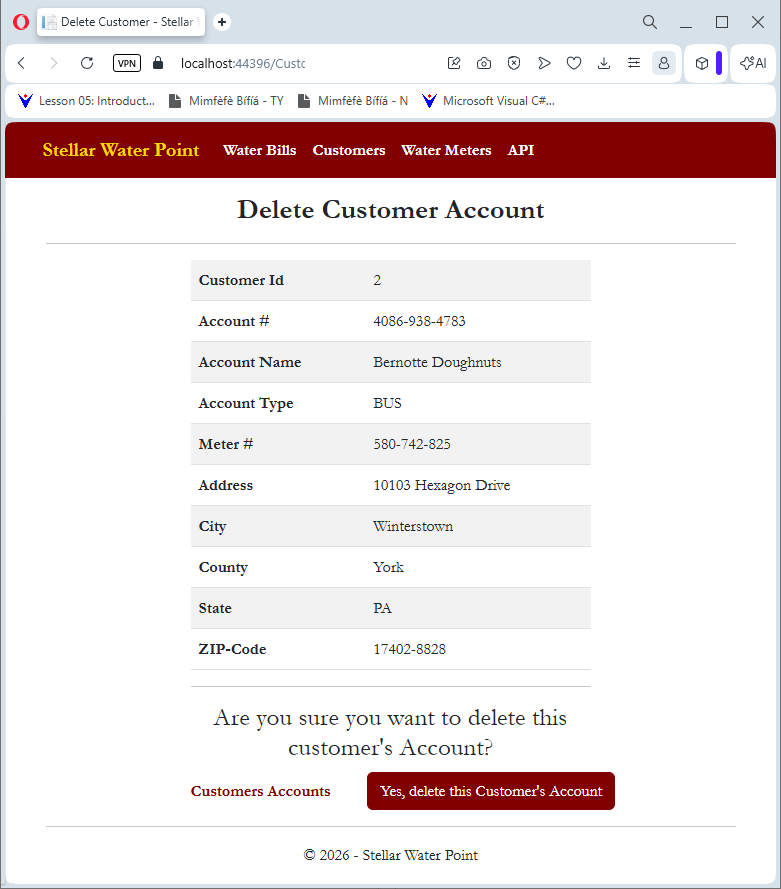
Deleting a Customer Account from the Database
.
Practical Learning: Deleting a Customer Account
@model StellarWaterPoint11.Models.Customer

@{
    ViewBag.Title = "Delete Customer";
}

<h2 class="fw-bold text-center common-font">Delete Customer Account</h2>

<hr />

<div class="encloser-medium common-font">
    <table class="table table-striped common-font">
        <tr>
            <th>@Html.DisplayNameFor(model => model.CustomerId)</th>
            <td>@Html.DisplayFor(model => model.CustomerId)</td>
        </tr>
        <tr>
            <th>@Html.DisplayNameFor(model => model.AccountNumber)</th>
            <td>@Html.DisplayFor(model => model.AccountNumber)</td>
        </tr>
        <tr>
            <th>@Html.DisplayNameFor(model => model.AccountName)</th>
            <td>@Html.DisplayFor(model => model.AccountName)</td>
        </tr>
        <tr>
            <th>@Html.DisplayNameFor(model => model.MeterNumber)</th>
            <td>@Html.DisplayFor(model => model.MeterNumber)</td>
        </tr>
        <tr>
            <th>Meter Details</th>
            <td>@ViewBag.MeterDetails</td>
        </tr>
        <tr>
            <th>@Html.DisplayNameFor(model => model.AccountType)</th>
            <td>@ViewBag.AccountType</td>
        </tr>
        <tr>
            <th>@Html.DisplayNameFor(model => model.Address)</th>
            <td>@Html.DisplayFor(model => model.Address)</td>
        </tr>
        <tr>
            <th>@Html.DisplayNameFor(model => model.City)</th>
            <td>@Html.DisplayFor(model => model.City)</td>
        </tr>
        <tr>
            <th>@Html.DisplayNameFor(model => model.County)</th>
            <td>@Html.DisplayFor(model => model.County)</td>
        </tr>
        <tr>
            <th>@Html.DisplayNameFor(model => model.ZIPCode)</th>
            <td>@Html.DisplayFor(model => model.ZIPCode)</td>
        </tr>
    </table>

    <hr />

    <h3 class="common-font text-center">Are you sure you want to delete this customer's Account?</h3>

    @using (Html.BeginForm())
    {
        @Html.AntiForgeryToken()

        <div class="row mb-2">
            <div class="col-form-label col-sm-5 fw-bold">
                @Html.ActionLink("Customers Accounts", "Index", null, htmlAttributes: new { @class = "stellar" })
            </div>
            <div class="col-sm-7 text-center">
                <input type="submit" value="Yes, delete this Customer's Account" class="btn btn-maroon" />
            </div>
        </div>
    }
</div>
DROP TABLE Customers;
GO
CREATE TABLE Customers
(
	CustomerId    int identity(1, 1),
	AccountNumber nvarchar(15),
	AccountName   nvarchar(200),
	MeterNumber   nvarchar(15),
	AccountType   nvarchar(5),
	[Address]     nvarchar(150),
	City          nvarchar(25),
	County        nvarchar(35),
	[State]       nvarchar(35),
	ZIPCode       nvarchar(12),
	CONSTRAINT    PK_Customers PRIMARY KEY(CustomerId)
);
GO
INSERT INTO Customers(AccountNumber, AccountName, AccountType, MeterNumber, [Address], City, County, [State], ZIPCode)
VALUES(N'9279-570-8394', N'Thomas Stones', N'RES', N'799-528-461', N'10252 Broward Ave #D4', N'Frederick', N'Frederick', N'MD', N'21703-4422'),
      (N'4086-938-4783', N'Bernotte Doughnuts', N'BUS', N'580-742-825', N'10103 Hexagon Drv', N'Winterstown', N'York', N'PA', N'17402-8818'),
      (N'2068-258-9486', N'Yollanda Training', N'UUO', N'186-962-805', N'4819 East Munk Street', N'Whitehall', N'Fulton', N'PA', N'17340-1188'),
      (N'6986-829-3741', N'Eyes Wide', N'BUS', N'208-428-308', N'12087 Avencia Court #4D1', N'Silver Spring', N'Montgomery', N'MD', N'20910-2288');
GO
INSERT INTO Customers(AccountNumber, AccountName, AccountType, MeterNumber, [Address], City, [State], ZIPCode)
VALUES(N'9947-374-2648', N'Marianne Harrington', N'RES', N'862-715-006', N'708 Correta Drv', N'Arlington', N'VA', N'22222-6060');
GO
INSERT INTO Customers(AccountNumber, AccountName, AccountType, MeterNumber, [State])
VALUES(N'2793-857-4970', N'Ascending Line', N'UUO', N'849-351-444', N'OH');
GO
INSERT INTO Customers(AccountNumber, AccountName, AccountType, MeterNumber, [Address], City, County, [State], ZIPCode)
VALUES(N'4293-802-8506', N'Kelly Davids', N'RES', N'496-813-794', N'938 East Panchot Str', N'Greenwood', N'Sussex', N'DE', N'19950-4242');
GO
INSERT INTO Customers(AccountNumber, AccountType, MeterNumber, City, [State], ZIPCode)
VALUES(N'2039-680-4968', N'BUS', N'582-755-263', N'Washington', N'DC', N'20006-5058');
GO
INSERT INTO Customers(AccountNumber, AccountName, AccountType, MeterNumber, [Address])
VALUES(N'6240-857-4965', N'First Methodist Congregation', N'RES', N'739-777-749', N'7702 Charles Road');
GO
INSERT INTO Customers(AccountNumber, AccountName, AccountType, MeterNumber, City, County, [State], ZIPCode)
VALUES(N'7928-131-4850', N'Department of Public Affairs', N'SGO', N'483-770-648', N'Hyattsville', N'Prince Georges', N'MD', N'20783-2277');
GO
INSERT INTO Customers(AccountNumber, AccountName, AccountType, MeterNumber, [Address], City, County, [State], ZIPCode)
VALUES(N'1386-949-2058', N'Watson Country Buffet', N'WAT', N'296-837-495', N'4862 Wellington Street', N'Hammonton', N'Atlantic ', N'NJ', N'08037-2828');
GO
INSERT INTO Customers(AccountNumber, AccountName, AccountType, MeterNumber, [Address], City, County, [State], ZIPCode)
VALUES(N'7943-686-9786', N'Angel Bulzaides', N'RES', N'394-835-297', N'10227 Old Harbor Drv', N'Elkview', N'Kanawha', N'WV', N'25071-5858');
GO
INSERT INTO Customers(AccountNumber, AccountName, AccountType, MeterNumber, [Address], City, [State], ZIPCode)
VALUES(N'4820-375-2842', N'Sun Communal', N'SGO', N'392-494-572', N'748 Red Hills Rd', N'Roanoke', N'VA', N'24012-4824');
GO
INSERT INTO Customers(AccountNumber, AccountName, AccountType, MeterNumber, [Address], City, County, [State], ZIPCode)
VALUES(N'9618-579-2577', N'Gerald Place', N'UUO', N'847-252-246', N'3666 Hanchor Drv', N'Granville', N'Licking', N'OH', N'43023-2777'),
      (N'8027-304-6829', N'Anthony Clarcksons', N'RES', N'837-806-836', N'904 Augusta Drive', N'Blackbird', N'New Castle', N'DE', N'19734-8822');
GO
INSERT INTO Customers(AccountNumber, MeterNumber, [Address], [State], ZIPCode)
VALUES(N'5074-805-8222', N'594-827-359', N'10202 North Carla Rd, NE', N'DC', N'20004-8866');
GO
INSERT INTO Customers(AccountNumber, AccountName, AccountType, MeterNumber, [Address], City, County)
VALUES(N'2037-495-8528', N'Astral Sequence', N'BUS', N'739-749-737', N'12715 Eastern Gateway', N'Catonsville', N'Baltimore County');
GO
INSERT INTO Customers(AccountNumber, AccountName, AccountType, MeterNumber, [Address], City, County, [State], ZIPCode)
VALUES(N'6003-386-3955', N'Mandiakandara Marmoudi', N'OTH', N'374-886-284', N'539 Avalon Court', N'Greenwood', N'Sussex', N'DE', N'19950-5550'),
      (N'5294-859-7513', N'Jeannette Schiller', N'RES', N'713-942-058', N'10110 Winslow Ave', N'Mercerville', N'Mercer', N'NJ', N'08619-7472'),
      (N'9249-379-6848', N'Country West Eatery', N'BUS', N'588-279-663', N'8280 Sligo North Way', N'Albright', N'Preston', N'WV', N'26519-6620');
GO
INSERT INTO Customers(AccountNumber, AccountName, AccountType, MeterNumber, [Address], [State])
VALUES(N'5252-757-9595', N'Sathyavanthara Khooni', N'RES', N'379-386-979', N'4992 Preston Street', N'OH');
GO
INSERT INTO Customers(AccountNumber, AccountName, AccountType, MeterNumber, [Address], City, County, [State], ZIPCode)
VALUES(N'7080-583-5947', N'Sunny Yard', N'WAT', N'827-508-248', N'663 Sherry Wood East Street', N'Shimpstown', N'Franklin', N'PA', N'17236-2626'),
      (N'6699-396-2905', N'Spencer Reuter', N'RES', N'649-373-505', N'2850 Burnsweak Avenue', N'Silver Spring', N'Montgomery', N'MD', N'20910-4044'),
      (N'1827-395-0203', N'Watson Country Buffet', N'WAT', N'470-628-850', N'10331 Chryswell Road', N'Washington', NULL, N'DC', N'20008-2426');
GO
INSERT INTO Customers(AccountNumber, AccountName, AccountType, MeterNumber, [Address], City, [State])
VALUES(N'5862-736-9741', N'Eastern Cage', N'BUS', N'947-528-317', N'2039 Night Stand Court', N'Hammonton', N'NJ');
GO
INSERT INTO Customers(AccountNumber, AccountName, AccountType, MeterNumber, [Address], City, County, [State], ZIPCode)
VALUES(N'3947-957-4958', N'Patsil Industries', N'BUS', N'747-581-379', N'10348 Larrens Drive', N'Baltimore', N'Baltimore', N'MD', N'21215-2222'),
      (N'2836-485-9699', N'Red Oak High School', N'SGO', N'379-386-979', N'442 Donham Road', N'Silver Spring', N'Montgomery', N'MD', N'20910-8822'),
      (N'5938-074-5293', N'Park and Roll', N'SGO', N'592-824-957', N'582G Dunhill Avenue', N'Lanham', N'Prince Georges', N'MD', N'20706-8284'),
      (N'3028-502-9418', N'Spencer Kershaw', N'RES', N'186-959-757', N'338C Grayson Street', N'Gatchellville', N'York', N'PA', N'17352-6464');
GO
INSERT INTO Customers(AccountNumber, AccountName, AccountType, MeterNumber)
VALUES(N'9684-759-2227', N'Country West Eatery', N'BUS', N'928-317-924');
GO
INSERT INTO Customers(AccountNumber, AccountName, AccountType, MeterNumber, [Address], City, County, [State], ZIPCode)
VALUES(N'2974-972-8139', N'Paul Arnette', N'OTH', N'295-770-695', N'8127 Bledsoe Str', N'Hyattsville', N'Prince Georges', N'MD', N'20783-5858'),
      (N'2758-493-7249', N'Hervey Smile', N'WAT', N'293-924-869', N'12973 Sonaa Street #E42', N'Silver Spring', N'Montgomery', N'MD', N'20910-4488');
GO
INSERT INTO Customers(AccountNumber, AccountName, AccountType, MeterNumber, City, [State])
VALUES(N'9337-947-3664', N'Awesome Aid', N'SGO', N'649-358-184', N'Bellefontaine', N'OH');
GO
INSERT INTO Customers(AccountNumber, AccountName, AccountType, MeterNumber, [Address], City, County, [State], ZIPCode)
VALUES(N'7518-302-6895', N'Grace Brenner', N'BUS', N'207-964-835', N'4299 Peachtree Court', N'Rockville', N'Montgomery', N'MD', N'20853-1888');
GO
INSERT INTO Customers(AccountNumber, AccountName, AccountType, MeterNumber)
VALUES(N'2937-947-3008', N'Jeffrey Maney', N'RES', N'928-247-580');
GO
INSERT INTO Customers(AccountNumber, AccountName, AccountType, MeterNumber, [Address], City, County, [State], ZIPCode)
VALUES(N'7028-405-9381', N'Valley Services', N'WAT', N'306-842-497', N'613 Meadowhill Road', N'Alonzaville', N'Shenandoah', N'VA', N'22664-8080'),
      (N'5293-957-3395', N'Wellway Community Center', N'RES', N'386-468-057', N'10484 Greenway Avenue', N'Mt Storm', N'Grant', N'WV', N'26739-7700');
GO
INSERT INTO Customers(AccountNumber, AccountName, AccountType, MeterNumber, [Address], City, [State], ZIPCode)
VALUES(N'2038-413-9680', N'Eastern Friandise', N'BUS', N'938-725-869', N'2075 Rose Hills Avenue', N'Washington', N'DC', N'20004-2626');
GO
INSERT INTO Customers(AccountNumber, AccountName, AccountType, MeterNumber, [Address], City, [State])
VALUES(N'7484-744-9708', N'Amidou Gomah', N'RES', N'529-283-752', N'14118 Yellow Burrough Blvd', N'Philadelphia', N'PA');
GO
INSERT INTO Customers(AccountNumber, AccountName, AccountType, MeterNumber, City, County)
VALUES(N'3792-853-6885', N'Department of Public Affairs', NULL, N'595-753-147', N'Upper Marlboro', N'Prince George County');
GO
INSERT INTO Customers(AccountNumber, AccountName, AccountType, MeterNumber, [Address], City, [State], ZIPCode)
VALUES(N'8282-777-8282', N'Garland Hotel', N'BUS', N'938-275-294', N'4222 Extell Ave', N'Cambridge', N'MD', N'21613-2288');
GO
INSERT INTO Customers(AccountNumber, AccountType, City, [State])
VALUES(N'3937-524-8002', N'UUO', N'Arlington', N'VA');
GO
INSERT INTO Customers(AccountNumber, AccountName, AccountType, MeterNumber, City, [State], ZIPCode)
VALUES(N'5975-863-7057', N'Single Connection', N'BUS', N'288-427-585', N'Mansfield', N'OH', N'44903-3030');
GO
INSERT INTO Customers(AccountNumber, AccountName, AccountType, MeterNumber, [Address], County)
VALUES(N'2499-636-4444', N'Bryanna Spencer', N'RES', N'497-584-700', N'6282 Sheppherd Str', N'Anne Arundel');
GO
INSERT INTO Customers(AccountNumber, AccountName, AccountType, MeterNumber, [Address], City)
VALUES(N'2842-585-7260', N'District Community Reserves', N'SGO', N'349-725-848', N'3280 Hopewell Street, NE', N'Washington');
GO
INSERT INTO Customers(AccountNumber, AccountName, AccountType, MeterNumber, [Address], City, [State])
VALUES(N'9282-794-7937', N'Yashua Yáñés', N'RES', N'392-494-572', N'10214 Monroe Ave', N'Easton', N'MD');
GO
INSERT INTO Customers(AccountNumber, AccountName, AccountType, MeterNumber, [Address], City, County, [State], ZIPCode)
VALUES(N'6837-468-4750', N'Miguel Altieri', N'RES', N'827-260-758', N'10941 Patriot Blvd', N'Crenshaw', N'Jefferson', N'PA', N'15824-6628');
GO
INSERT INTO Customers(AccountNumber, AccountName, AccountType, MeterNumber, [Address], [State])
VALUES(N'2847-597-2829', N'Jameson', N'WAT', N'379-386-979', N'7373 Gold Town Rd', N'WV');
GO
INSERT INTO Customers(AccountNumber, AccountName, AccountType, MeterNumber, [Address], City, County, [State], ZIPCode)
VALUES(N'6381-748-2222', N'Up Eyes', N'BUS', N'931-486-003', N'4149 Deerfield Str', NULL, NULL, NULL, NULL);
GO
INSERT INTO Customers(AccountNumber, AccountName, AccountType, MeterNumber, [Address])
VALUES(N'4968-274-9638', N'Annette Wald', N'RES', N'297-585-947', N'11441  Eastern Friendshi Rd');
GO
INSERT INTO Customers(AccountNumber, AccountName, AccountType, MeterNumber, [State])
VALUES(N'8384-708-2941', N'Department of Environment Affairs', N'SGO', N'285-973-947', N'OH');
GO
INSERT INTO Customers(AccountNumber, AccountName, MeterNumber, [Address], [State])
VALUES(N'3728-138-2947', N'Marie Rath', N'394-739-242', N'8802 Atlantic Ave', N'PA');
GO
INSERT INTO Customers(AccountNumber, AccountName, AccountType, MeterNumber, City, [State])
VALUES(N'1793-857-9413', N'Body Care', N'WAT', N'304-805-869', N'Ocean City', N'NJ');
GO
INSERT INTO Customers(AccountNumber, AccountName, AccountType, MeterNumber)
VALUES(N'6028-695-2068', N'Ronald Glassman', N'BUS', N'468-359-486');
GO
INSERT INTO Customers(AccountNumber, AccountName, AccountType, MeterNumber, [Address], [State])
VALUES(N'4069-37-49728', N'Lucette Wash N Dry', N'WAT', N'630-207-055', N'8812 Lawrence Ave', N'NW');
GO
INSERT INTO Customers(AccountNumber, AccountName, AccountType, [Address], City, [State], ZIPCode)
VALUES(N'9616-283-7249', N'Department of Public Affairs', N'SGO', N'13006 Blueberry Ave', N'Greenbelt', N'MD', N'20770-2040');
GO
INSERT INTO Customers(AccountNumber, AccountName, AccountType, MeterNumber, [Address])
VALUES(N'2829-516-8353', N'Richard Eghert', N'RES', N'738-588-249', N'662 Placido Road');
GO
INSERT INTO Customers(AccountNumber, AccountName, AccountType, MeterNumber, [Address], City, [State])
VALUES(N'6296-875-9607', N'Country West Eatery', N'BUS', N'682-537-380', N'837 Larrenson Drv', N'Cumberland', N'MD');
GO
INSERT INTO Customers(AccountNumber, AccountName, AccountType, [Address])
VALUES(N'9684-794-6379', N'Eye Care', N'BUS', N'8626 Cameron Str');
GO
INSERT INTO Customers(AccountNumber, AccountName, AccountType, MeterNumber, City, [State])
VALUES(N'2405-839-5820', N'Watson Country Buffet', N'WAT', N'293-835-704', N'Harrisburg', N'PA');
GOWater Bills
Introduction
.
Practical Learning: Introducing Water Bills
namespace StellarWaterPoint1.Models
{
    using System.ComponentModel;
    using System.ComponentModel.DataAnnotations;

    public partial class WaterBill
    {
        [Key]
        [DisplayName("Water Bill Id")]
        public int WaterBillId { get; set; }

        [DisplayName("Water Bill #")]
        public int WaterBillNumber { get; set; }

        [Required]
        [StringLength(15)]
        [DisplayName("Account #")]
        public string AccountNumber { get; set; }

        [Required]
        [StringLength(50)]
        [DisplayName("Meter Reading Start Date")]
        public string MeterReadingStartDate { get; set; }

        [Required]
        [StringLength(50)]
        [DisplayName("Meter Reading End Date")]
        public string MeterReadingEndDate { get; set; }

        [DisplayName("Billing Days")]
        public int BillingDays { get; set; }

        [StringLength(15)]
        [DisplayName("Counter Reading Start")]
        public string CounterReadingStart { get; set; }

        [StringLength(15)]
        [DisplayName("Counter Reading End")]
        public string CounterReadingEnd { get; set; }

        [StringLength(15)]
        [DisplayName("Total HCF")]
        public string TotalHCF { get; set; }

        [StringLength(15)]
        [DisplayName("Total Gallons")]
        public string TotalGallons { get; set; }

        [StringLength(15)]
        [DisplayName("First Tier Consumption")]
        public string FirstTierConsumption { get; set; }

        [StringLength(15)]
        [DisplayName("Second Tier Consumption")]
        public string SecondTierConsumption { get; set; }

        [StringLength(15)]
        [DisplayName("Last Tier Consumption")]
        public string LastTierConsumption { get; set; }

        [StringLength(15)]
        [DisplayName("Water Charges")]
        public string WaterCharges { get; set; }

        [StringLength(15)]
        [DisplayName("Sewer Charges")]
        public string SewerCharges { get; set; }

        [StringLength(15)]
        [DisplayName("Environment Charges")]
        public string EnvironmentCharges { get; set; }

        [StringLength(15)]
        [DisplayName("Service Charges")]
        public string ServiceCharges { get; set; }

        [StringLength(15)]
        [DisplayName("Total Charges")]
        public string TotalCharges { get; set; }

        [StringLength(15)]
        [DisplayName("Local Taxes")]
        public string LocalTaxes { get; set; }

        [StringLength(15)]
        [DisplayName("State Taxes")]
        public string StateTaxes { get; set; }

        [StringLength(50)]
        [DisplayName("Payment Due Date")]
        public string PaymentDueDate { get; set; }

        [StringLength(15)]
        [DisplayName("Amount Due")]
        public string AmountDue { get; set; }

        [StringLength(50)]
        [DisplayName("Late Payment Due Date")]
        public string LatePaymentDueDate { get; set; }

        [StringLength(15)]
        [DisplayName("Late Amount Due")]
        public string LateAmountDue { get; set; }
    }
}using StellarWaterPoint1.Models;
using System.Data.Entity;
using System.Data.Entity.Infrastructure;
using System.Linq;
using System.Net;
using System.Web.Http;
using System.Web.Http.Description;
namespace StellarWaterPoint1.Controllers
{
public class ClientsController : ApiController
{
private WaterManagementModel db = new WaterManagementModel();
// GET: api/Clients
public IQueryable<Customer> GetCustomers()
{
return db.Customers;
}
// GET: api/Clients/5
[ResponseType(typeof(Customer))]
public IHttpActionResult GetCustomer(int id)
{
Customer customer = db.Customers.Find(id);
if (customer == null)
{
return NotFound();
}
return Ok(customer);
}
// PUT: api/Clients/5
[ResponseType(typeof(void))]
public IHttpActionResult PutCustomer(int id, Customer customer)
{
if (!ModelState.IsValid)
{
return BadRequest(ModelState);
}
if (id != customer.CustomerId)
{
return BadRequest();
}
db.Entry(customer).State = EntityState.Modified;
try
{
db.SaveChanges();
}
catch (DbUpdateConcurrencyException)
{
if (!CustomerExists(id))
{
return NotFound();
}
else
{
throw;
}
}
return StatusCode(HttpStatusCode.NoContent);
}
// POST: api/Clients
[ResponseType(typeof(Customer))]
public IHttpActionResult PostCustomer(Customer customer)
{
if (!ModelState.IsValid)
{
return BadRequest(ModelState);
}
db.Customers.Add(customer);
db.SaveChanges();
return CreatedAtRoute("DefaultApi", new { id = customer.CustomerId }, customer);
}
// DELETE: api/Clients/5
[ResponseType(typeof(Customer))]
public IHttpActionResult DeleteCustomer(int id)
{
Customer customer = db.Customers.Find(id);
if (customer == null)
{
return NotFound();
}
db.Customers.Remove(customer);
db.SaveChanges();
return Ok(customer);
}
protected override void Dispose(bool disposing)
{
if (disposing)
{
db.Dispose();
}
base.Dispose(disposing);
}
private bool CustomerExists(int id)
{
return db.Customers.Count(e => e.CustomerId == id) > 0;
}
}
}using StellarWaterPoint1.Models;
using System.Data.Entity;
using System.Linq;
using System.Net;
using System.Web.Mvc;
namespace StellarWaterPoint1.Controllers
{
public class WaterBillsController : Controller
{
private WaterManagementModel db = new WaterManagementModel();
// GET: WaterBills
public ActionResult Index()
{
return View(db.WaterBills.ToList());
}
// GET: WaterBills/Details/5
public ActionResult Details(int? id)
{
if (id == null)
{
return new HttpStatusCodeResult(HttpStatusCode.BadRequest);
}
WaterBill waterBill = db.WaterBills.Find(id);
if (waterBill == null)
{
return HttpNotFound();
}
return View(waterBill);
}
// GET: WaterBills/Create
public ActionResult Create()
{
return View();
}
// POST: WaterBills/Create
// To protect from overposting attacks, enable the specific properties you want to bind to, for
// more details see https://go.microsoft.com/fwlink/?LinkId=317598.
[HttpPost]
[ValidateAntiForgeryToken]
public ActionResult Create([Bind(Include = "WaterBillId,WaterBillNumber,AccountNumber,MeterReadingStartDate,MeterReadingEndDate,BillingDays,CounterReadingStart,CounterReadingEnd,TotalHCF,TotalGallons,FirstTierConsumption,SecondTierConsumption,LastTierConsumption,WaterCharges,SewerCharges,EnvironmentCharges,ServiceCharges,TotalCharges,LocalTaxes,StateTaxes,PaymentDueDate,AmountDue,LatePaymentDueDate,LateAmountDue")] WaterBill waterBill)
{
if (ModelState.IsValid)
{
db.WaterBills.Add(waterBill);
db.SaveChanges();
return RedirectToAction("Index");
}
return View(waterBill);
}
// GET: WaterBills/Edit/5
public ActionResult Edit(int? id)
{
if (id == null)
{
return new HttpStatusCodeResult(HttpStatusCode.BadRequest);
}
WaterBill waterBill = db.WaterBills.Find(id);
if (waterBill == null)
{
return HttpNotFound();
}
return View(waterBill);
}
// POST: WaterBills/Edit/5
// To protect from overposting attacks, enable the specific properties you want to bind to, for
// more details see https://go.microsoft.com/fwlink/?LinkId=317598.
[HttpPost]
[ValidateAntiForgeryToken]
public ActionResult Edit([Bind(Include = "WaterBillId,WaterBillNumber,AccountNumber,MeterReadingStartDate,MeterReadingEndDate,BillingDays,CounterReadingStart,CounterReadingEnd,TotalHCF,TotalGallons,FirstTierConsumption,SecondTierConsumption,LastTierConsumption,WaterCharges,SewerCharges,EnvironmentCharges,ServiceCharges,TotalCharges,LocalTaxes,StateTaxes,PaymentDueDate,AmountDue,LatePaymentDueDate,LateAmountDue")] WaterBill waterBill)
{
if (ModelState.IsValid)
{
db.Entry(waterBill).State = EntityState.Modified;
db.SaveChanges();
return RedirectToAction("Index");
}
return View(waterBill);
}
// GET: WaterBills/Delete/5
public ActionResult Delete(int? id)
{
if (id == null)
{
return new HttpStatusCodeResult(HttpStatusCode.BadRequest);
}
WaterBill waterBill = db.WaterBills.Find(id);
if (waterBill == null)
{
return HttpNotFound();
}
return View(waterBill);
}
// POST: WaterBills/Delete/5
[HttpPost, ActionName("Delete")]
[ValidateAntiForgeryToken]
public ActionResult DeleteConfirmed(int id)
{
WaterBill waterBill = db.WaterBills.Find(id);
db.WaterBills.Remove(waterBill);
db.SaveChanges();
return RedirectToAction("Index");
}
protected override void Dispose(bool disposing)
{
if (disposing)
{
db.Dispose();
}
base.Dispose(disposing);
}
}
}@model IEnumerable<StellarWaterPoint5.Models.WaterBill>
@{
ViewBag.Title = "Water Bills";
}
<h2>Customers Water Bills</h2>
<hr />
<table class="table common-font table-striped">
<tr>
<th class="text-center">@Html.DisplayNameFor(model => model.WaterBillId)</th>
<th class="text-center">@Html.DisplayNameFor(model => model.InvoiceNumber)</th>
<th class="text-center">@Html.DisplayNameFor(model => model.AccountNumber)</th>
<th class="text-center">@Html.DisplayNameFor(model => model.MeterReadingStartDate)</th>
<th class="text-center">@Html.DisplayNameFor(model => model.MeterReadingEndDate)</th>
<th>@Html.DisplayNameFor(model => model.BillingDays)</th>
<th>@Html.DisplayNameFor(model => model.CounterReadingStart)</th>
<th>@Html.DisplayNameFor(model => model.CounterReadingEnd)</th>
<th>@Html.DisplayNameFor(model => model.TotalHCF)</th>
<th>@Html.DisplayNameFor(model => model.TotalGallons)</th>
<th>@Html.DisplayNameFor(model => model.First15HCF)</th>
<th>@Html.DisplayNameFor(model => model.Next10HCF)</th>
<th>@Html.DisplayNameFor(model => model.RemainingHCF)</th>
<th>@Html.DisplayNameFor(model => model.SewerCharges)</th>
<th>@Html.DisplayNameFor(model => model.StormCharges)</th>
<th>@Html.DisplayNameFor(model => model.WaterUsageCharges)</th>
<th>@Html.DisplayNameFor(model => model.TotalCharges)</th>
<th>@Html.DisplayNameFor(model => model.LocalTaxes)</th>
<th>@Html.DisplayNameFor(model => model.StateTaxes)</th>
<th>@Html.DisplayNameFor(model => model.PaymentDueDate)</th>
<th>@Html.DisplayNameFor(model => model.AmountDue)</th>
<th class="text-center">@Html.DisplayNameFor(model => model.LatePaymentDueDate)</th>
<th>@Html.DisplayNameFor(model => model.LateAmountDue)</th>
<th>@Html.ActionLink("New Water Bill", "Create", null, htmlAttributes: new { @class = "water-nav" })</th>
</tr>
@foreach (var item in Model)
{
<tr>
<td class="text-center">@Html.DisplayFor(modelItem => item.WaterBillId)</td>
<td>@Html.DisplayFor(modelItem => item.InvoiceNumber)</td>
<td class="text-center">@Html.DisplayFor(modelItem => item.AccountNumber)</td>
<td class="text-center">@Html.DisplayFor(modelItem => item.MeterReadingStartDate)</td>
<td class="text-center">@Html.DisplayFor(modelItem => item.MeterReadingEndDate)</td>
<td>@Html.DisplayFor(modelItem => item.BillingDays)</td>
<td>@Html.DisplayFor(modelItem => item.CounterReadingStart)</td>
<td>@Html.DisplayFor(modelItem => item.CounterReadingEnd)</td>
<td>@Html.DisplayFor(modelItem => item.TotalHCF)</td>
<td>@Html.DisplayFor(modelItem => item.TotalGallons)</td>
<td>@Html.DisplayFor(modelItem => item.First15HCF)</td>
<td>@Html.DisplayFor(modelItem => item.Next10HCF)</td>
<td>@Html.DisplayFor(modelItem => item.RemainingHCF)</td>
<td>@Html.DisplayFor(modelItem => item.SewerCharges)</td>
<td>@Html.DisplayFor(modelItem => item.StormCharges)</td>
<td>@Html.DisplayFor(modelItem => item.WaterUsageCharges)</td>
<td>@Html.DisplayFor(modelItem => item.TotalCharges)</td>
<td>@Html.DisplayFor(modelItem => item.LocalTaxes)</td>
<td>@Html.DisplayFor(modelItem => item.StateTaxes)</td>
<td>@Html.DisplayFor(modelItem => item.PaymentDueDate)</td>
<td>@Html.DisplayFor(modelItem => item.AmountDue)</td>
<td class="text-center">@Html.DisplayFor(modelItem => item.LatePaymentDueDate)</td>
<td>@Html.DisplayFor(modelItem => item.LateAmountDue)</td>
<td>
@Html.ActionLink("Update", "Edit", new { id = item.WaterBillId }) ::
@Html.ActionLink("Review", "Details", new { id = item.WaterBillId }) ::
@Html.ActionLink("Delete", "Delete", new { id = item.WaterBillId })
</td>
</tr>
}
</table>@model StellarWaterPoint5.Models.WaterBill
@{
ViewBag.Title = "Water Bill Details";
}
<div class="push-down">
<h2>Water Bill Details</h2>
</div>
<hr />
<div class="containment">
<dl class="dl-horizontal common-font cream">
<dt>@Html.DisplayNameFor(model => model.WaterBillId)</dt>
<dd>@Html.DisplayFor(model => model.WaterBillId)</dd>
<dt>@Html.DisplayNameFor(model => model.InvoiceNumber)</dt>
<dd>@Html.DisplayFor(model => model.InvoiceNumber)</dd>
<dt>@Html.DisplayNameFor(model => model.AccountNumber)</dt>
<dd>@Html.DisplayFor(model => model.AccountNumber)</dd>
<dt>@Html.DisplayNameFor(model => model.MeterReadingStartDate)</dt>
<dd>@Html.DisplayFor(model => model.MeterReadingStartDate)</dd>
<dt>@Html.DisplayNameFor(model => model.MeterReadingEndDate)</dt>
<dd>@Html.DisplayFor(model => model.MeterReadingEndDate)</dd>
<dt>@Html.DisplayNameFor(model => model.BillingDays)</dt>
<dd>@Html.DisplayFor(model => model.BillingDays)</dd>
<dt>@Html.DisplayNameFor(model => model.CounterReadingStart)</dt>
<dd>@Html.DisplayFor(model => model.CounterReadingStart)</dd>
<dt>@Html.DisplayNameFor(model => model.CounterReadingEnd)</dt>
<dd>@Html.DisplayFor(model => model.CounterReadingEnd)</dd>
<dt>@Html.DisplayNameFor(model => model.TotalHCF)</dt>
<dd>@Html.DisplayFor(model => model.TotalHCF)</dd>
<dt>@Html.DisplayNameFor(model => model.TotalGallons)</dt>
<dd>@Html.DisplayFor(model => model.TotalGallons)</dd>
<dt>@Html.DisplayNameFor(model => model.First15HCF)</dt>
<dd>@Html.DisplayFor(model => model.First15HCF)</dd>
<dt>@Html.DisplayNameFor(model => model.Next10HCF)</dt>
<dd>@Html.DisplayFor(model => model.Next10HCF)</dd>
<dt>@Html.DisplayNameFor(model => model.RemainingHCF)</dt>
<dd>@Html.DisplayFor(model => model.RemainingHCF)</dd>
<dt>@Html.DisplayNameFor(model => model.SewerCharges)</dt>
<dd>@Html.DisplayFor(model => model.SewerCharges)</dd>
<dt>@Html.DisplayNameFor(model => model.StormCharges)</dt>
<dd>@Html.DisplayFor(model => model.StormCharges)</dd>
<dt>@Html.DisplayNameFor(model => model.WaterUsageCharges)</dt>
<dd>@Html.DisplayFor(model => model.WaterUsageCharges)</dd>
<dt>@Html.DisplayNameFor(model => model.TotalCharges)</dt>
<dd>@Html.DisplayFor(model => model.TotalCharges)</dd>
<dt>@Html.DisplayNameFor(model => model.LocalTaxes)</dt>
<dd>@Html.DisplayFor(model => model.LocalTaxes)</dd>
<dt>@Html.DisplayNameFor(model => model.StateTaxes)</dt>
<dd>@Html.DisplayFor(model => model.StateTaxes)</dd>
<dt>@Html.DisplayNameFor(model => model.PaymentDueDate)</dt>
<dd>@Html.DisplayFor(model => model.PaymentDueDate)</dd>
<dt>@Html.DisplayNameFor(model => model.AmountDue)</dt>
<dd>@Html.DisplayFor(model => model.AmountDue)</dd>
<dt>@Html.DisplayNameFor(model => model.LatePaymentDueDate)</dt>
<dd>@Html.DisplayFor(model => model.LatePaymentDueDate)</dd>
<dt>@Html.DisplayNameFor(model => model.LateAmountDue)</dt>
<dd>@Html.DisplayFor(model => model.LateAmountDue)</dd>
</dl>
</div>
<p class="text-center">
@Html.ActionLink("Edit", "Edit", new { id = Model.WaterBillId },
htmlAttributes: new { @class = "water-nav" }) <span class="cream">::</span>
@Html.ActionLink("Customers Water Bills", "Index", null, new { @class = "water-nav" })
</p>@model StellarWaterPoint5.Models.WaterBill
@{
ViewBag.Title = "Create Water Bill";
}
<div class="push-down">
<h2>Prepare Customer Water Bill</h2>
</div>
<hr />
@using (Html.BeginForm())
{
@Html.AntiForgeryToken()
<div class="form-horizontal">
@Html.ValidationSummary(true, "", new { @class = "text-danger" })
<div class="form-group">
@Html.LabelFor(model => model.InvoiceNumber, htmlAttributes: new { @class = "control-label col-md-4 cream" })
<div class="col-md-8">
@Html.TextBox("InvoiceNumber", ViewData["InvoiceNumber"] as string, htmlAttributes: new { @class = "form-control" })
@Html.ValidationMessageFor(model => model.InvoiceNumber, "", new { @class = "text-danger" })
</div>
</div>
<div class="form-group">
@Html.LabelFor(model => model.AccountNumber, htmlAttributes: new { @class = "control-label col-md-4 cream" })
<div class="col-md-8">
@Html.EditorFor(model => model.AccountNumber, new { htmlAttributes = new { @class = "form-control", id = "acntNbr" } })
@Html.ValidationMessageFor(model => model.AccountNumber, "", new { @class = "text-danger" })
</div>
</div>
<div class="form-group">
<label class="control-label col-md-4 cream">Customer Name</label>
<div class="col-md-6">
<span class="form-control" id="custName"></span>
</div>
</div>
<div class="form-group">
<label class="control-label col-md-4 cream">Address</label>
<div class="col-md-6">
<span class="form-control" id="adrs"></span>
</div>
</div>
<div class="form-group">
<label class="control-label col-md-4"> </label>
<div class="col-md-125">
<span class="form-control" id="city"></span>
</div>
<div class="col-md-125">
<span class="form-control" id="county"></span>
</div>
<div class="col-md-125">
<span class="form-control" id="state"></span>
</div>
<div class="col-md-125">
<span class="form-control" id="zip"></span>
</div>
</div>
<div class="form-group">
<label class="control-label col-md-4 cream">Meter Details</label>
<div class="col-md-125">
<span class="form-control" id="mtrNbr"></span>
</div>
<div class="col-md-375">
<span class="form-control" id="meterDetails"></span>
</div>
</div>
<div class="form-group">
@Html.LabelFor(model => model.MeterReadingStartDate, htmlAttributes: new { @class = "control-label col-md-4 cream" })
<div class="col-md-2">
@Html.EditorFor(model => model.MeterReadingStartDate,
new { htmlAttributes = new { @class = "form-control", id = "mrsd"} })
@Html.ValidationMessageFor(model => model.MeterReadingStartDate, "", new { @class = "text-danger" })
</div>
@Html.LabelFor(model => model.MeterReadingEndDate, htmlAttributes: new { @class = "control-label col-md-125 cream" })
<div class="col-md-125">
@Html.EditorFor(model => model.MeterReadingEndDate,
new { htmlAttributes = new { @class = "form-control", id = "mred", type = "date" } })
@Html.ValidationMessageFor(model => model.MeterReadingEndDate, "", new { @class = "text-danger" })
</div>
@Html.LabelFor(model => model.BillingDays, htmlAttributes: new { @class = "control-label col-md-125 cream" })
<div class="col-md-125">
@Html.EditorFor(model => model.BillingDays, new { htmlAttributes = new { @class = "form-control", id = "days" } })
@Html.ValidationMessageFor(model => model.BillingDays, "", new { @class = "text-danger" })
</div>
</div>
<div class="form-group">
@Html.LabelFor(model => model.CounterReadingStart, htmlAttributes: new { @class = "control-label col-md-4 cream" })
<div class="col-md-2">
@Html.EditorFor(model => model.CounterReadingStart, new { htmlAttributes = new { @class = "form-control", id = "crs" } })
@Html.ValidationMessageFor(model => model.CounterReadingStart, "", new { @class = "text-danger" })
</div>
@Html.LabelFor(model => model.CounterReadingEnd, htmlAttributes: new { @class = "control-label col-md-125 cream" })
<div class="col-md-125">
@Html.EditorFor(model => model.CounterReadingEnd, new { htmlAttributes = new { @class = "form-control", id = "cre" } })
@Html.ValidationMessageFor(model => model.CounterReadingEnd, "", new { @class = "text-danger" })
</div>
@Html.LabelFor(model => model.TotalHCF, htmlAttributes: new { @class = "control-label col-md-125 cream" })
<div class="col-md-125">
@Html.EditorFor(model => model.TotalHCF,
new { htmlAttributes = new { @class = "form-control", id = "thcf" } })
@Html.ValidationMessageFor(model => model.TotalHCF, "", new { @class = "text-danger" })
</div>
</div>
<div class="form-group">
<label class="control-label col-md-4"> </label>
<div class="col-md-2"> </div>
<label class="control-label col-md-125"> </label>
<div class="col-md-125"> </div>
@Html.LabelFor(model => model.TotalGallons, htmlAttributes: new { @class = "control-label col-md-125 cream" })
<div class="col-md-125">
@Html.EditorFor(model => model.TotalGallons, new { htmlAttributes = new { @class = "form-control", id = "gallons" } })
@Html.ValidationMessageFor(model => model.TotalGallons, "", new { @class = "text-danger" })
</div>
</div>
<div class="form-group">
@Html.LabelFor(model => model.First15HCF, htmlAttributes: new { @class = "control-label col-md-4 cream" })
<div class="col-md-2">
@Html.EditorFor(model => model.First15HCF, new { htmlAttributes = new { @class = "form-control", id = "f15HCF" } })
@Html.ValidationMessageFor(model => model.First15HCF, "", new { @class = "text-danger" })
</div>
@Html.LabelFor(model => model.Next10HCF, htmlAttributes: new { @class = "control-label col-md-125 cream" })
<div class="col-md-125">
@Html.EditorFor(model => model.Next10HCF,
new { htmlAttributes = new { @class = "form-control", id = "next10HCF" } })
@Html.ValidationMessageFor(model => model.Next10HCF, "", new { @class = "text-danger" })
</div>
@Html.LabelFor(model => model.RemainingHCF, htmlAttributes: new { @class = "control-label col-md-125 cream" })
<div class="col-md-125">
@Html.EditorFor(model => model.RemainingHCF,
new { htmlAttributes = new { @class = "form-control", id = "remHCF" } })
@Html.ValidationMessageFor(model => model.RemainingHCF, "", new { @class = "text-danger" })
</div>
</div>
<div class="form-group">
@Html.LabelFor(model => model.SewerCharges, htmlAttributes: new { @class = "control-label col-md-4 cream" })
<div class="col-md-2">
@Html.EditorFor(model => model.SewerCharges,
new { htmlAttributes = new { @class = "form-control", id = "sewerCharges" } })
@Html.ValidationMessageFor(model => model.SewerCharges, "", new { @class = "text-danger" })
</div>
@Html.LabelFor(model => model.StormCharges, htmlAttributes: new { @class = "control-label col-md-125 cream" })
<div class="col-md-125">
@Html.EditorFor(model => model.StormCharges,
new { htmlAttributes = new { @class = "form-control", id = "stormCharges" } })
@Html.ValidationMessageFor(model => model.StormCharges, "", new { @class = "text-danger" })
</div>
@Html.LabelFor(model => model.WaterUsageCharges, htmlAttributes: new { @class = "control-label col-md-125 cream" })
<div class="col-md-125">
@Html.EditorFor(model => model.WaterUsageCharges,
new { htmlAttributes = new { @class = "form-control", id = "wuc" } })
@Html.ValidationMessageFor(model => model.WaterUsageCharges, "", new { @class = "text-danger" })
</div>
</div>
<div class="form-group">
<label class="control-label col-md-4"> </label>
<div class="col-md-2"> </div>
<label class="control-label col-md-125"> </label>
<div class="col-md-125"> </div>
@Html.LabelFor(model => model.TotalCharges, htmlAttributes: new { @class = "control-label col-md-125 cream" })
<div class="col-md-125">
@Html.EditorFor(model => model.TotalCharges,
new { htmlAttributes = new { @class = "form-control", id = "totalCharges" } })
@Html.ValidationMessageFor(model => model.TotalCharges, "", new { @class = "text-danger" })
</div>
</div>
<div class="form-group">
<label class="control-label col-md-4"> </label>
<div class="col-md-2"> </div>
@Html.LabelFor(model => model.LocalTaxes, htmlAttributes: new { @class = "control-label col-md-125 cream" })
<div class="col-md-125">
@Html.EditorFor(model => model.LocalTaxes,
new { htmlAttributes = new { @class = "form-control", id = "localTaxes" } })
@Html.ValidationMessageFor(model => model.LocalTaxes, "", new { @class = "text-danger" })
</div>
@Html.LabelFor(model => model.StateTaxes, htmlAttributes: new { @class = "control-label col-md-125 cream" })
<div class="col-md-125">
@Html.EditorFor(model => model.StateTaxes,
new { htmlAttributes = new { @class = "form-control", id = "stateTaxes" } })
@Html.ValidationMessageFor(model => model.StateTaxes, "", new { @class = "text-danger" })
</div>
</div>
<div class="form-group">
<label class="control-label col-md-4"> </label>
<div class="col-md-2"> </div>
@Html.LabelFor(model => model.PaymentDueDate, htmlAttributes: new { @class = "control-label col-md-125 cream" })
<div class="col-md-125">
@Html.EditorFor(model => model.PaymentDueDate, new { htmlAttributes = new { @class = "form-control", type = "date" } })
@Html.ValidationMessageFor(model => model.PaymentDueDate, "", new { @class = "text-danger" })
</div>
@Html.LabelFor(model => model.AmountDue, htmlAttributes: new { @class = "control-label col-md-125 cream" })
<div class="col-md-125">
@Html.EditorFor(model => model.AmountDue,
new { htmlAttributes = new { @class = "form-control", id = "amtDue" } })
@Html.ValidationMessageFor(model => model.AmountDue, "", new { @class = "text-danger" })
</div>
</div>
<div class="form-group">
<label class="col-md-4 cream"> </label>
<div class="col-md-2"> </div>
@Html.LabelFor(model => model.LatePaymentDueDate, htmlAttributes: new { @class = "control-label col-md-125 cream" })
<div class="col-md-125">
@Html.EditorFor(model => model.LatePaymentDueDate,
new { htmlAttributes = new { @class = "form-control", type = "date" } })
@Html.ValidationMessageFor(model => model.LatePaymentDueDate, "", new { @class = "text-danger" })
</div>
@Html.LabelFor(model => model.LateAmountDue, htmlAttributes: new { @class = "control-label col-md-125 cream" })
<div class="col-md-125">
@Html.EditorFor(model => model.LateAmountDue,
new { htmlAttributes = new { @class = "form-control", id = "lateAmtDue" } })
@Html.ValidationMessageFor(model => model.LateAmountDue, "", new { @class = "text-danger" })
</div>
</div>
<div class="form-group">
<label class="control-label col-md-5">
@Html.ActionLink("Water Bills", "Index", null, htmlAttributes: new { @class = "water-nav" })
</label>
<div class="col-md-7">
<input type="submit" value="Save this Water Bill" class="btn btn-maroon" />
</div>
</div>
</div>
}
@section Scripts {
@Scripts.Render("~/bundles/jqueryval")
<script type="text/javascript">
$(document).ready(function () {
$("#acntNbr").blur(function (event) {
$.ajax({
method: "GET",
dataType: "json",
url: "/api/Customers",
success: function (data) {
$.each(data, function (index, client) {
if (client["AccountNumber"] === $("#acntNbr").val()) {
$("#mtrNbr").text(client["MeterNumber"]);
$("#custName").text(client["FirstName"] + " " + client["LastName"]);
$("#adrs").text(client["Address"]);
$("#city").text(client["City"]);
$("#county").text(client["County"]);
$("#state").text(client["State"]);
$("#zip").text(client["ZIPCode"]);
} // if
}); // $.each
} // Success
}); // $.ajax
$.ajax({
method: "GET",
dataType: "json",
url: "/api/WaterMeters",
success: function (data) {
$.each(data, function (index, meter) {
if (meter["MeterNumber"] === $("#mtrNbr").text()) {
$("#meterDetails").text(meter["Make"] + " " + meter["Model"] + " (" + meter["MeterSize"] + ")");
$("#mrsd").val(meter["DateLastUpdate"]);
$("#crs").val(meter["CounterValue"]);
} // if
}); // $.each
} // Success
}); // $.ajax
$.ajax({
method: "GET",
dataType: "json",
url: "/api/WaterBills",
success: function (data) {
$.each(data, function (index, invoice) {
if (invoice["AccountNumber"] === $("#acntNbr").val()) {
$("#mrsd").val(invoice["MeterReadingEndDate"]);
$("#crs").val(invoice["CounterReadingEnd"]);
} // if
}); // $.each
} // Success
}); // $.ajax
$("#mred").change(function (event) {
var meterReadingStartDate = Date.parse($("#mrsd").val());
var meterReadingEndDate = Date.parse($("#mred").val());
var days = (meterReadingEndDate - meterReadingStartDate) / 86400000;
$("#days").val(days.toFixed());
}); // Meter Reading End Date Lost Focus
$("#cre").blur(function (event) {
const counterReadingStart = parseInt($("#crs").val());
const counterReadingEnd = parseInt($("#cre").val());
const totalHCF = counterReadingEnd - counterReadingStart;
const gallons = totalHCF * 748; // 748.05
var first15HCF = totalHCF * 3.612;
var next10HCF = 0, remainingHCF = 0;
if (totalHCF <= 15) {
first15HCF = totalHCF * 3.612;
next10HCF = 0;
remainingHCF = 0;
}
else if (totalHCF <= 25) {
first15HCF = 15 * 3.612;
next10HCF = (totalHCF - 15) * 3.918;
remainingHCF = 0;
}
else {
first15HCF = 15 * 3.612;
next10HCF = 10 * 3.918;
remainingHCF = (totalHCF - 25) * 2.2763;
}
const waterUsageCharges = first15HCF + next10HCF + remainingHCF;
const sewerCharges = waterUsageCharges * 0.252;
const stormCharges = waterUsageCharges * 0.0025;
const totalCharges = waterUsageCharges + sewerCharges + stormCharges;
const localTaxes = totalCharges * 0.0152;
const stateTaxes = totalCharges * 0.005;
const amountDue = totalCharges + localTaxes + stateTaxes;
$("#thcf").val(totalHCF.toFixed());
$("#gallons").val(gallons.toFixed());
$("#amtDue").val(amountDue.toFixed(2));
$("#f15HCF").val(first15HCF.toFixed(2));
$("#next10HCF").val(next10HCF.toFixed(2));
$("#remHCF").val(remainingHCF.toFixed(2));
$("#wuc").val(waterUsageCharges.toFixed(2));
$("#stateTaxes").val(stateTaxes.toFixed(2));
$("#localTaxes").val(localTaxes.toFixed(2));
$("#sewerCharges").val(sewerCharges.toFixed(2));
$("#stormCharges").val(stormCharges.toFixed(2));
$("#totalCharges").val(totalCharges.toFixed(2));
$("#lateAmtDue").val((amountDue + 8.95).toFixed(2));
}); // Counter Reading End Lost Focus
}); // Lost Focus Event
}); // Document.Ready
</script>
}@model StellarWaterPoint5.Models.WaterBill
@{
ViewBag.Title = "Edit Water Bill";
}
<div class="push-down">
<h2>Edit or Process Process Water Bill</h2>
</div>
<hr />
@using (Html.BeginForm())
{
@Html.AntiForgeryToken()
<div class="form-horizontal">
@Html.ValidationSummary(true, "", new { @class = "text-danger" })
@Html.HiddenFor(model => model.WaterBillId)
<div class="form-group">
@Html.LabelFor(model => model.InvoiceNumber, htmlAttributes: new { @class = "control-label col-md-4 cream" })
<div class="col-md-8">
@Html.EditorFor(model => model.InvoiceNumber, new { htmlAttributes = new { @class = "form-control" } })
@Html.ValidationMessageFor(model => model.InvoiceNumber, "", new { @class = "text-danger" })
</div>
</div>
<div class="form-group">
@Html.LabelFor(model => model.AccountNumber, htmlAttributes: new { @class = "control-label col-md-4 cream" })
<div class="col-md-8">
@Html.EditorFor(model => model.AccountNumber, new { htmlAttributes = new { @class = "form-control", id = "acntNbr" } })
@Html.ValidationMessageFor(model => model.AccountNumber, "", new { @class = "text-danger" })
</div>
</div>
<div class="form-group">
<label class="control-label col-md-4 cream">Customer Name</label>
<div class="col-md-6">
<span class="form-control" id="custName"></span>
</div>
</div>
<div class="form-group">
<label class="control-label col-md-4 cream">Address</label>
<div class="col-md-6">
<span class="form-control" id="adrs"></span>
</div>
</div>
<div class="form-group">
<label class="control-label col-md-4"> </label>
<div class="col-md-125">
<span class="form-control" id="city"></span>
</div>
<div class="col-md-125">
<span class="form-control" id="county"></span>
</div>
<div class="col-md-125">
<span class="form-control" id="state"></span>
</div>
<div class="col-md-125">
<span class="form-control" id="zip"></span>
</div>
</div>
<div class="form-group">
<label class="control-label col-md-4 cream">Meter Details</label>
<div class="col-md-125">
<span class="form-control" id="mtrNbr"></span>
</div>
<div class="col-md-375">
<span class="form-control" id="meterDetails"></span>
</div>
</div>
<div class="form-group">
@Html.LabelFor(model => model.MeterReadingStartDate, htmlAttributes: new { @class = "control-label col-md-4 cream" })
<div class="col-md-2">
@Html.EditorFor(model => model.MeterReadingStartDate,
new { htmlAttributes = new { @class = "form-control", id = "mrsd"} })
@Html.ValidationMessageFor(model => model.MeterReadingStartDate, "", new { @class = "text-danger" })
</div>
@Html.LabelFor(model => model.MeterReadingEndDate, htmlAttributes: new { @class = "control-label col-md-125 cream" })
<div class="col-md-125">
@Html.EditorFor(model => model.MeterReadingEndDate,
new { htmlAttributes = new { @class = "form-control", id = "mred", type = "date" } })
@Html.ValidationMessageFor(model => model.MeterReadingEndDate, "", new { @class = "text-danger" })
</div>
@Html.LabelFor(model => model.BillingDays, htmlAttributes: new { @class = "control-label col-md-125 cream" })
<div class="col-md-125">
@Html.EditorFor(model => model.BillingDays, new { htmlAttributes = new { @class = "form-control", id = "days" } })
@Html.ValidationMessageFor(model => model.BillingDays, "", new { @class = "text-danger" })
</div>
</div>
<div class="form-group">
@Html.LabelFor(model => model.CounterReadingStart, htmlAttributes: new { @class = "control-label col-md-4 cream" })
<div class="col-md-2">
@Html.EditorFor(model => model.CounterReadingStart, new { htmlAttributes = new { @class = "form-control", id = "crs" } })
@Html.ValidationMessageFor(model => model.CounterReadingStart, "", new { @class = "text-danger" })
</div>
@Html.LabelFor(model => model.CounterReadingEnd, htmlAttributes: new { @class = "control-label col-md-125 cream" })
<div class="col-md-125">
@Html.EditorFor(model => model.CounterReadingEnd, new { htmlAttributes = new { @class = "form-control", id = "cre" } })
@Html.ValidationMessageFor(model => model.CounterReadingEnd, "", new { @class = "text-danger" })
</div>
@Html.LabelFor(model => model.TotalHCF, htmlAttributes: new { @class = "control-label col-md-125 cream" })
<div class="col-md-125">
@Html.EditorFor(model => model.TotalHCF,
new { htmlAttributes = new { @class = "form-control", id = "thcf" } })
@Html.ValidationMessageFor(model => model.TotalHCF, "", new { @class = "text-danger" })
</div>
</div>
<div class="form-group">
<label class="control-label col-md-4"> </label>
<div class="col-md-2"> </div>
<label class="control-label col-md-125"> </label>
<div class="col-md-125"> </div>
@Html.LabelFor(model => model.TotalGallons, htmlAttributes: new { @class = "control-label col-md-125 cream" })
<div class="col-md-125">
@Html.EditorFor(model => model.TotalGallons, new { htmlAttributes = new { @class = "form-control", id = "gallons" } })
@Html.ValidationMessageFor(model => model.TotalGallons, "", new { @class = "text-danger" })
</div>
</div>
<div class="form-group">
@Html.LabelFor(model => model.First15HCF, htmlAttributes: new { @class = "control-label col-md-4 cream" })
<div class="col-md-2">
@Html.EditorFor(model => model.First15HCF, new { htmlAttributes = new { @class = "form-control", id = "f15HCF" } })
@Html.ValidationMessageFor(model => model.First15HCF, "", new { @class = "text-danger" })
</div>
@Html.LabelFor(model => model.Next10HCF, htmlAttributes: new { @class = "control-label col-md-125 cream" })
<div class="col-md-125">
@Html.EditorFor(model => model.Next10HCF,
new { htmlAttributes = new { @class = "form-control", id = "next10HCF" } })
@Html.ValidationMessageFor(model => model.Next10HCF, "", new { @class = "text-danger" })
</div>
@Html.LabelFor(model => model.RemainingHCF, htmlAttributes: new { @class = "control-label col-md-125 cream" })
<div class="col-md-125">
@Html.EditorFor(model => model.RemainingHCF,
new { htmlAttributes = new { @class = "form-control", id = "remHCF" } })
@Html.ValidationMessageFor(model => model.RemainingHCF, "", new { @class = "text-danger" })
</div>
</div>
<div class="form-group">
@Html.LabelFor(model => model.SewerCharges, htmlAttributes: new { @class = "control-label col-md-4 cream" })
<div class="col-md-2">
@Html.EditorFor(model => model.SewerCharges,
new { htmlAttributes = new { @class = "form-control", id = "sewerCharges" } })
@Html.ValidationMessageFor(model => model.SewerCharges, "", new { @class = "text-danger" })
</div>
@Html.LabelFor(model => model.StormCharges, htmlAttributes: new { @class = "control-label col-md-125 cream" })
<div class="col-md-125">
@Html.EditorFor(model => model.StormCharges,
new { htmlAttributes = new { @class = "form-control", id = "stormCharges" } })
@Html.ValidationMessageFor(model => model.StormCharges, "", new { @class = "text-danger" })
</div>
@Html.LabelFor(model => model.WaterUsageCharges, htmlAttributes: new { @class = "control-label col-md-125 cream" })
<div class="col-md-125">
@Html.EditorFor(model => model.WaterUsageCharges,
new { htmlAttributes = new { @class = "form-control", id = "wuc" } })
@Html.ValidationMessageFor(model => model.WaterUsageCharges, "", new { @class = "text-danger" })
</div>
</div>
<div class="form-group">
<label class="control-label col-md-4"> </label>
<div class="col-md-2"> </div>
<label class="control-label col-md-125"> </label>
<div class="col-md-125"> </div>
@Html.LabelFor(model => model.TotalCharges, htmlAttributes: new { @class = "control-label col-md-125 cream" })
<div class="col-md-125">
@Html.EditorFor(model => model.TotalCharges,
new { htmlAttributes = new { @class = "form-control", id = "totalCharges" } })
@Html.ValidationMessageFor(model => model.TotalCharges, "", new { @class = "text-danger" })
</div>
</div>
<div class="form-group">
<label class="control-label col-md-4"> </label>
<div class="col-md-2"> </div>
@Html.LabelFor(model => model.LocalTaxes, htmlAttributes: new { @class = "control-label col-md-125 cream" })
<div class="col-md-125">
@Html.EditorFor(model => model.LocalTaxes,
new { htmlAttributes = new { @class = "form-control", id = "localTaxes" } })
@Html.ValidationMessageFor(model => model.LocalTaxes, "", new { @class = "text-danger" })
</div>
@Html.LabelFor(model => model.StateTaxes, htmlAttributes: new { @class = "control-label col-md-125 cream" })
<div class="col-md-125">
@Html.EditorFor(model => model.StateTaxes,
new { htmlAttributes = new { @class = "form-control", id = "stateTaxes" } })
@Html.ValidationMessageFor(model => model.StateTaxes, "", new { @class = "text-danger" })
</div>
</div>
<div class="form-group">
<label class="control-label col-md-4"> </label>
<div class="col-md-2"> </div>
@Html.LabelFor(model => model.PaymentDueDate, htmlAttributes: new { @class = "control-label col-md-125 cream" })
<div class="col-md-125">
@Html.EditorFor(model => model.PaymentDueDate, new { htmlAttributes = new { @class = "form-control", type = "date" } })
@Html.ValidationMessageFor(model => model.PaymentDueDate, "", new { @class = "text-danger" })
</div>
@Html.LabelFor(model => model.AmountDue, htmlAttributes: new { @class = "control-label col-md-125 cream" })
<div class="col-md-125">
@Html.EditorFor(model => model.AmountDue,
new { htmlAttributes = new { @class = "form-control", id = "amtDue" } })
@Html.ValidationMessageFor(model => model.AmountDue, "", new { @class = "text-danger" })
</div>
</div>
<div class="form-group">
<label class="col-md-4 cream"> </label>
<div class="col-md-2"> </div>
@Html.LabelFor(model => model.LatePaymentDueDate, htmlAttributes: new { @class = "control-label col-md-125 cream" })
<div class="col-md-125">
@Html.EditorFor(model => model.LatePaymentDueDate,
new { htmlAttributes = new { @class = "form-control", type = "date" } })
@Html.ValidationMessageFor(model => model.LatePaymentDueDate, "", new { @class = "text-danger" })
</div>
@Html.LabelFor(model => model.LateAmountDue, htmlAttributes: new { @class = "control-label col-md-125 cream" })
<div class="col-md-125">
@Html.EditorFor(model => model.LateAmountDue,
new { htmlAttributes = new { @class = "form-control", id = "lateAmtDue" } })
@Html.ValidationMessageFor(model => model.LateAmountDue, "", new { @class = "text-danger" })
</div>
</div>
<div class="form-group">
<label class="control-label col-md-5">
@Html.ActionLink("Water Bills", "Index", null, htmlAttributes: new { @class = "water-nav" })
</label>
<div class="col-md-7">
<input type="submit" value="Save this Water Bill" class="btn btn-maroon" />
</div>
</div>
</div>
}
@section Scripts {
@Scripts.Render("~/bundles/jqueryval")
<script type="text/javascript">
$(document).ready(function () {
$.ajax({
method: "GET",
dataType: "json",
url: "/api/Customers",
success: function (data) {
$.each(data, function (index, client) {
if (client["AccountNumber"] === $("#acntNbr").val()) {
$("#mtrNbr").text(client["MeterNumber"]);
$("#custName").text(client["FirstName"] + " " + client["LastName"]);
$("#adrs").text(client["Address"]);
$("#city").text(client["City"]);
$("#county").text(client["County"]);
$("#state").text(client["State"]);
$("#zip").text(client["ZIPCode"]);
} // if
}); // $.each
} // Success
}); // $.ajax
$.ajax({
method: "GET",
dataType: "json",
url: "/api/WaterMeters",
success: function (data) {
$.each(data, function (index, meter) {
if (meter["MeterNumber"] === $("#mtrNbr").text()) {
$("#meterDetails").text(meter["Make"] + " " + meter["Model"] + " (" + meter["MeterSize"] + ")");
// $("#mrsd").val(meter["DateLastUpdate"]);
// $("#crs").val(meter["CounterValue"]);
} // if
}); // $.each
} // Success
}); // $.ajax
$("#acntNbr").blur(function (event) {
$.ajax({
method: "GET",
dataType: "json",
url: "/api/Customers",
success: function (data) {
$.each(data, function (index, client) {
if (client["AccountNumber"] === $("#acntNbr").val()) {
$("#mtrNbr").text(client["MeterNumber"]);
$("#custName").text(client["FirstName"] + " " + client["LastName"]);
$("#adrs").text(client["Address"]);
$("#city").text(client["City"]);
$("#county").text(client["County"]);
$("#state").text(client["State"]);
$("#zip").text(client["ZIPCode"]);
} // if
}); // $.each
} // Success
}); // $.ajax
$.ajax({
method: "GET",
dataType: "json",
url: "/api/WaterMeters",
success: function (data) {
$.each(data, function (index, meter) {
if (meter["MeterNumber"] === $("#mtrNbr").text()) {
$("#meterDetails").text(meter["Make"] + " " + meter["Model"] + " (" + meter["MeterSize"] + ")");
$("#mrsd").val(meter["DateLastUpdate"]);
$("#crs").val(meter["CounterValue"]);
} // if
}); // $.each
} // Success
}); // $.ajax
$.ajax({
method: "GET",
dataType: "json",
url: "/api/WaterBills",
success: function (data) {
$.each(data, function (index, invoice) {
if (invoice["AccountNumber"] === $("#acntNbr").val()) {
$("#mrsd").val(invoice["MeterReadingEndDate"]);
$("#crs").val(invoice["CounterReadingEnd"]);
} // if
}); // $.each
} // Success
}); // $.ajax
$("#mred").change(function (event) {
var meterReadingStartDate = Date.parse($("#mrsd").val());
var meterReadingEndDate = Date.parse($("#mred").val());
var days = (meterReadingEndDate - meterReadingStartDate) / 86400000;
$("#days").val(days.toFixed());
}); // Meter Reading End Date Lost Focus
$("#cre").blur(function (event) {
const counterReadingStart = parseInt($("#crs").val());
const counterReadingEnd = parseInt($("#cre").val());
const totalHCF = counterReadingEnd - counterReadingStart;
const gallons = totalHCF * 748; // 748.05
var first15HCF = totalHCF * 3.612;
var next10HCF = 0, remainingHCF = 0;
if (totalHCF <= 15) {
first15HCF = totalHCF * 3.612;
next10HCF = 0;
remainingHCF = 0;
}
else if (totalHCF <= 25) {
first15HCF = 15 * 3.612;
next10HCF = (totalHCF - 15) * 3.918;
remainingHCF = 0;
}
else {
first15HCF = 15 * 3.612;
next10HCF = 10 * 3.918;
remainingHCF = (totalHCF - 25) * 2.2763;
}
const waterUsageCharges = first15HCF + next10HCF + remainingHCF;
const sewerCharges = waterUsageCharges * 0.252;
const stormCharges = waterUsageCharges * 0.0025;
const totalCharges = waterUsageCharges + sewerCharges + stormCharges;
const localTaxes = totalCharges * 0.0152;
const stateTaxes = totalCharges * 0.005;
const amountDue = totalCharges + localTaxes + stateTaxes;
$("#thcf").val(totalHCF.toFixed());
$("#gallons").val(gallons.toFixed());
$("#amtDue").val(amountDue.toFixed(2));
$("#f15HCF").val(first15HCF.toFixed(2));
$("#next10HCF").val(next10HCF.toFixed(2));
$("#remHCF").val(remainingHCF.toFixed(2));
$("#wuc").val(waterUsageCharges.toFixed(2));
$("#stateTaxes").val(stateTaxes.toFixed(2));
$("#localTaxes").val(localTaxes.toFixed(2));
$("#sewerCharges").val(sewerCharges.toFixed(2));
$("#stormCharges").val(stormCharges.toFixed(2));
$("#totalCharges").val(totalCharges.toFixed(2));
$("#lateAmtDue").val((amountDue + 8.95).toFixed(2));
}); // Counter Reading End Lost Focus
}); // Lost Focus Event
}); // Document.Ready
</script>
}@model StellarWaterPoint5.Models.WaterBill
@{
ViewBag.Title = "Delete Water Bill";
}
<div class="push-down">
<h2>Delete Water Bill</h2>
</div>
<hr />
<div class="containment">
<dl class="dl-horizontal common-font cream">
<dt>@Html.DisplayNameFor(model => model.WaterBillId)</dt>
<dd>@Html.DisplayFor(model => model.WaterBillId)</dd>
<dt>@Html.DisplayNameFor(model => model.InvoiceNumber)</dt>
<dd>@Html.DisplayFor(model => model.InvoiceNumber)</dd>
<dt>@Html.DisplayNameFor(model => model.AccountNumber)</dt>
<dd>@Html.DisplayFor(model => model.AccountNumber)</dd>
<dt>@Html.DisplayNameFor(model => model.MeterReadingStartDate)</dt>
<dd>@Html.DisplayFor(model => model.MeterReadingStartDate)</dd>
<dt>@Html.DisplayNameFor(model => model.MeterReadingEndDate)</dt>
<dd>@Html.DisplayFor(model => model.MeterReadingEndDate)</dd>
<dt>@Html.DisplayNameFor(model => model.BillingDays)</dt>
<dd>@Html.DisplayFor(model => model.BillingDays)</dd>
<dt>@Html.DisplayNameFor(model => model.CounterReadingStart)</dt>
<dd>@Html.DisplayFor(model => model.CounterReadingStart)</dd>
<dt>@Html.DisplayNameFor(model => model.CounterReadingEnd)</dt>
<dd>@Html.DisplayFor(model => model.CounterReadingEnd)</dd>
<dt>@Html.DisplayNameFor(model => model.TotalHCF)</dt>
<dd>@Html.DisplayFor(model => model.TotalHCF)</dd>
<dt>@Html.DisplayNameFor(model => model.TotalGallons)</dt>
<dd>@Html.DisplayFor(model => model.TotalGallons)</dd>
<dt>@Html.DisplayNameFor(model => model.First15HCF)</dt>
<dd>@Html.DisplayFor(model => model.First15HCF)</dd>
<dt>@Html.DisplayNameFor(model => model.Next10HCF)</dt>
<dd>@Html.DisplayFor(model => model.Next10HCF)</dd>
<dt>@Html.DisplayNameFor(model => model.RemainingHCF)</dt>
<dd>@Html.DisplayFor(model => model.RemainingHCF)</dd>
<dt>@Html.DisplayNameFor(model => model.SewerCharges)</dt>
<dd>@Html.DisplayFor(model => model.SewerCharges)</dd>
<dt>@Html.DisplayNameFor(model => model.StormCharges)</dt>
<dd>@Html.DisplayFor(model => model.StormCharges)</dd>
<dt>@Html.DisplayNameFor(model => model.WaterUsageCharges)</dt>
<dd>@Html.DisplayFor(model => model.WaterUsageCharges)</dd>
<dt>@Html.DisplayNameFor(model => model.TotalCharges)</dt>
<dd>@Html.DisplayFor(model => model.TotalCharges)</dd>
<dt>@Html.DisplayNameFor(model => model.LocalTaxes)</dt>
<dd>@Html.DisplayFor(model => model.LocalTaxes)</dd>
<dt>@Html.DisplayNameFor(model => model.StateTaxes)</dt>
<dd>@Html.DisplayFor(model => model.StateTaxes)</dd>
<dt>@Html.DisplayNameFor(model => model.PaymentDueDate)</dt>
<dd>@Html.DisplayFor(model => model.PaymentDueDate)</dd>
<dt>@Html.DisplayNameFor(model => model.AmountDue)</dt>
<dd>@Html.DisplayFor(model => model.AmountDue)</dd>
<dt>@Html.DisplayNameFor(model => model.LatePaymentDueDate)</dt>
<dd>@Html.DisplayFor(model => model.LatePaymentDueDate)</dd>
<dt>@Html.DisplayNameFor(model => model.LateAmountDue)</dt>
<dd>@Html.DisplayFor(model => model.LateAmountDue)</dd>
</dl>
<h3 class="common-font cream">Are you sure you want to delete or cancel this water bill?</h3>
@using (Html.BeginForm())
{
@Html.AntiForgeryToken()
<div class="form-actions no-color">
<input type="submit" value="Delete this Water Bill" class="btn btn-maroon" /> <span class="cream">::</span>
@Html.ActionLink("Water Bills", "Index", null, htmlAttributes: new { @class = "water-nav" })
</div>
}
</div>Finalizing the Application
Most of the time, it is a good idea to apply a common design to most webpages of a website. In ASP.NET, such a design is created as a layout view.
Practical Learning: Finalizing the Application
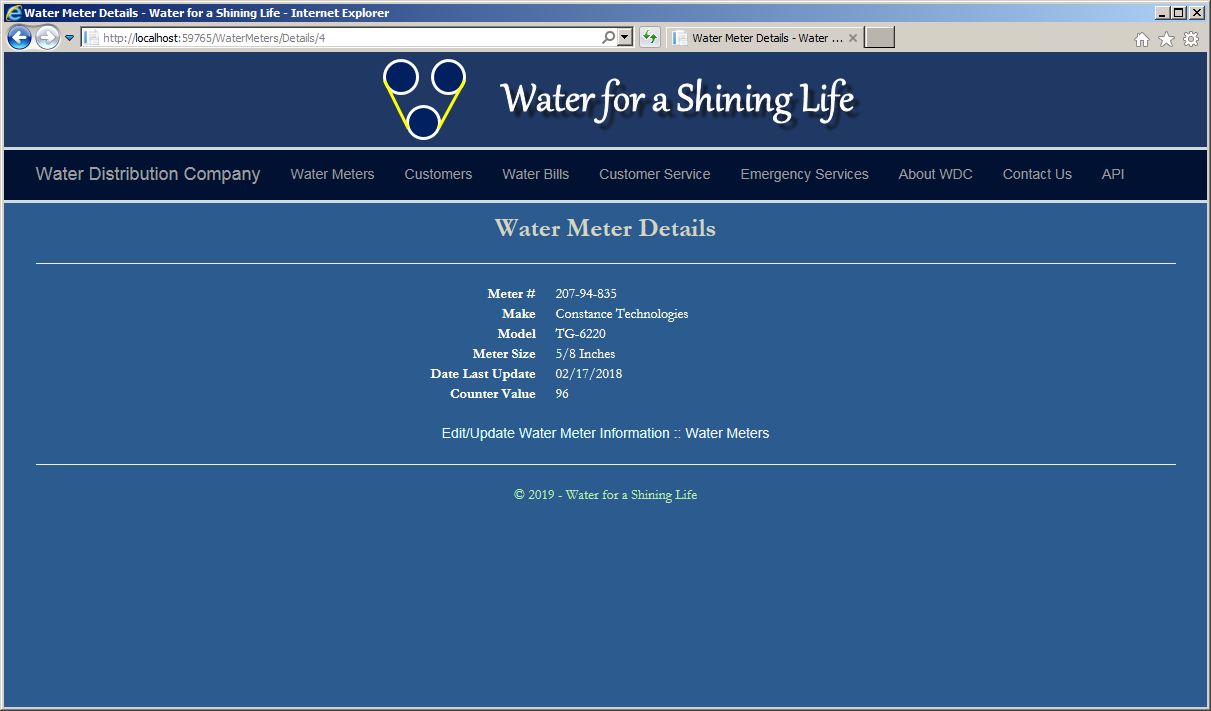
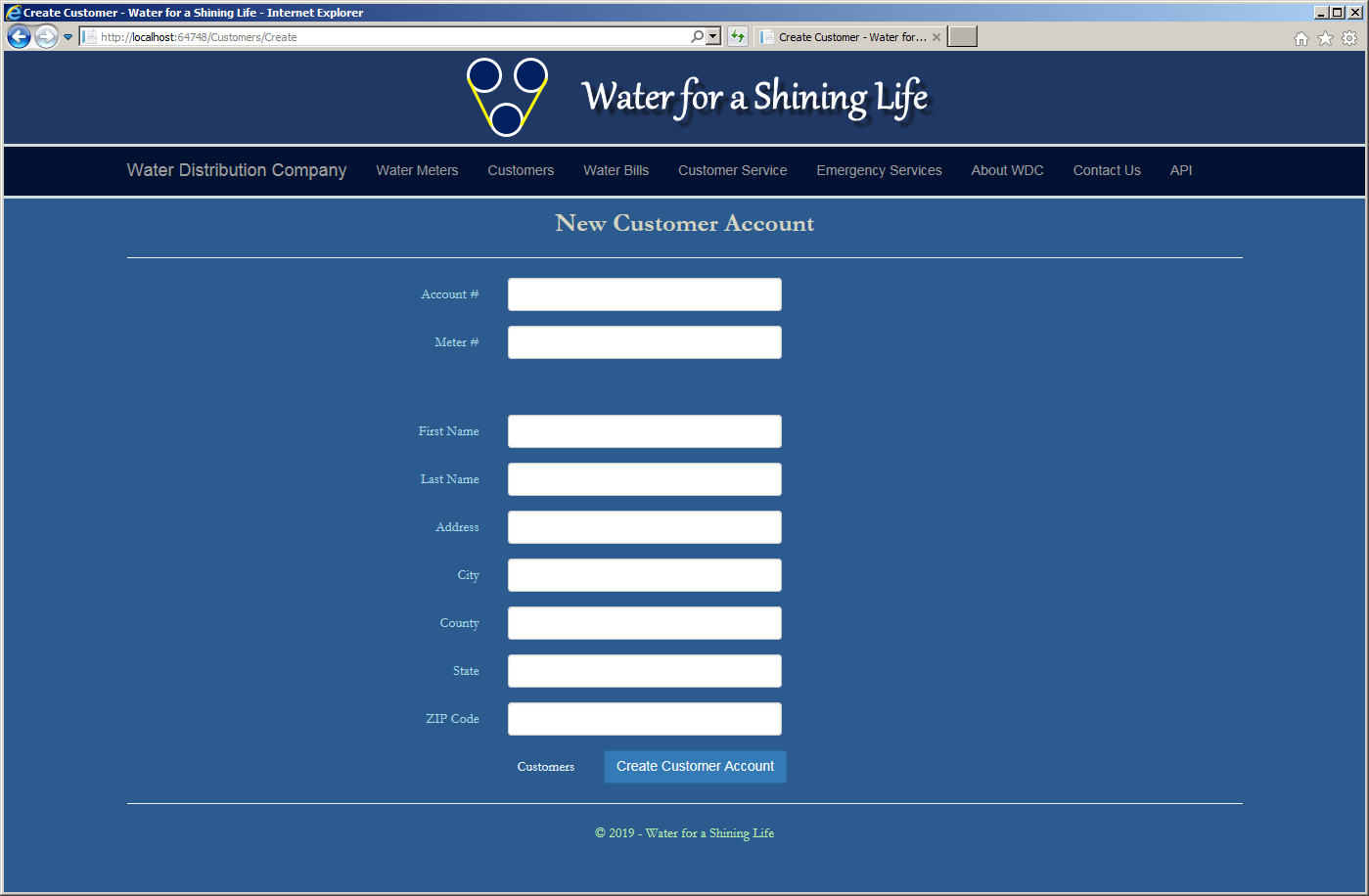
| Account # | Meter # | First Name | Last Name | Address | City | County | State | ZIP Code |
| 9279-570-8394 | 799-28-461 | Thomas | Stones | 10252 Broward Ave #D4 | Frederick | Frederick | MD | 21703 |
| 4820-375-2842 | 392-44-572 | Akhil | Koumari | 748 Red Hills Rd | Roanoke | VA | 24012 | |
| 7518-302-6895 | 207-94-835 | Grace | Brenner | 4299 Peachtree Court | Rockville | Montgomery | MD | 20853 |
| 2038-413-9680 | 938-75-869 | Amidou | Gomah | 2075 Rose Hills Ave | Washington | DC | 20004 | |
| 5938-074-5293 | 592-84-957 | Marie | Rath | 582G Dunhill Ave | Lanham | Prince George | MD | 20706 |
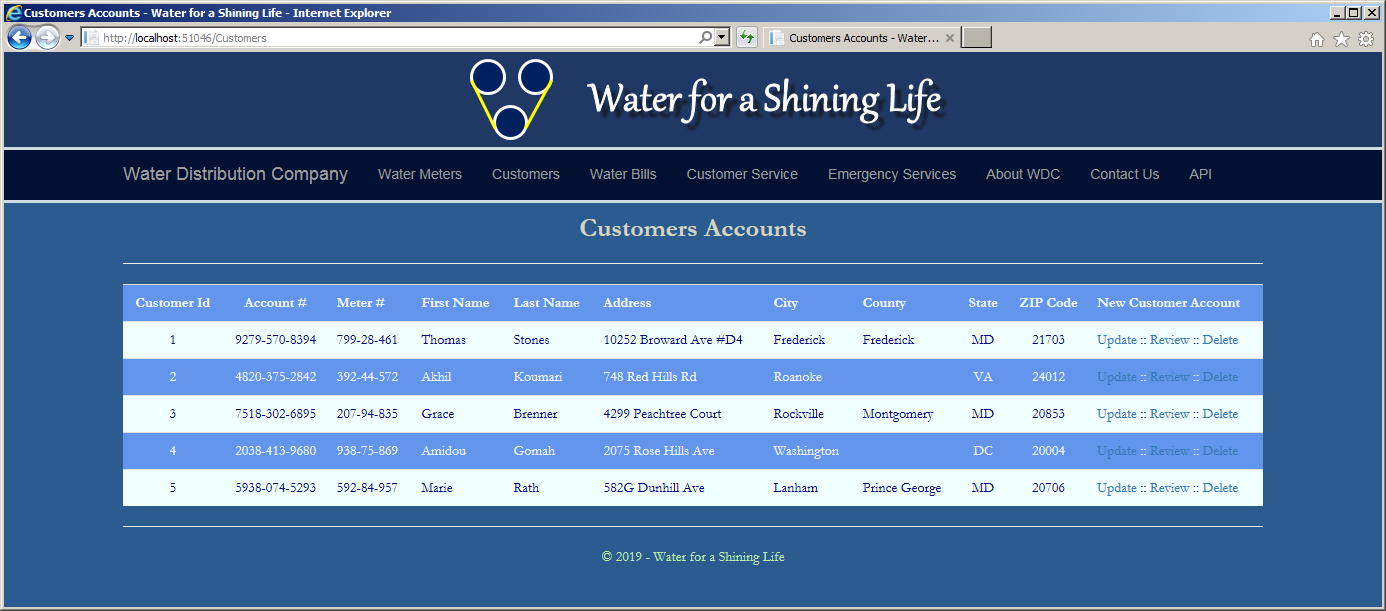

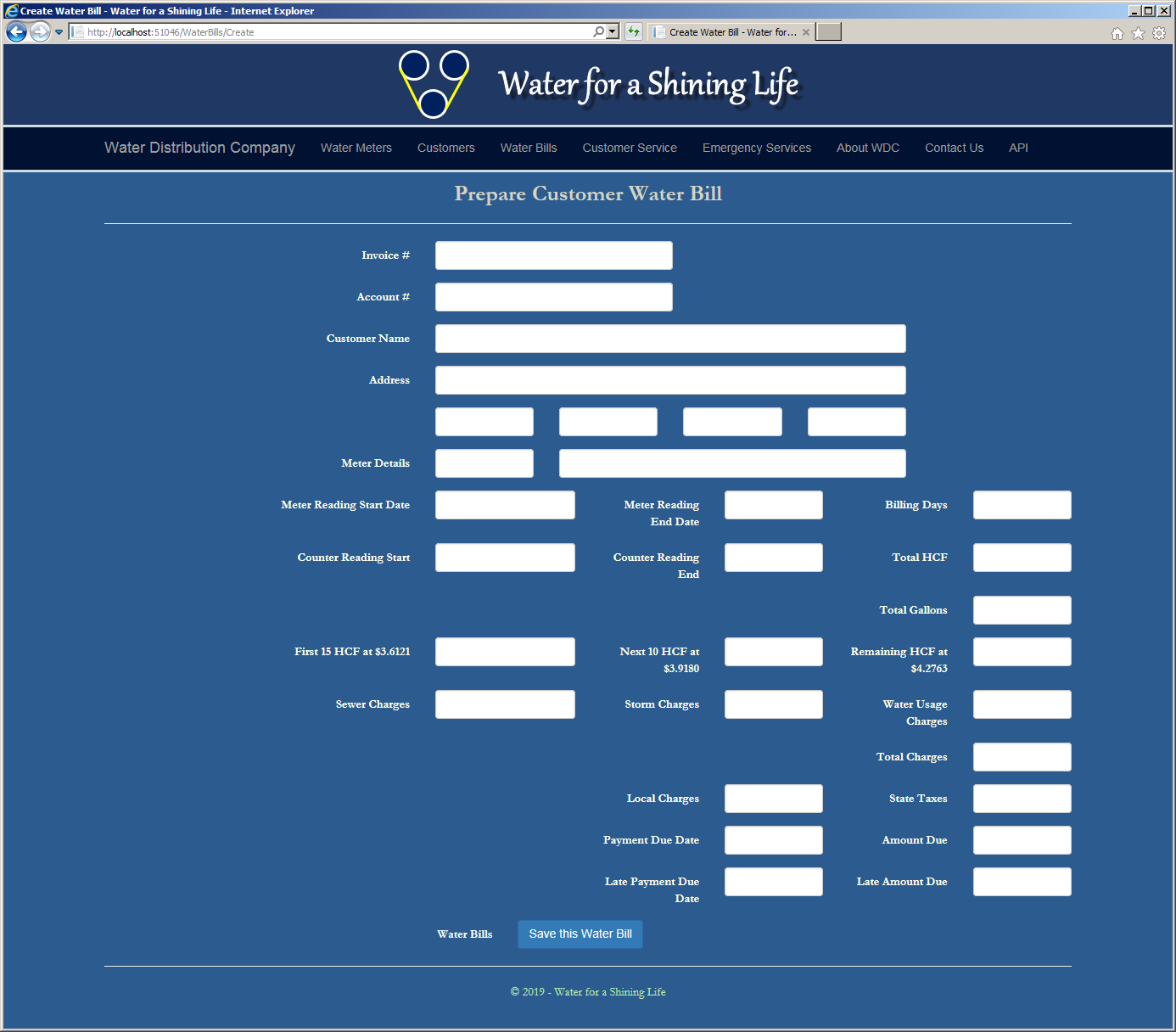
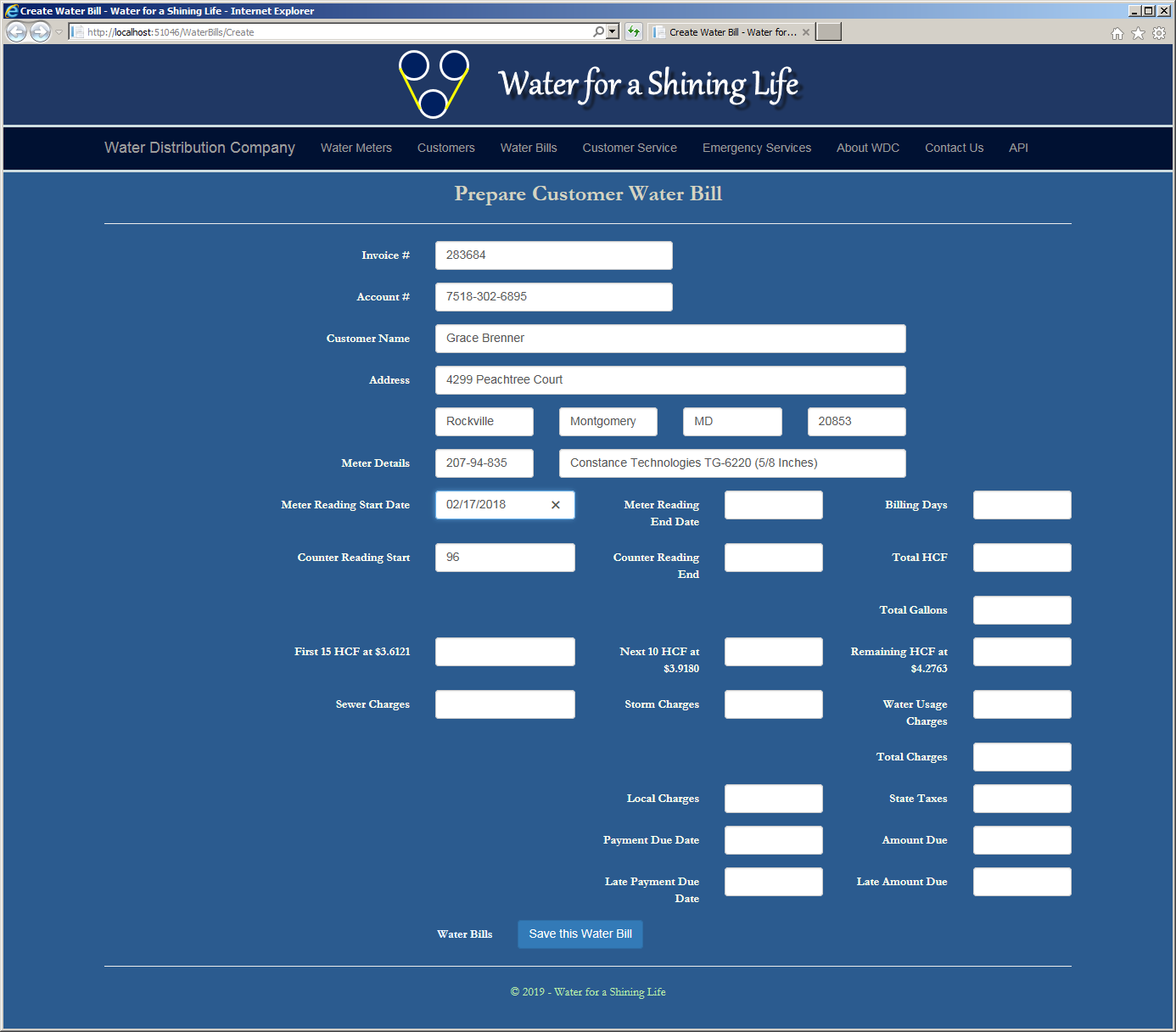

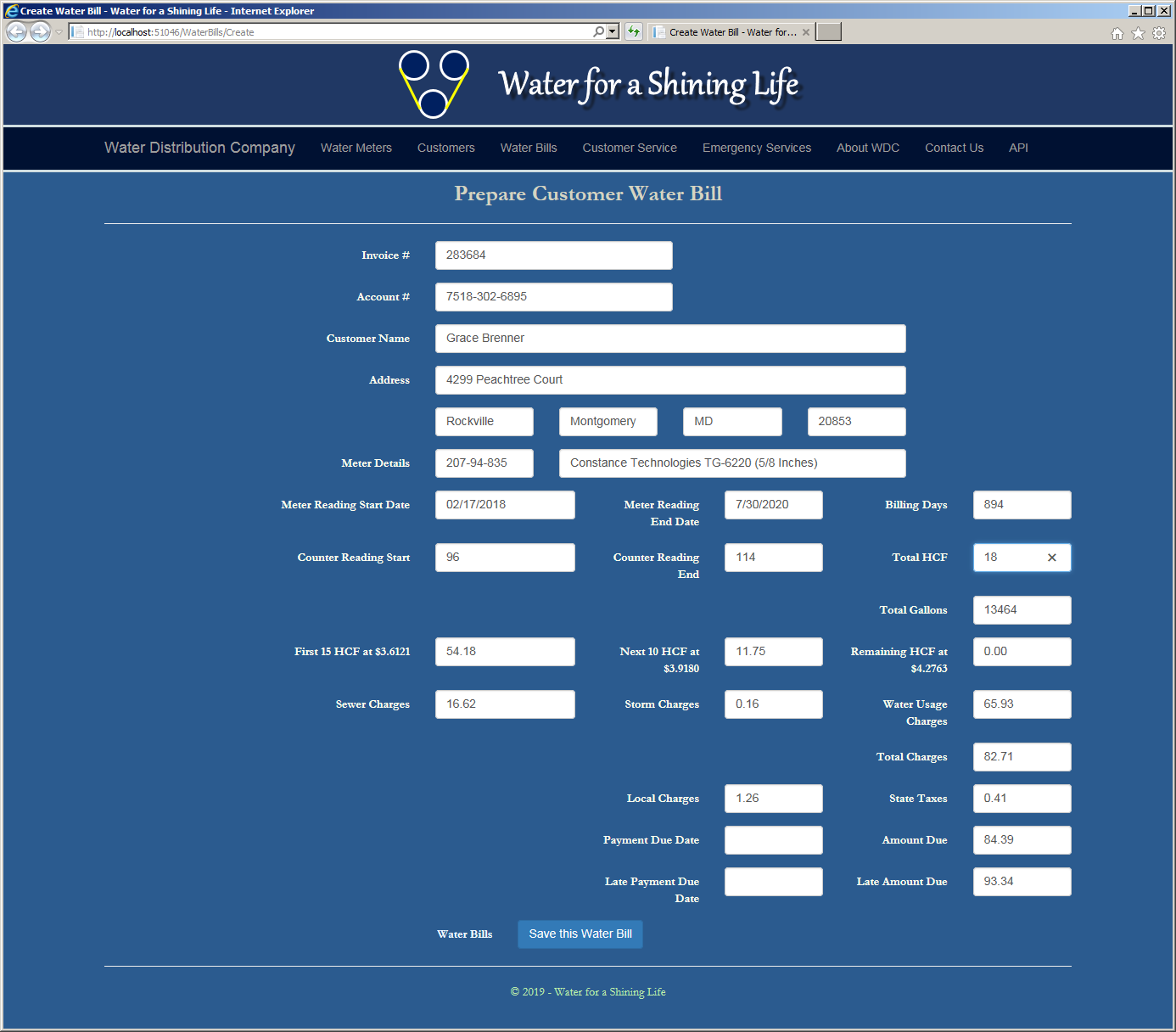
Payment Due Date:      08/27/2022
Late Payment Due Date: 09/13/2022

| Invoice # | Account # | Meter Reading End Date | Current Meter Reading | Payment Due Date | Late Payment Due Date |
| 835064 | 4820-375-2842 | 07/31/2022 | 109998 | 08/28/2022 | 09/14/2022 |
| 283746 | 2038-413-9680 | 7/30/2022 | 137975 | 8/27/2022 | 9/13/2022 |
| 575020 | 9279-570-8394 | 08/07/2022 | 6275 | 08/04/2022 | 08/20/2022 |
| 360550 | 7518-302-6895 | 11/07/2022 | 118 | 12/01/2022 | 12/15/2022 |
| 826407 | 2038-413-9680 | 10/27/2022 | 138012 | 11/24/2022 | 12/10/2022 |
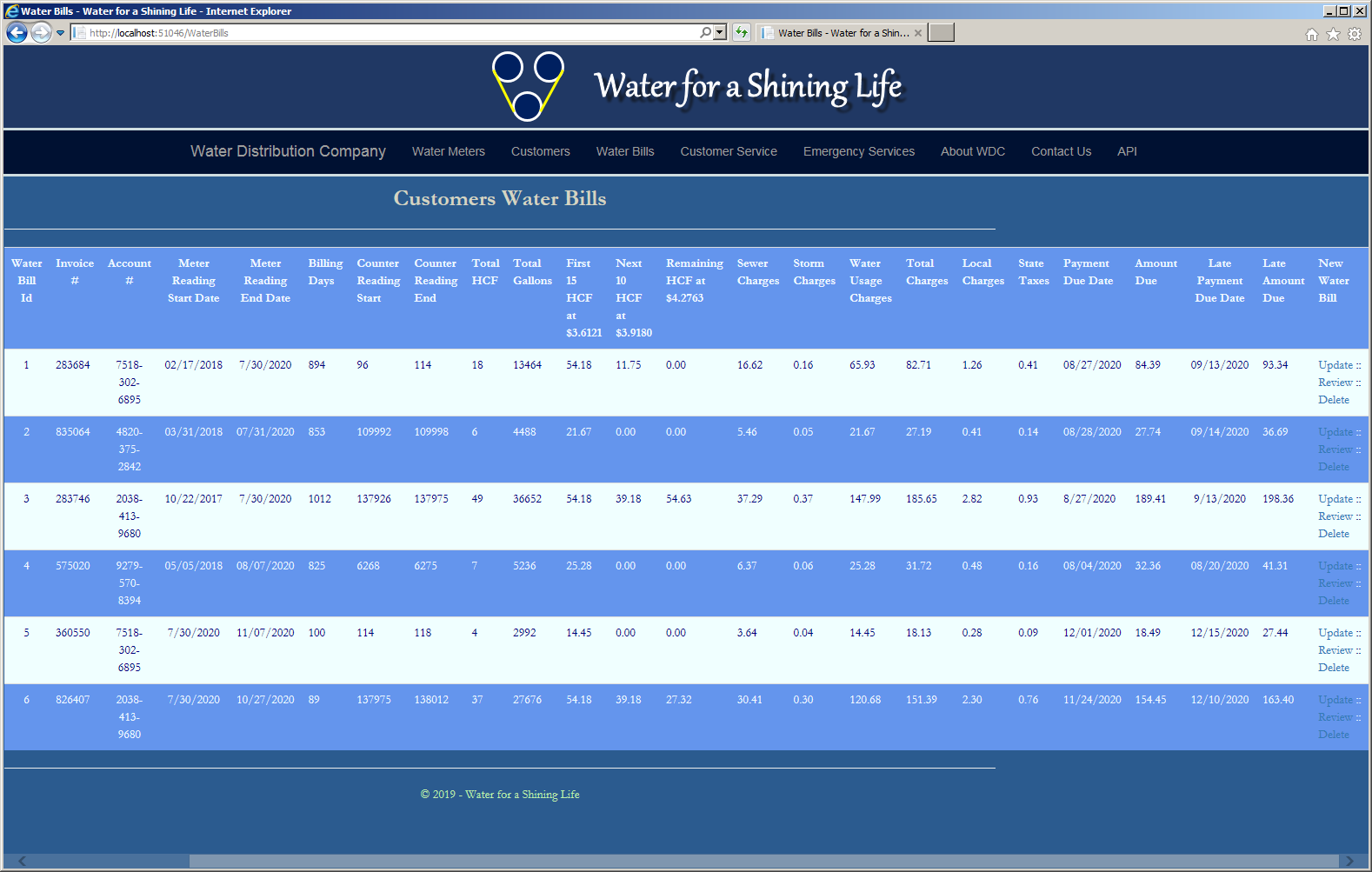
|
|
|||
| Home | Copyright © 2005-2026, FunctionX | Wednesday 04 May 2022 | Home |
|
|
|||