Introduction to the Types of Values

Introduction to the Types of Values
Fundamentals of the Type of a Value
Introduction to Values
When you are using a database, you are in fact dealing with values, various types of values. To make this possible, a database uses various types of values, created in different objects, but also managed in various ways. To be an effective database developer, you should be aware of the available types of various of values, when, where, how, and why they should be used.
 Practical Learning: Introducing Variables
A Re-Introduction to the Columns of a Tables
The most important role of a column is to hold some values. For this reason, a column is also called a field. A field of a table uses a certain type of value. Therefore, when creating a column, you must specify the type of values it will hold. If you are visually creating a column, to specify its type:
If you are programmatically creating the column, after specifying its name, enter its type: CREATE TABLE table-name
(
column-name data-type
);
GO
As we saw already in our introduction to variables, SQL and Transact-SQL provide various data types. A data type is represented by a special word, such as DECIMAL. |
 |
Variables Fundamentals
Introduction
 |
We know how to use some values such as 242 or 'James Knight'. These types of values are referred to as constant because we certainly know them before their use and we don't change them in our statements. If you intend to use a certain category of value over and over again, you can reserve a section of memory for that value. This allows you to put the value in an area of the computer's memory, easily change the value for another, over and over. To use the same area of memory to store and remove values as needed, the SQL interpreter needs two primary pieces of information: a name and the desired amount of space in memory capable of storing the value. |
A variable is an area of memory used to store values that can be used in a program. Before using a variable, you must inform the interpreter. This is also referred to as declaring a variable. To declare a variable, use the DECLARE keyword.
The primary formula to declare a variable is:
DECLARE @variable-name . . .[;]
The DECLARE keyword lets the interpreter know that you are making a declaration.
In Transact-SQL, the name of a variable starts with the @ sign. Whenever you need to refer to the variable, you must include the @ sign. A name can be made of digits only. Here is an example:
DECLARE @264
There are rules and suggestions you will use for the names:
When naming your variables, avoid using Transact-SQL reserved words.
Introduction to the Type of a Variable
When declaring a variable, after giving a name, you must also specify its data type. The formula to follow is:
DECLARE @variable-name AS data-type[;]
This means that, after the name of the variable, add a space, the AS keyword, and a data type. The AS keyword is not required. This means that, if you want, you can omit it. In that case, the formula to declare a variable would be:
DECLARE @variable-name [AS] data-type[;]
You can optionally end the declaration with a semicolon.
As mentioned already, a data type is known by its name, which is a special word. The SQL, including Transact-SQL, as a computer language, is not case-sensitive. This means that the words DECIMAL, decimal, and Decimal mean the same thing. This means that you can use any case of a data type when declaring a variable or when specifying the type of a column of a table. On the other hand, when naming your variables and columns, you should strive to be consistent; otherwise, your code could become confusing.
After declaring a variable, the interpreter reserves space in the computer memory for it but the space doesn't necessarily hold a recognizable value. This means that, at this time, the variable is null. One way you can change this is to give a value to the variable. One way to take care of this is to give a value to a variable when declaring it. This operation is referred to as initializing the variable.
The primary formula to initialize a variable is:
DECLARE @variable-name data-type AS data-type = desired-value[;]
This means that, after the data type, type = followed by a value. Once again, you can add or omit a semicolon.
Fundamentals of Character Types
When it comes to applications, a character is any symbol, readable or not, you can think of. Examples of characters are the letters of the alphabet, digits, and the writing signs. To support characters, Transact-SQL provides a data type named char. If you are declaring a variable, you can specify its data type as char. Here is an example:
DECLARE @gender char
Such a variable can hold a character or any kind of symbol. To initialize the variable, include its value in single-quotes. Here is an example:
1> DECLARE @gender AS char = 'M';
2> SELECT @gender AS Gender;
3> GO
Gender
------
M

(1 rows affected)
If you are writing code to create a table, when creating a column, you can specify its type as CHAR. Here is an example:
CREATE TABLE LibraryMembers
(
    Gender char
);
GO
Practical Learning: Declaring a Variable
declare @gender char = 'M';
select @gender AS Gender;
GO
As another option to represent a characer, Transact-SQL provides a data type named varchar. You can use it to declare a variable that would hold a symbol of any type. In the same way, you can specify as the data type of a column of a table.
If you need a value for an international character or a non-Latin symbol (Unicode), Transact-SQL provides a data type named nchar. You can specify it as the data type of a column you are creating in a table. You can also use it as the type of a variable you are declaring. Here is an example:
1> DECLARE @gender nchar[;]
When initializing the variable, if you want to indicate that it is using an international character or a Unicode symbol, you should precede its value with N. Here is an example:
1> DECLARE @gender nchar = N'M';
2> SELECT @gender AS Gender;
3> GO
Gender
------
M

(1 rows affected)
Practical Learning: Declaring a Unicode Variable
declare @gender as nchar = N'M';
select @gender AS Gender;
GO
Introduction to Strings
We already saw that, to support characters, Transact-SQL provides the char, the nchar, and the varchar types. On the other hand, a string is a combination of characters or symbols of any kind.
Introduction to the Length of a String
Remember that a character type is meant to hold a single symbol. A string is a group of characers. To indicate that you want a variable to hold more than one symbol, you must specify the number of characters for the string. This number of characters is also referred to as the length of the string. To specify the length of a string, add some parentheses to one of the above data types. Inside the parentheses, type a natural number. This will be the maximum number of characters that the string can hold. You can use such a type of a column you are creating for a table. Here are examples:
CREATE TABLE Persons
(
    FirstName varchar(12),
    Gender    char(6)
);
You can also specify that expression as the type of a variable. Here are examples:
DECLARE @gender AS char(6);
declare @firstName as varchar(12);
To initialize the variable, assign a single-quoted value to it. In the quotes, put the symbolds you want. Here are examples:
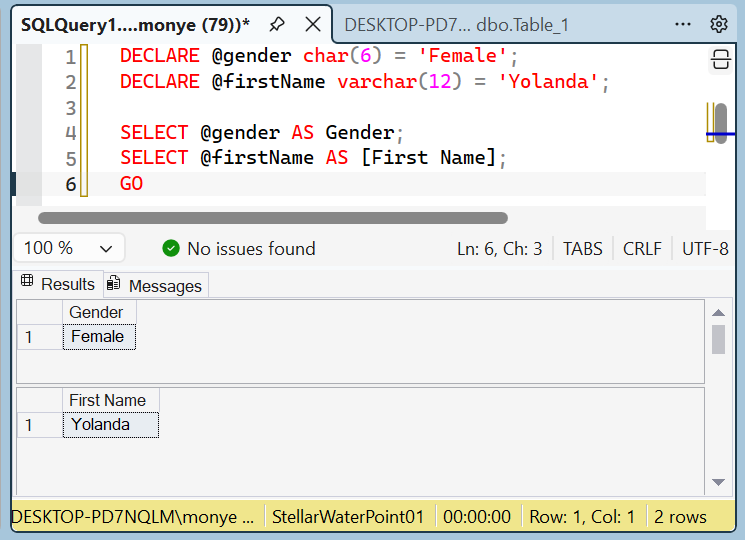
DECLARE @gender char(6) = 'Female';
DECLARE @firstName varchar(12) = 'Yolanda';

SELECT @gender AS Gender;
SELECT @firstName AS [First Name];
GO
If you are using the Command Prompt (SQLCMD.EXE), include the value between double-quotes.
If you are using a Query Editor, don't include the string value in double-quotes; otherwise, you would receive an error.
If the string may involve international characters or symbols (Unicode), you should declare its variable using a data type named nvarchar. You can apply such a type for a column you are creating for a table. Here is an example:
CREATE TABLE Persons
(
	FirstName varchar(12),
	LastName nvarchar(12),
	Gender    char(6)
);
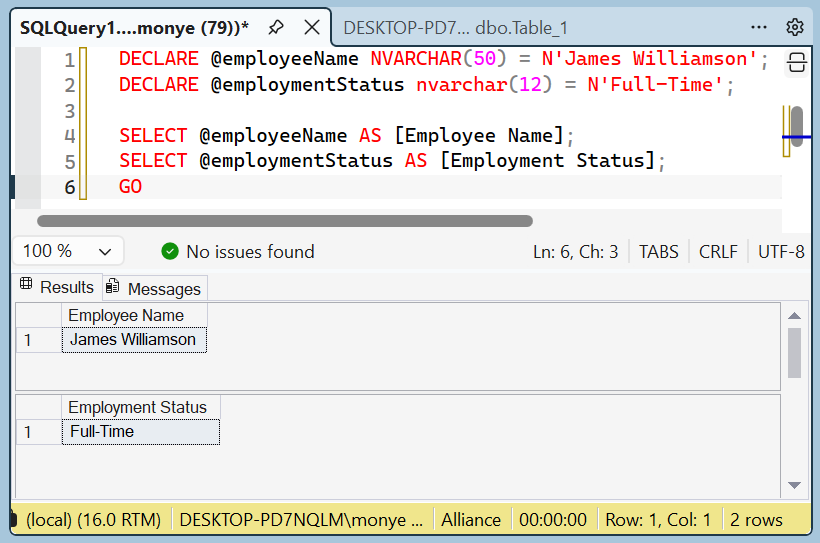
You can also use that expression for a variable. When initializing the variable, you can precede its value with N. Here are examples:
DECLARE @employeeName NVARCHAR(50) = N'James Williamson';
DECLARE @employmentStatus nvarchar(12) = N'Full-Time';

select @employeeName AS [Employee Name];
select @employmentStatus AS [Employment Status];
GO
A Character from a String
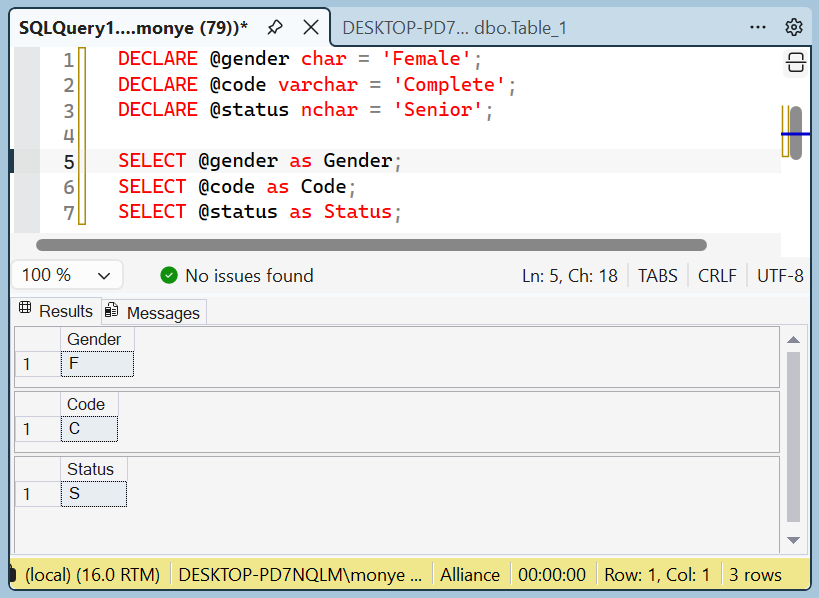
As we have seen above, you can declare a variable using with the char, the nchar, the varchar, or the nvarchar types. You can then initialize the variable. In reality, you can initialize the variable with any number of characters as if it were a string. Here are examples:
DECLARE @gender AS char = 'Female';
DECLARE @code as varchar = 'Complete';
DECLARE @status As nchar = 'Senior';
In that case, only the first (most left) character would be stored in the variable. Therefore, when you access the variable, you would get only the first character:
If you want a value to use large text, you can use the varchar() data type. In this case, in the parentheses of the type, enter max, as in varchar(max). If the text may involve Unicode characters, use the nvarchar(max) data type. Here is an example:
declare @TermPaper nvarchar(max);
You can initialize the variable using any of the rules we reviewed for strings.
Introduction
A natural number is a value that includes one or a combination of digits.
A Tiny Integer
If the value is a very small positive number in the range of 0 to 255, it is referred to as a tiny integer. To support this type of value, Transact-SQL provides a data type named TINYINT. You can apply it to a column you are adding to a table. Here is an example:
Create Table MaritalsStatus
(
    StatusCode TINYINT
);
You can also apply this type to a variable you are declaring. When initializing the variable, assign a small natural number between 0 and 255 to it. Here is an example:

If you want to use a relatively small number that is between -32,768 and 32,767, Transact-SQL provides a data type named smallint. You can apply it to a new column of a table. Here are examples:
create table Employees
(
    EmployeeNumber INT,
    FirstName NVARCHAR(18),
    LastName NVARCHAR(18),
    DayHired TINYINT,
    MonthHired SMALLINT,
    YearHired SmallInt
);
You can apply it to a variable. Here is an example of a variable declared with smallint:
1> DECLARE @numberOfPages smallint = 268;
2> SELECT @numberOfPages AS [Number of Pages];
3> GO
Number of Pages
---------------
            268

(1 rows affected)
Regular Integers
To provide a simple regular type for natural numbers, Transact-SQL supports a data type named int. A value of int type can be between -2,147,483,648 and 2,147,483,647. You can apply it to a new column of a table. Here are examples:
CREATE TABLE Employees
(
    EmployeeNumber INT,
    FirstName NVARCHAR(18),
    LastName NVARCHAR(18),
    DayHired TINYINT,
    MonthHired SMALLINT,
    YearHired SmallInt,
    YearlySalary INT
);
You can apply the int type to a variable. Here is an example:
DECLARE @category AS int = 1450;
PRINT @category;
GO
This would produce 1450
A Big Integer
To support numbers that can be extremely large, Transact-SQL provides a data type named bigint. This type can handle numbers between -9,223,372,036,854,775,808 and 9,223,372,036,854,775,807. You can apply it to a new column of a table or to a variable. Here is an example:
1> declare @countryPopulation BigInt = 16500000;
2> select @countryPopulation AS 'Country Population';
3> GO
Country Population
--------------------
            16500000

(1 rows affected)
Fractional Numbers
Introduction
A fractional or decimal number is a value that contains either a natural number or a combination of a natural number and a fraction of 1. Transact-SQL supports various types of decimal numbers.
Decimal Numbers
To let you indicate that a value must be a real number, Transact-SQL provides a data type named numeric. Another name for that type is decimal. You can use one of those types to for a column or a table. Here are examples:
CREATE SCHEMA Administration
GO

CREATE TABLE Administration.StudentsGradeScale
(
    LetterGrade char,
    MinRange decimal,
    MaxRange DECIMAL,
    MinPercent numeric,
    MaxPercent NUMERIC,
    Descriptor nchar
);
GO
Or you can apply one of those types to a variable you are declaring. You can initialize the variable with a natural number or a number with a fraction. Here is an example:
1> DECLARE @distance DECIMAL = 648.16;
2> SELECT @distance;
3> GO
648
The Precision of a Decimal Number
The precision of a decimal number is the number of digits used to display the value. To specify the precision of a decimal or numeric data type, add some parentheses to the data type. In the paretheses, enter a number between 1 and 38.
The Scale of a Decimal Number
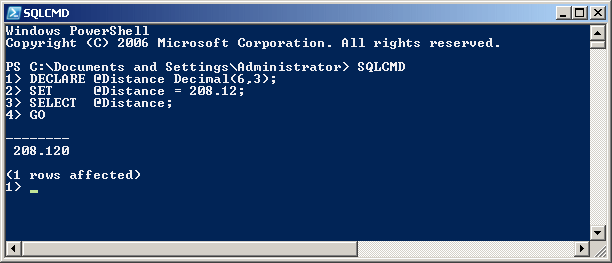
The scale specifies the fractional part of a decimal number. It is set on the right side of the period (in US English). Here is an example:
Transact-SQL supports floating-point numbers through a data type named float. You can apply that type to a column of a table. You can use that type to a variable you are declaring. Here is an example:
1> DECLARE @radius FLOAT = 48.16;
2> SELECT @radius AS Radius;
3> GO
Radius
------------------------
      48.159999999999997

(1 rows affected)
Another name for the float data type is real. You can apply it to a variable or to a column of a table. Here are examples:
CREATE TABLE EmployeesCommissions
(
    TransactionMinimum real,
    TransactionMaximum REAL,
    CommissionBase Real,
    CommissionRate real
);
GO
Monetary Values
A Regular Money Value
If you want a number for monetary values, Transact-SQL provides a data type named money. You can apply that type to a column of a table. You can use it to declare a variable. You can then initialize the variable with a decimal number. Here is an example:
1> DECLARE @yearlyIncome Money = 48500.15;
2> SELECT @yearlyIncome AS [Yearly Income];
3> GO
Yearly Income
---------------------
           48500.1500

(1 rows affected)
A Small Money Value
Transact-SQL supports another type for monetary values. The data type is named smallmoney. Its value can be between -214,748.3648 and 214,748.3647. The precision and scale of a money or smallmoney variable are fixed by Microsoft SQL Server. The scale is fixed to 4.
Practical Learning: Using Boolean Variables
DECLARE @isMarried bit
SET @isMarried = 1
SELECT @isMarried AS [Is Married?];
GO
Other Types
A Boolean value is one that holds a value as True or as False. To support such values, Transact-SQL provides a data type named BIT. You can apply it to a column. Here is an example:
CREATE TABLE TruckDriver
(
    IsOrganDonor bit
);
GO
Of oucrs, you can also apply the BIT type to a variable.
SQL Variants
If you want a value that can hold any type, Transact-SQL provides a data type named sql_variant. You can use it to declare a variable. When initializing the variable, you must follow the rules of the actual data type the SQL variant represents. Here are examples:
DECLARE @fullName SQL_VARIANT = N'Paul Yamo';
DECLARE @dateHired Sql_Variant = N'20110407';
DECLARE @isMarried SQL_variant = 1;
DECLARE @yearlyIncome sql_variant = 48500.15;

SELECT @fullName AS [Full Name];
SELECT @dateHired AS [Date Hired];
SELECT @isMarried AS [Is Married?];
SELECT @yearlyIncome AS [Yearly Income];
GO
 |
The binary data type is used for a column that would hold natural numbers. The value of a binary type can be stored as a normal integer. Use the binary data type if all values of the column would have the exact same length (or quantity). If you anticipate that some entries would be different than others, then use the alternative varbinary data type. The varbinary type also is used for hexadecimal numbers but allows dissimilar entries, as long as all entries are hexadecimals. |
We saw that Transact-SQL provides the sql_variant data type as an alternative to any of the other data types.
Transact-SQL supports coordinates of a geometrical shape through a data type named geometry. To create a column for such a type, apply the geometry type to it.
Geographical Location-Based Columns
Transact-SQL supports geographical locations through a data type named GEOGRAPHY. To create a column that stores the geographic location of an item, apply this data type to it.
User-Defined Types
A data type, or UDT, is referred to as user-defined if you create or define it yourself. Such a type is created from an existing Transact-SQL data type. Transact-SQL allows you to define a UDT.
To create a user-defined type, the formula to use is:
CREATE TYPE new-name FROM known-type[;]
Start with the CREATE TYPE expression, followed by a name of your choice. The name should follow the rules and suggestions of names of variables. Add the FROM keyword, followed by one of the data types we have seen so far. Here are examples:
CREATE TYPE NaturalNumber FROM int;
GO
CREATE TYPE ShortString FROM nvarchar(20);
GO
CREATE TYPE ItemCode FROM nchar(10);
GO
CREATE TYPE LongString FROM nvarchar(80);
GO
CREATE TYPE Salary FROM decimal(8, 2);
GO
CREATE TYPE Boolean FROM bit;
GO
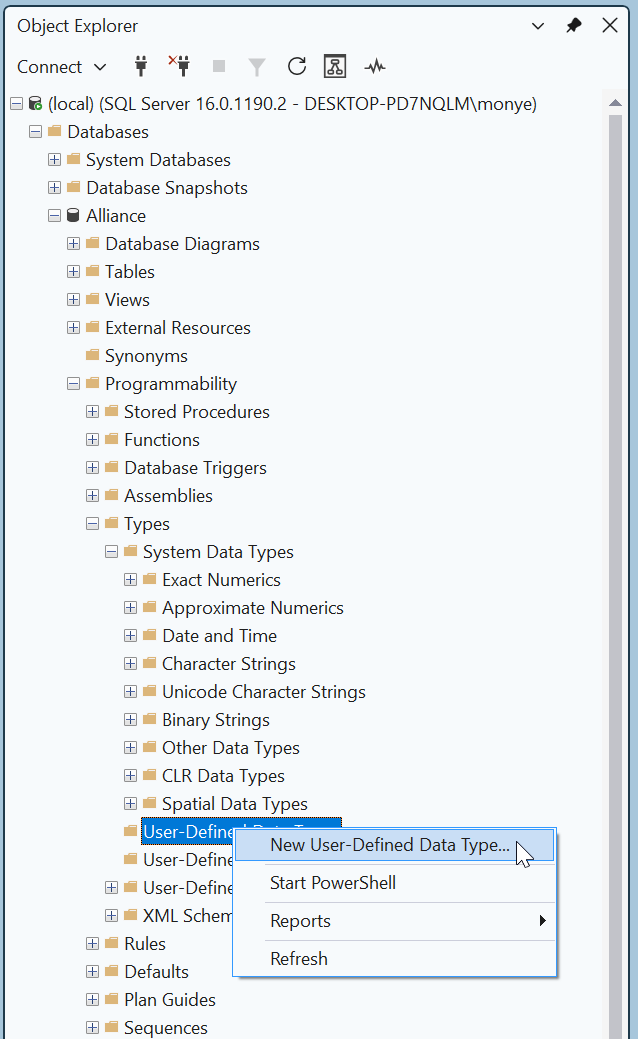
To visually create a UDT, in the Object Explorer, expand a database, expand its Programmability node, and expand the Types item. Under Types, right-click User-Defined Data Types and click New User-Defined Data Type...
This would open the New User-Defined Data Type dialog box:
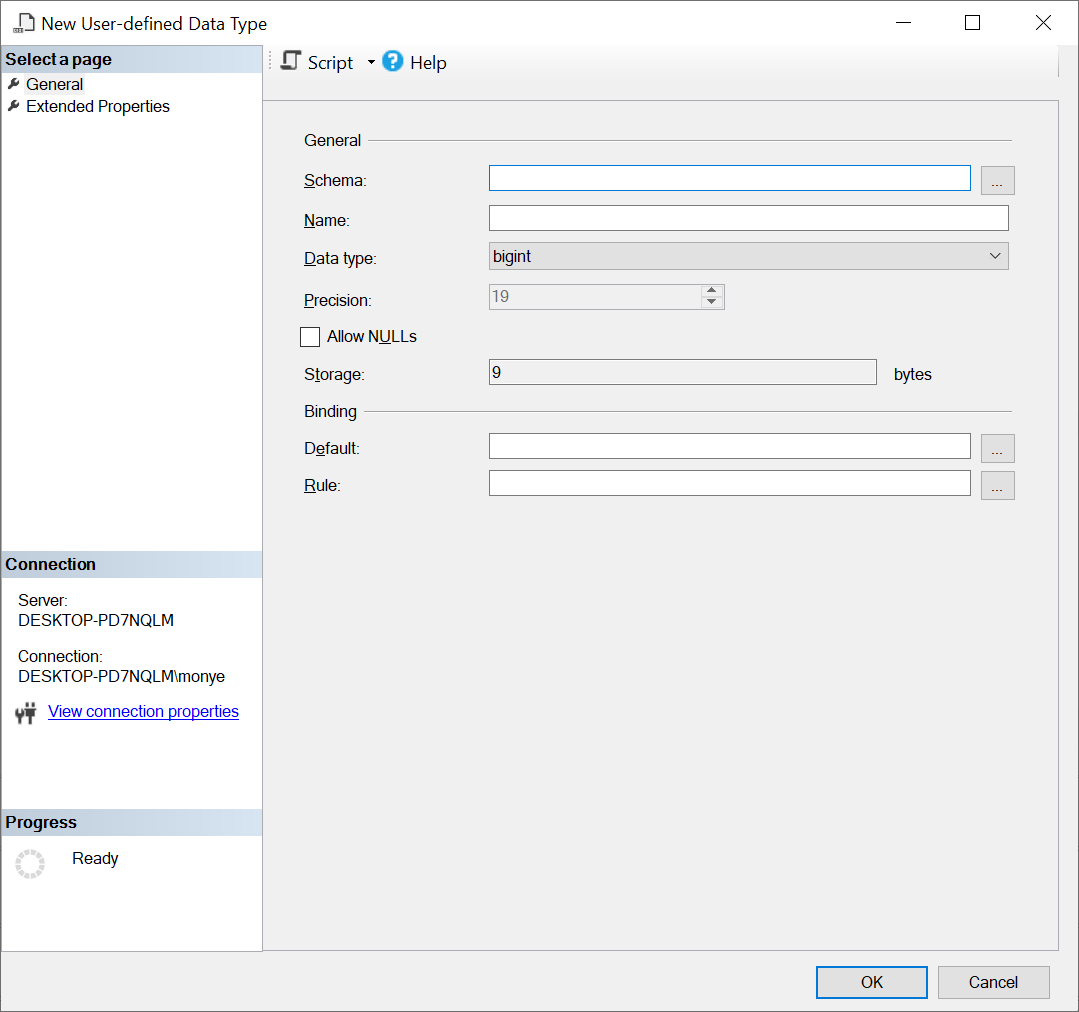
The first piece of information you must provide is the schema that will own the new type. Normally, a default schema is provided and you can just accept it. Otherwise, if you had previously created a schema and you want to use it, click the button on the right side of the Schema text box, select it and click OK.
The two most important pieces of information you must provide are a name for the new type as alias and the Transact-SQL type on which it will be based. The name must follow the rules of names in Transact-SQL. In the Data Type combo box, select the data type of your choice. Of course, you must know what type you want to use. Here is an exampleAfter entering and selecting the desired information, click OK.
To create a UDT with code, the basic formula to use is:
CREATE TYPE AliasName FROM BaseType
To get assistance from template code, open a Query Editor. From the Templates Explorer, expand the User-Defined Data Type node. Drag Create User-Defined Data Type and drop it in the Query Editor. Skeleton code will be generated for you:
-- ================================
-- Create User-defined Data Type
-- ================================
USE <database_name,sysname,AdventureWorks>
GO

-- Create the data type
CREATE TYPE <schema_name,sysname,dbo>.<type_name,sysname,Phone>
	FROM <base_type,,nvarchar> (<precision,int,25>) <allow_null,,NULL>

-- Create table using the data type
CREATE TABLE <table_name,sysname,test_data_type>
(
	ID int NOT NULL,
	Phone <schema_name,sysname,dbo>.<type_name,sysname,Phone> NULL
)
GO
You start with the CREATE TYPE expression, followed by the desired name for the new type. After the FROM keyword, type an existing Transact-SQL data type. Here is an example:
CREATE TYPE NaturalNumber FROM int;
GO
In the same way, you can create as many aliases of known data types as you want. You must also be aware of rules that govern each data type. Here are examples:
CREATE TYPE NaturalNumber FROM int;
GO
CREATE TYPE Boolean FROM bit;
GO
After creating a UDT, you can declare a variable using its type. You must initialize the variable with the appropriate value. Here are examples:
DECLARE @employeeId NaturalNumber = 1;
DECLARE @employeeNumber ItemCode = N'28-380';
DECLARE @firstName ShortString = N'Gertrude';
DECLARE @lastName ShortString = N'Monay';
DECLARE @address LongString = N'1044 Alicot Drive';
DECLARE @hourlySalary Salary = 26.75;
DECLARE @isMarried Boolean = 1;

SELECT  @employeeId AS [Empl ID],  @employeeNumber AS [Empl #],
        @firstName AS [First Name], @lastName AS [Last Name],
        @address, @hourlySalary AS [Hourly Salary],
        @isMarried AS [Is Married ?];
GO
Of course, you can mix Transact-SQL data types and your own defined type in your code.
Topics on Declaring and Using Variables
Updating a Variable
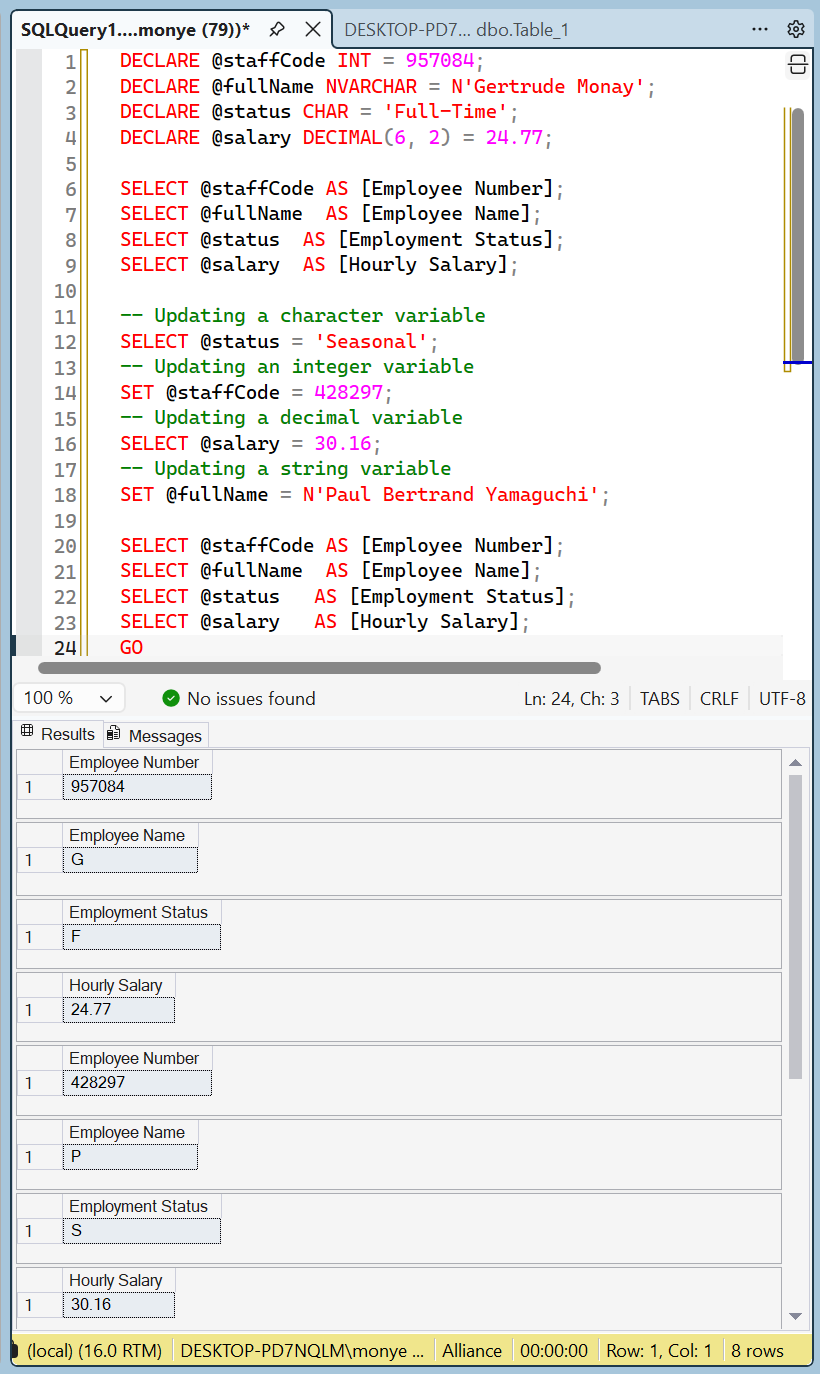
In previous sections, we saw that, when you declare a variable, you can immediately give it a value. This was referred to as initializing the variable. Sometimes, as your code progresses from top-down, you may want the variable to change its value. This is referred to as updating a variable. As a result, at any time, you can change the value of a variable. In other words, at any time, you can update a value once you judge it necessary.
The formula to change the value of a variable is:
SET/SELECT @ variable-name = desired-value[;]
Based on this formula, type the SET or the SELECT keyword, a space, the name of the variable, the = operator, and the desired value. Of course, the value must be appropriate for the type of the variable. You can optionally end the statement with a semicolon. Here are examples:
DECLARE @staffCode INT = 957084;
DECLARE @fullName NVARCHAR = N'Gertrude Monay';
DECLARE @status CHAR = 'Full-Time';
DECLARE @salary DECIMAL(6, 2) = 24.77;

SELECT @staffCode AS [Employee Number];
SELECT @fullName  AS [Employee Name];
SELECT @status  AS [Employment Status];
SELECT @salary  AS [Hourly Salary];

-- Updating a character variable
SELECT @status = 'Seasonal';
-- Updating an integer variable
SET @staffCode = 428297;
-- Updating a decimal variable
SELECT @salary = 30.16;
-- Updating a string variable
SET @fullName = N'Paul Bertrand Yamaguchi';

SELECT @staffCode AS [Employee Number];
SELECT @fullName  AS [Employee Name];
SELECT @status   AS [Employment Status];
SELECT @salary   AS [Hourly Salary];
GO
So far, we initialized all the variables we declared. You are not required to initialize a variable when declaring it. This means that you can declare a variable and not initialize it. Here are examples:
-- An integer variable
DECLARE @staffCode INT;
-- A string variable
DECLARE @fullName NVARCHAR;
-- A character variable
DECLARE @status CHAR;
-- A numeric variable
DECLARE @salary DECIMAL(6, 2);
GO
A NULL Value
If you declare a variable and not initialize it, by default, it receives a value referred to as NULL. Here are examples:
Microsoft Windows [Version 10.0.19045.5679]
(c) Microsoft Corporation. All rights reserved.

C:\Users\monye>SQLCMD
1> DECLARE @staffCode INT;
2> DECLARE @fullName nvarchar;
3> DECLARE @status char;
4> DECLARE @salary Decimal(6, 2);
5> SELECT @staffCode AS [Employee Number];
6> SELECT @fullName AS [Employee Name];
7> SELECT @status AS [Employment Status];
8> SELECT @salary AS [Hourly Salary];
9> GO
Employee Number
---------------
           NULL

(1 rows affected)
Employee Name
-------------
NULL

(1 rows affected)
Employment Status
-----------------
NULL

(1 rows affected)
Hourly Salary
-------------
         NULL

(1 rows affected)
1>
Therefore, before accessing a variable, you should assign a value to it. The ability to assign a value to a variable allows you to first declare a variable, and then assign a value to it later. Here are examples:
1> DECLARE @staffCode Int;
2> DECLARE @status Char;
3> DECLARE @fullName NvarChar(50);
4> DECLARE @salary Numeric;
5> SET @fullName = N'Michael Carlock';
6> SET @salary = 68225;
7> SET @staffCode = 947315;
8> SET @status = 'Part-Time';
9> SELECT @staffCode AS N'Employee Number';
10> SELECT @fullName AS N'Employee Name';
11> SELECT @status AS N'Employment Status';
12> SELECT @salary AS N'Yearly Salary';
13> GO
Employee Number
---------------
         947315

(1 rows affected)
Employee Name
--------------------------------------------------
Michael Carlock

(1 rows affected)
Employment Status
-----------------
P

(1 rows affected)
Yearly Salary
--------------------
               68225

(1 rows affected)
Declaring many Variables
You can declare more than one variable using the DECLARE keyword. The formula to follow is:
DECLARE @variable_1 data-type_1, @variable_2 data-type_2, @variable_n data-type_n;
Following this formula, you can use one DECLARE keyword followed by each combination of a variable name and its type. Separate the combinations with comas. Here are examples:
DECLARE @staffCode Int, @status Char;
DECLARE @fullName AS NvarChar(50), @salary as Numeric;

SET @fullName = N'Michael Carlock';
SET @salary = 68225;
SET @staffCode = 947315;
SET @status = 'Part-Time';
SELECT @staffCode AS N'Employee Number';
SELECT @fullName AS N'Employee Name';
SELECT @status AS N'Employment Status';
SELECT @salary AS N'Yearly Salary';
GO
If you declare many variables that use the same data type, the name of each variable must be followed by its own data type.
Practical Learning: Ending the Lesson
|
|
|||
| Previous | Copyright © 2000-2026, FunctionX | Last Update: Wednesday 05 August 2026, 17:37 | Next |
|
|
|||