
Introduction to SQL Conjunctions
|
|
Introduction to SQL Conjunctions |
Fundamentals of Conjunctions
Filtering by Selection and Conjunctions
A logical conjunction is a condition in which two expressions must be true for the whole statement to be true. A logical conjunction can be created on a table, a query, a form, or a report, in either their regular view or in design. Microsoft Access provides many options to create and execute a logical conjunction.
Filtering by selection is one of the ways, and one of the easiest ways you can create a logical conjunction for data analysis. To proceed, display the table or form in the Datasheet View, the form in the Form View, the report in Report View, or the form or report in Layout View. As seen in Lesson 34, either right-click a value in the column of your choice and select one of the filter options, or click the desired value and use the desired option from the Selection button in the Ribbon. Then do the same for another column of your choice.
 Practical
Learning: Introducing SQL Conjunctions
Practical
Learning: Introducing SQL Conjunctions
A Logical Conjunction When Filtering by Value
Filtering by value is another option to apply a conjunctive filter in a list. To start:
In both cases, a window would come up with a check box for each values of the column you selected. Here is an example:
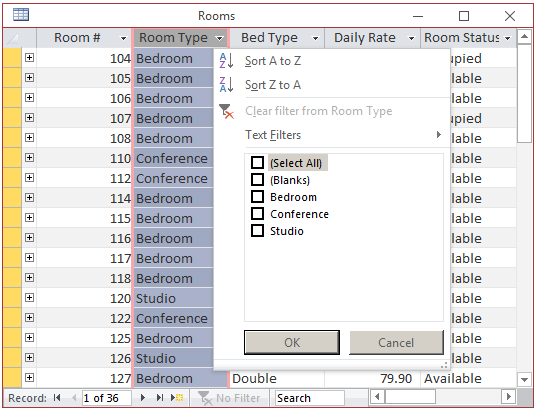
Put a check mark on a value other than (Select All). After that first selection, click OK. Perform the same actions in another column, that is, make a value selection on another column and click OK. This means that the selections must be made on two different columns.
To remove the filter, we saw that you could click the Toggle Filters button on the Ribbon or the Filtered button on the table, query, or form. As an alternative, you can display the window again, click the (Select All) option and click OK.
Filtering by Form for a Logical Conjunction
As seen in the previous lesson, to filter by form, open the table, query, or form in its regular view. Switch to the Filter By Form window as we saw in the previous lesson. To create a conjunction when filtering by form, click the combo box under a desired field and select the desired value. Then, click the combo box under the other desired field and select the second desired value. After making the selections, apply the filter. The resulting list would include the records that use both of the selected values.


A Logical Conjunction in a Query Design
Remember that, to create a filter in the Design View of a query, you use the Criteria box of a field. To create a logical conjunction, click the Criteria box of the other field and type the second Boolean expression. This means that the sub-expressions of a logical conjunction should be made on the same Criteria row but for different fields.


A Logical Conjunction on an Object Filter or the Query Builder
To set a conditional conjunction on a table, an existing query, or a form/report that already has a record source, or if you are setting up the Record Source of a new form or report, display the window for data selection and proceed as if you were working in the Design View of a query.
An Expression for a Logical Conjunction
Introduction
The Boolean operator used to create a logical conjunction is named AND. Its expression uses the following formula:
sub-expression1 AND sub-expression2
As you can see, you create a sub-expression on each side of the AND operator. Each sub-expression is the type of logical expression we saw in Lesson 34 as:
column-name operator value
This means that a logical conjunction is formulated as:
column-name1 operator value1 AND column-name2 operator value2
To make the expression easy to read, you should put each sub-expression in parentheses as in:
(column-name1 operator value1) AND (column-name2 operator value2)
Creating a Conjunction Criterion in the Design View
To create a filtered conjunction for a table, a query, a form, or a report in Design View, access its Property Sheet. Click Filter and type a conjunctive expression as seen above. Remember that if you want the filter to apply immediately when you display the object in its regular view, set the Filter On Load property to Yes.


Logical Conjunctions in the SQL
As seen for other filters, in the SQL, a logical disjunction is created in the WHERE clause as follows:
WHERE sub-expression1 AND sub-expression2
Remember that each sub-expression is in the form:
field-name Operator Value
Here is an example:
SELECT PropertyNumber,
       City,
       Locality,
       PropertyType,
       Condition,
       Bedrooms,
       Bathrooms,
       MarketValue
FROM   Properties
WHERE  PropertyType = "single family" AND Condition = "excellent";
Remember that it is a good idea to put each sub-expression in parentheses. Here is an example:
SELECT PropertyNumber,
       City,
       Locality,
       PropertyType,
       Condition,
       Bedrooms,
       Bathrooms,
       MarketValue
FROM   Properties
WHERE (PropertyType = "single family") AND (Condition = "excellent");
Of course, the values can come from Windows controls. In this case, make sure you convert each value to the appropriate type.
Practical
Learning: Applying a SQL Conjunction
Private Sub txtStartDate_LostFocus()
    Dim dbWattsALoan As Database
    Dim rsTimeSheets As Recordset

    If IsNull(txtEmployeeNumber) Then
        Exit Sub
    End If

    If IsNull(txtStartDate) Then
        Exit Sub
    End If

    Set dbWattsALoan = CurrentDb
    Set rsTimeSheets = dbWattsALoan.OpenRecordset("SELECT TimeSheetID, " & _
                                                  "       Week1Monday, Week1Tuesday, Week1Wednesday, Week1Thursday, Week1Friday, Week1Saturday, Week1Sunday, " & _
                                                  "       Week2Monday, Week2Tuesday, Week2Wednesday, Week2Thursday, Week2Friday, Week2Saturday, Week2Sunday " & _
                                                  "FROM TimeSheets " & _
                                                  "WHERE (EmployeeNumber = '" & txtEmployeeNumber & "') AND (StartDate = #" & CDate(txtStartDate) & "#);", _
                                                  RecordsetTypeEnum.dbOpenDynaset, RecordsetOptionEnum.dbForwardOnly, LockTypeEnum.dbOptimistic)

    If rsTimeSheets.RecordCount > 0 Then
        txtTimeSheetNumber = rsTimeSheets("TimeSheetID").Value
        txtTimeSheetNumber.Visible = True

        txtWeek1Monday = rsTimeSheets("Week1Monday").Value
        txtWeek1Tuesday = rsTimeSheets("Week1Tuesday").Value
        txtWeek1Wednesday = rsTimeSheets("Week1Wednesday").Value
        txtWeek1Thursday = rsTimeSheets("Week1Thursday").Value
        txtWeek1Friday = rsTimeSheets("Week1Friday").Value
        txtWeek1Saturday = rsTimeSheets("Week1Saturday").Value
        txtWeek1Sunday = rsTimeSheets("Week1Sunday").Value

        txtWeek2Monday = rsTimeSheets("Week2Monday").Value
        txtWeek2Tuesday = rsTimeSheets("Week2Tuesday").Value
        txtWeek2Wednesday = rsTimeSheets("Week2Wednesday").Value
        txtWeek2Thursday = rsTimeSheets("Week2Thursday").Value
        txtWeek2Friday = rsTimeSheets("Week2Friday").Value
        txtWeek2Saturday = rsTimeSheets("Week2Saturday").Value
        txtWeek2Sunday = rsTimeSheets("Week2Sunday").Value
    Else
        txtTimeSheetNumber = "0"
        'txtTimeSheetNumber.Visible = False

        txtWeek1Monday = "0.00"
        txtWeek1Tuesday = "0.00"
        txtWeek1Wednesday = "0.00"
        txtWeek1Thursday = "0.00"
        txtWeek1Friday = "0.00"
        txtWeek1Saturday = "0.00"
        txtWeek1Sunday = "0.00"

        txtWeek2Monday = "0.00"
        txtWeek2Tuesday = "0.00"
        txtWeek2Wednesday = "0.00"
        txtWeek2Thursday = "0.00"
        txtWeek2Friday = "0.00"
        txtWeek2Saturday = "0.00"
        txtWeek2Sunday = "0.00"
    End If

    ' After the user has entered a start date, get that date.
    ' Add 14 days to the start date to get the end date
    txtEndDate = DateAdd("d", 13, CDate(txtStartDate))

    lblWeek1Monday.Caption = txtStartDate
    lblWeek1Tuesday.Caption = DateAdd("d", 1, CDate(txtStartDate))
    lblWeek1Wednesday.Caption = DateAdd("d", 2, CDate(txtStartDate))
    lblWeek1Thursday.Caption = DateAdd("d", 3, CDate(txtStartDate))
    lblWeek1Friday.Caption = DateAdd("d", 4, CDate(txtStartDate))
    lblWeek1Saturday.Caption = DateAdd("d", 5, CDate(txtStartDate))
    lblWeek1Sunday.Caption = DateAdd("d", 6, CDate(txtStartDate))

    lblWeek2Monday.Caption = DateAdd("d", 1, CDate(lblWeek1Sunday.Caption))
    lblWeek2Tuesday.Caption = DateAdd("d", 1, CDate(lblWeek2Monday.Caption))
    lblWeek2Wednesday.Caption = DateAdd("d", 1, CDate(lblWeek2Tuesday.Caption))
    lblWeek2Thursday.Caption = DateAdd("d", 1, CDate(lblWeek2Wednesday.Caption))
    lblWeek2Friday.Caption = DateAdd("d", 1, CDate(lblWeek2Thursday.Caption))
    lblWeek2Saturday.Caption = DateAdd("d", 1, CDate(lblWeek2Friday.Caption))
    lblWeek2Sunday.Caption = DateAdd("d", 1, CDate(lblWeek2Saturday.Caption))

    txtTimeSheetCode = CreateTimeSheetCode(txtEmployeeNumber, CDate(txtStartDate))

    rsTimeSheets.Close
    dbWattsALoan.Close
End SubPrivate Sub cmdFindTimeSheet_Click()
Dim dbWattsALoan As Database
Dim rsEmployees As Recordset
Dim rsTimeSheets As Recordset
Dim dWeek1Monday As Double, dWeek1Tuesday As Double
Dim dWeek1Wednesday As Double, dWeek1Thursday As Double
Dim dWeek1Friday As Double, dWeek1Saturday As Double, dWeek1Sunday As Double
Dim dWeek2Monday As Double, dWeek2Tuesday As Double
Dim dWeek2Wednesday As Double, dWeek2Thursday As Double
Dim dWeek2Friday As Double, dWeek2Saturday As Double, dWeek2Sunday As Double
Dim dHourlySalary As Double, dOvertimeSalary As Double
Dim dTotalWeek1Time As Double, dTotalWeek2Time As Double
Dim dWeek1Overtime As Double, dWeek2Overtime As Double
Dim dWeek1RegularTime As Double, dWeek2RegularTime As Double
Dim dWeek1RegularPay As Currency, dWeek2RegularPay As Currency
Dim dWeek1OvertimePay As Currency, dWeek2OvertimePay As Currency
Dim dRegularTime As Double, dOvertime As Double
Dim dRegularPay As Double, dOvertimePay As Double
Dim dTotalEarnings As Double, dNetEarnings As Double
Dim dFederalTax As Double, dSocialSecurityTax As Double, _
dMedicalTax As Double, dStateTax As Double
If IsNull(txtEmployeeNumber) Then
Exit Sub
End If
If IsNull(txtStartDate) Then
Exit Sub
End If
Set dbWattsALoan = CurrentDb
Set rsTimeSheets = dbWattsALoan.OpenRecordset("SELECT Week1Monday, Week1Tuesday, Week1Wednesday, Week1Thursday, Week1Friday, Week1Saturday, Week1Sunday, " & _
" Week2Monday, Week2Tuesday, Week2Wednesday, Week2Thursday, Week2Friday, Week2Saturday, Week2Sunday " & _
"FROM TimeSheets " & _
"WHERE (EmployeeNumber = '" & txtEmployeeNumber & "') AND (StartDate = #" & CDate(txtStartDate) & "#);", _
RecordsetTypeEnum.dbOpenDynaset, RecordsetOptionEnum.dbForwardOnly, LockTypeEnum.dbOptimistic)
If rsTimeSheets.RecordCount > 0 Then
' Retrieve the hourly salary
dHourlySalary = CDbl(txtHourlySalary)
' Retrieve the time for each day
' First Week
dWeek1Monday = rsTimeSheets("Week1Monday").Value
dWeek1Tuesday = rsTimeSheets("Week1Tuesday").Value
dWeek1Wednesday = rsTimeSheets("Week1Wednesday").Value
dWeek1Thursday = rsTimeSheets("Week1Thursday").Value
dWeek1Friday = rsTimeSheets("Week1Friday").Value
dWeek1Saturday = rsTimeSheets("Week1Saturday").Value
dWeek1Sunday = rsTimeSheets("Week1Sunday").Value
' Second Week
dWeek2Monday = rsTimeSheets("Week2Monday").Value
dWeek2Tuesday = rsTimeSheets("Week2Tuesday").Value
dWeek2Wednesday = rsTimeSheets("Week2Wednesday").Value
dWeek2Thursday = rsTimeSheets("Week2Thursday").Value
dWeek2Friday = rsTimeSheets("Week2Friday").Value
dWeek2Saturday = rsTimeSheets("Week2Saturday").Value
dWeek2Sunday = rsTimeSheets("Week2Sunday").Value
' Calculate the total time for first week
dTotalWeek1Time = dWeek1Monday + dWeek1Tuesday + _
dWeek1Wednesday + dWeek1Thursday + _
dWeek1Friday + dWeek1Saturday + dWeek1Sunday
' Calculate the total time for second week
dTotalWeek2Time = dWeek2Monday + dWeek2Tuesday + _
dWeek2Wednesday + dWeek2Thursday + _
dWeek2Friday + dWeek2Saturday + dWeek2Sunday
' The overtime is paid time and half
dOvertimeSalary = dHourlySalary * 1.5
' If the employee worked under 40 hours, there is no overtime
If dTotalWeek1Time <= 40 Then
dWeek1RegularTime = dTotalWeek1Time
dWeek1RegularPay = dHourlySalary * dWeek1RegularTime
dWeek1Overtime = 0
dWeek1OvertimePay = 0
' If the employee worked over 40 hours, calculate the overtime
ElseIf dTotalWeek1Time > 40 Then
dWeek1RegularTime = 40
dWeek1RegularPay = dHourlySalary * 40
dWeek1Overtime = dTotalWeek1Time - 40
dWeek1OvertimePay = dWeek1Overtime * dOvertimeSalary
End If
If dTotalWeek2Time <= 40 Then
dWeek2RegularTime = dTotalWeek2Time
dWeek2RegularPay = dHourlySalary * dWeek2RegularTime
dWeek2Overtime = 0
dWeek2OvertimePay = 0
ElseIf dTotalWeek2Time > 40 Then
dWeek2RegularTime = 40
dWeek2RegularPay = dHourlySalary * 40
dWeek2Overtime = dTotalWeek2Time - 40
dWeek2OvertimePay = dWeek2Overtime * dOvertimeSalary
End If
dRegularTime = dWeek1RegularTime + dWeek2RegularTime
dOvertime = dWeek1Overtime + dWeek2Overtime
dRegularPay = dWeek1RegularPay + dWeek2RegularPay
dOvertimePay = dWeek1OvertimePay + dWeek2OvertimePay
dTotalEarnings = dRegularPay + dOvertimePay
' The following calculations are for demonstration purpose only
' Consult the brochure for federal tax table
' FederalTax = ???
dSocialSecurityTax = dTotalEarnings * 6.2 / 100
dMedicalTax = dTotalEarnings * 1.45 / 100
dStateTax = dTotalEarnings * 5.5 / 100
dNetEarnings = dTotalEarnings - dSocialSecurityTax - dMedicalTax - dStateTax
txtRegularTime = dRegularTime
txtOvertime = dOvertime
txtRegularPay = CCur(dRegularPay)
txtOvertimePay = CCur(dOvertimePay)
txtGrossPay = CDbl(dTotalEarnings)
txtSocialSecurityTax = CDbl(dSocialSecurityTax)
txtMedicareTax = CDbl(dMedicalTax)
txtStateTax = CDbl(dStateTax)
txtNetPay = CDbl(dNetEarnings)
Else
MsgBox "No time sheet was found in that time frame for the indicated employee.", _
vbOKOnly Or vbInformation, "Watts A Loan - Employees Payroll"
txtRegularTime = "0.00"
txtOvertime = "0.00"
txtRegularPay = "0.00"
txtOvertimePay = "0.00"
txtGrossPay = "0.00"
txtSocialSecurityTax = "0.00"
txtMedicareTax = "0.00"
txtStateTax = "0.00"
txtNetPay = "0.00"
End If
rsTimeSheets.Close
dbWattsALoan.Close
End SubPrivate Sub cmdLoanAllocation_Click()
DoCmd.OpenForm "LoanAllocation"
End SubPrivate Sub cmdNewPayment_Click()
DoCmd.OpenForm "NewPayment"
End SubPrivate Sub cmdEmployeesRecords_Click()
DoCmd.OpenForm "Employees"
End SubPrivate Sub cmdTimeSheet_Click()
DoCmd.OpenForm "TimeSheet"
End SubPrivate Sub cmdPayroll_Click()
DoCmd.OpenForm "Payroll"
End SubPrivate Sub cmdClose_Click()
DoCmd.Close
End Sub

Private Sub txtStartDate_LostFocus()
Dim rsTimeSheets As Object
Dim dbDepartmentStore As Object
If IsNull(txtStartDate) Then
Exit Sub
End If
txtEndDate = FormatDateTime(DateAdd("d", 13, CDate(txtStartDate)), vbLongDate)
Set dbDepartmentStore = CurrentDb
Set rsTimeSheets = dbDepartmentStore.OpenRecordset("SELECT TimeSheetNumber FROM TimeSheets;")
If rsTimeSheets.RecordCount > 0 Then
rsTimeSheets.MoveLast
timeSheetFound = False
txtTimeSheetNumber = rsTimeSheets("TimeSheetNumber")
rsTimeSheets.MoveFirst
End If
Set rsTimeSheets = dbDepartmentStore.OpenRecordset("SELECT TimeSheetNumber, EmployeeNumber, StartDate, " & _
"Week1Monday, Week1Tuesday, Week1Wednesday, Week1Thursday, Week1Friday, Week1Saturday, Week1Sunday, " & _
"Week2Monday, Week2Tuesday, Week2Wednesday, Week2Thursday, Week2Friday, Week2Saturday, Week2Sunday " & _
"FROM TimeSheets " & _
"WHERE (EmployeeNumber = '" & txtEmployeeNumber & "') AND (StartDate = '" & txtStartDate & "');")
If rsTimeSheets.RecordCount > 0 Then
MsgBox "The indicated employee already completed a time sheet for the specified time frame." & vbCrLf & _
"The time sheet record will be displayed.", _
VbMsgBoxStyle.vbOKOnly Or vbInformation, _
"FunDS - Employees Time Sheets"
timeSheetFound = True
With rsTimeSheets
txtTimeSheetNumber = rsTimeSheets("TimeSheetNumber")
txtWeek1Monday = rsTimeSheets("Week1Monday")
txtWeek1Tuesday = rsTimeSheets("Week1Tuesday")
txtWeek1Wednesday = rsTimeSheets("Week1Wednesday")
txtWeek1Thursday = rsTimeSheets("Week1Thursday")
txtWeek1Friday = rsTimeSheets("Week1Friday")
txtWeek1Saturday = rsTimeSheets("Week1Saturday")
txtWeek1Sunday = rsTimeSheets("Week1Sunday")
txtWeek2Monday = rsTimeSheets("Week2Monday")
txtWeek2Tuesday = rsTimeSheets("Week2Tuesday")
txtWeek2Wednesday = rsTimeSheets("Week2Wednesday")
txtWeek2Thursday = rsTimeSheets("Week2Thursday")
txtWeek2Friday = rsTimeSheets("Week2Friday")
txtWeek2Saturday = rsTimeSheets("Week2Saturday")
txtWeek2Sunday = rsTimeSheets("Week2Sunday")
End With
End If
Set rsTimeSheets = Nothing
Set dbDepartmentStore = Nothing
End Sub
Private Sub cmdSubmit_Click()
Dim rstTimeSheets As Object
Dim dbDepartmentStore As Object
Set dbDepartmentStore = CurrentDb
Set rstTimeSheets = dbDepartmentStore.OpenRecordset("SELECT TimeSheetNumber, EmployeeNumber, StartDate, " & _
"Week1Monday, Week1Tuesday, Week1Wednesday, Week1Thursday, Week1Friday, Week1Saturday, Week1Sunday, " & _
"Week2Monday, Week2Tuesday, Week2Wednesday, Week2Thursday, Week2Friday, Week2Saturday, Week2Sunday " & _
"FROM TimeSheets " & _
"WHERE (EmployeeNumber = '" & txtEmployeeNumber & "') AND (StartDate = '" & txtStartDate & "');")
If rstTimeSheets.RecordCount > 0 Then
rstTimeSheets.Edit
rstTimeSheets("Week1Monday").Value = CDbl(Nz(txtWeek1Monday))
rstTimeSheets("Week1Tuesday").Value = CDbl(Nz(txtWeek1Tuesday))
rstTimeSheets("Week1Wednesday").Value = CDbl(Nz(txtWeek1Wednesday))
rstTimeSheets("Week1Thursday").Value = CDbl(Nz(txtWeek1Thursday))
rstTimeSheets("Week1Friday").Value = CDbl(Nz(txtWeek1Friday))
rstTimeSheets("Week1Saturday").Value = CDbl(Nz(txtWeek1Saturday))
rstTimeSheets("Week1Sunday").Value = CDbl(Nz(txtWeek1Sunday))
rstTimeSheets("Week2Monday").Value = CDbl(Nz(txtWeek2Monday))
rstTimeSheets("Week2Tuesday").Value = CDbl(Nz(txtWeek2Tuesday))
rstTimeSheets("Week2Wednesday").Value = CDbl(Nz(txtWeek2Wednesday))
rstTimeSheets("Week2Thursday").Value = CDbl(Nz(txtWeek2Thursday))
rstTimeSheets("Week2Friday").Value = CDbl(Nz(txtWeek2Friday))
rstTimeSheets("Week2Saturday").Value = CDbl(Nz(txtWeek2Saturday))
rstTimeSheets("Week2Sunday").Value = CDbl(Nz(txtWeek2Sunday))
rstTimeSheets.Update
Else
rstTimeSheets.AddNew
rstTimeSheets("TimeSheetNumber").Value = CLng(txtTimeSheetNumber) + 1
rstTimeSheets("EmployeeNumber").Value = txtEmployeeNumber
rstTimeSheets("StartDate").Value = txtStartDate
rstTimeSheets("Week1Monday").Value = CDbl(Nz(txtWeek1Monday))
rstTimeSheets("Week1Tuesday").Value = CDbl(Nz(txtWeek1Tuesday))
rstTimeSheets("Week1Wednesday").Value = CDbl(Nz(txtWeek1Wednesday))
rstTimeSheets("Week1Thursday").Value = CDbl(Nz(txtWeek1Thursday))
rstTimeSheets("Week1Friday").Value = CDbl(Nz(txtWeek1Friday))
rstTimeSheets("Week1Saturday").Value = CDbl(Nz(txtWeek1Saturday))
rstTimeSheets("Week1Sunday").Value = CDbl(Nz(txtWeek1Sunday))
rstTimeSheets("Week2Monday").Value = CDbl(Nz(txtWeek2Monday))
rstTimeSheets("Week2Tuesday").Value = CDbl(Nz(txtWeek2Tuesday))
rstTimeSheets("Week2Wednesday").Value = CDbl(Nz(txtWeek2Wednesday))
rstTimeSheets("Week2Thursday").Value = CDbl(Nz(txtWeek2Thursday))
rstTimeSheets("Week2Friday").Value = CDbl(Nz(txtWeek2Friday))
rstTimeSheets("Week2Saturday").Value = CDbl(Nz(txtWeek2Saturday))
rstTimeSheets("Week2Sunday").Value = CDbl(Nz(txtWeek2Sunday))
rstTimeSheets.Update
End If
cmdClose_Click
Set rstTimeSheets = Nothing
Set dbDepartmentStore = Nothing
End Sub
Private Sub cmdClose_Click()
    DoCmd.Close
End Sub
Private Sub cmdProcessPayroll_Click()
Dim dbFunDS As Object
Dim rsTimeSheets As Object
Dim PayrollFound As Boolean
Dim timeSheetFound As Boolean
Dim rsEmployeeLastPayroll As Object
Dim rsPayrollFromTimeSheet As Object
Dim GrossSalary As Double, Exemptions As Double
Dim SocialSecurity As Double, Medicare As Double
Dim AllowanceRate As Double, WithheldAmount As Double
Dim WithheldingAllowances As Double, TaxableGrossWages As Double
Dim rsFilingStatus As Object
Dim iFilingStatus As Integer
Dim rsMaritalStatus As Object
Dim iMaritalStatus As Integer
If IsNull(txtStartDate) Or IsEmpty(txtStartDate) Or IsNull(txtEmployeeNumber) Or IsEmpty(txtEmployeeNumber) Then
Exit Sub
End If
PayrollFound = False
timeSheetFound = False
Set dbFunDS = CurrentDb
Set rsPayrollFromTimeSheet = dbFunDS.OpenRecordset("SELECT PayrollNumber, EmployeeNumber, EmployeeFirstName, " & _
" EmployeeLastName, EmployeeAddress, EmployeeCity, " & _
" EmployeeCounty, EmployeeState, EmployeeZIPCode, " & _
" EmployeeMaritalStatus, EmployeeExemptions, " & _
" EmployeeHourlySalary, EmployeeFilingStatus, " & _
" TimeSheetNumber, TimeSheetStartDate, TimeSheetWeek1Monday, " & _
" TimeSheetWeek1Tuesday, TimeSheetWeek1Wednesday, " & _
" TimeSheetWeek1Thursday, TimeSheetWeek1Friday, " & _
" TimeSheetWeek1Saturday, TimeSheetWeek1Sunday, " & _
" TimeSheetWeek2Monday, TimeSheetWeek2Tuesday, " & _
" TimeSheetWeek2Wednesday, TimeSheetWeek2Thursday, " & _
" TimeSheetWeek2Friday, TimeSheetWeek2Saturday, TimeSheetWeek2Sunday, " & _
" RegularTime, Overtime, RegularPay, OvertimePay, GrossSalary, " & _
" TaxableGrossWagesCurrent, AllowancesCurrent, FederalIncomeTaxCurrent, " & _
" SocialSecurityTaxCurrent, MedicareTaxCurrent, StateIncomeTaxCurrent, " & _
" TaxableGrossWagesYTD, AllowancesYTD, FederalIncomeTaxYTD, " & _
" SocialSecurityTaxYTD, MedicareTaxYTD, StateIncomeTaxYTD " & _
"FROM PayrollSystem " & _
"WHERE (TimeSheetStartDate = '" & txtStartDate & "') AND (EmployeeNumber = '" & txtEmployeeNumber & "');")
With rsPayrollFromTimeSheet
If .RecordCount > 0 Then
MsgBox "A payroll for that time sheet (based on the specified start date and the employee number) was prepared already." & vbCrLf & _
"The payroll record will be displayed.", _
VbMsgBoxStyle.vbOKOnly Or vbInformation, _
"FunDS - Employees Payrol"
iPayrollNumber = rsPayrollFromTimeSheet("PayrollNumber")
txtPayrollNumber = CStr(iPayrollNumber)
txtFirstName = .Fields("EmployeeFirstName").Value
txtLastName = .Fields("EmployeeLastName").Value
txtAddress = .Fields("EmployeeAddress").Value
txtCity = .Fields("EmployeeCity").Value
txtCounty = .Fields("EmployeeCounty").Value
txtState = .Fields("EmployeeState").Value
txtZIPCode = .Fields("EmployeeZIPCode").Value
txtExemptions = .Fields("EmployeeExemptions").Value
txtHourlySalary = .Fields("EmployeeHourlySalary").Value
iMaritalStatus = .Fields("EmployeeMaritalStatus")
iFilingStatus = .Fields("EmployeeFilingStatus")
Set rsMaritalStatus = dbFunDS.OpenRecordset("SELECT MaritalStatusID, MaritalStatus " & _
"FROM MaritalsStatus " & _
"WHERE MaritalStatusID = " & iMaritalStatus & ";")
txtMaritalStatus = rsMaritalStatus("MaritalStatusID") & " - " & rsMaritalStatus("MaritalStatus")
Set rsFilingStatus = dbFunDS.OpenRecordset("SELECT FilingStatusID, FilingStatus " & _
"FROM FilingsStatus " & _
"WHERE FilingStatusID = " & iFilingStatus & ";")
txtFilingStatus = rsFilingStatus("FilingStatusID") & " - " & rsFilingStatus("FilingStatus")
txtTimeSheetNumber = .Fields("TimeSheetNumber").Value
txtWeek1Monday = .Fields("TimeSheetWeek1Monday").Value
txtWeek1Tuesday = .Fields("TimeSheetWeek1Tuesday").Value
txtWeek1Wednesday = .Fields("TimeSheetWeek1Wednesday").Value
txtWeek1Thursday = .Fields("TimeSheetWeek1Thursday").Value
txtWeek1Friday = .Fields("TimeSheetWeek1Friday").Value
txtWeek1Saturday = .Fields("TimeSheetWeek1Saturday").Value
txtWeek1Sunday = .Fields("TimeSheetWeek1Sunday").Value
txtWeek2Monday = .Fields("TimeSheetWeek2Monday").Value
txtWeek2Tuesday = .Fields("TimeSheetWeek2Tuesday").Value
txtWeek2Wednesday = .Fields("TimeSheetWeek2Wednesday").Value
txtWeek2Thursday = .Fields("TimeSheetWeek2Thursday").Value
txtWeek2Friday = .Fields("TimeSheetWeek2Friday").Value
txtWeek2Saturday = .Fields("TimeSheetWeek2Saturday").Value
txtWeek2Sunday = .Fields("TimeSheetWeek2Sunday").Value
txtRegularTime = .Fields("RegularTime").Value
txtOvertime = .Fields("Overtime").Value
txtRegularPay = .Fields("RegularPay").Value
txtOvertimePay = .Fields("OvertimePay").Value
txtGrossSalary = .Fields("GrossSalary").Value
txtTaxableGrossWagesCurrent = .Fields("TaxableGrossWagesCurrent").Value
txtAllowancesCurrent = .Fields("AllowancesCurrent").Value
txtFederalIncomeTaxCurrent = .Fields("FederalIncomeTaxCurrent").Value
txtSocialSecurityTaxCurrent = .Fields("SocialSecurityTaxCurrent").Value
txtMedicareTaxCurrent = .Fields("MedicareTaxCurrent").Value
txtStateIncomeTaxCurrent = .Fields("StateIncomeTaxCurrent").Value
txtTaxableGrossWagesYTD = .Fields("TaxableGrossWagesYTD").Value
txtAllowancesYTD = .Fields("AllowancesYTD").Value
txtFederalIncomeTaxYTD = .Fields("FederalIncomeTaxYTD").Value
txtSocialSecurityTaxYTD = .Fields("SocialSecurityTaxYTD").Value
txtMedicareTaxYTD = .Fields("MedicareTaxYTD").Value
txtStateIncomeTaxYTD = .Fields("StateIncomeTaxYTD").Value
CalculateWeek1Monday
CalculateWeek1Tuesday
CalculateWeek1Wednesday
CalculateWeek1Thursday
CalculateWeek1Friday
CalculateWeek1Saturday
CalculateWeek1Sunday
CalculateWeek2Monday
CalculateWeek2Tuesday
CalculateWeek2Wednesday
CalculateWeek2Thursday
CalculateWeek2Friday
CalculateWeek2Saturday
CalculateWeek2Sunday
txtWeek1TotalTimeWorked = CDbl(txtWeek1Monday) + CDbl(txtWeek1Tuesday) + CDbl(txtWeek1Wednesday) + CDbl(txtWeek1Thursday) + CDbl(txtWeek1Friday) + CDbl(txtWeek1Saturday) + CDbl(txtWeek1Sunday)
txtWeek1TotalRegularTime = CDbl(txtWk1MonRegularTime) + CDbl(txtWk1TueRegularTime) + CDbl(txtWk1WedRegularTime) + CDbl(txtWk1ThuRegularTime) + CDbl(txtWk1FriRegularTime) + CDbl(txtWk1SatRegularTime) + CDbl(txtWk1SunRegularTime)
txtWeek1TotalOvertime = CDbl(txtWk1MonOvertime) + CDbl(txtWk1TueOvertime) + CDbl(txtWk1WedOvertime) + CDbl(txtWk1ThuOvertime) + CDbl(txtWk1FriOvertime) + CDbl(txtWk1SatOvertime) + CDbl(txtWk1SunOvertime)
txtWeek1TotalRegularPay = CDbl(txtWk1MonRegularPay) + CDbl(txtWk1TueRegularPay) + CDbl(txtWk1WedRegularPay) + CDbl(txtWk1ThuRegularPay) + CDbl(txtWk1FriRegularPay) + CDbl(txtWk1SatRegularPay) + CDbl(txtWk1SunRegularPay)
txtWeek1TotalOvertimePay = CDbl(txtWk1MonOvertimePay) + CDbl(txtWk1TueOvertimePay) + CDbl(txtWk1WedOvertimePay) + CDbl(txtWk1ThuOvertimePay) + CDbl(txtWk1FriOvertimePay) + CDbl(txtWk1SatOvertimePay) + CDbl(txtWk1SunOvertimePay)
txtWeek2TotalTimeWorked = CDbl(txtWeek2Monday) + CDbl(txtWeek2Tuesday) + CDbl(txtWeek2Wednesday) + CDbl(txtWeek2Thursday) + CDbl(txtWeek2Friday) + CDbl(txtWeek2Saturday) + CDbl(txtWeek2Sunday)
txtWeek2TotalRegularTime = CDbl(txtWk2MonRegularTime) + CDbl(txtWk2TueRegularTime) + CDbl(txtWk2WedRegularTime) + CDbl(txtWk2ThuRegularTime) + CDbl(txtWk2FriRegularTime) + CDbl(txtWk2SatRegularTime) + CDbl(txtWk2SunRegularTime)
txtWeek2TotalOvertime = CDbl(txtWk2MonOvertime) + CDbl(txtWk2TueOvertime) + CDbl(txtWk2WedOvertime) + CDbl(txtWk2ThuOvertime) + CDbl(txtWk2FriOvertime) + CDbl(txtWk2SatOvertime) + CDbl(txtWk2SunOvertime)
txtWeek2TotalRegularPay = CDbl(txtWk2MonRegularPay) + CDbl(txtWk2TueRegularPay) + CDbl(txtWk2WedRegularPay) + CDbl(txtWk2ThuRegularPay) + CDbl(txtWk2FriRegularPay) + CDbl(txtWk2SatRegularPay) + CDbl(txtWk2SunRegularPay)
txtWeek2TotalOvertimePay = CDbl(txtWk2MonOvertimePay) + CDbl(txtWk2TueOvertimePay) + CDbl(txtWk2WedOvertimePay) + CDbl(txtWk2ThuOvertimePay) + CDbl(txtWk2FriOvertimePay) + CDbl(txtWk2SatOvertimePay) + CDbl(txtWk2SunOvertimePay)
PayrollFound = True
Exit Sub
End If
End With
If PayrollFound = False Then
Set rsTimeSheets = dbFunDS.OpenRecordset("SELECT TimeSheetNumber, EmployeeNumber, StartDate, " & _
"Week1Monday, Week1Tuesday, Week1Wednesday, Week1Thursday, Week1Friday, Week1Saturday, Week1Sunday, " & _
"Week2Monday, Week2Tuesday, Week2Wednesday, Week2Thursday, Week2Friday, Week2Saturday, Week2Sunday " & _
"FROM TimeSheets " & _
"WHERE (StartDate = '" & txtStartDate & "') AND (EmployeeNumber = '" & txtEmployeeNumber & "');")
If rsTimeSheets.RecordCount > 0 Then
MsgBox "The indicated employee already completed a time sheet for the specified time frame " & _
"but the payroll for that time sheet was not yet prepared." & vbCrLf & _
"The time sheet record will be displayed and the related calculations will be made.", _
VbMsgBoxStyle.vbOKOnly Or vbInformation, _
"FunDS - Employees Time Sheets"
With rsTimeSheets
txtTimeSheetNumber = rsTimeSheets("TimeSheetNumber")
txtWeek1Monday = rsTimeSheets("Week1Monday")
txtWeek1Tuesday = rsTimeSheets("Week1Tuesday")
txtWeek1Wednesday = rsTimeSheets("Week1Wednesday")
txtWeek1Thursday = rsTimeSheets("Week1Thursday")
txtWeek1Friday = rsTimeSheets("Week1Friday")
txtWeek1Saturday = rsTimeSheets("Week1Saturday")
txtWeek1Sunday = rsTimeSheets("Week1Sunday")
txtWeek2Monday = rsTimeSheets("Week2Monday")
txtWeek2Tuesday = rsTimeSheets("Week2Tuesday")
txtWeek2Wednesday = rsTimeSheets("Week2Wednesday")
txtWeek2Thursday = rsTimeSheets("Week2Thursday")
txtWeek2Friday = rsTimeSheets("Week2Friday")
txtWeek2Saturday = rsTimeSheets("Week2Saturday")
txtWeek2Sunday = rsTimeSheets("Week2Sunday")
CalculateWeek1Monday
CalculateWeek1Tuesday
CalculateWeek1Wednesday
CalculateWeek1Thursday
CalculateWeek1Friday
CalculateWeek1Saturday
CalculateWeek1Sunday
CalculateWeek2Monday
CalculateWeek2Tuesday
CalculateWeek2Wednesday
CalculateWeek2Thursday
CalculateWeek2Friday
CalculateWeek2Saturday
CalculateWeek2Sunday
txtWeek1TotalTimeWorked = CDbl(txtWeek1Monday) + CDbl(txtWeek1Tuesday) + CDbl(txtWeek1Wednesday) + CDbl(txtWeek1Thursday) + CDbl(txtWeek1Friday) + CDbl(txtWeek1Saturday) + CDbl(txtWeek1Sunday)
txtWeek1TotalRegularTime = CDbl(txtWk1MonRegularTime) + CDbl(txtWk1TueRegularTime) + CDbl(txtWk1WedRegularTime) + CDbl(txtWk1ThuRegularTime) + CDbl(txtWk1FriRegularTime) + CDbl(txtWk1SatRegularTime) + CDbl(txtWk1SunRegularTime)
txtWeek1TotalOvertime = CDbl(txtWk1MonOvertime) + CDbl(txtWk1TueOvertime) + CDbl(txtWk1WedOvertime) + CDbl(txtWk1ThuOvertime) + CDbl(txtWk1FriOvertime) + CDbl(txtWk1SatOvertime) + CDbl(txtWk1SunOvertime)
txtWeek1TotalRegularPay = CDbl(txtWk1MonRegularPay) + CDbl(txtWk1TueRegularPay) + CDbl(txtWk1WedRegularPay) + CDbl(txtWk1ThuRegularPay) + CDbl(txtWk1FriRegularPay) + CDbl(txtWk1SatRegularPay) + CDbl(txtWk1SunRegularPay)
txtWeek1TotalOvertimePay = CDbl(txtWk1MonOvertimePay) + CDbl(txtWk1TueOvertimePay) + CDbl(txtWk1WedOvertimePay) + CDbl(txtWk1ThuOvertimePay) + CDbl(txtWk1FriOvertimePay) + CDbl(txtWk1SatOvertimePay) + CDbl(txtWk1SunOvertimePay)
txtWeek2TotalTimeWorked = CDbl(txtWeek2Monday) + CDbl(txtWeek2Tuesday) + CDbl(txtWeek2Wednesday) + CDbl(txtWeek2Thursday) + CDbl(txtWeek2Friday) + CDbl(txtWeek2Saturday) + CDbl(txtWeek2Sunday)
txtWeek2TotalRegularTime = CDbl(txtWk2MonRegularTime) + CDbl(txtWk2TueRegularTime) + CDbl(txtWk2WedRegularTime) + CDbl(txtWk2ThuRegularTime) + CDbl(txtWk2FriRegularTime) + CDbl(txtWk2SatRegularTime) + CDbl(txtWk2SunRegularTime)
txtWeek2TotalOvertime = CDbl(txtWk2MonOvertime) + CDbl(txtWk2TueOvertime) + CDbl(txtWk2WedOvertime) + CDbl(txtWk2ThuOvertime) + CDbl(txtWk2FriOvertime) + CDbl(txtWk2SatOvertime) + CDbl(txtWk2SunOvertime)
txtWeek2TotalRegularPay = CDbl(txtWk2MonRegularPay) + CDbl(txtWk2TueRegularPay) + CDbl(txtWk2WedRegularPay) + CDbl(txtWk2ThuRegularPay) + CDbl(txtWk2FriRegularPay) + CDbl(txtWk2SatRegularPay) + CDbl(txtWk2SunRegularPay)
txtWeek2TotalOvertimePay = CDbl(txtWk2MonOvertimePay) + CDbl(txtWk2TueOvertimePay) + CDbl(txtWk2WedOvertimePay) + CDbl(txtWk2ThuOvertimePay) + CDbl(txtWk2FriOvertimePay) + CDbl(txtWk2SatOvertimePay) + CDbl(txtWk2SunOvertimePay)
txtRegularTime = CDbl(txtWeek1TotalRegularTime) + CDbl(txtWeek2TotalRegularTime)
txtOvertime = CDbl(txtWeek1TotalOvertime) + CDbl(txtWeek2TotalOvertime)
txtRegularPay = CDbl(txtWeek1TotalRegularPay) + CDbl(txtWeek2TotalRegularPay)
txtOvertimePay = CDbl(txtWeek1TotalOvertimePay) + CDbl(txtWeek2TotalOvertimePay)
txtGrossSalary = CDbl(txtRegularPay) + CDbl(txtOvertimePay)
AllowanceRate = 76.9
WithheldAmount = 0#
GrossSalary = CDbl(txtGrossSalary)
Exemptions = CDbl(txtExemptions)
WithheldingAllowances = AllowanceRate * Exemptions
TaxableGrossWages = GrossSalary - WithheldingAllowances
Select Case Left(txtMaritalStatus, 1)
Case 1 ' "Single"
If TaxableGrossWages <= 44# Then
WithheldAmount = 0#
ElseIf (TaxableGrossWages > 44#) And (TaxableGrossWages <= 222#) Then
WithheldAmount = (TaxableGrossWages - 44#) * 10# / 100#
ElseIf (TaxableGrossWages > 222#) And (TaxableGrossWages <= 764#) Then
WithheldAmount = 17.8 + ((TaxableGrossWages - 222#) * 15# / 100#)
ElseIf (TaxableGrossWages > 764#) And (TaxableGrossWages <= 1789#) Then
WithheldAmount = 99.1 + ((TaxableGrossWages - 764#) * 25# / 100#)
ElseIf (TaxableGrossWages > 1789#) And (TaxableGrossWages <= 3685#) Then
WithheldAmount = 355.05 + ((TaxableGrossWages - 1789#) * 28# / 100#)
ElseIf (TaxableGrossWages > 3685#) And (TaxableGrossWages <= 7958#) Then
WithheldAmount = 886.23 + ((TaxableGrossWages - 3685#) * 33# / 100#)
ElseIf (TaxableGrossWages > 7958#) And (TaxableGrossWages <= 7990#) Then
WithheldAmount = 2296.32 + ((TaxableGrossWages - 7958#) * 35# / 100#)
Else
WithheldAmount = 2307.52 + ((TaxableGrossWages - 7990#) * 39.6 / 100#)
End If
Case 2 ' "Married"
If TaxableGrossWages <= 165# Then
WithheldAmount = 0#
ElseIf (TaxableGrossWages > 165#) And (TaxableGrossWages <= 520#) Then
WithheldAmount = (TaxableGrossWages - 165#) * 10# / 100#
ElseIf (TaxableGrossWages > 520#) And (TaxableGrossWages <= 1606#) Then
WithheldAmount = 35.5 + ((TaxableGrossWages - 520#) * 15# / 100#)
ElseIf (TaxableGrossWages > 1606#) And (TaxableGrossWages <= 3073#) Then
WithheldAmount = 198.4 + ((TaxableGrossWages - 1606#) * 25# / 100#)
ElseIf (TaxableGrossWages > 3073#) And (TaxableGrossWages <= 4597#) Then
WithheldAmount = 565.15 + ((TaxableGrossWages - 3073#) * 28# / 100#)
ElseIf (TaxableGrossWages > 4597#) And (TaxableGrossWages <= 8079#) Then
WithheldAmount = 991.87 + ((TaxableGrossWages - 4597#) * 33# / 100#)
ElseIf (TaxableGrossWages > 8079#) And (TaxableGrossWages <= 9105#) Then
WithheldAmount = 2140.93 + ((TaxableGrossWages - 8079#) * 35# / 100#)
Else
WithheldAmount = 2500.03 + ((TaxableGrossWages - 9105#) * 39.6 / 100#)
End If
Case Else
WithheldAmount = 0#
End Select
If GrossSalary < 118500# Then
SocialSecurity = GrossSalary * 6.2 / 100# ' FY 2015
Else
SocialSecurity = 118500# * 6.2 / 100#
End If
Medicare = GrossSalary * 1.45 / 100#
txtAllowancesCurrent = FormatNumber(WithheldingAllowances)
txtTaxableGrossWagesCurrent = FormatNumber(TaxableGrossWages)
txtFederalIncomeTaxCurrent = FormatNumber(WithheldAmount)
txtSocialSecurityTaxCurrent = FormatNumber(SocialSecurity)
txtMedicareTaxCurrent = FormatNumber(Medicare)
CalculateCurrentStateTaxes
End With
timeSheetFound = True
End If
End If
If timeSheetFound = True Then
Set rsEmployeeLastPayroll = dbFunDS.OpenRecordset("SELECT PayrollNumber, EmployeeNumber, EmployeeFirstName, " & _
" EmployeeLastName, EmployeeAddress, EmployeeCity, " & _
" EmployeeCounty, EmployeeState, EmployeeZIPCode, " & _
" EmployeeMaritalStatus, EmployeeExemptions, " & _
" EmployeeHourlySalary, EmployeeFilingStatus, " & _
" TimeSheetNumber, TimeSheetStartDate, TimeSheetWeek1Monday, " & _
" TimeSheetWeek1Tuesday, TimeSheetWeek1Wednesday, " & _
" TimeSheetWeek1Thursday, TimeSheetWeek1Friday, " & _
" TimeSheetWeek1Saturday, TimeSheetWeek1Sunday, " & _
" TimeSheetWeek2Monday, TimeSheetWeek2Tuesday, " & _
" TimeSheetWeek2Wednesday, TimeSheetWeek2Thursday, " & _
" TimeSheetWeek2Friday, TimeSheetWeek2Saturday, TimeSheetWeek2Sunday, " & _
" RegularTime, Overtime, RegularPay, OvertimePay, GrossSalary, " & _
" TaxableGrossWagesCurrent, AllowancesCurrent, FederalIncomeTaxCurrent, " & _
" SocialSecurityTaxCurrent, MedicareTaxCurrent, StateIncomeTaxCurrent, " & _
" TaxableGrossWagesYTD, AllowancesYTD, FederalIncomeTaxYTD, " & _
" SocialSecurityTaxYTD, MedicareTaxYTD, StateIncomeTaxYTD " & _
"FROM PayrollSystem " & _
"WHERE EmployeeNumber = '" & txtEmployeeNumber & "';")
If rsEmployeeLastPayroll.RecordCount > 0 Then
rsEmployeeLastPayroll.MoveLast
txtTaxableGrossWagesYTD = CDbl(txtTaxableGrossWagesCurrent) + CDbl(rsEmployeeLastPayroll("TaxableGrossWagesYTD"))
txtAllowancesYTD = CDbl(txtAllowancesCurrent) + rsEmployeeLastPayroll("AllowancesYTD")
txtFederalIncomeTaxYTD = CDbl(txtFederalIncomeTaxCurrent) + rsEmployeeLastPayroll("FederalIncomeTaxYTD")
txtSocialSecurityTaxYTD = CDbl(txtSocialSecurityTaxCurrent) + rsEmployeeLastPayroll("SocialSecurityTaxYTD")
txtMedicareTaxYTD = CDbl(txtMedicareTaxCurrent) + rsEmployeeLastPayroll("MedicareTaxYTD")
txtStateIncomeTaxYTD = CDbl(txtStateIncomeTaxCurrent) + rsEmployeeLastPayroll("StateIncomeTaxYTD")
Else
txtTaxableGrossWagesYTD = txtTaxableGrossWagesCurrent
txtAllowancesYTD = txtAllowancesCurrent
txtFederalIncomeTaxYTD = txtFederalIncomeTaxCurrent
txtSocialSecurityTaxYTD = txtSocialSecurityTaxCurrent
txtMedicareTaxYTD = txtMedicareTaxCurrent
txtStateIncomeTaxYTD = txtStateIncomeTaxCurrent
End If
Else
MsgBox "There is neither a payroll nor a time sheet for the indicated employee in the specified time frame.", _
VbMsgBoxStyle.vbOKOnly Or vbInformation, _
"FunDS - Employees Payroll"
ResetForm
txtStartDate = ""
txtEndDate = ""
Exit Sub
End If
Set dbFunDS = Nothing
Set rsFilingStatus = Nothing
Set rsMaritalStatus = Nothing
Set rsPayrollFromTimeSheet = Nothing
Set rsEmployeeLastPayroll = Nothing
Set rsTimeSheets = Nothing
End Sub
Private Sub cmdClose_Click()
    DoCmd.Close
End Sub and, in the Property Sheet, change the following characteristics:

| Control | Name | Caption | |
| Button |
 |
cmdNewTimeSheet | New Time Sheet... |
| Button |
|
cmdNewEmployee | New Employee... |
| Button |
|
cmdPayrollPreparation | Payroll Preparation... |
| Button |
|
cmdClose | Close |
Private Sub cmdNewEmployee_Click()
DoCmd.OpenForm "New Employee"
End Sub
Private Sub cmdNewTimeSheet_Click()
DoCmd.OpenForm "New Time Sheet"
End Sub
Private Sub cmdPayrollSystem_Click()
DoCmd.OpenForm "Payroll System"
End Sub
Private Sub cmdClose_Click()
    DoCmd.Close
End Sub
Creating a Many-Field Logical Conjunction
Introduction
So far, we included only two sub-expressions for a conjunction. Actually, you can include as many sub-expressions as you want. At the end, the database engine will include all records that include all of the values.
Filtering by Value
To create a logical conjunction that includes more than two expressions, if you are filtering by value, display the list of check boxes for one field, click the value of the desired check box, and click OK. Proceed to another field to make the next check selection and click OK. Continue with each additional field for the conjunction.
Filtering by Form
To create a logical conjunction that involves more than one value, if you are filtering by form, in the combo box of the desired field, select the desired value. Access the combo box of another field and select the desired value. Keep selecting the additional values from the desired fields. After making all the selections, apply the filter.


The SQL and Logical Conjunctions
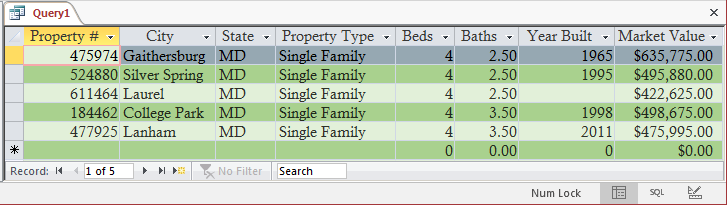
To create a logical conjunction with many expressions in SQL, add as many logical expressions as you want and separate them with AND operators. Although the parentheses are not required, they make your expression easier to read.
SELECT PropertyNumber,
       City,
       State,
       PropertyType,
       Bedrooms AS Beds,
       Bathrooms AS Baths,
       YearBuilt,
       MarketValue
FROM Properties
WHERE (State = "md") AND (PropertyType = "single family") AND (Bedrooms = 4);
Topics on Creating and Using Conjunctions
Logical Expressions and Conjunctions
Each sub-expression of a logical conjunction can be a logical operation that can produce True/False or any value you want. To visually create it, in the Design View of a query, enter the desired criteria in the Criteria box of each field. Here is an example:


To create the conjunction in SQL, create two expressions separated by the AND operator.
Logical Expressions and/or Functions in a Conjunction
Each sub-expression of a logical conjunction can be a logical operation that can produce True/False or any value you want. A sub-expression can also be produced by a function. Here is an example:


Sorting Records
When creating a logical conjunction, you can sort the records using any of the fields, whether it is included in the expression or not.


Conjunctions and Record Sets
Instead of a simple SELECT statement, you can specify the condition of a record set as a conjunction. The condition is formulated as a normal disjunction.
Practical
Learning: Testing a Database

| 1 | 2 | 3 | 4 | |
| Employee # | 941148 | 927048 | 606384 | 952748 |
| First Name | Catherine | Henry | Herbert | David |
| Last Name | Watts | Meuer | Gibson | Evans |
| Address | 12004 Harrington Ave | 802 Wheeler Street | 10324 Marina Ave | 5102 Piedmont Rd |
| City | Baltimore | York | College Park | Silver Spring |
| County | Baltimore | York | Prince George | Montgomery |
| State | MD | PA | MD | MD |
| ZIP Code | 21206 | 17401 | 20742 | 20910 |
| Marital Status | 1 | 1 | 1 | 1 |
| Exemptions | 0 | 3 | 1 | 2 |
| Hourly Salary | 26.15 | 8.95 | 22.25 | 17.25 |
| Filing Status | 2 | 2 | 2 | 2 |
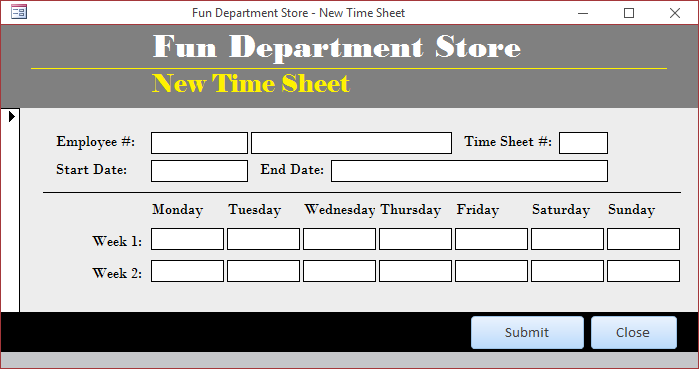
| Employee # | Start Date | Week 1 Monday | Week 1 Tuesday | Week 1 Wednesday | Week 1 Thursday | Week 1 Friday | Week 1 Saturday | Week 1 Sunday | Week 2 Monday | Week 2 Tuesday | Week 2 Wednesday | Week 2 Thursday | Week 2 Friday | Week 2 Saturday | Week 2 Sunday |
| 606384 | 1/1/2018 | 0 | 0 | 0 | 0 | 0 | 8 | 8 | 0 | 0 | 0 | 0 | 0 | 8 | 8 |
| 952748 | 1/1/2018 | 8 | 8 | 8 | 8 | 8 | 0 | 0 | 8 | 8 | 8 | 8 | 8 | 0 | 0 |
| 941148 | 1/1/2018 | 9 | 10 | 8.50 | 9.50 | 10.50 | 12 | 12 | 8.50 | 9 | 9.50 | 8 | 10 | 10 | 8.50 |
| 927048 | 1/1/2018 | 8 | 8 | 8 | 8 | 8 | 0 | 0 | 8 | 8 | 8 | 8 | 8 | 0 | 0 |

| Start Date | Employee # |
| 1/1/2018 | 941148 |
| 1/1/2018 | 952748 |
| 1/1/2018 | 927048 |
| 1/1/2018 | 606384 |
| 5 | 6 | 7 | |
| Employee # | 941148 | 283749 | 606384 |
| First Name | Catherine | Laura | Herbert |
| Last Name | Watts | Bellius | Gibson |
| Address | 12004 Harrington Ave | 7447 Emiry Street | 8206 Stanson Rd |
| City | Baltimore | Alexandria | Columbia |
| County | Baltimore | Howard | |
| State | MD | VA | MD |
| ZIP Code | 21206 | 22314 | 21044 |
| Marital Status | 2 | 1 | 1 |
| Exemptions | 0 | 3 | 1 |
| Hourly Salary | 26.15 | 16.85 | 24.50 |
| Filing Status | 3 | 2 | 2 |
| Employee # | Start Date | Week 1 Monday | Week 1 Tuesday | Week 1 Wednesday | Week 1 Thursday | Week 1 Friday | Week 1 Saturday | Week 1 Sunday | Week 2 Monday | Week 2 Tuesday | Week 2 Wednesday | Week 2 Thursday | Week 2 Friday | Week 2 Saturday | Week 2 Sunday |
| 606384 | 1/15/2018 | 0 | 0 | 0 | 0 | 4 | 9.50 | 8 | 0 | 0 | 0 | 0 | 6 | 8.50 | 6 |
| 941148 | 1/15/2018 | 10 | 8 | 9 | 10 | 8 | 9 | 0 | 8 | 9 | 10 | 9 | 9 | 9 | 6 |
| 283749 | 1/15/2018 | 8 | 8 | 8 | 8 | 0 | 8 | 8 | 6 | 6 | 8 | 6 | 0 | 7 | 0 |
| 927048 | 1/15/2018 | 8 | 8 | 8 | 6 | 8 | 2 | 5 | 8 | 8 | 8 | 8 | 8 | 0 | 0 |
| 952748 | 1/15/2018 | 8 | 8 | 8.50 | 8 | 10 | 0 | 0 | 8.50 | 9.50 | 10 | 8.50 | 9.50 | 0 | 0 |
| Start Date | Employee # |
| 1/15/2018 | 606384 |
| 1/15/2018 | 952748 |
| 1/15/2018 | 283749 |
| 1/15/2018 | 927048 |
| 1/15/2018 | 941148 |
| 8 | 9 | 10 | |
| Employee # | 837405 | 428041 | 941148 |
| First Name | Christopher | Jeannine | Catherine |
| Last Name | Mann | Hewsen | Watts |
| Address | 6218 Willimon Ave | 2418 Woodwell Rd | 482 Matherson Drv |
| City | Wilmington | Rockville | Rockville |
| County | New Castle | Montgomery | Montgomery |
| State | DE | MD | MD |
| ZIP Code | 19801 | 20850 | 20856 |
| Marital Status | 2 | 2 | 2 |
| Exemptions | 2 | 2 | 3 |
| Hourly Salary | 14.75 | 34.05 | 38.15 |
| Filing Status | 3 | 2 | 3 |
| Employee # | Start Date | Week 1 Monday | Week 1 Tuesday | Week 1 Wednesday | Week 1 Thursday | Week 1 Friday | Week 1 Saturday | Week 1 Sunday | Week 2 Monday | Week 2 Tuesday | Week 2 Wednesday | Week 2 Thursday | Week 2 Friday | Week 2 Saturday | Week 2 Sunday |
| 952748 | 1/29/2018 | 8 | 8 | 8 | 9.50 | 8.50 | 0 | 0 | 9.50 | 8 | 8 | 9.50 | 8.50 | 0 | 0 |
| 606384 | 1/29/2018 | 0 | 0 | 0 | 0 | 4 | 8 | 6 | 0 | 0 | 0 | 0 | 6 | 8 | 10 |
| 283749 | 1/29/2018 | 8 | 6 | 6 | 6 | 8 | 0 | 0 | 86 | 6 | 7 | 8 | 8 | 0 | 0 |
| 941148 | 1/29/2018 | 8 | 8 | 9 | 8 | 9 | 6 | 9 | 9 | 8 | 8 | 9 | 8 | 10 | 7 |
| 428041 | 1/29/2018 | 10 | 9 | 9.50 | 10 | 9 | 0 | 0 | 9 | 8.50 | 10 | 9 | 8.50 | 0 | 0 |
| 837405 | 1/29/2018 | 8 | 8 | 8 | 8 | 8 | 0 | 0 | 8 | 8 | 8 | 8 | 8 | 0 | 0 |
| 927048 | 1/29/2018 | 8 | 8 | 8 | 8 | 0 | 0 | 0 | 8 | 8 | 8 | 8 | 0 | 0 | 0 |
| Start Date | Employee # |
| 1/29/2018 | 428041 |
| 1/29/2018 | 606384 |
| 1/29/2018 | 952748 |
| 1/29/2018 | 283749 |
| 1/29/2018 | 837405 |
| 1/29/2018 | 927048 |
| 1/29/2018 | 941148 |
|
|
||
| Previous | Copyright © 2000-2016, FunctionX, Inc. | Next |
|
|
||